DECAN_S1_Troubleshooting_Guide(Eng_Ver1.3)_Print_Web.pdf - 第113页
1-89 System Messages of the MMI and Solutions Occurs when using u ndefined feeder type . [Solution] T urn of f the Buzze r by pressing th e “ST OP” button. Switch the machine to “IDLE” mo de by pressing the “RESET”…

1-88
Next Generation, Multi-Functional Placer DECAN S1 Troubleshooting Guide
$4900 Failed to find the reference fiducial mark on the head. [WARNING LEVEL]
[Problem]
Failed to find the reference fiducial mark on the head during part recognition.
[Solution]
Pick up the corresponding part with corresponding head manually to check for
successful operation.
In case of failure, check the light status. If it is too dark, adjust it to be a little brighter.
If the light status cannot be adjusted smoothly, check the light mapping value of the
corresponding camera. If any problem is found there, perform the light mapping again.
If the fly camera is not in complete focus, adjust the focus by performing Z-axis offset
calibration.
If the reference fiducial mark of the head is out of the recognition range, perform the
fly camera offset calibration again.
Despite such checks and measures, if the problem occurs again, contact our designated
C/S and local agent.
$4A00 An error occurred while moving to place the part of the corresponding cycle.
[WARNING LEVEL]
[Problem]
An error occurred while moving to place the part.
[Solution]
Check whether the placement position of the corresponding cycle is within the range
of movement.
In the Step dialog box, move the corresponding head to the placement position of the
corresponding cycle.
In case of movement failure, select the ‘Fiducial Position & Mark’ dialog box of the
PCB to check if the corresponding data is correct.
Check the local fiducial information for incorrect information input.
Check the offset of the corresponding head for incorrect information input.
Check if there is any mechanical interference when moving for part placement.
Despite such checks and measures, if the problem occurs again, contact our designated
C/S and local agent.
1.4.6. Common Error Related to Feeding Device and Production [$5000~$50ff]
$5000 Undefined feeder method. [EMER LEVEL]
[Problem]
1-89
System Messages of the MMI and Solutions
Occurs when using undefined feeder type.
[Solution]
Turn off the Buzzer by pressing the “STOP” button.
Switch the machine to “IDLE” mode by pressing the “RESET” button.
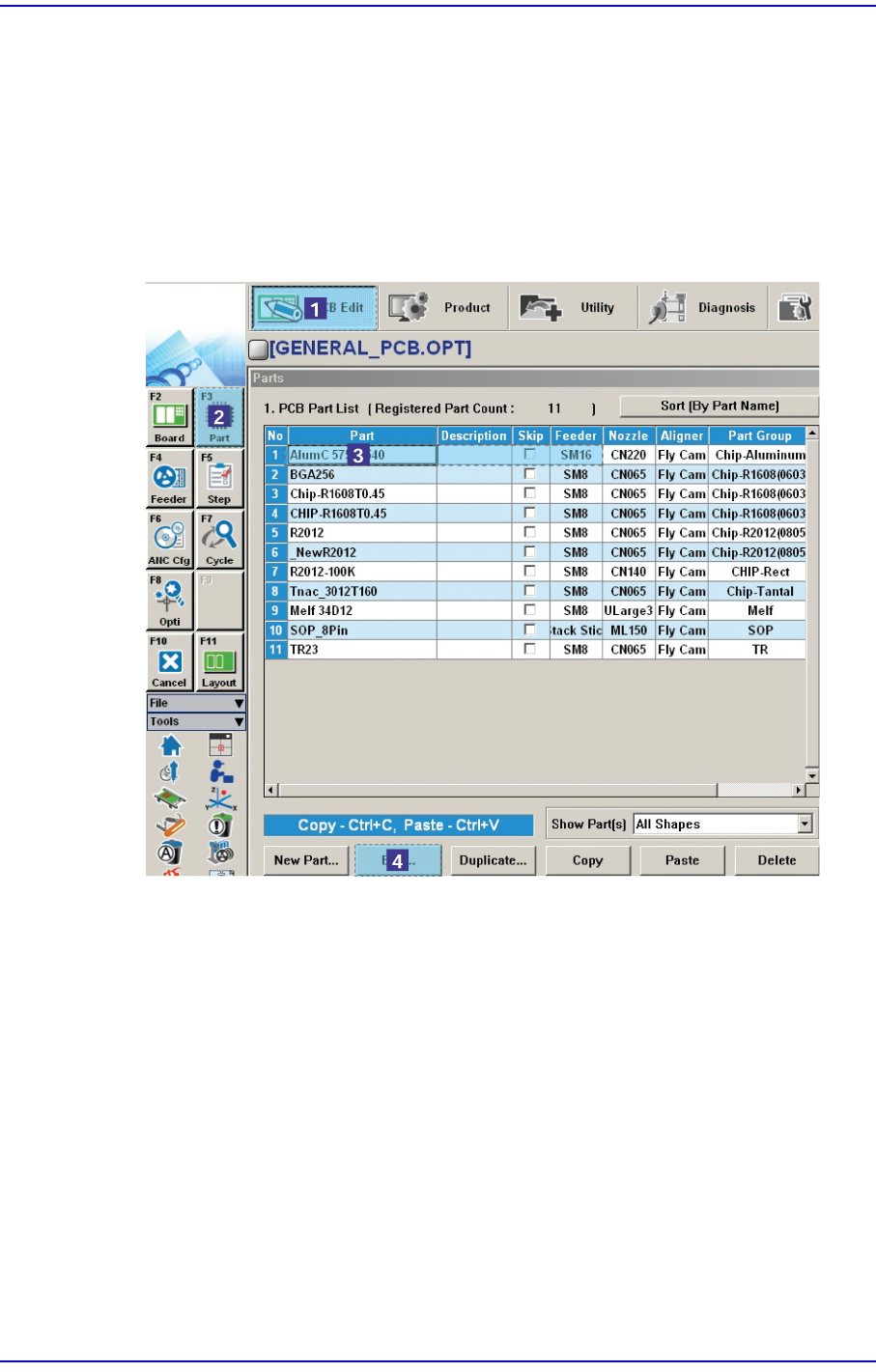
Check on the ‘Part’ dialog box of the PCB Edit menu if the feeder type of
corresponding part is correctly setup, If not correctly setup, click the <Edit> button
with the component being selected.
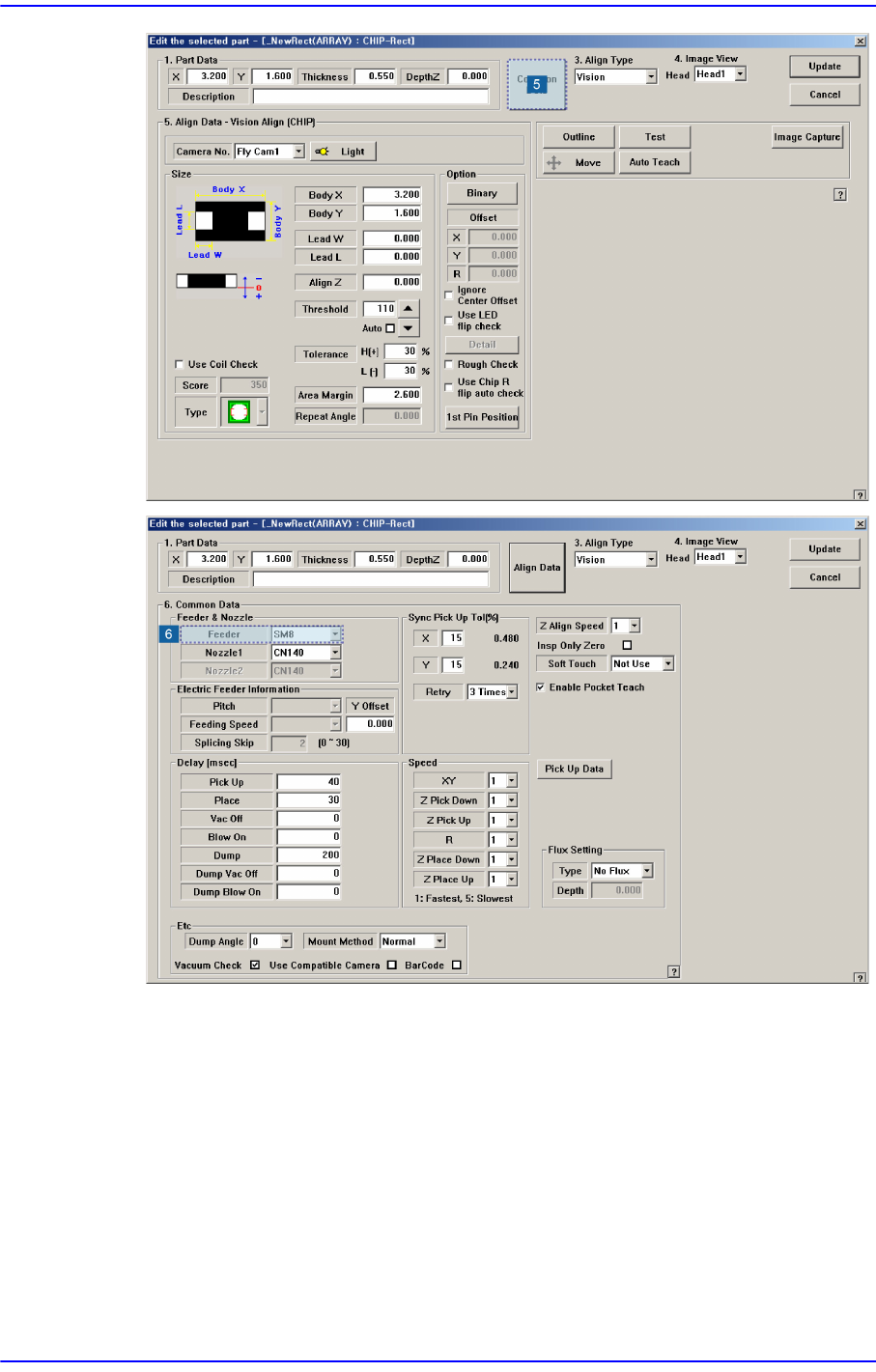
Then, the component editor dialog box is executed. Click <Common Data> here, and
setup the feeder again.
1-90
Next Generation, Multi-Functional Placer DECAN S1 Troubleshooting Guide
Check on the ‘Feeder’ dialog box of the PCB Edit menu if the corresponding part is
setup at the required feeder.
Defined feeder types are feeder base(tape), stick unit and tray unit.
If trouble continues to occur, please contact the C/S company designated by Hanwha
Precision Machinery Co., Ltd. or the local agent.
$5004 Production is stopped without finishing part placement on the PCB. [WARNING ??]
[Problem]
A PCB is stuck to the conveyor.