DECAN_S1_Troubleshooting_Guide(Eng_Ver1.3)_Print_Web.pdf - 第123页
1-99 System Messages of the MMI and Solutions Despite such checks and measures, if the pr oblem occurs again, contact our designated C/S and loca l agent. $5633 Head $H picked part $P up at the edge in feeder $F. [FREE…
1-98
Next Generation, Multi-Functional Placer DECAN S1 Troubleshooting Guide
The pneumatic pressure check result before part placement shows that the pneumatic
pressure is lower than the vacuum when the part is picked up.
[Solution]
Check if there is a part remaining at the corresponding head.
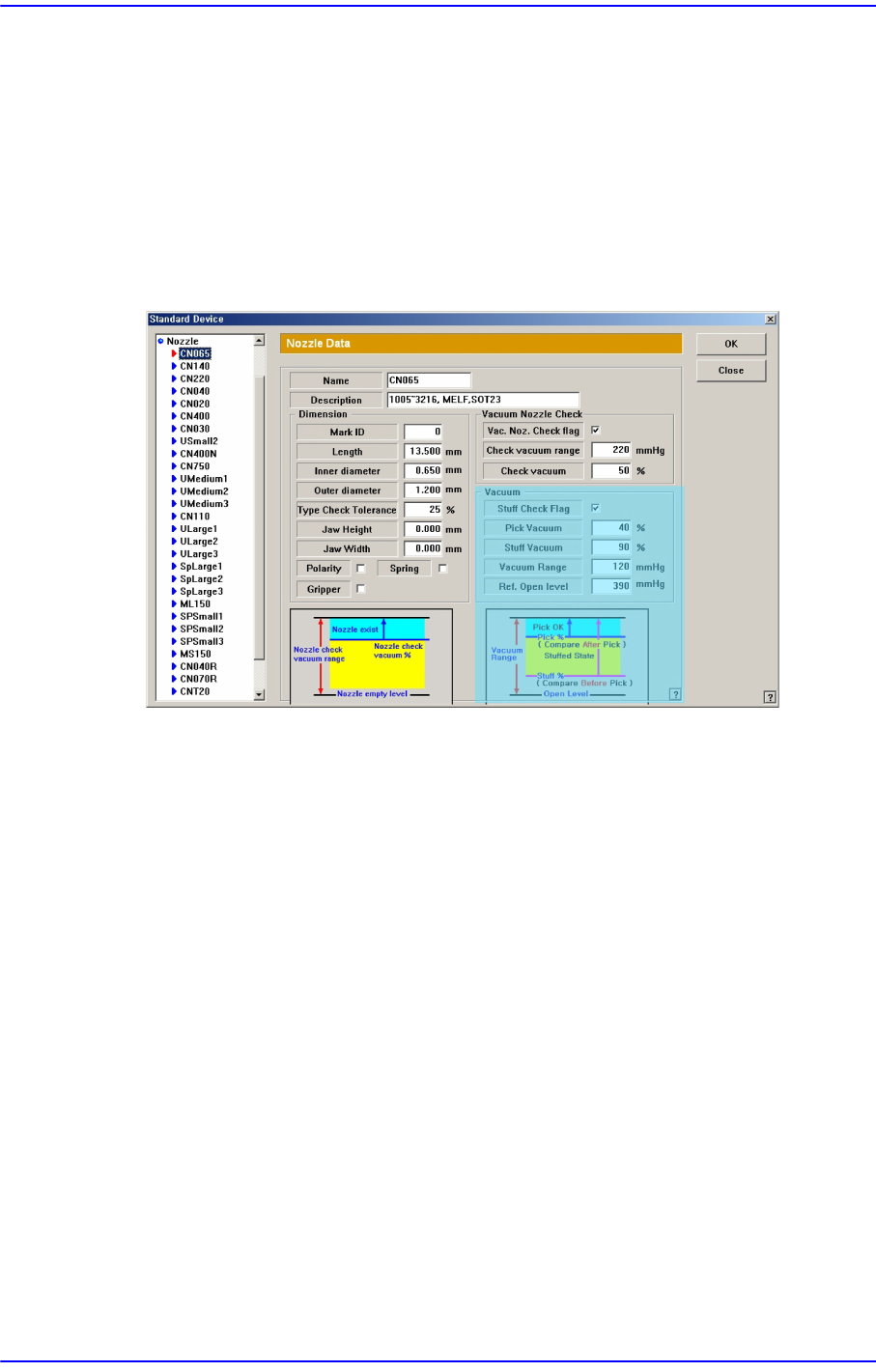
When there is a part, select the ‘Device’ submenu of the ‘System Setup’ menu and
select the ‘Nozzle’ item. Then check the vacuum value in the ‘Nozzle’ dialog box.
Adjust the vacuum value after comparing the current vacuum state with the pneumatic
pressure setup related to the part pickup of the corresponding nozzle.
Unless the pneumatic pressure when the part is picked up is higher than Vacuum
Range * Pick Vacuum’, lower the ‘Pick Vacuum’ value.
If such problem occurs frequently during machine shutdown of automatic production,
check pneumatic pressure supply state, twist of the pneumatic line, defective contact
of the head interface board, etc.
Despite such checks and measures, if the problem occurs again, contact our designated
C/S and local agent.
$5631 A pneumatic error occurred to the head after placing the part (failed to place the
part). [WARNING LEVEL]
[Problem]
The pneumatic pressure check result after part placement shows that the pneumatic
pressure is higher than when there is no part
[Solution]
Check if there is a part remaining at the corresponding head.
When there is a part at the corresponding head, perform the measures for error code
“$5506” and adjust the “Stuff Vac” value.

1-99
System Messages of the MMI and Solutions
Despite such checks and measures, if the problem occurs again, contact our designated
C/S and local agent.
$5633 Head $H picked part $P up at the edge in feeder $F.
[FREEZE LEVEL]
[Problem]
When the part size is smaller than 1005 (including 1005), if the nozzle picks a part up
at the edge, it is highly possible that the part stands vertically when it is placed even
though the vision system recognized the part normally. This error occurs mainly when
the calibration of the part measured by the vision system exceeds the value set by the
equipment.
[Solution]
Check if the state and pickup position of the part in the feeder is appropriate.
In the case of excessive part dumping, contact our designated C/S or local agent.
1.4.10. ANC Related Error [$6000~$65ff]
$6002 Can't open the ANC. [EMER LEVEL]
$6003 Can't close the ANC. [FREEZE LEVEL]
[Problem]
The ANC can't be opened due to mechanical interference. ($6002)
The ANC can't be closed due to mechanical interference. ($6003)
The position of the ANC sensor is incorrect.
[Solution]
Turn off the Buzzer by pressing the “STOP” button.
Switch the machine to “IDLE” mode by pressing the “RESET” button.
Check if there is any mechanical interference.
Check on the ‘I/O’ of the Diagnosis menu if shutter of the ANC operates correctly and
detected by the sensor. Check it during manual operation. To perform manual
operation, click the <Shutter Open/Close> button on the ANC menu.
Check the position of the sensor.
$6004 XY couldn't move to the nozzle put position. [FREEZE LEVEL]
[Problem]
An error occurred while the head was moving to the corresponding position to change
the nozzle automatically.
[Solution]

1-100
Next Generation, Multi-Functional Placer DECAN S1 Troubleshooting Guide
Turn off the Buzzer by pressing the “STOP” button.
Switch the machine to “IDLE” mode by pressing the “RESET” button.
Check the XY-Axis board.
Check the wiring related to XY. Please refer to the servo interface (x, y1, y2) drawings
of the “Technical Reference”.
$6009 Can't find the Z axis PORT. [FREEZE LEVEL]
[Problem]
Can not find the port of Z-axis motor due to fault in equipment setup or software
problem.
[Solution]
Check motor setup value from the ‘Confg.DB’ file in the mark3/system/ directory.
Check motor setup value in the ‘Factory Setup’. (Factory setup value)
If any problem occurs, contact the C/S company designated by Hanwha Precision
Machinery Co., Ltd. or the local agent.
$600a Couldn't move to the position of nozzle pick. [FREEZE LEVEL]
[Problem]
An error occurred when the head moved to the corresponding position to change the
nozzle automatically.
[Solution]
Perform [Solution] in $6004.
$600c No nozzle ID in the component Data. [FREEZE LEVEL]
[Problem]
In the component data, there is no nozzle related setting.
[Solution]
Turn off the Buzzer by pressing the “STOP” button.
Switch the machine to “IDLE” mode by pressing the “RESET” button.
Click ‘Common Data’ of corresponding component on the ‘Part’ of the PCB Edit
menu, and register the nozzle to work on in the nozzle 1.