DECAN_S1_Troubleshooting_Guide(Eng_Ver1.3)_Print_Web.pdf - 第89页
1-65 System Messages of the MMI and Solutions A PCB is on the conveyor when the conveyor width is to be adjusted [Solution] T urn of f the Buzze r by pressing th e “ST OP” button. Press the “RESET” button to change…

1-64
Next Generation, Multi-Functional Placer DECAN S1 Troubleshooting Guide
If the problem remains unsolved, contact our designated C/S company or local agent.
1.4.3. Axis related error [$1000~$1fff]
$1000 -H/W Limit is sensed at the corresponding axis. [EMER LEVEL]
[Problem]
$1000- H/W Limit is sensed at the corresponding axis. [EMER LEVEL]
[Solution]
Turn off the Buzzer by pressing the “STOP” button.
Move the head to a position that can't be sensed by the H/W limit sensor..
Switch the machine to “IDLE” mode by pressing the “RESET” button.
Supply power to the motor of the machine by pressing the “READY” button.
Select the submenu for calibration in the system setup menu and then click the <Axis
Home Calibration> button. And find the limit again by clicking the <X-Y Axis Limit
Automatic Searching…> button.
$1001 +H/W Limit is sensed at the corresponding axis. [EMER LEVEL]
[Problem]
The H/W limit sensor in + direction is sensed at the specified axis.
[Solution]
Take measures same as those against the error code "$1000”.
$1002 Alarm is sensed at the corresponding axis. [EMER LEVEL]
[Problem]
In the case of an axis, excessive pressing can cause this.
A motor error occurred at the specified axis.
[Solution]
Turn off the Buzzer by pressing the “STOP” button.
Check the operation of the sensor and the actuator corresponding axis.(Motor, Z/R
Sensor, Z-Axis Offset so on)
If any problem occurs, contact the C/S company designated by Hanwha Precision
Machinery Co., Ltd. or the local agent.
1.4.4. Conveyor related error [$3000~$3fff]
$3000 PCB is in the conveyor area. [FREEZE LEVEL]
[Problem]

1-65
System Messages of the MMI and Solutions
A PCB is on the conveyor when the conveyor width is to be adjusted
[Solution]
Turn off the Buzzer by pressing the “STOP” button.
Press the “RESET” button to change the operation mode to “IDLE”.
Remove the PCB from the conveyor.
Remove the PCB from the conveyor.
Warning Adjusting the sensor or correcting an error while the
equipment is ready could result in personal injury. Be sure
to adjust the sensor or correct an error in the stop status
(idle mode) after canceling the ready status.
$3042 Check the state of the backup table. [EMER LEVEL]
[Problem]
When the backup table does not move up or down due to mechanical interference.
When pneumatic pressure is not supplied to the cylinder of the backup table properly.
A problem occurred in the position and wiring of the sensor related to the upward
movement of the backup table.
[Solution]
Turn off the Buzzer by pressing the “STOP” button.
Switch the machine to “IDLE” mode by pressing the “RESET” button.
If there is mechanical interference related to the up/down movement of the backup
table, remove it.
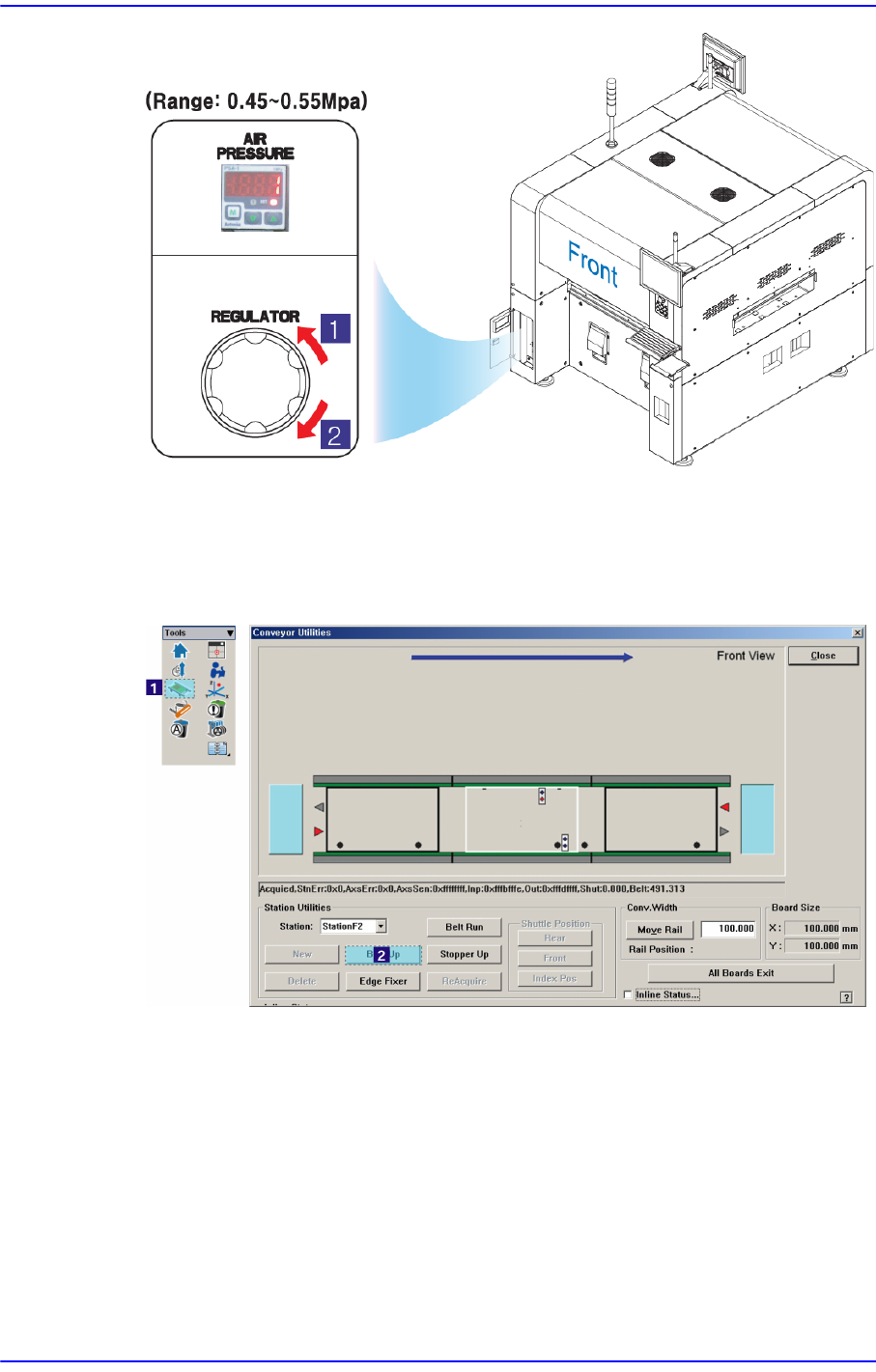
Check if pneumatic pressure is supplied normally (0.45-0.55Mpa) from the front
pressure gage.
1-66
Next Generation, Multi-Functional Placer DECAN S1 Troubleshooting Guide
1: Pressure Decrease (Counterclockwise)
2: Pressure increase (Clockwise)
Check if the sensor related to the upward movement of the backup table operates
normally. If it is thought to have a problem, adjust the sensor position.
Check the wiring related to the upward movement of the backup table.
For further details, refer to section “Conveyor Board Interface (2/5)” in the Technical
Reference.