JBC_PHXLE-K_manual.pdf - 第12页
PHXLE PHXL -SA PHB -SA PHS -SA PHN-SA PHBE PHSE PHNE OK 14:15 20 º C Power 45% TC1 45 º C Selected 120 º C TC2 P 100 º C 20 º C TC3 P 100 º C 20 º C TC4 P 100 º C 14:15 20 º C Power 45% Selected power 45 % TC1 P 100 º C …
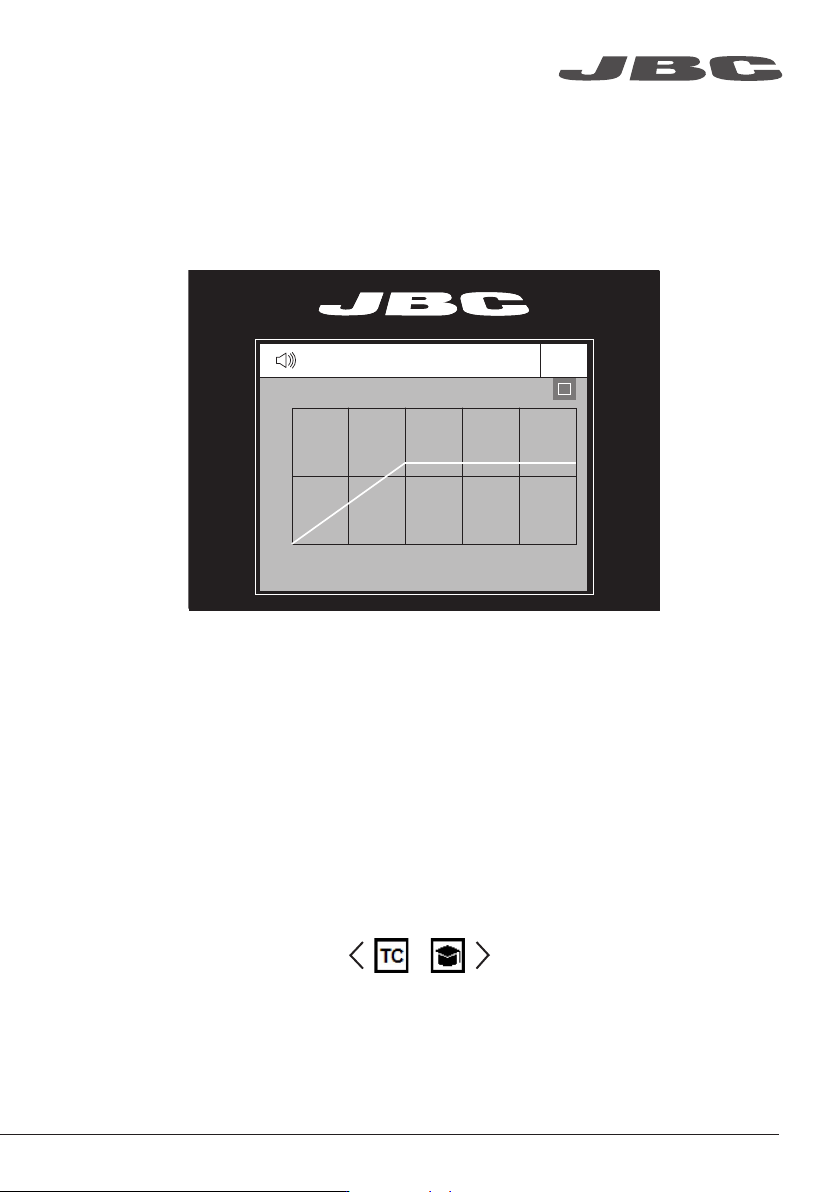
For repetitive jobs you running profiles without the Thermocouple (TC). In order to do so, the Te ach
profile mode has to be executed before running any profile. It can be executed from the Work mode
menu if the Profiles mode is selected. Once the profile has been run to the end, the system has all
the process data which you can save.
Once it is saved, you can run this profile without connecting the Thermocouple (TC). The heating
process will be the same as long as the same working conditions are respected.
The profiles which already have the data from the Teach profile are marked with this symbol
These profiles can be run either with or without the Thermocouples. It can be chosen from the
Profiles mode work screen:
Teach Profile
Select Profile Mode from the Work Mode Menu. In this mode the heater unit regulates the
temperature of the TC1 thermocouple according to the selected profile as long as the other TCs do
not reach the control/protection temperature limit.
Profile Modes
PHXLE
PHXL-SA
PHB-SA
PHS-SA
PHN-SA
PHBE
PHSE
PHNE
OK
14:15
20
º
C
Power
45%
TC1
45
º
C
Selected 120
º
C
TC2
P
100
º
C
20
º
C
TC3
P
100
º
C
20
º
C
TC4
P
100
º
C
14:15
20
º
C
Power
45%
Selected power
45
%
TC1
P
100
º
C
20
º
C
TC3
P
100
º
C
20
º
C
TC4
P
100
º
C
20
º
C
TC2
P
100
º
C
14:15
20
º
C
T1
23
º
C
20
5’ 8’
º
C
120
º
C
T3
24
º
C
T7
StopPROFILE1
200
100
14:15
31
º
C
27
º
C
TC1
TC2
StopPROFILE1
200
100
14:15
200
150
100
50
300
250
14:15
5m 00s
120
º
C
PROFILE1
200
100
14:15
30
º
C
Power
45%
Selected power
45
%
TC1
C
100
º
C
---
º
C
TC2
P
100
º
C
0 60 120 180 240 300
Point
2/3
Temp Time
2m 00s
14:15
20
º
C
20
º
C
TC1
TC2
20
º
C
TC3
20
º
C
TC4
StopPROFILE1
200
100
Ext. Temp [ºC]Power [%]
14:15
20
º
C
Power
45%
TC1
45
º
C
Selected 120
º
C
TC2
P
100
º
C
20
º
C
TC3
P
100
º
C
20
º
C
TC4
P
100
º
C
14:15
20
º
C
Power
45%
TC1
45
º
C
Selected 120
º
C
TC2
C
100
º
C
20
º
C
TC3
P
100
º
C
20
º
C
TC4
P
100
º
C
14:15
20
º
C
Power
45%
Selected power
45
%
TC5
P
100
º
C
20
º
C
TC7
P
100
º
C
20
º
C
TC8
P
100
º
C
20
º
C
TC6
P
100
º
C
20
º
C
TC5
P
100
º
C
14:15
20
º
C
Power
45%
TC1
25
º
C
Selected 120
º
C
TC2
P
100
º
C
14:15
20
º
C
Power
45%
TC1
25
º
C
Selected 120
º
C
TC2
P
100
º
C
14:15
20
º
C
Power
45%
TC1
45
º
C
Selected 120
º
C
TC2
C
100
º
C
20
º
C
TC3
P
100
º
C
20
º
C
TC4
P
100
º
C
20
º
C
TC5
P
100
º
C
20
5’ 8’
º
C
120
º
C
80
º
C
100
º
C
5’ 8’5’30”3’30” 8’
20
º
C
120
º
C
80
º
C
Lorem ipsum
11
www.jbctools.com
PHXLE
PHXL-SA
PHB-SA
PHS-SA
PHN-SA
PHBE
PHSE
PHNE
OK
14:15
20
º
C
Power
45%
TC1
45
º
C
Selected 120
º
C
TC2
P
100
º
C
20
º
C
TC3
P
100
º
C
20
º
C
TC4
P
100
º
C
14:15
20
º
C
Power
45%
Selected power
45
%
TC1
P
100
º
C
20
º
C
TC3
P
100
º
C
20
º
C
TC4
P
100
º
C
20
º
C
TC2
P
100
º
C
14:15
20
º
C
T1
23
º
C
20
5’ 8’
º
C
120
º
C
T3
24
º
C
T7
StopPROFILE1
200
100
14:15
31
º
C
27
º
C
TC1
TC2
StopPROFILE1
200
100
14:15
200
150
100
50
300
250
14:15
5m 00s
120
º
C
PROFILE1
200
100
14:15
30
º
C
Power
45%
Selected power
45
%
TC1
C
100
º
C
---
º
C
TC2
P
100
º
C
0 60 120 180 240 300
Point
2/3
Temp Time
2m 00s
14:15
20
º
C
20
º
C
TC1
TC2
20
º
C
TC3
20
º
C
TC4
StopPROFILE1
200
100
Ext. Temp [ºC]Power [%]
14:15
20
º
C
Power
45%
TC1
45
º
C
Selected 120
º
C
TC2
P
100
º
C
20
º
C
TC3
P
100
º
C
20
º
C
TC4
P
100
º
C
14:15
20
º
C
Power
45%
TC1
45
º
C
Selected 120
º
C
TC2
C
100
º
C
20
º
C
TC3
P
100
º
C
20
º
C
TC4
P
100
º
C
14:15
20
º
C
Power
45%
Selected power
45
%
TC5
P
100
º
C
20
º
C
TC7
P
100
º
C
20
º
C
TC8
P
100
º
C
20
º
C
TC6
P
100
º
C
20
º
C
TC5
P
100
º
C
14:15
20
º
C
Power
45%
TC1
25
º
C
Selected 120
º
C
TC2
P
100
º
C
14:15
20
º
C
Power
45%
TC1
25
º
C
Selected 120
º
C
TC2
P
100
º
C
14:15
20
º
C
Power
45%
TC1
45
º
C
Selected 120
º
C
TC2
C
100
º
C
20
º
C
TC3
P
100
º
C
20
º
C
TC4
P
100
º
C
20
º
C
TC5
P
100
º
C
20
5’ 8’
º
C
120
º
C
80
º
C
100
º
C
5’ 8’5’30”3’30” 8’
20
º
C
120
º
C
80
º
C
Lorem ipsum
PHXLE
PHXL-SA
PHB-SA
PHS-SA
PHN-SA
PHBE
PHSE
PHNE
OK
14:15
20
º
C
Power
45%
TC1
45
º
C
Selected 120
º
C
TC2
P
100
º
C
20
º
C
TC3
P
100
º
C
20
º
C
TC4
P
100
º
C
14:15
20
º
C
Power
45%
Selected power
45
%
TC1
P
100
º
C
20
º
C
TC3
P
100
º
C
20
º
C
TC4
P
100
º
C
20
º
C
TC2
P
100
º
C
14:15
20
º
C
T1
23
º
C
20
5’ 8’
º
C
120
º
C
T3
24
º
C
T7
StopPROFILE1
200
100
14:15
31
º
C
27
º
C
TC1
TC2
StopPROFILE1
200
100
14:15
200
150
100
50
300
250
14:15
5m 00s
120
º
C
PROFILE1
200
100
14:15
30
º
C
Power
45%
Selected power
45
%
TC1
C
100
º
C
---
º
C
TC2
P
100
º
C
0 60 120 180 240 300
Point
2/3
Temp Time
2m 00s
14:15
20
º
C
20
º
C
TC1
TC2
20
º
C
TC3
20
º
C
TC4
StopPROFILE1
200
100
Ext. Temp [ºC]Power [%]
14:15
20
º
C
Power
45%
TC1
45
º
C
Selected 120
º
C
TC2
P
100
º
C
20
º
C
TC3
P
100
º
C
20
º
C
TC4
P
100
º
C
14:15
20
º
C
Power
45%
TC1
45
º
C
Selected 120
º
C
TC2
C
100
º
C
20
º
C
TC3
P
100
º
C
20
º
C
TC4
P
100
º
C
14:15
20
º
C
Power
45%
Selected power
45
%
TC5
P
100
º
C
20
º
C
TC7
P
100
º
C
20
º
C
TC8
P
100
º
C
20
º
C
TC6
P
100
º
C
20
º
C
TC5
P
100
º
C
14:15
20
º
C
Power
45%
TC1
25
º
C
Selected 120
º
C
TC2
P
100
º
C
14:15
20
º
C
Power
45%
TC1
25
º
C
Selected 120
º
C
TC2
P
100
º
C
14:15
20
º
C
Power
45%
TC1
45
º
C
Selected 120
º
C
TC2
C
100
º
C
20
º
C
TC3
P
100
º
C
20
º
C
TC4
P
100
º
C
20
º
C
TC5
P
100
º
C
20
5’ 8’
º
C
120
º
C
80
º
C
100
º
C
5’ 8’5’30”3’30” 8’
20
º
C
120
º
C
80
º
C
Lorem ipsum
· Add Point
· Delete Point
· Load Profile
· Save Profile
· Exit
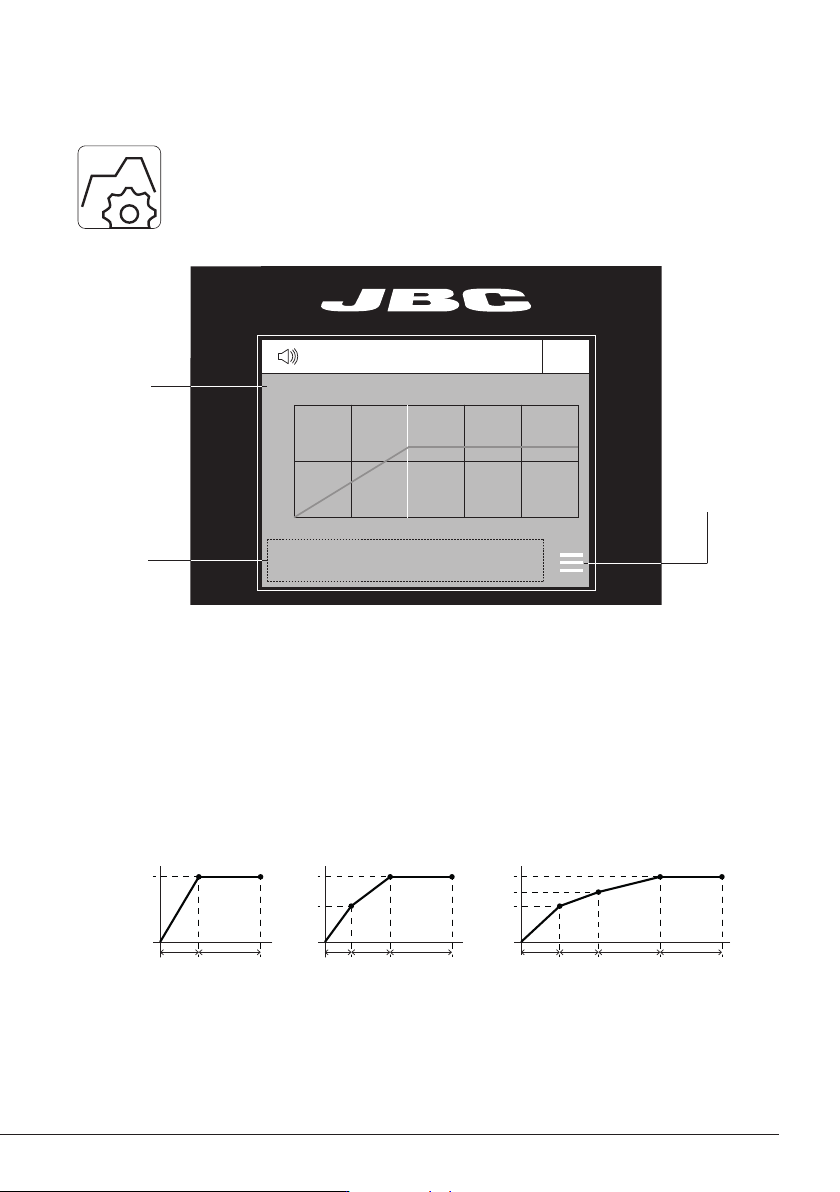
Data for
these Points
Profile Name
Profile Editor
The Profile editor can be opened from the main menu or from the Profiles mode work
screen by pressing the ‘OK’ button.
In this mode you can edit as many as 25 profiles of temperature.
Menu
Options
JBC Set Profiles
There are 3 profiles predefined by JBC: A, B and C. The difference between them is the number of
steps: 2, 3 or 4. The thicker your PCB is and the more layers it contains, the more steps are needed
to obtain a gradual warming.
These profiles are not modifiable but can be used as a template to create your own profiles.
JBC-A
2 steps
JBC-B
3 steps
JBC-C
4 steps
PCB Reference
Specifications:
FR4 1,6mm thick
and 2 layers.
FR4 2,2mm thick
and 6 layers.
FR4 1,6mm thick
and 6 layers.
Profiles set using the low position of the Support (28 mm in height between the PCB and the heating area).
Profi le Editor
Profiles set using the low position of the PHXL-SA Support (28 mm in height between the PCB and the heating area).
12
PHXLE
PHXL-SA
PHB-SA
PHS-SA
PHN-SA
PHBE
PHSE
PHNE
OK
14:15
20
º
C
Power
45%
TC1
45
º
C
Selected 120
º
C
TC2
P
100
º
C
20
º
C
TC3
P
100
º
C
20
º
C
TC4
P
100
º
C
14:15
20
º
C
Power
45%
Selected power
45
%
TC1
P
100
º
C
20
º
C
TC3
P
100
º
C
20
º
C
TC4
P
100
º
C
20
º
C
TC2
P
100
º
C
14:15
20
º
C
T1
23
º
C
20
5’ 8’
º
C
120
º
C
T3
24
º
C
T7
StopPROFILE1
200
100
14:15
31
º
C
27
º
C
TC1
TC2
StopPROFILE1
200
100
14:15
200
150
100
50
300
250
14:15
5m 00s
120
º
C
PROFILE1
200
100
14:15
30
º
C
Power
45%
Selected power
45
%
TC1
C
100
º
C
---
º
C
TC2
P
100
º
C
0 60 120 180 240 300
Point
2/3
Temp Time
2m 00s
14:15
20
º
C
20
º
C
TC1
TC2
20
º
C
TC3
20
º
C
TC4
StopPROFILE1
200
100
Ext. Temp [ºC]Power [%]
14:15
20
º
C
Power
45%
TC1
45
º
C
Selected 120
º
C
TC2
P
100
º
C
20
º
C
TC3
P
100
º
C
20
º
C
TC4
P
100
º
C
14:15
20
º
C
Power
45%
TC1
45
º
C
Selected 120
º
C
TC2
C
100
º
C
20
º
C
TC3
P
100
º
C
20
º
C
TC4
P
100
º
C
14:15
20
º
C
Power
45%
Selected power
45
%
TC5
P
100
º
C
20
º
C
TC7
P
100
º
C
20
º
C
TC8
P
100
º
C
20
º
C
TC6
P
100
º
C
20
º
C
TC5
P
100
º
C
14:15
20
º
C
Power
45%
TC1
25
º
C
Selected 120
º
C
TC2
P
100
º
C
14:15
20
º
C
Power
45%
TC1
25
º
C
Selected 120
º
C
TC2
P
100
º
C
14:15
20
º
C
Power
45%
TC1
45
º
C
Selected 120
º
C
TC2
C
100
º
C
20
º
C
TC3
P
100
º
C
20
º
C
TC4
P
100
º
C
20
º
C
TC5
P
100
º
C
20
5’ 8’
º
C
120
º
C
80
º
C
100
º
C
5’ 8’5’30”3’30” 8’
20
º
C
120
º
C
80
º
C
Lorem ipsum
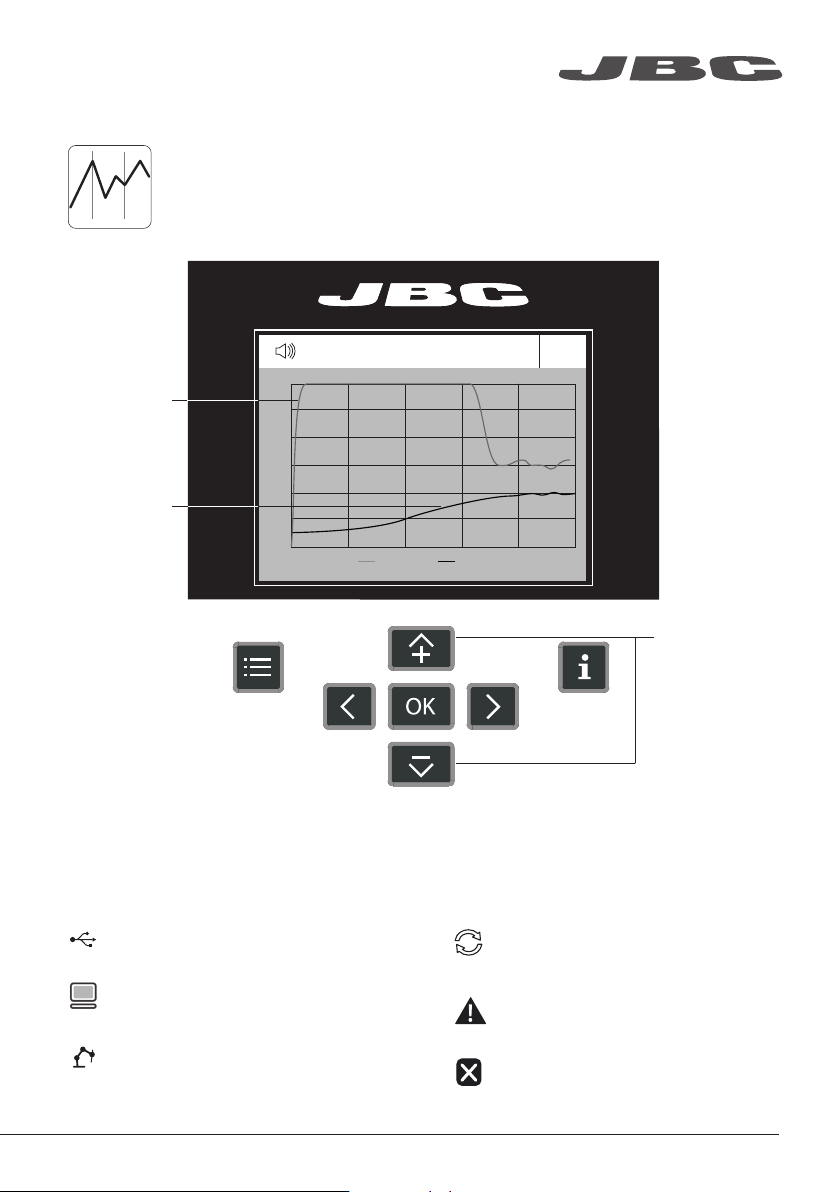
Process Analysis
By pressing Graphics in the main MENU, temperature of TC1 thermocouple and
power fi gures in real time are displayed.
Temperature (ºC)
Power (%)
Switch Y Axis
Between Power
and Temperature
USB fl ash drive is connected.
Station is controlled by a PC.
Station is controlled by a robot.
System Notifications
Station software update.
Press INFO to start the process.
Warning.
Press INFO for failure description.
Error.
Press INFO for failure description,
the type of error and how to proceed.
The following icons will be displayed on the screen’s status bar.
Graphics
13
www.jbctools.com