JBC_PHXLE-K_manual.pdf - 第8页
C P PHXLE PHXL -SA PHB -SA PHS -SA PHN-SA PHBE PHSE PHNE OK 14:15 20 º C Power 45% TC1 45 º C Selected 120 º C TC2 P 100 º C 20 º C TC3 P 100 º C 20 º C TC4 P 100 º C 14:15 20 º C Power 45% Selected power 45 % TC1 P 100 …
PHXLE
PHXL-SA
PHB-SA
PHS-SA
PHN-SA
PHBE
PHSE
PHNE
OK
14:15
20
º
C
Power
45%
TC1
45
º
C
Selected 120
º
C
TC2
P
100
º
C
20
º
C
TC3
P
100
º
C
20
º
C
TC4
P
100
º
C
14:15
20
º
C
Power
45%
Selected power
45
%
TC1
P
100
º
C
20
º
C
TC3
P
100
º
C
20
º
C
TC4
P
100
º
C
20
º
C
TC2
P
100
º
C
14:15
20
º
C
T1
23
º
C
20
5’ 8’
º
C
120
º
C
T3
24
º
C
T7
StopPROFILE1
200
100
14:15
31
º
C
27
º
C
TC1
TC2
StopPROFILE1
200
100
14:15
200
150
100
50
300
250
14:15
5m 00s
120
º
C
PROFILE1
200
100
14:15
30
º
C
Power
45%
Selected power
45
%
TC1
C
100
º
C
---
º
C
TC2
P
100
º
C
0 60 120 180 240 300
Point
2/3
Temp Time
2m 00s
14:15
20
º
C
20
º
C
TC1
TC2
20
º
C
TC3
20
º
C
TC4
StopPROFILE1
200
100
Ext. Temp [ºC]Power [%]
14:15
20
º
C
Power
45%
TC1
45
º
C
Selected 120
º
C
TC2
P
100
º
C
20
º
C
TC3
P
100
º
C
20
º
C
TC4
P
100
º
C
14:15
20
º
C
Power
45%
TC1
45
º
C
Selected 120
º
C
TC2
C
100
º
C
20
º
C
TC3
P
100
º
C
20
º
C
TC4
P
100
º
C
14:15
20
º
C
Power
45%
Selected power
45
%
TC5
P
100
º
C
20
º
C
TC7
P
100
º
C
20
º
C
TC8
P
100
º
C
20
º
C
TC6
P
100
º
C
20
º
C
TC5
P
100
º
C
14:15
20
º
C
Power
45%
TC1
25
º
C
Selected 120
º
C
TC2
P
100
º
C
14:15
20
º
C
Power
45%
TC1
25
º
C
Selected 120
º
C
TC2
P
100
º
C
14:15
20
º
C
Power
45%
TC1
45
º
C
Selected 120
º
C
TC2
C
100
º
C
20
º
C
TC3
P
100
º
C
20
º
C
TC4
P
100
º
C
20
º
C
TC5
P
100
º
C
20
5’ 8’
º
C
120
º
C
80
º
C
100
º
C
5’ 8’5’30”3’30” 8’
20
º
C
120
º
C
80
º
C
Lorem ipsum
PHXLE
PHXL-SA
PHB-SA
PHS-SA
PHN-SA
PHBE
PHSE
PHNE
OK
14:15
20
º
C
Power
45%
TC1
45
º
C
Selected 120
º
C
TC2
P
100
º
C
20
º
C
TC3
P
100
º
C
20
º
C
TC4
P
100
º
C
14:15
20
º
C
Power
45%
Selected power
45
%
TC1
P
100
º
C
20
º
C
TC3
P
100
º
C
20
º
C
TC4
P
100
º
C
20
º
C
TC2
P
100
º
C
14:15
20
º
C
T1
23
º
C
20
5’ 8’
º
C
120
º
C
T3
24
º
C
T7
StopPROFILE1
200
100
14:15
31
º
C
27
º
C
TC1
TC2
StopPROFILE1
200
100
14:15
200
150
100
50
300
250
14:15
5m 00s
120
º
C
PROFILE1
200
100
14:15
30
º
C
Power
45%
Selected power
45
%
TC1
C
100
º
C
---
º
C
TC2
P
100
º
C
0 60 120 180 240 300
Point
2/3
Temp Time
2m 00s
14:15
20
º
C
20
º
C
TC1
TC2
20
º
C
TC3
20
º
C
TC4
StopPROFILE1
200
100
Ext. Temp [ºC]Power [%]
14:15
20
º
C
Power
45%
TC1
45
º
C
Selected 120
º
C
TC2
P
100
º
C
20
º
C
TC3
P
100
º
C
20
º
C
TC4
P
100
º
C
14:15
20
º
C
Power
45%
TC1
45
º
C
Selected 120
º
C
TC2
C
100
º
C
20
º
C
TC3
P
100
º
C
20
º
C
TC4
P
100
º
C
14:15
20
º
C
Power
45%
Selected power
45
%
TC5
P
100
º
C
20
º
C
TC7
P
100
º
C
20
º
C
TC8
P
100
º
C
20
º
C
TC6
P
100
º
C
20
º
C
TC5
P
100
º
C
14:15
20
º
C
Power
45%
TC1
25
º
C
Selected 120
º
C
TC2
P
100
º
C
14:15
20
º
C
Power
45%
TC1
25
º
C
Selected 120
º
C
TC2
P
100
º
C
14:15
20
º
C
Power
45%
TC1
45
º
C
Selected 120
º
C
TC2
C
100
º
C
20
º
C
TC3
P
100
º
C
20
º
C
TC4
P
100
º
C
20
º
C
TC5
P
100
º
C
20
5’ 8’
º
C
120
º
C
80
º
C
100
º
C
5’ 8’5’30”3’30” 8’
20
º
C
120
º
C
80
º
C
Lorem ipsum
PHXLE
PHXL-SA
PHB-SA
PHS-SA
PHN-SA
PHBE
PHSE
PHNE
OK
14:15
20
º
C
Power
45%
TC1
45
º
C
Selected 120
º
C
TC2
P
100
º
C
20
º
C
TC3
P
100
º
C
20
º
C
TC4
P
100
º
C
14:15
20
º
C
Power
45%
Selected power
45
%
TC1
P
100
º
C
20
º
C
TC3
P
100
º
C
20
º
C
TC4
P
100
º
C
20
º
C
TC2
P
100
º
C
14:15
20
º
C
T1
23
º
C
20
5’ 8’
º
C
120
º
C
T3
24
º
C
T7
StopPROFILE1
200
100
14:15
31
º
C
27
º
C
TC1
TC2
StopPROFILE1
200
100
14:15
200
150
100
50
300
250
14:15
5m 00s
120
º
C
PROFILE1
200
100
14:15
30
º
C
Power
45%
Selected power
45
%
TC1
C
100
º
C
---
º
C
TC2
P
100
º
C
0 60 120 180 240 300
Point
2/3
Temp Time
2m 00s
14:15
20
º
C
20
º
C
TC1
TC2
20
º
C
TC3
20
º
C
TC4
StopPROFILE1
200
100
Ext. Temp [ºC]Power [%]
14:15
20
º
C
Power
45%
TC1
45
º
C
Selected 120
º
C
TC2
P
100
º
C
20
º
C
TC3
P
100
º
C
20
º
C
TC4
P
100
º
C
14:15
20
º
C
Power
45%
TC1
45
º
C
Selected 120
º
C
TC2
C
100
º
C
20
º
C
TC3
P
100
º
C
20
º
C
TC4
P
100
º
C
14:15
20
º
C
Power
45%
Selected power
45
%
TC5
P
100
º
C
20
º
C
TC7
P
100
º
C
20
º
C
TC8
P
100
º
C
20
º
C
TC6
P
100
º
C
20
º
C
TC5
P
100
º
C
14:15
20
º
C
Power
45%
TC1
25
º
C
Selected 120
º
C
TC2
P
100
º
C
14:15
20
º
C
Power
45%
TC1
25
º
C
Selected 120
º
C
TC2
P
100
º
C
14:15
20
º
C
Power
45%
TC1
45
º
C
Selected 120
º
C
TC2
C
100
º
C
20
º
C
TC3
P
100
º
C
20
º
C
TC4
P
100
º
C
20
º
C
TC5
P
100
º
C
20
5’ 8’
º
C
120
º
C
80
º
C
100
º
C
5’ 8’5’30”3’30” 8’
20
º
C
120
º
C
80
º
C
Lorem ipsum
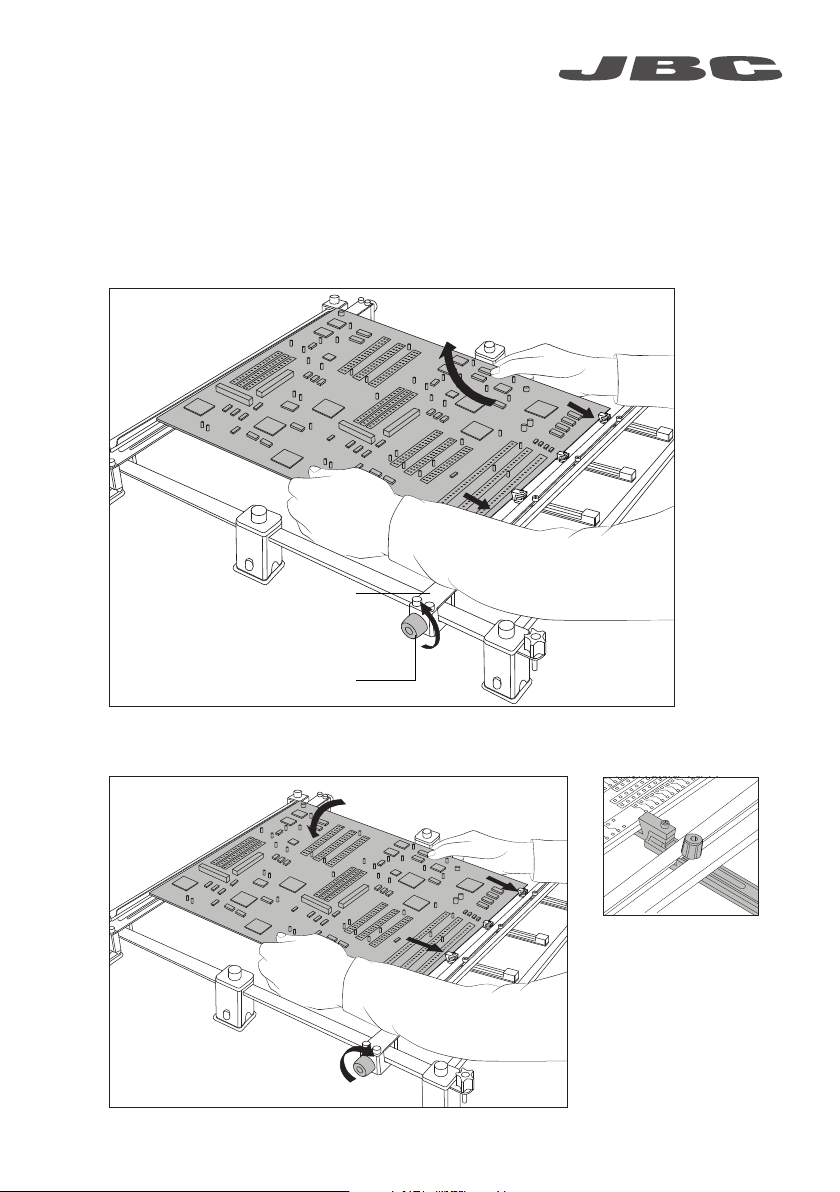
7
Adjustable slot clamps
for switching PCBs
Loosen one sliding guide, pull back and lift out the PCB.
Fast PCB Replacement
The support lets you replace PCBs of the same batch fast and easily.
Use the sliding guides to change the PCBs.
Removing the PCB
Placing another PCB
Sliding Guide Knobs
Sliding Guide
Position it and tighten the sliding guide knobs.
www.jbctools.com
C
P
PHXLE
PHXL-SA
PHB-SA
PHS-SA
PHN-SA
PHBE
PHSE
PHNE
OK
14:15
20
º
C
Power
45%
TC1
45
º
C
Selected 120
º
C
TC2
P
100
º
C
20
º
C
TC3
P
100
º
C
20
º
C
TC4
P
100
º
C
14:15
20
º
C
Power
45%
Selected power
45
%
TC1
P
100
º
C
20
º
C
TC3
P
100
º
C
20
º
C
TC4
P
100
º
C
20
º
C
TC2
P
100
º
C
14:15
20
º
C
T1
23
º
C
20
5’ 8’
º
C
120
º
C
T3
24
º
C
T7
StopPROFILE1
200
100
14:15
31
º
C
27
º
C
TC1
TC2
StopPROFILE1
200
100
14:15
200
150
100
50
300
250
14:15
5m 00s
120
º
C
PROFILE1
200
100
14:15
30
º
C
Power
45%
Selected power
45
%
TC1
C
100
º
C
---
º
C
TC2
P
100
º
C
0 60 120 180 240 300
Point
2/3
Temp Time
2m 00s
14:15
20
º
C
20
º
C
TC1
TC2
20
º
C
TC3
20
º
C
TC4
StopPROFILE1
200
100
Ext. Temp [ºC]Power [%]
14:15
20
º
C
Power
45%
TC1
45
º
C
Selected 120
º
C
TC2
P
100
º
C
20
º
C
TC3
P
100
º
C
20
º
C
TC4
P
100
º
C
14:15
20
º
C
Power
45%
TC1
45
º
C
Selected 120
º
C
TC2
C
100
º
C
20
º
C
TC3
P
100
º
C
20
º
C
TC4
P
100
º
C
14:15
20
º
C
Power
45%
Selected power
45
%
TC5
P
100
º
C
20
º
C
TC7
P
100
º
C
20
º
C
TC8
P
100
º
C
20
º
C
TC6
P
100
º
C
20
º
C
TC5
P
100
º
C
14:15
20
º
C
Power
45%
TC1
25
º
C
Selected 120
º
C
TC2
P
100
º
C
14:15
20
º
C
Power
45%
TC1
25
º
C
Selected 120
º
C
TC2
P
100
º
C
14:15
20
º
C
Power
45%
TC1
45
º
C
Selected 120
º
C
TC2
C
100
º
C
20
º
C
TC3
P
100
º
C
20
º
C
TC4
P
100
º
C
20
º
C
TC5
P
100
º
C
20
5’ 8’
º
C
120
º
C
80
º
C
100
º
C
5’ 8’5’30”3’30” 8’
20
º
C
120
º
C
80
º
C
Lorem ipsum
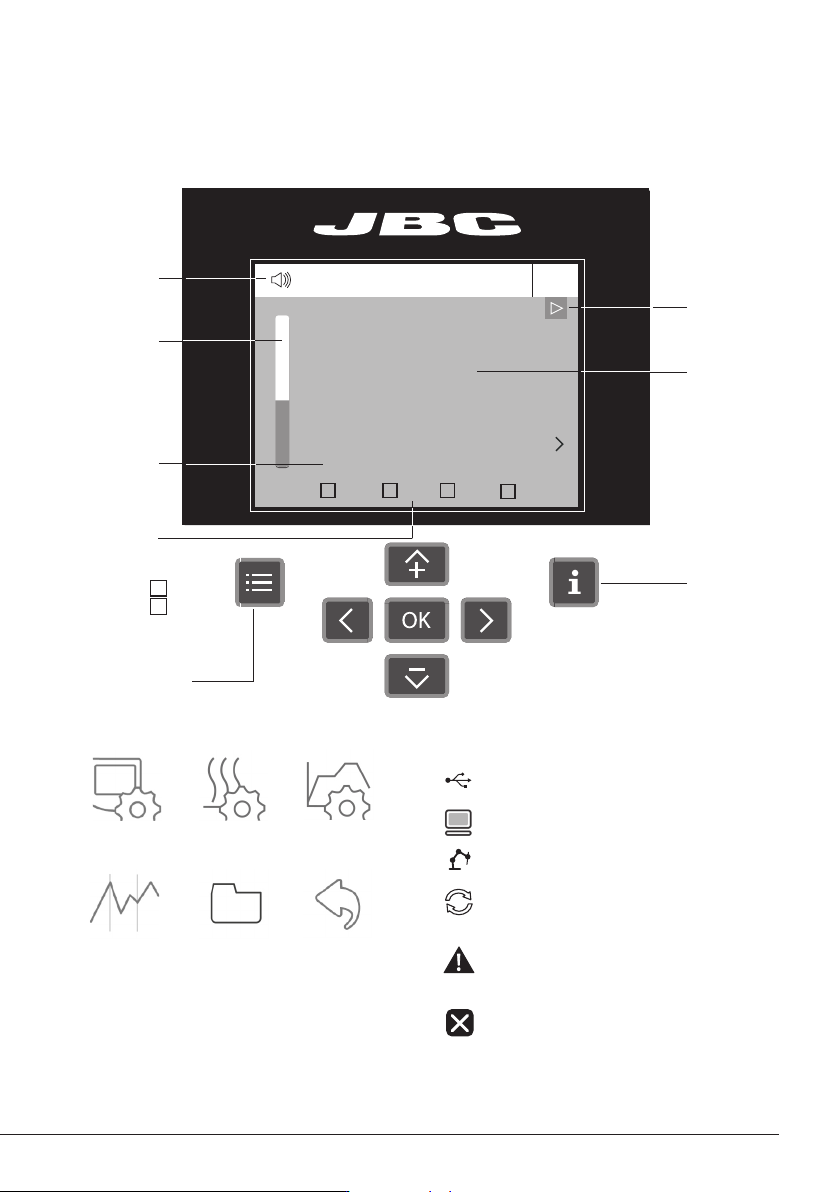
Work Screen
Menu Options
Station
Information
Instant Power
Supplied to
Heater
Status
Indicator
Status Bar
Thermocouple
Selected Temp.
and Mode
· Control
· Protection
· Info
Thermocouple
Current Temp.
TC1 Current
and Selected
Temperature
The Console offers an intuitive user interface which provides quick access to station parameters.
Station troubleshooting available on the product page at www.jbctools.com
Troubleshooting
USB flash drive is connected.
Station is controlled by a PC.
Station is controlled by a robot.
Station software update.
Press INFO to start the process.
Warning.
Press INFO for failure description.
Error. Press INFO for failure description,
the type of error and how to proceed.
System notifications (Status Bar)
*Original PIN: 0105
General Work mode Profile editor
ResetGraphics Files
Available languages: English, Spanish,
German, French, Italian, Portuguese,
Japanese, Chinese, Russian and Korean.
PHXLE
PHXL-SA
PHB-SA
PHS-SA
PHN-SA
PHBE
PHSE
PHNE
OK
14:15
20
º
C
Power
45%
TC1
45
º
C
Selected 120
º
C
TC2
P
100
º
C
20
º
C
TC3
P
100
º
C
20
º
C
TC4
P
100
º
C
14:15
20
º
C
Power
45%
Selected power
45
%
TC1
P
100
º
C
20
º
C
TC3
P
100
º
C
20
º
C
TC4
P
100
º
C
20
º
C
TC2
P
100
º
C
14:15
20
º
C
T1
23
º
C
20
5’ 8’
º
C
120
º
C
T3
24
º
C
T7
StopPROFILE1
200
100
14:15
31
º
C
27
º
C
TC1
TC2
StopPROFILE1
200
100
14:15
200
150
100
50
300
250
14:15
5m 00s
120
º
C
PROFILE1
200
100
14:15
30
º
C
Power
45%
Selected power
45
%
TC1
C
100
º
C
---
º
C
TC2
P
100
º
C
0 60 120 180 240 300
Point
2/3
Temp Time
2m 00s
14:15
20
º
C
20
º
C
TC1
TC2
20
º
C
TC3
20
º
C
TC4
StopPROFILE1
200
100
Ext. Temp [ºC]Power [%]
14:15
20
º
C
Power
45%
TC1
45
º
C
Selected 120
º
C
TC2
P
100
º
C
20
º
C
TC3
P
100
º
C
20
º
C
TC4
P
100
º
C
14:15
20
º
C
Power
45%
TC1
45
º
C
Selected 120
º
C
TC2
C
100
º
C
20
º
C
TC3
P
100
º
C
20
º
C
TC4
P
100
º
C
14:15
20
º
C
Power
45%
Selected power
45
%
TC5
P
100
º
C
20
º
C
TC7
P
100
º
C
20
º
C
TC8
P
100
º
C
20
º
C
TC6
P
100
º
C
20
º
C
TC5
P
100
º
C
14:15
20
º
C
Power
45%
TC1
25
º
C
Selected 120
º
C
TC2
P
100
º
C
14:15
20
º
C
Power
45%
TC1
25
º
C
Selected 120
º
C
TC2
P
100
º
C
14:15
20
º
C
Power
45%
TC1
45
º
C
Selected 120
º
C
TC2
C
100
º
C
20
º
C
TC3
P
100
º
C
20
º
C
TC4
P
100
º
C
20
º
C
TC5
P
100
º
C
20
5’ 8’
º
C
120
º
C
80
º
C
100
º
C
5’ 8’5’30”3’30” 8’
20
º
C
120
º
C
80
º
C
Lorem ipsum
8
PHXLE
PHXL-SA
PHB-SA
PHS-SA
PHN-SA
PHBE
PHSE
PHNE
OK
14:15
20
º
C
Power
45%
TC1
45
º
C
Selected 120
º
C
TC2
P
100
º
C
20
º
C
TC3
P
100
º
C
20
º
C
TC4
P
100
º
C
14:15
20
º
C
Power
45%
Selected power
45
%
TC1
P
100
º
C
20
º
C
TC3
P
100
º
C
20
º
C
TC4
P
100
º
C
20
º
C
TC2
P
100
º
C
14:15
20
º
C
T1
23
º
C
20
5’ 8’
º
C
120
º
C
T3
24
º
C
T7
StopPROFILE1
200
100
14:15
31
º
C
27
º
C
TC1
TC2
StopPROFILE1
200
100
14:15
200
150
100
50
300
250
14:15
5m 00s
120
º
C
PROFILE1
200
100
14:15
30
º
C
Power
45%
Selected power
45
%
TC1
C
100
º
C
---
º
C
TC2
P
100
º
C
0 60 120 180 240 300
Point
2/3
Temp Time
2m 00s
14:15
20
º
C
20
º
C
TC1
TC2
20
º
C
TC3
20
º
C
TC4
StopPROFILE1
200
100
Ext. Temp [ºC]Power [%]
14:15
20
º
C
Power
45%
TC1
45
º
C
Selected 120
º
C
TC2
P
100
º
C
20
º
C
TC3
P
100
º
C
20
º
C
TC4
P
100
º
C
14:15
20
º
C
Power
45%
TC1
45
º
C
Selected 120
º
C
TC2
C
100
º
C
20
º
C
TC3
P
100
º
C
20
º
C
TC4
P
100
º
C
14:15
20
º
C
Power
45%
Selected power
45
%
TC5
P
100
º
C
20
º
C
TC7
P
100
º
C
20
º
C
TC8
P
100
º
C
20
º
C
TC6
P
100
º
C
20
º
C
TC5
P
100
º
C
14:15
20
º
C
Power
45%
TC1
25
º
C
Selected 120
º
C
TC2
P
100
º
C
14:15
20
º
C
Power
45%
TC1
25
º
C
Selected 120
º
C
TC2
P
100
º
C
14:15
20
º
C
Power
45%
TC1
45
º
C
Selected 120
º
C
TC2
C
100
º
C
20
º
C
TC3
P
100
º
C
20
º
C
TC4
P
100
º
C
20
º
C
TC5
P
100
º
C
20
5’ 8’
º
C
120
º
C
80
º
C
100
º
C
5’ 8’5’30”3’30” 8’
20
º
C
120
º
C
80
º
C
Lorem ipsum
C
P
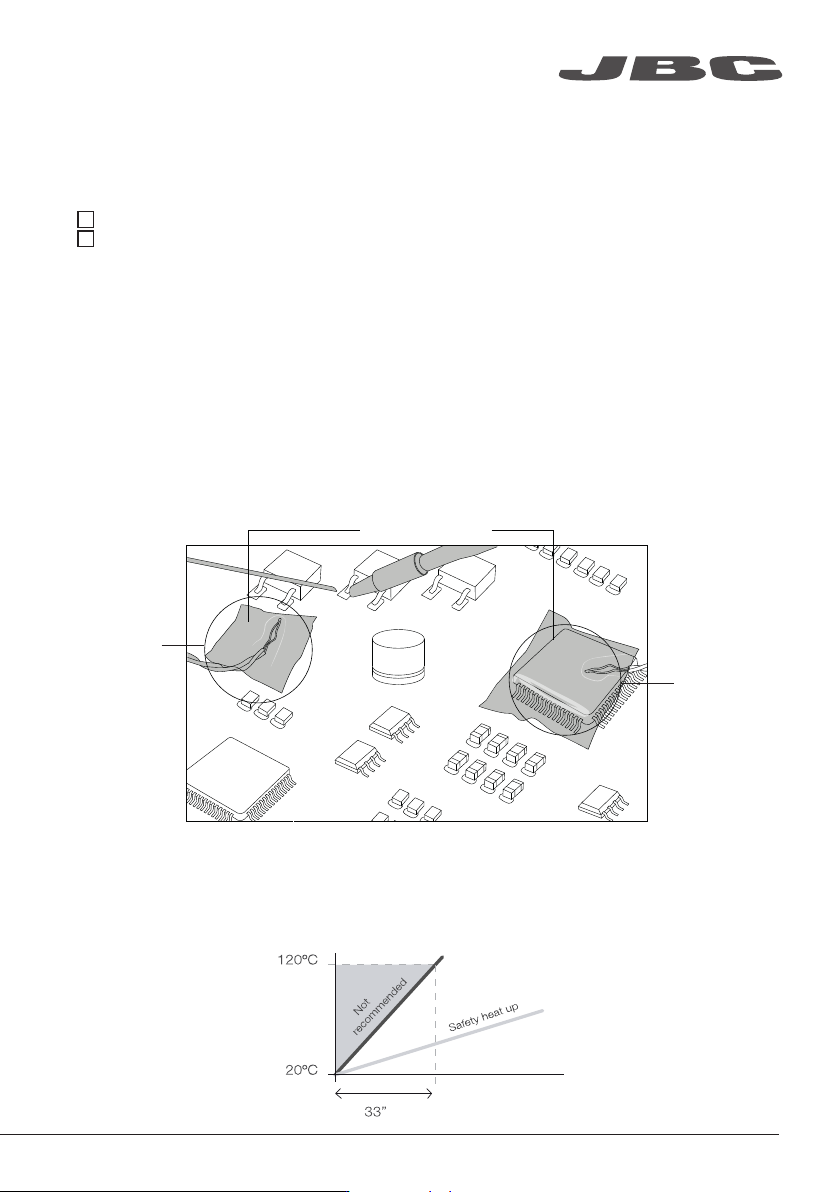
Recommended Guidelines
1. Place the Control Thermocouple as near as possible to the component being worked on.
2. If there are any sensitive components, use a Thermocouple as protection.
You can select the protection temperature in the Thermocouples menu. If the selected temperature
is reached, the Heater Unit will stop the process and a warning message will be shown.
3. IPC* does not recommend exceeding ramp-up rates over 3 - 4 °C / sec (5 - 7 °F / sec) so as to
reduce the risk of thermal stress on the PCB.
* IPC was founded in the U.S. in 1957 as the Institute for Printed Circuits and is committed to becoming the
most recognized international industry association for the electronics manufacturing industry.
Fix with Kapton Tape
Protection
Thermocouple
Setting Thermocouples Function
Select Thermocouples from the Work mode menu to set them up.
The thermocouples (TC) can work in three diferent ways depending on what is needed.
· Control: the unit mantains the selected temperature.
· Protection: the Heater Unit stops if the TC reaches the selected temperature.
· Info: the TC temperature is shown in the work screen.
The TC1 is always working in Control mode for the Temperature mode as well as for Profiles mode.
The temperature of each TC can also be selected from the work screen.
Control
Thermocouple
9
www.jbctools.com