03229208-01-01 All Purpose Clamping (APC) Manual DE.PDFA - 第99页
3 APC-SOFTWARE EINSTELLUNG UND EMPFOHLENE EINSTELLUNGEN 3.2 SOFTWARE EINSTELLUNG PARAMETER EIGENSTÄNDIGES HANDBUCH UNIVERSALKLEMMEN (APC) 12/2019 99 3.2.1 Klemm-Modus Der Klemm-Modus-Parameter stellt den Betriebsmodus de…
3 APC-SOFTWARE EINSTELLUNG UND EMPFOHLENE EINSTELLUNGEN
3.2 SOFTWARE EINSTELLUNG PARAMETER
98 EIGENSTÄNDIGES HANDBUCH UNIVERSALKLEMMEN (APC) 12/2019
3.2 SOFTWARE EINSTELLUNG PARAMETER
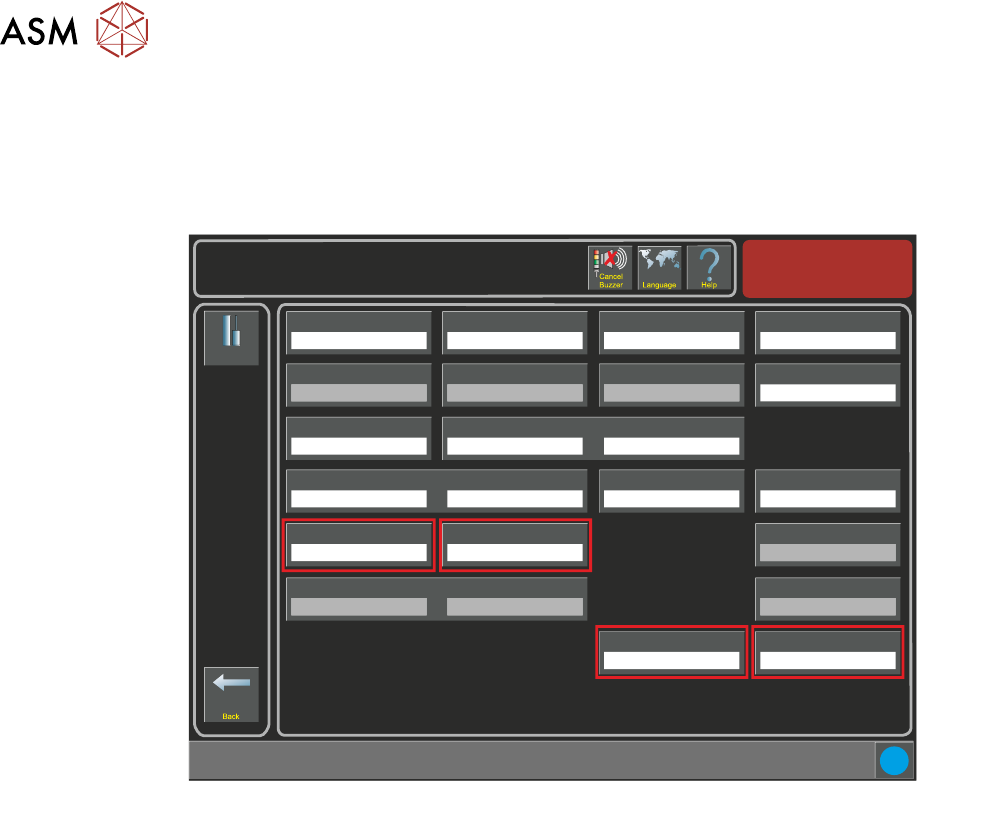
Es gibt vier mit APC verknüpfte Prozessparameter, die konfiguriert werden müssen: APC-Klemm-
modus, Snug Kraft, Klemmdruck und OTS-Vakuum-Modus. Diese sind alle auf der Einstellung ->
Werkzeug Seite zu finden.
Setup
Tooling
Tooling Type
Vacuum
Board Stop X
50.0 mm
Setup \ Tooling
Board Stop Y
66.0 mm
Under Clearance
19.0 mm
Right Feed Delay
0.0 s
Vacuum Sensor Delay
1.5 s
Tooling Deviation
20.0 %
Board Run On Period
0.3 s
Print Gap
0.000 mm
Separation Speed
5.0 mm/s
Separation Distance
3.0 mm
Board Length
100.0 mm
Board Width
100.0 mm
Board Thickness
2.0 mm
Board Stop Retract Delay
0.0 s
Snugging Force
20 newtons
Clamp Pressure
3.0 bar
Vacuum Decay Delay
0.0 s
Flatten Vac Delay
0.0 s
Separate Vac Delay
0.0 s
Stop After Idle
30 minute
APC Clamp Mode
Snug
OTS Vacuum Mode
Before
i
3 APC-SOFTWARE EINSTELLUNG UND EMPFOHLENE EINSTELLUNGEN
3.2 SOFTWARE EINSTELLUNG PARAMETER
EIGENSTÄNDIGES HANDBUCH UNIVERSALKLEMMEN (APC) 12/2019 99
3.2.1 Klemm-Modus
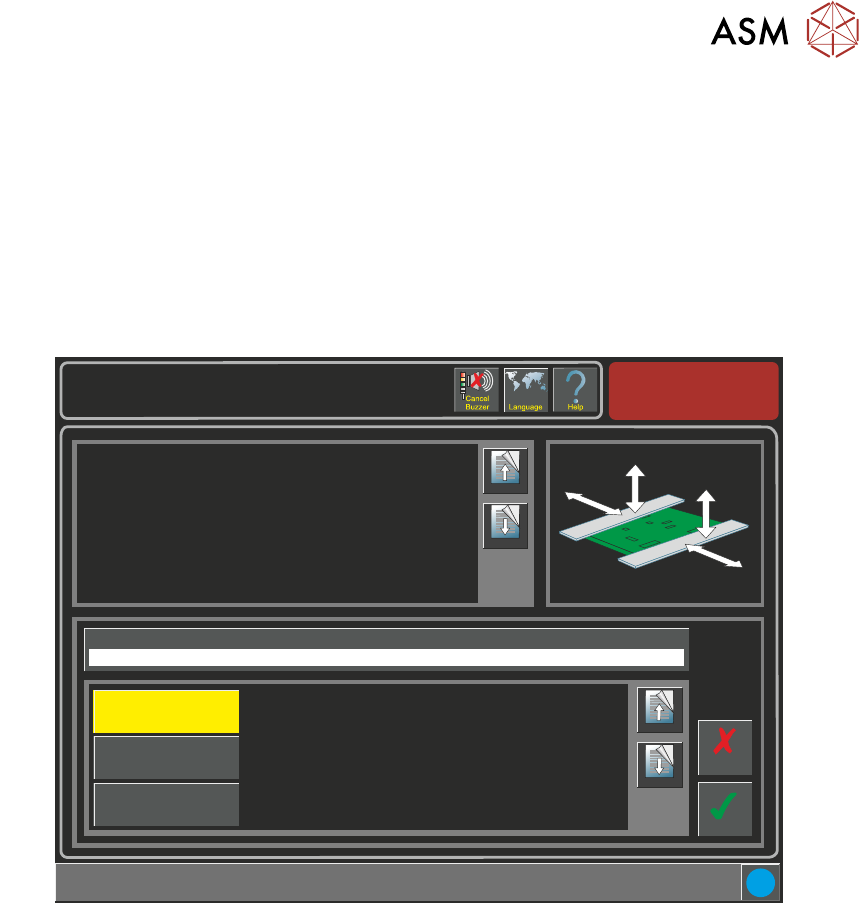
Der Klemm-Modus-Parameter stellt den Betriebsmodus des APC-Systems ein. Die Optionen sind:
●
Seitliche Klemme
●
Klemme
●
Seitliche und obere Klemme
HINWEIS
Siehe Betriebsmodusabläufe im Universalklemmen Kapitel in diesem Handbuch für weitere Einzel-
heiten.
Setup \ Tooling
Page Up
Page
Down
This parameter is used to select the mode of operation:
Snug - the mode of securing the product by snugging it on its edges.
Clamp - the mode of securing the product by bring the foil section of the
clamp down onto the top of the product.
Snug and Clamp - a combination of snugging and clamping.
Accept
Cancel
APC Clamp Mode
Snug
Page Up
Page
Down
Snug
Clamp
Snug and Clamp
i
3 APC-SOFTWARE EINSTELLUNG UND EMPFOHLENE EINSTELLUNGEN
3.2 SOFTWARE EINSTELLUNG PARAMETER
100 EIGENSTÄNDIGES HANDBUCH UNIVERSALKLEMMEN (APC) 12/2019
3.2.2 Snug Kraft
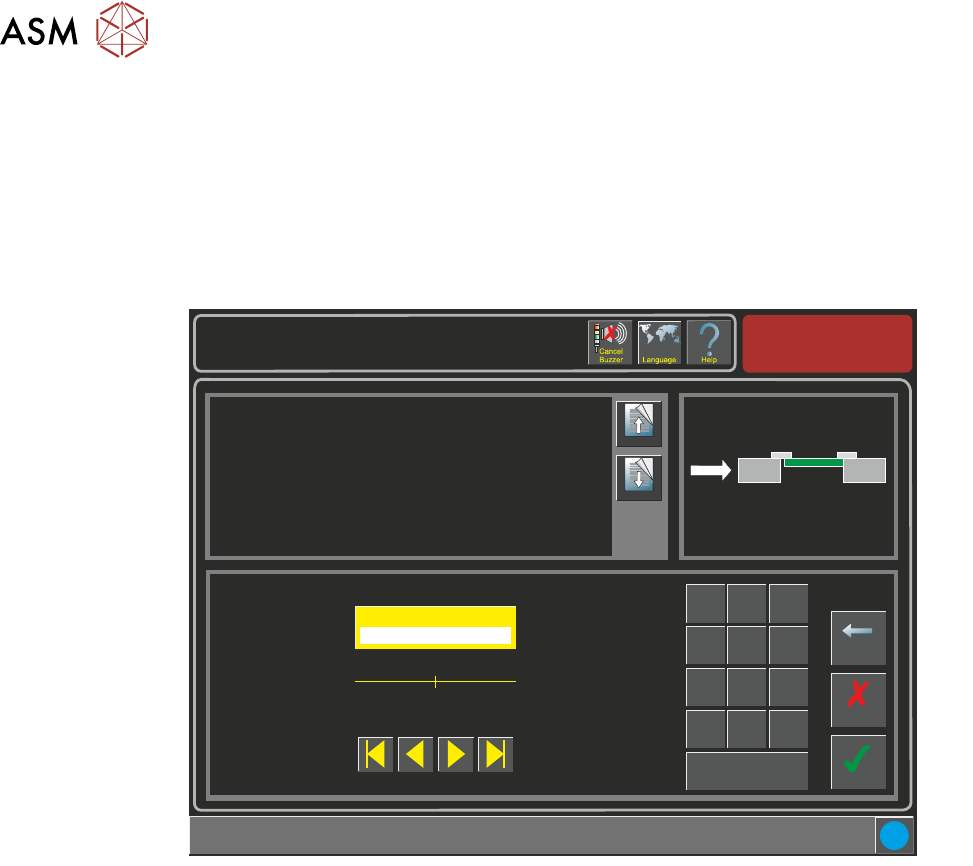
Wenn das Substrat in die Maschine geführt wird und der Snugger läuft, wird das Substrat zurück-
behalten. Es kann eine Mindesteinstellung von 20 und eine Maximaleinstellung von 60 Newtons
erfolgen.
HINWEIS
Die Snug-Kraft Drehmomentwerte müssen kalibriert werden, ehe dieser Parameter angewendet
wird. Siehe "Kalibration" später in diesem Kapitel für Einzelheiten hierzu.
Setup \ Tooling
Page Up
Page
Down
This parameter sets the force applied by the snugger to hold the board in
place whilst printing.
Additional information:
Ensure that the torque values have been properly calibrated before applying
this parameter.
Accept
Cancel
Snugging Force ( newtons )
40
Backspace
Min
20
Max
60
7
8 9
4
5
6
1 2
3
0
.
+/-
Apply
i