ACT - Accuracy Check Tool.pdf - 第143页
ACT with SSW 7xx / User Manual 07/2017 Edition 35 ► Enable the Store Recipe p ermanently on Station chec k box. Figure 4-2: Configuration – Colum ns ► When specifying the program, enable t he check box in t he Permanent …
ACT with SSW 7xx / User Manual 07/2017 Edition
34
4.1.2 Specifying the Boards
► Select a suiting placement program for your head configuration from the pre-configured boards
(with the aid of the tables under 4.1 ff).
► Specify a job (recipe) in SIPLACE Pro Line Control and send it to the line (download).
NOTICE
Placement machines with dual conveyors
When using a dual conveyor, the ACT should be run with both conveyor lanes.
4.1.2.1 Specifying Programs to be Permanently Stored on the Station
The specified programs downloaded to the SIPLACE station are stored temporarily on the station.
However, this is a FIFO principle.
Therefore, ACT programs which are rarely used are usually already deleted from the memory
before they are reused.
But especially ACT programs usually do not change as they mainly depend on the machine
configuration.
NOTICE
Specifying Programs to be Permanently Stored on the Station
As of station software version 709.x and SIPLACE Pro 13.1, all placement programs can
now be specified to be permanently stored.
I.e., these programs keep stored on the machine, will not be deleted according to the
FIFO principle and can be used anytime in Stand alone mode at the station.
► First, you have to set the Store permanently on Station column to be visible in the SIPLACE
Pro Line Control GUI program.
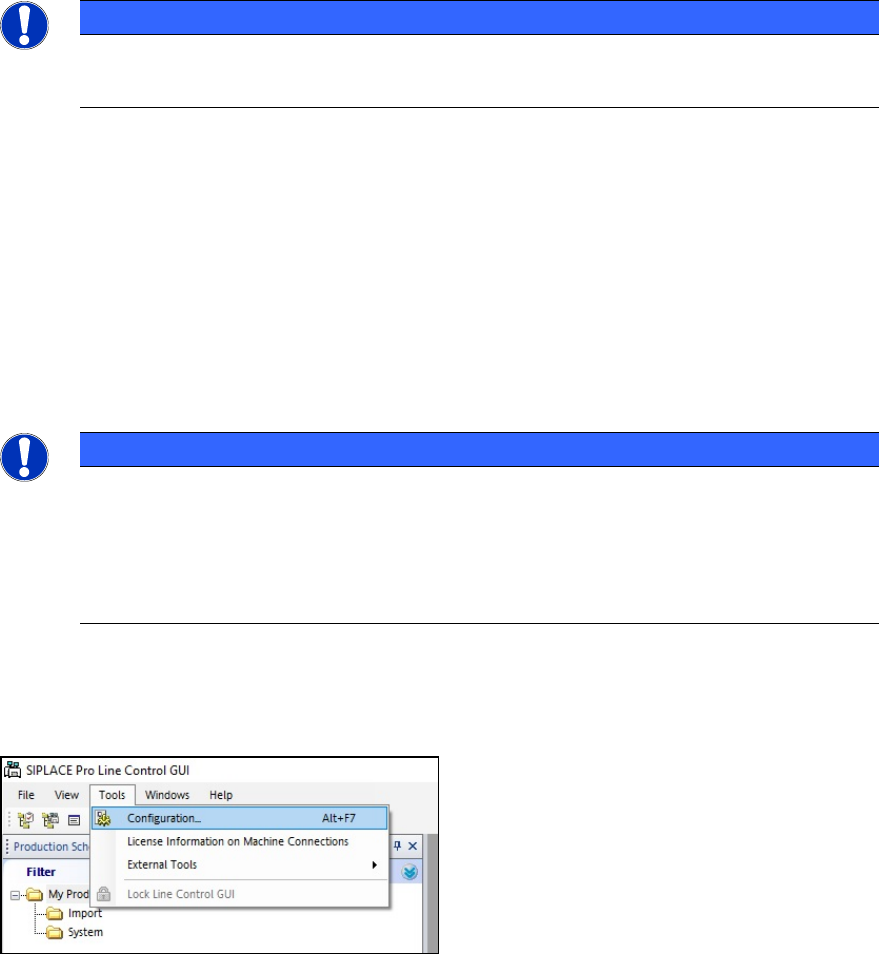
In the Tools menu, open the Configuration window.
Figure 4-1: Line Control GUI – Configuration
ACT with SSW 7xx / User Manual 07/2017 Edition
35
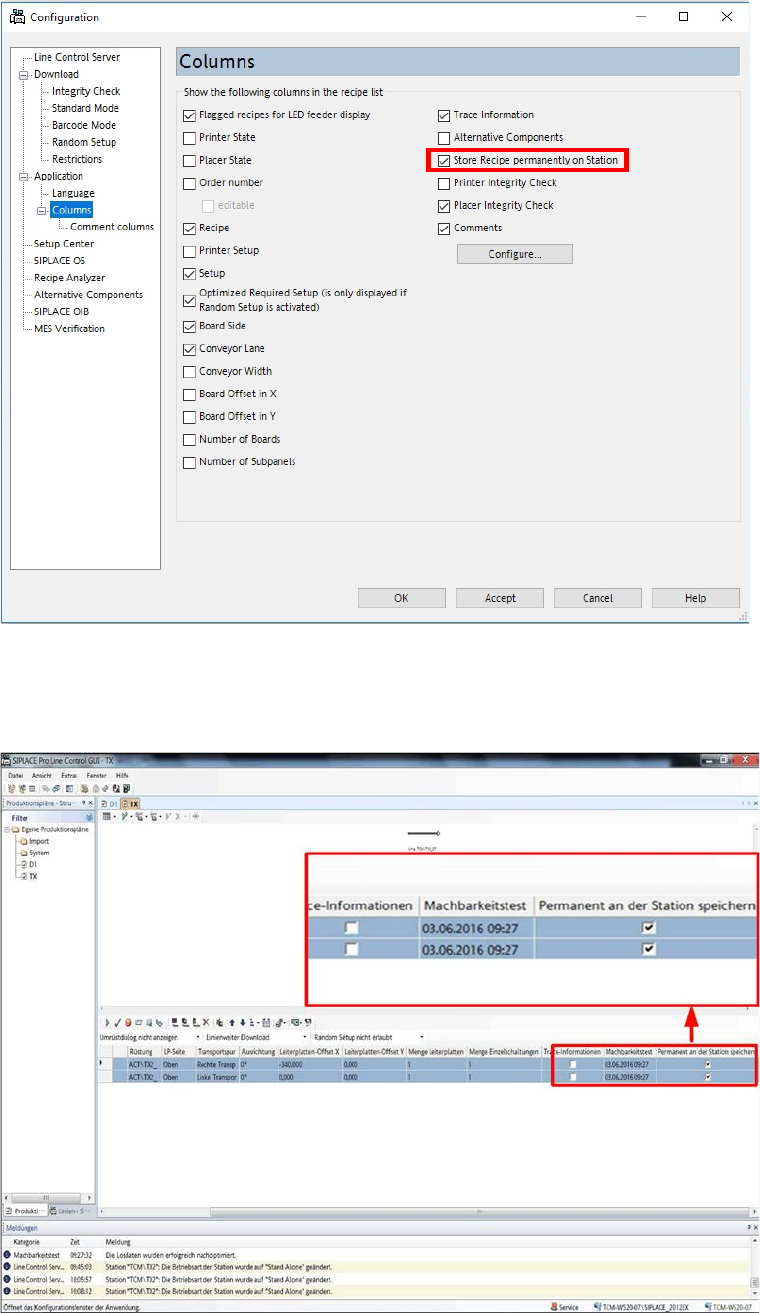
► Enable the Store Recipe permanently on Station check box.
Figure 4-2: Configuration – Columns
► When specifying the program, enable the check box in the Permanent an der Station
speichern (Store permanently on Station) column in the list of SIPLACE Pro Line Control
GUI.
Figure 4-3: Storing specification permanently
Programs specified in this way keep stored on the station until they are explicitly deleted.
ACT with SSW 7xx / User Manual 07/2017 Edition
36
4.1.2.2 Specifying ACT Programs in Stand Alone Mode
Due to the above-described permanent storage of the placement programs on the station, a once-
defined program can be repeated at any time in stand-alone mode at the station, without having to
re-specify via SIPLACE Pro.
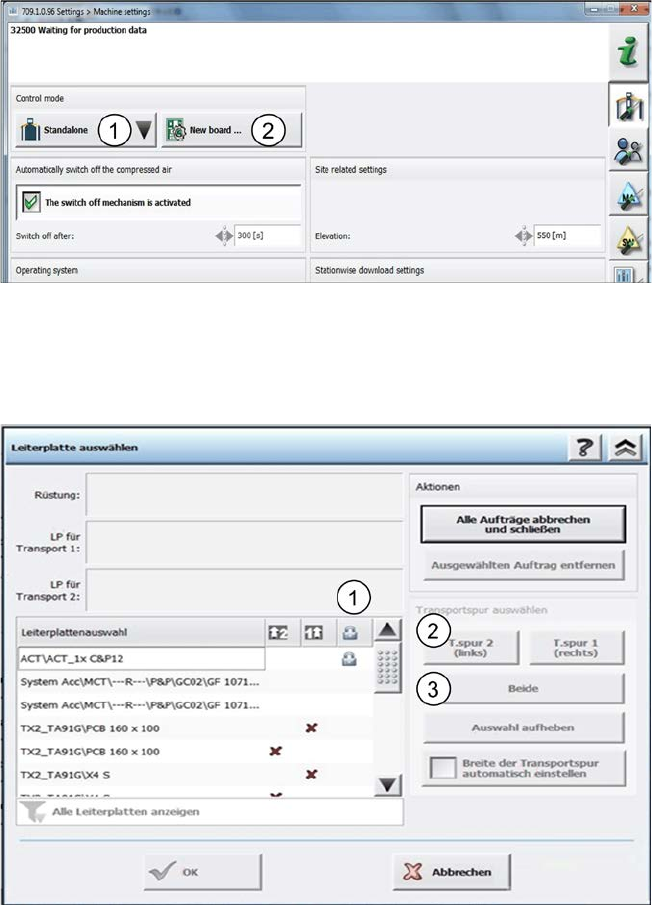
You are in the Stand alone mode (1).
Figure 4-4: Stand alone mode
► Select a new board (placement program) from the stored list on the station under New board
(2).
The boards stored on the station are listed in the following window.
Figure 4-5: Permanent specification
The permanently stored boards are marked with a Padlock symbol (1).
► Mark the corresponding line.
► Either specify the board on one lane (2) or on both lanes simultaneously (3).