ACT - Accuracy Check Tool.pdf - 第145页
ACT with SSW 7xx / User Manual 07/2017 Edition 37 4.1.2.3 Accessibility P roblems for Various M achine / H ead Configurations SIPLACE SX4 and DX4 machines: NOTICE In order to access the fiducials, t he ACT measuring pl a…
ACT with SSW 7xx / User Manual 07/2017 Edition
36
4.1.2.2 Specifying ACT Programs in Stand Alone Mode
Due to the above-described permanent storage of the placement programs on the station, a once-
defined program can be repeated at any time in stand-alone mode at the station, without having to
re-specify via SIPLACE Pro.
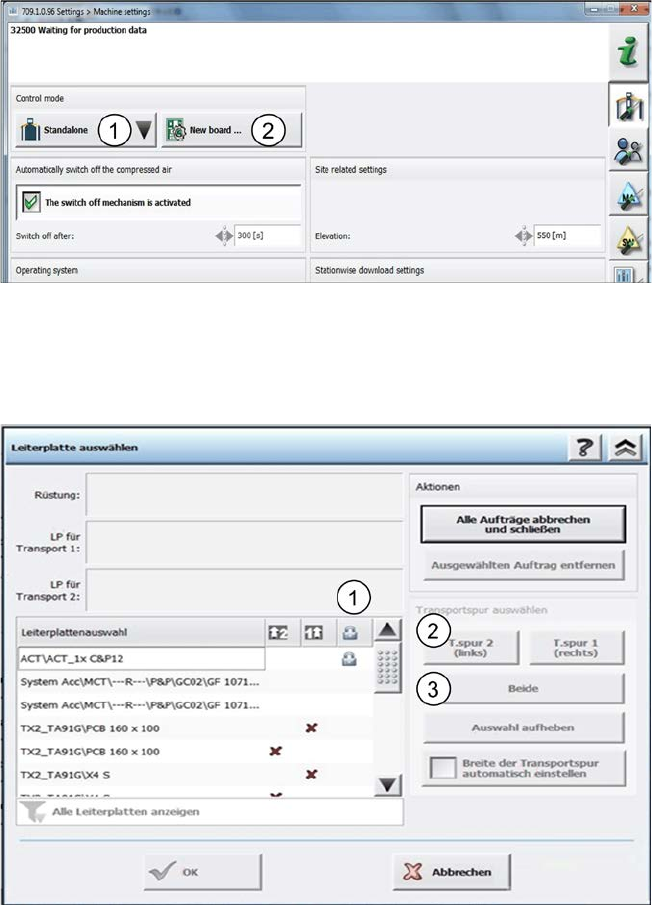
You are in the Stand alone mode (1).
Figure 4-4: Stand alone mode
► Select a new board (placement program) from the stored list on the station under New board
(2).
The boards stored on the station are listed in the following window.
Figure 4-5: Permanent specification
The permanently stored boards are marked with a Padlock symbol (1).
► Mark the corresponding line.
► Either specify the board on one lane (2) or on both lanes simultaneously (3).
ACT with SSW 7xx / User Manual 07/2017 Edition
37
4.1.2.3 Accessibility Problems for Various Machine / Head Configurations
SIPLACE SX4 and DX4 machines:
NOTICE
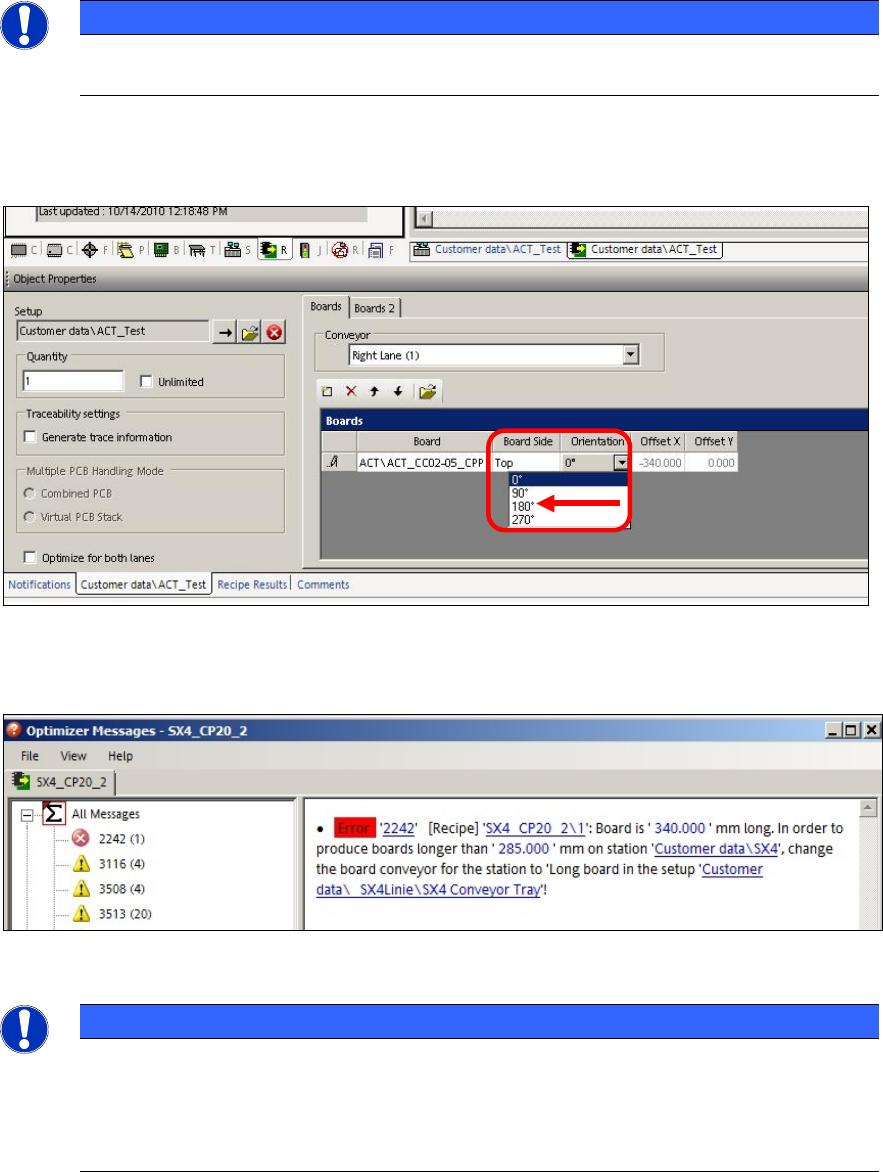
In order to access the fiducials, the ACT measuring plate has to be placed rotated by
180° in SIPLACE SX4 and DX4 machines.
Thus, if an ACT placement program is defined for a SIPLACE SX4 or DX4 machine, the orientation
(position) of the board has to be adapted to 180° in the created recipe.
Figure 4-6: Rotating board orientation by 180° on SX4, DX4
If this adaption of the board orientation is not performed, the following error message (example) is
already displayed on the SIPLACE Pro Line Control GUI during specification:
Figure 4-7: Example: Error message due to unavailable ink spots
NOTICE
Due to the problems of accessing the fiducials described above, please observe:
If the ACT has to be measured on a machine of the SX-, DX-, or X-series, in front of
which one or more SIPLACE SX4- or DX4-stations are arranged in a line, the Pass-
through function has to be activated on all machines in front of the measuring machine
that require another board orientation (0°/180°).
ACT with SSW 7xx / User Manual 07/2017 Edition
38
Twin Head in Placement Area 1:
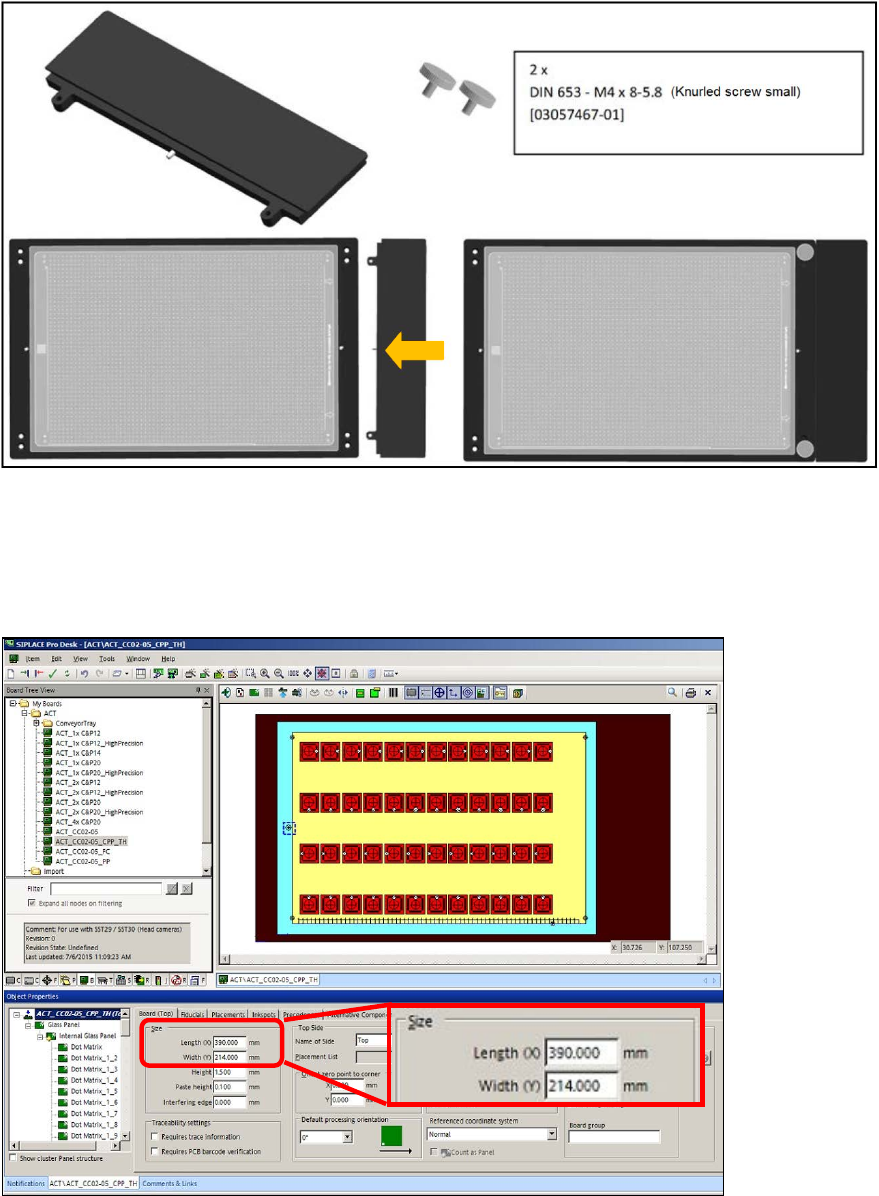
For machines with Twin Head in placement area 1 (i.e. gantry 1 and / or 4), you can use the
following adapter to ensure the accessibility of segment 2 during placement on the plate. The
adapter is placed on the front of the plate to move the plate by a total of 50 mm to the rear in the
direction of the input belt.
50 mm TWIN adapter [03085310-01]
Figure 4-8: 50 mm TWIN adapter
If you use the "50 mm TWIN adapter" [03085310-01] in the outmost panel, you must extend the
board by 50 mm in SIPLACE Pro Desk!
► For this, enter 390 mm length instead of 340 mm in the board description that you want to use
(ACT_CC02-05_CPP_TH).
Figure 4-9: Extending the board