Autosite_Users_Manual.pdf - 第11页
AutoSite User Manual xi P reface The Preface describes h ow to contact Data I/O f or technical assist ance, for repair and warrant y services, and Keep Current™ subscription service. It also describes how to reach Data I…
Safety Summary
x AutoSite User Manual
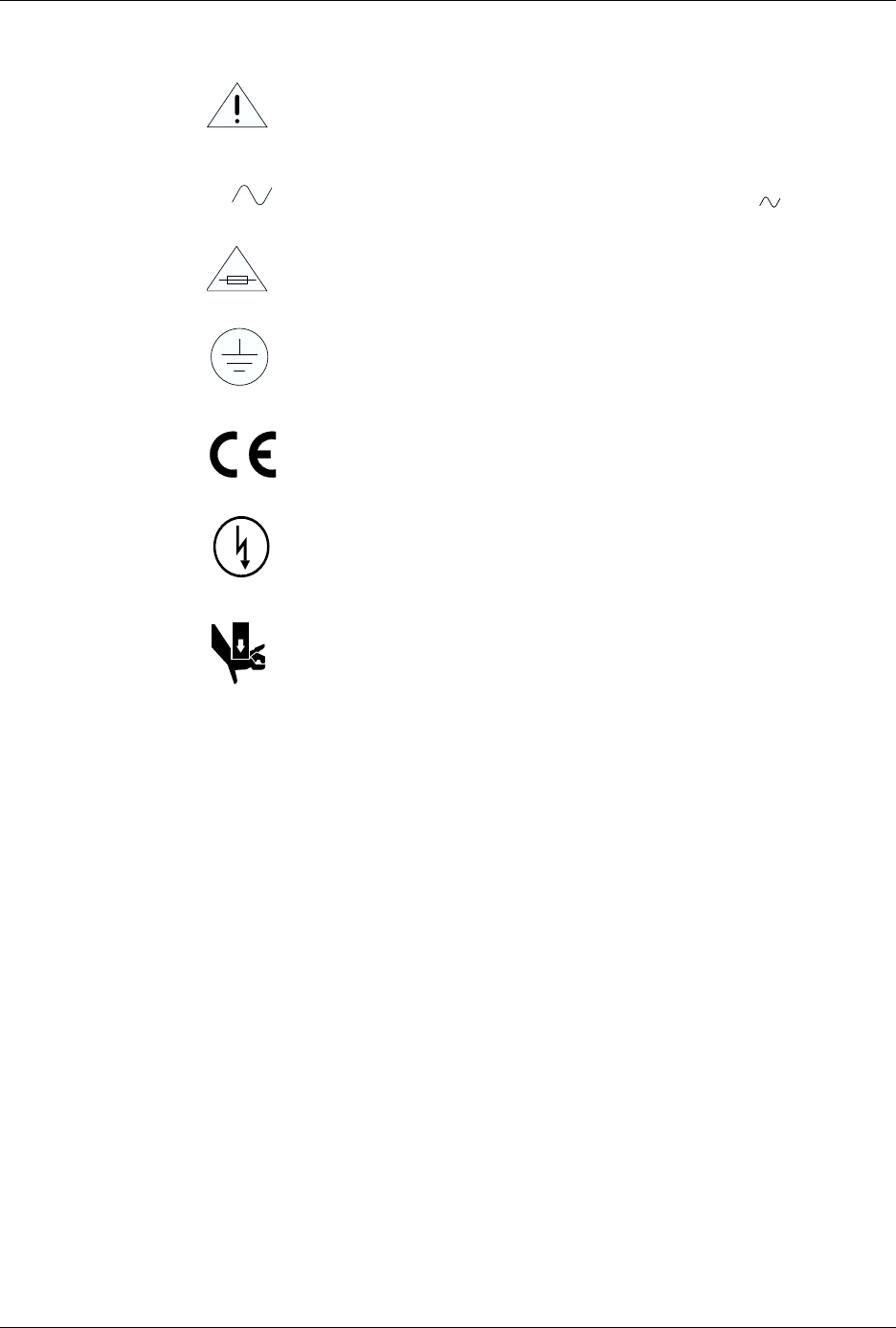
Symbol
This symbol indicates that the user should consult the manual for
further detail.
This symbol stands for Volts ac, for example: 120 V = 120 Vac.
This symbol denotes a fuse rating for a user-replaceable fuse.
This symbol denotes earth ground. An antistatic wrist strap with
impedance of 1 M
Ω
(minimum) to 10 M
Ω
(maximum) can be
attached to terminals designated for that function and marked
with this symbol.
This symbol denotes compliance of the programmer with the
requirements called out by the EC (European Community) for this
equipment.
This symbol denotes dangerous, high voltage is present and
precaustions should be taken to prevent injury from electrical
shock.
This symbol denotes that movement of system components can
cause physical injury from pinching or crushing.
V
AutoSite User Manual xi
P
reface
The Preface describes how to contact Data I/O for technical assistance, for
repair and warranty services, and Keep Current™ subscription service. It
also describes how to reach Data I/O’s Home Page on the World Wide Web.
Data I/O Customer Support
United States
For technical assistance, repair, or warranty service, contact:
Technical Operations
Telephone: 1-800-247-5700 (
Press 2 on your touch-tone telephone to bypass
the recorded message and speak to the first available Support Engineer
)
Fax: 425-867-6972
E-mail: pmhelp@data-io.com
For Keep Current subscription service or repair service contract, contact:
Corporate Sales
Telephone: 1-800-332-8246
Fax: 425-869-7423
E-mail: telsales@data-io.com
Canada
For technical assistance, contact:
Technical Operations
Telephone: 800-247-5700 (
Press 2 on your touch-tone telephone to bypass
the recorded message and speak to the first available Support Engineer
)
Fax: 425-867-6972
E-mail: pmhelp@data-io.com
For repair or warranty service, or Keep Current subscription service, contact:
Data I/O Canada
6725 Airport Road, Suite 102
Mississauga, Ontario, L4V 1V2
Telephone: 905-678-0761
Fax: 905-678-7306
Preface
xii AutoSite User Manual
Japan
For technical assistance, repair or warranty service or
Keep Current
subscription service,
contact:
Data I/O Japan
Osaki CN Building 2F
5-10-10 Osaki
Shinagawa-ku
Tokyo 141
Telephone: 3-3779-2151
Fax: 3-3779-2203
Germany
For technical assistance, repair, or warranty service, or
Keep Current
subscription service
contact:
Data I/O GmbH
Lochhamer Schlag 5
82166 Gräfelfing
Telephone: 89-858-580
Fax: 89-858-5810
Other Countries
For technical assistance, repair, or warranty service, or
Keep Current
subscription service
contact your local Data I/O representative.
Contacting Data I/O
You can contact Data I/O for technical assistance by calling, sending a fax
or electronic mail (e-mail), or using the Bulletin Board Service (BBS).
To help us give you quick and accurate assistance, please provide the
following information:
• ProMaster serial number
•Product version number
• Detailed description of the problem you are experiencing
• Error messages (if any)
• Device manufacturer and part number (if device-related)
Telephone
Call the appropriate Data I/O Customer Support number listed at the
front of the Preface. When you call, please be at your programmer or
computer, have the product manual nearby, and be ready to provide the
information listed above.
Fax
Fax the information listed above with your name, phone number, and
address to the appropriate Data I/O Customer Support fax number listed
at the front of the Preface.
E-mail
To reach Data I/O via e-mail, send a message including your name,
telephone number, e-mail address, and the information listed above to
the following address:
pmhelp@data-io.com