Autosite_Users_Manual.pdf - 第158页
Keep Cu rrent S ubscription Service Keep Current 3 1. Gather Device Information 2. Connect to Keep Current 3. Find Device Algorithm 4. Download Algorithm 5. Use Algorithm BBS Web Page Does the algorithm appear on the sta…

Keep Current Subscription Service
2 Keep Current
Procedure Overview
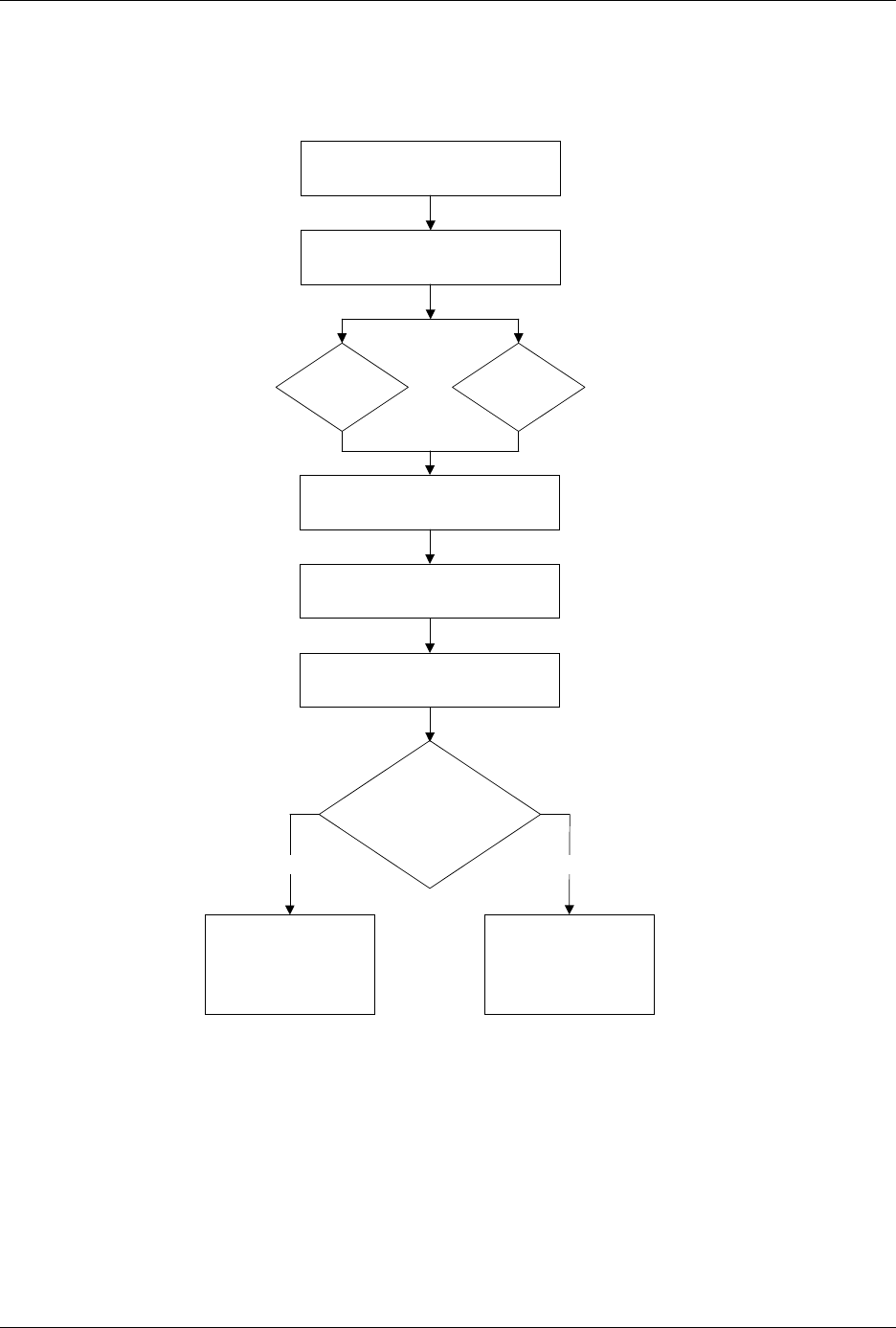
Keep Current Subscription Service
Keep Current 3
1. Gather Device Information
2. Connect to Keep Current
3. Find Device Algorithm
4. Download Algorithm
5. Use Algorithm
BBS
Web
Page
Does the
algorithm appear
on the standard
device list?
No Yes
Select Device /
(1) Keep Current
More Commands /
Configure System /
Keep Current /
Replace-Restore

Keep Current Subscription Service
4 Keep Current
1. Gather Information
Knowing the following information about the devices you will be
programming will enable you to find the correct algorithm once you are
connected.
• Manufacturer (
example
: AMD)
• Device name (
example
: 27c1024)
• Package type (
example
: 48-pin PLCC)
• Current version of the programmer software (
example
: 5.5)
2. Connect to Keep Current
Using the BBS
Use the following procedure to log on to the Keep Current BBS:
1.
Modem:
Call
425-882-3211
.
Internet:
Using telnet, go to
bbs.data-io.com
.
2. If this is the first time you have called, when the logon screen
appears, type
new
at the prompt to create a new account and provide
the requested information.
Note: Be sure to write down your user name and password for future reference.
This is your personal BBS account and should not be shared.
3. Press
L
to go to the Library menu.
4. Press
S
to select the Keep Current Library.
5. Press
F
to search for algorithms.
Using the Web
The Data I/O Home Page is located at www.data-io.com. Click on the
Keep Current image from the Home Page or from the Programmer
Device Support page.
3. Find Device Algorithm
When you reach the Keep Current Library, select the correct algorithm.
Algorithms are arranged by programmer and system software version.
Keep Current filenames are represented as follows:
xVVddddd
.exe
Programmer Type
u
= UniSite
r
= 2900
s
= 3900
a
= AutoSite or
ProMaster 2500
Version Number
with which this
algorithm works.
Data I/O Device
Support Number