Autosite_Users_Manual.pdf - 第33页
Setup an d Installa tion AutoSite User Manual 2-11 Attaching the Pin Driver Head Connect the pin driver head to th e 2000 as follows: 10. Position the pin driver head agai nst the 2000 so the handle on the clamp ring poi…
Setup and Installation
2-10 AutoSite User Manual
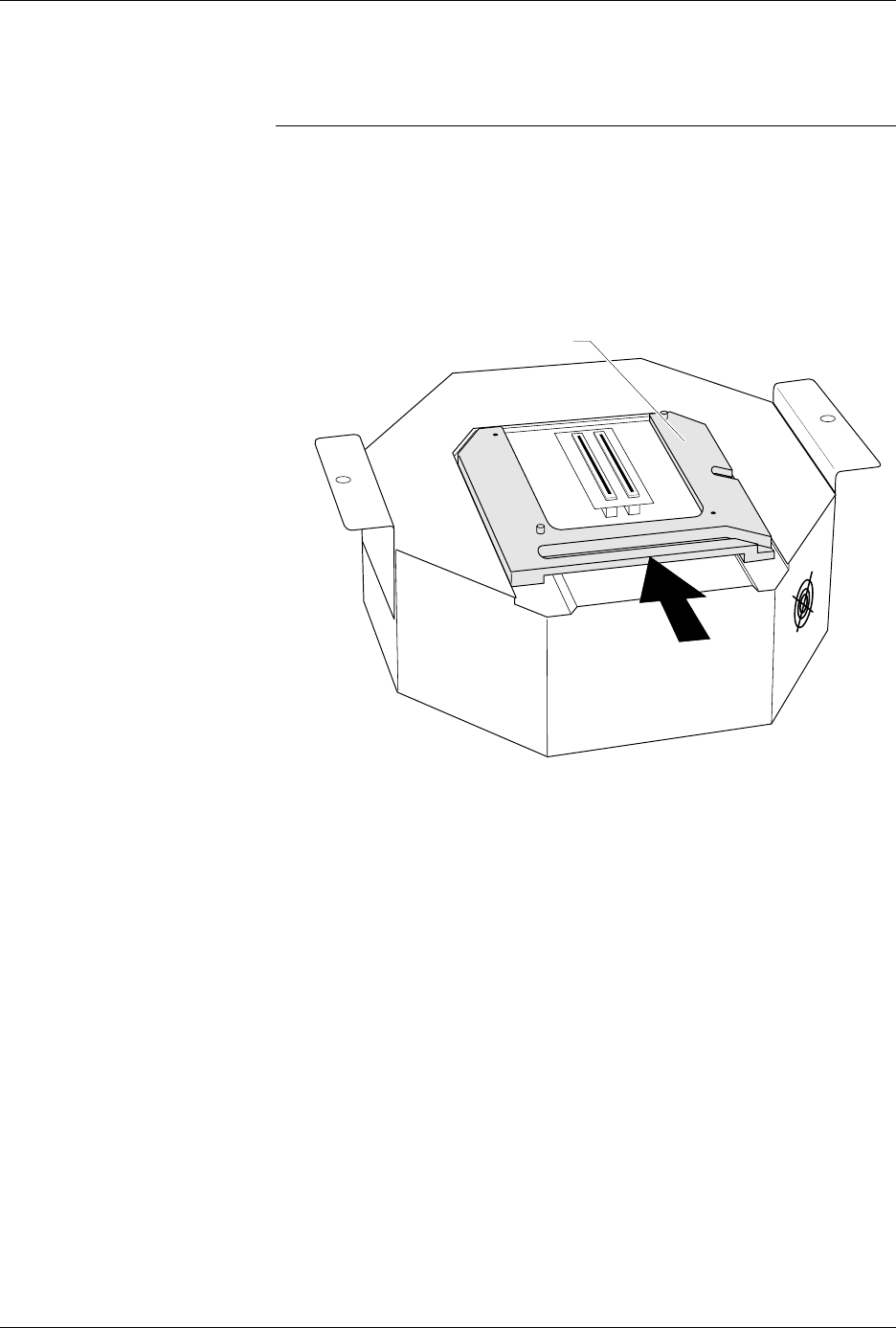
9. As shown in Figure 2-10, slide the clamp ring onto the pin driver
head, securing the programming module in place.
CAUTION: You may have to push down on the programming module
while sliding the clamp ring onto the pin driver head.
Do not use the device socket on the programming module as
a leverage point. You can damage the device socket by
applying any sort of force to it.
You will feel and hear a “click” from the clamp ring when the
programming module is properly secured to the pin driver head.
Figure 2-10
Securing a Programming Module
to the Pin Driver Head
1351-2
PROGRAMMING MODULE CLAMP RING
Setup and Installation
AutoSite User Manual 2-11
Attaching the Pin
Driver Head
Connect the pin driver head to the 2000 as follows:
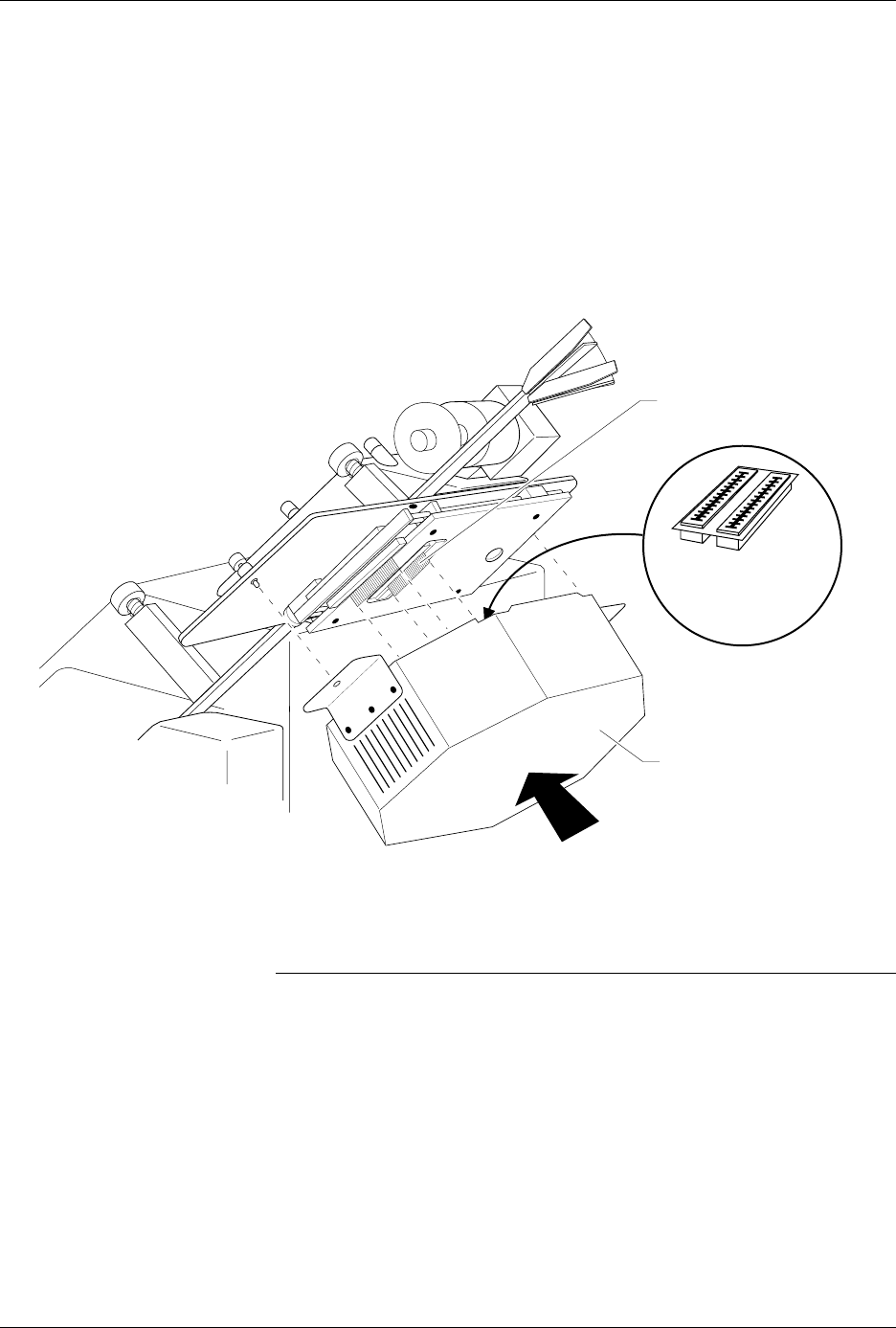
10. Position the pin driver head against the 2000 so the handle on the
clamp ring points toward the top of the 2000.
11. Align the card edge on the contactor set with the card edge
connectors on the programming module. Gently push the pin driver
head onto the 2000.
12. Tighten the thumbscrews on the pin driver head mounting plate,
securing the pin driver head to the Handler. You might have to use a
flatblade screwdriver to finish tightening the thumbscrews.
CAUTION: To prevent damage to the edge connectors, and to ensure
solid contact, we suggest you alternate tightening the left
and right thumbscrews until the pin driver head is
completely fastened to the handler.
13.
(For control units and pin driver heads without connector brackets at ports
J1 and J2)
Connect the 50-pin cable, and the 68-pin cable to the
AutoSite control unit and the pin driver head. The 50-pin cable and
68-pin cable and the ports to which they connect are shown in Figures
1-1 and 1-3.
Figure 2-11
Securing the Pin Driver Head to the ProMaster 2000
1402-2
CARD EDGE ON
CONTACTOR SET
PIN DRIVER HEAD
(clamp ring toward top)
CARD EDGE
CONNECTORS ON
PROGRAMMING
MODULE

Setup and Installation
2-12 AutoSite User Manual
(For control units and pin driver heads with connector brackets at ports J1
and J2.)
Remove the two screws that hold the connector shell together
at the unconnected end of the 50-pin cable. Plug the 50-pin cable into
the appropriate port on the pin driver head and fasten it to the
connector bracket by aligning the holes in the bracket with the holes
on the connector shell and reinserting the screws through the holes.
Tighten the screws.
Repeat the procedure for the 68-pin cable.
Checking the
Installation
When properly connected to the handler, the mounting brackets attached
to the pin driver head will be flush against the pin driver head mounting
plate.
If the mounting brackets are not flush against the pin driver head
mounting plate, detach the pin driver head from the pin driver head
mounting plate and go back to step 10.
You are finished connecting AutoSite to your 2000. Go to the section titled
“Power Up AutoSite,” on page 2-27, to continue with the installation.
Connect AutoSite to a ProMaster 3000 or ProMaster 7000
Handler
Note: The procedure for connecting AutoSite to a ProMaster 3000 is almost the
same as the procedure for connecting AutoSite to a ProMaster 7000.
Differences between the two procedures will be pointed out at the
appropriate times in this section.
This section describes how to install AutoSite in a ProMaster 3000
handler. The installation is divided into four main steps:
• Removing the programmer shelf from the 3000
• Rerouting the optics on the 3000
• Installing the AutoSite control unit in the 3000
• Attaching the AutoSite pin driver head to the 3000
Figure 2-12 is a flowchart that illustrates the general flow of the
installation procedures contained in this section.
Safety Information
This information is provided as a supplement to the Safety Summary at
the beginning of this manual.
The circuitry housed inside the pin driver head and the control unit, and
the devices AutoSite programs are static sensitive and can be damaged by
electrostatic discharge (ESD). To help minimize the effects of ESD, we
suggest you wear an antistatic wrist strap while you follow the
procedures described in this section.
For best performance, the antistatic wrist strap should be connected to a
properly grounded antistatic workstation and the wrist strap should
contain a 1M
Ω
(minimum) to 10M
Ω
(maximum) isolating resistor.