00196504-02_UM_X-Serie_SR70X_EN.pdf - 第250页
Setting up and commissioning User manual SIPLACE X-series Setting up the machine From software version SR.70x.xx 01/2011 EN edition 250 4.3.8.6 Axis unit X4I, X4 (gantry 2 and gantry 3) - con necting the plugs → Connect …
User manual SIPLACE X-series Setting up and commissioning
From software version SR.70x.xx 01/2011 EN edition Setting up the machine
249
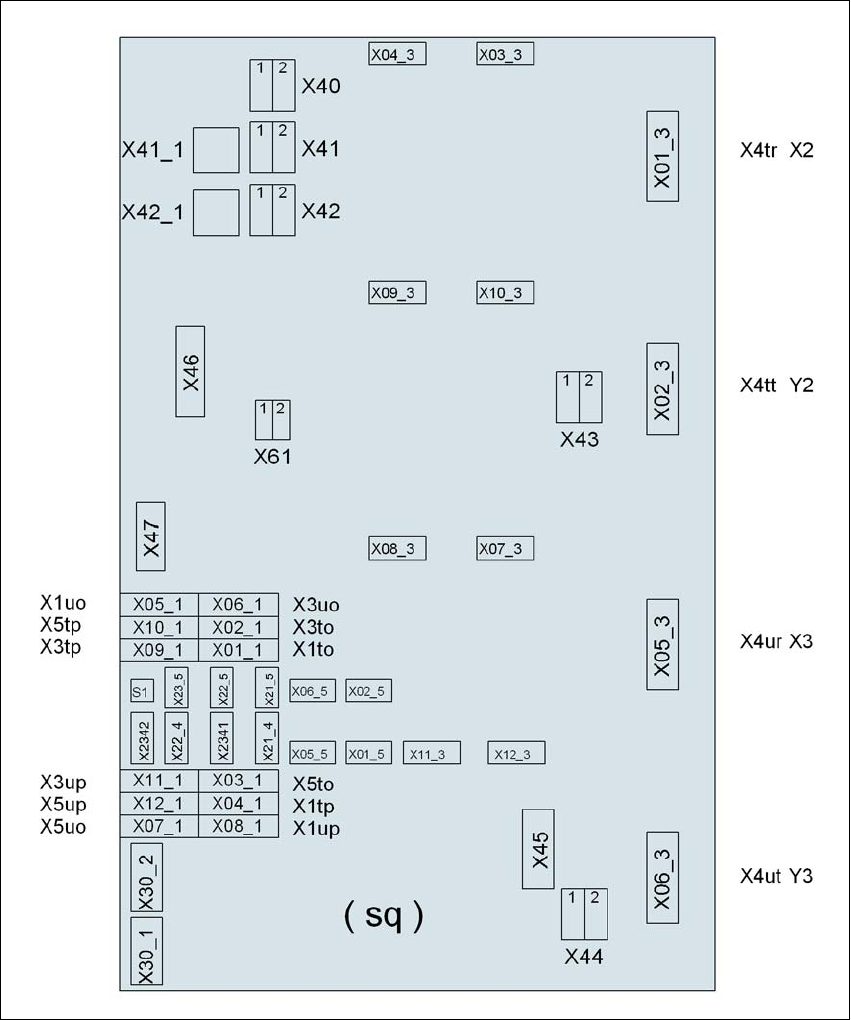
4.3.8.5 Axis unit X4I, X4 (gantry 2 and gantry 3) - electrical connection points
4
Fig. 4.3 - 13 Axis unit X4I, X4 (gantry 2 and gantry 3), rear panel - electrical connection points
Plug
Plug
Plug

Setting up and commissioning User manual SIPLACE X-series
Setting up the machine From software version SR.70x.xx 01/2011 EN edition
250
4.3.8.6 Axis unit X4I, X4 (gantry 2 and gantry 3) - connecting the plugs
→ Connect the power cable as shown in the following diagram:
4
Axis unit, plugs Connecting cable Please note
Plug Cable
X41_1sq X41_1sq 03050899 Snap connector into place
X42_1sq X42_1sq 03050899 Snap connector into place
X45sq X45sq 03050900-W1 Snap connector into place
X46sq X46sq
03050900-W2
03050900-W3
Snap connector into place
X47sq X47sq
03050900-W4
03050900-W5
Snap connector into place
X01_3sq X4tr 03050891 Snap connector into place
X02_3sq X4tt 03050892 Snap connector into place
X05_3sq X4ur 03050901 Snap connector into place
X06_3sq X4ut 03050902 Snap connector into place
X01_1sq X1to 03009791 Insert as far as the stop
X02_1sq X3to 03009792 Insert as far as the stop
X03_1sq X5to 03009793 Insert as far as the stop
X04_1sq X1tp 03009794 Insert as far as the stop
X05_1sq X1uo 03009811 Insert as far as the stop
X06_1sq X3uo 03009812 Insert as far as the stop
X07_1sq X5uo 03009813 Insert as far as the stop
X08_1sq X1up 03009814 Insert as far as the stop
X09_1sq X3tp 03009795 Insert as far as the stop
X10_1sq X5tp 03009796 Insert as far as the stop
X11_1sq X3up 03009815 Insert as far as the stop
X12_1sq X5up 03009816 Insert as far as the stop
X03_3sq X03_3sq 03050893 Snap connector into place
X04_3sq X04_3sq 03050894 Snap connector into place
X07_3sq X07_3sq 03050903 Snap connector into place
X08_3sq X08_3sq 03050904 Snap connector into place
User manual SIPLACE X-series Setting up and commissioning
From software version SR.70x.xx 01/2011 EN edition Setting up the machine
251
→ Check the switch settings for S1
1: ON
2: Not used
4.3.8.7 Fitting the axis unit
→ Carefully lift the axis unit onto the rail in the extension kit.
→ Make sure that you do not squash any cables.
→ Push the axis unit into the extension kit as far as the stop.
→ Secure the axis unit with the fillister head screw.
→ Insert the cover.
→ Fix the grounding cable to the doors (item 2 in Fig. 4.3 - 8
, page 239),
as shown in Fig. 4.3 - 9
on page 242.
→ Lock the doors.
4.3.8.8 Fitting the side plates
→ Fix the grounding cable to each side plate (item 6 in Fig. 4.3 - 8, page 239), as shown in Fig.
4.3 - 9
page 242.
→ Fix the side plate to the machine frame with 6 fillister head screws.
PLEASE NOTE 4
If you have dismantled the output conveyor, continue from Section 4.3.9
" Fitting the input con-
veyor" on page 252.
Once the input conveyor is fitted, then continue the assembly work from Section 4.3.14
"Fitting
the indicator lamp" on page 268.
X09_3sq X09_3sq 03050896 Snap connector into place
X10_3sq X10_3sq 03050895 Snap connector into place
X11_3sq X11_3sq 03050906 Snap connector into place
X12_3sq X12_3sq 03050905 Snap connector into place
X30_1sq X30_1sq 03010054 Screw tightly
X30_2sq X30_2sq 03010054 Screw tightly
Axis unit, plugs Connecting cable Please note
Plug Cable