00196504-02_UM_X-Serie_SR70X_EN.pdf - 第300页
Tasks on the machine User manual SIPLACE X-series Switch on the SIPLACE line From software version SR.70x.xx 01/2011 EN edition 300 5.3.3 User classification Certa in functions or menus may only by used or called by appr…

User manual SIPLACE X-series Tasks on the machine
From software version SR.70x.xx 01/2011 EN edition Switch on the SIPLACE line
299
5.3 Switch on the SIPLACE line
5.3.1 Start the SIPLACE Pro Line Control GUI program
On the line computer, start SIPLACE Pro Line Control GUI
from the Windows Start menu
Start --> Programs --> SIPLACE Pro --> LCGUI
or
by clicking the icon on the desktop.
Enter your user data.
The system then connects to the SIPLACE Pro server and opens the GUI.
5.3.2 Points to note before you switch on the stations
CAUTION
Before you switch on the stations, please carry out the steps described below. 5
Check that the stations are connected to the power and compressed air supplies.
Visually inspect the stations. In particular, make sure that there are no obstacles in the gantry
traversing range.
Make sure that the Z-axes of all the heads are in their top end positions.

Tasks on the machine User manual SIPLACE X-series
Switch on the SIPLACE line From software version SR.70x.xx 01/2011 EN edition
300
5.3.3 User classification
Certain functions or menus may only by used or called by appropriately trained personnel. There
are three different operator levels:
– Basic production
– Advanced production
– Machine service
– Service (SIPLACE)
The "Advanced production" and "Machine service" operator levels can be protected with a pass-
word. The SIPLACE operator level is already password-protected.
You will find a detailed description of the user classification in section 5.1
, page 291.
5.3.4 Switch on the station and start the station software user interface
CAUTION
Do not switch on the stations until the desktop appears on the monitor of your SIPLACE Pro com-
puter. Otherwise you may experience communication problems. 5
Switch the station on at the main power switch.
After switching on, check that the manometers are showing the required operating pressure.
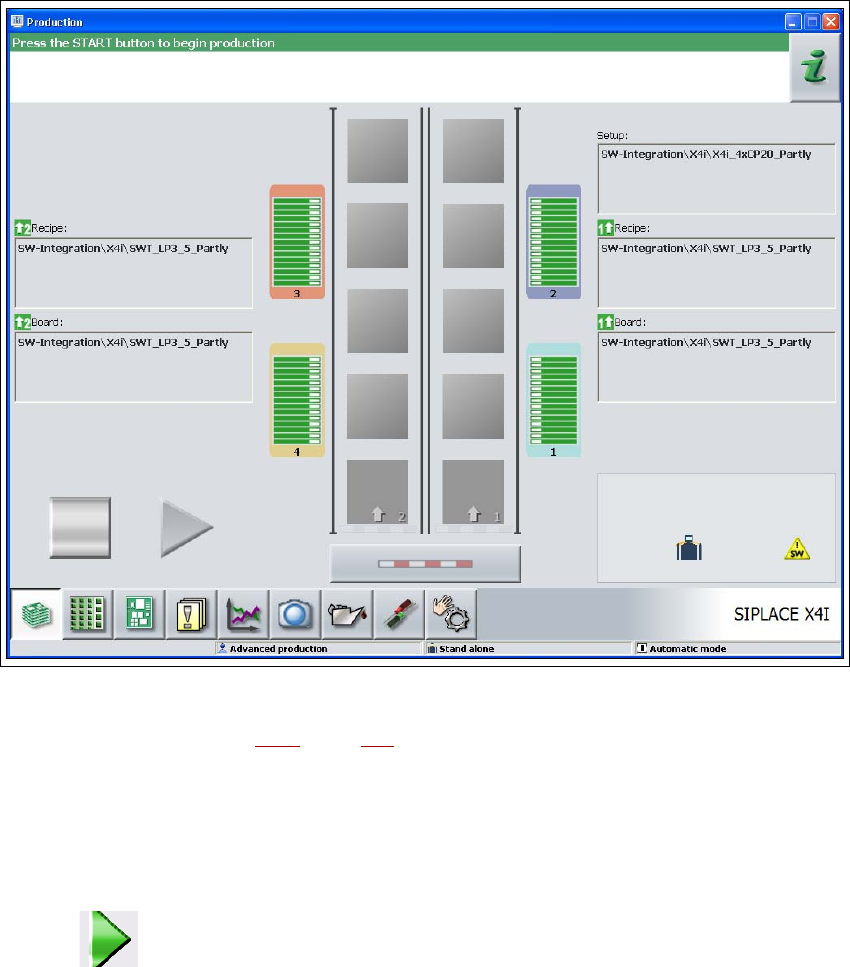
The station computer software loads and the "Production" view opens in the station software
for the "Basic production" operator level (see next picture).
User manual SIPLACE X-series Tasks on the machine
From software version SR.70x.xx 01/2011 EN edition Switch on the SIPLACE line
301
5
Fig. 5.3 - 1 "Production" view after loading the station software (on the example of the SIPLACE X4i)
The Status box (see Section 5.5.1, page 305) displays the current status of the station and the
action that you wish to carry out.
When you are prompted to "Press the START button", press a Start button.
You will find Start buttons on the input side, output side and on the operator panels on the left
and right-hand sides of the stations.
The reference run is carried out. When the reference run ends, the station is ready to start.
The symbol is displayed (activated) in the work area of the user interface.