00196504-02_UM_X-Serie_SR70X_EN.pdf - 第313页
User manual SIPLACE X-series Tasks on the machine From software version SR.70x.xx 01/2011 EN edition Alarm information and online help 313 5.6.1 Display information about the current alarm T o display information ab out …
Tasks on the machine User manual SIPLACE X-series
Alarm information and online help From software version SR.70x.xx 01/2011 EN edition
312
5.6 Alarm information and online help
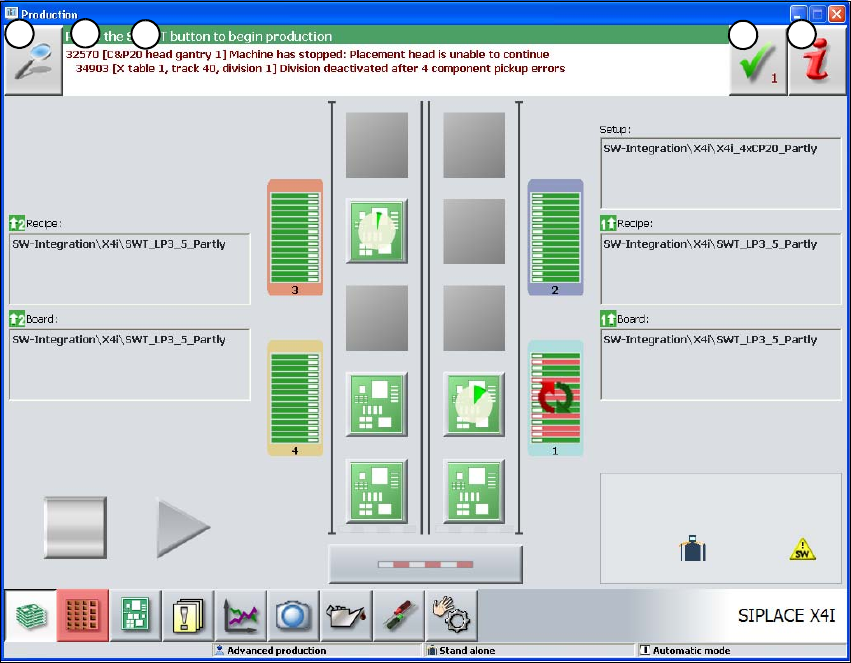
If alarms occur while work is in progress on the placement machine, the alarm message is dis-
played in red in the status field on the user interface. The Alarm information symbol is active.
The red highlighted button on the toolbar signals that operator intervention is required.
5
Fig. 5.6 - 1 "Basic production" view with alarm message (with reference to the SIPLACE X4I)
(1) Alarm number
(2) Alarm message: brief information about the alarm
(3) "Details" symbol: for calling up detailed information (e.g. source of the error, time at which it
occurred)
(4) "Acknowledge alarm" symbol: for clearing the alarm display
(5) "Alarm information" symbol: for calling up help about the current alarm
1
2
3
4
5
User manual SIPLACE X-series Tasks on the machine
From software version SR.70x.xx 01/2011 EN edition Alarm information and online help
313
5.6.1 Display information about the current alarm
To display information about the current alarm, click the symbol to start the help system for
the station computer. The main help system window opens with the -alarm information. This in-
formation relates to the currently-displayed alarm from which the help was started.
When an alarm is eliminated and this has been automatically detected by the machine, the alarm
is automatically deleted from the status field.
If elimination is not automatically detected, the alarm may be cleared manually from the -status
field.
To do this, click on the -symbol. The alarm -message will no longer appear in the status
field.
5.6.2 Display information about the selected alarm
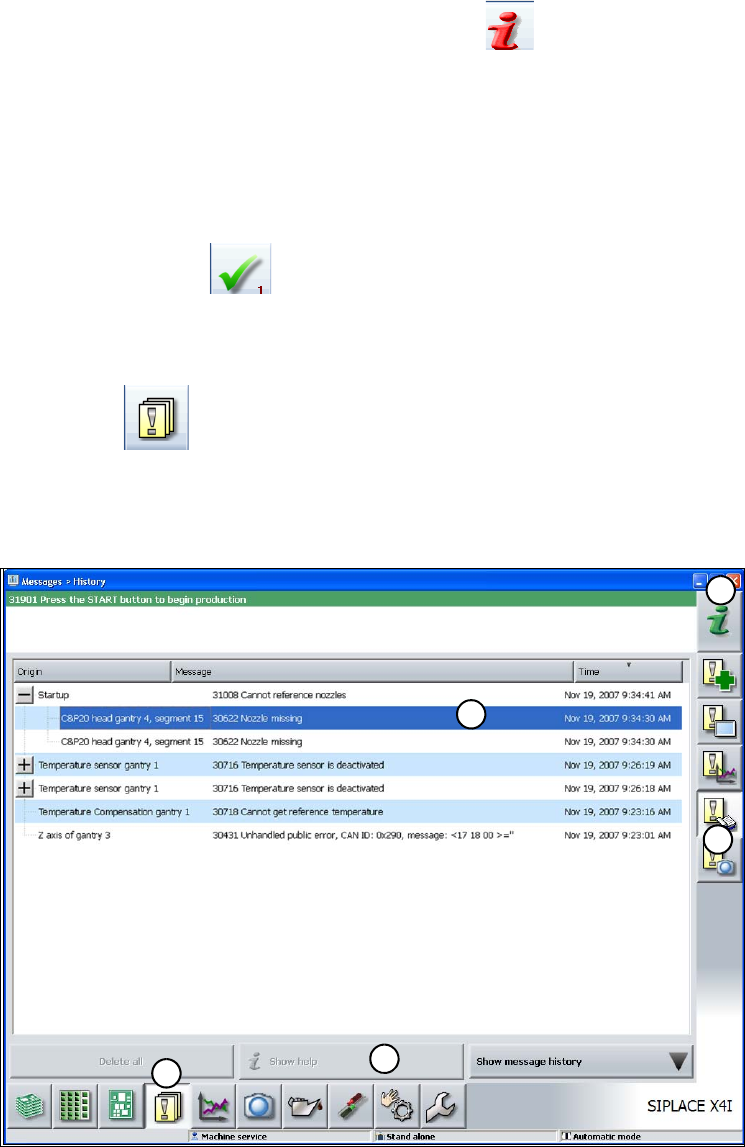
Click the button on the toolbar (1).
All alarms that have occurred are displayed.
Click the "Display recorded messages" button (2).
Click through the alarm list tree (3) to open detailed alarm messages.
. 5
Fig. 5.6 - 2 Example: Alarm list (with reference to the SIPLACE X4I)
In the alarm list, select the alarm display for which you want to read the information.
1
2
3
4
5
Tasks on the machine User manual SIPLACE X-series
Alarm information and online help From software version SR.70x.xx 01/2011 EN edition
314
Click the "Show help" button (4) to display the information.
You can search for and display alarm information about another alarm via the help system -index
(5) by entering the alarm number.
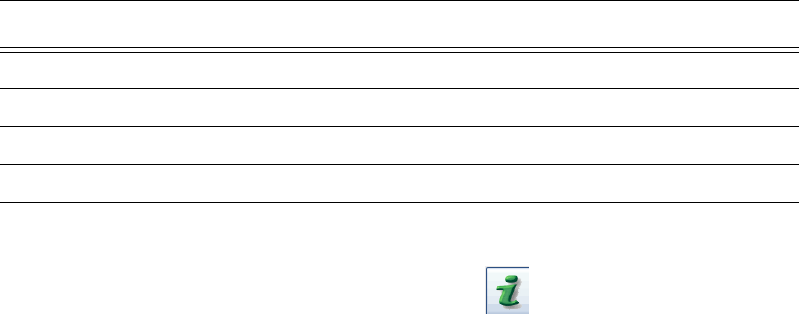
5.6.3 Meaning of the colors in the alarm information in the online help
5
5.6.4 Context-sensitive online help
To display information about the current view, click the symbol to start the help system for
the station computer. The main help system window opens with the -alarm information. This in-
formation relates to the currently-displayed view from which the help was started. You can call up
the entire content of the online help using the contents, index and search functions.
Text marking Meaning
Red text Alarm number and alarm message
Black text Possible cause(s) of the alarm
Green text Instructions to eliminate the alarm
Blue underlined text Calls up additional information