00196504-02_UM_X-Serie_SR70X_EN.pdf - 第337页
User manual SIPLACE X-series Tasks on the machine From software version SR.70x.xx 01/2011 EN edition Obse rve LCD and status displays on the X feeder module 337 5.1 1 Observe LCD and st atus displays on the X feeder modu…

Tasks on the machine User manual SIPLACE X-series
Setting up the feeder modules From software version SR.70x.xx 01/2011 EN edition
336
5.10.4.5 Splice sensors for X tape feeder modules
Splice sensors can be retrofitted to the X tape feeder modules. There are two versions of the sen-
sor:
Splice sensor for 8 mm and 12 mm X tape feeder modules
Splice sensor for 16 mm to 88 mm X tape feeder modules 5
The splice sensor is installed at the position indicated by item 3 in Fig. 5.10 - 8
, page 335.
Tape feeder modules with a splice sensor already installed can also be supplied (see Section
3.9.2
, from page 174).
5.10.5 Setting up the X feeder module
Setting up the X feeder modules is described in the job guide.
User manual SIPLACE X-series Tasks on the machine
From software version SR.70x.xx 01/2011 EN edition Observe LCD and status displays on the X feeder module
337
5.11 Observe LCD and status displays on the X feeder
module
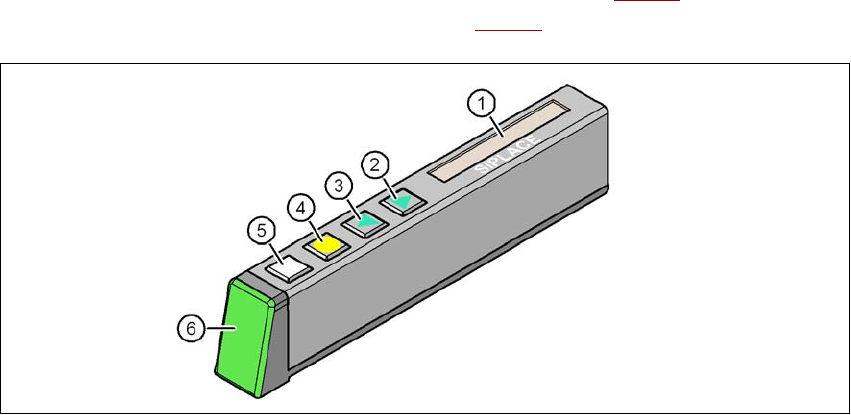
The X feeder modules have a multicolor status display (Pos. 6 in Fig. 5.11 - 1) for signaling the
operating statuses and an LCD display (item 1 in Fig. 5.11 - 1
) to display the texts.
5
Fig. 5.11 - 1 Buttons, LCD and status displays on the X feeder module
(1) LCD display
(2) FORWARD button
(3) BACK button
(4) FOIL button
(5) SET button
(6) Status display, multicolor
5.11.1 Status display
–Green:
The feeder module is on standby and is contained in the current set-up.
– Orange:
A warning is being signalized. The text of the warning appears on the LCD display.
–Red:
A malfunction has occurred. The error message is output on the LCD display.
– OFF:
The feeder module is not contained in the current set-up.

Tasks on the machine User manual SIPLACE X-series
Observe LCD and status displays on the X feeder module From software version SR.70x.xx 01/2011 EN edition
338
PLEASE NOTE 5
The machine controller switches off the status display of any feeder modules not included in the
set-up. The "LED off" status only occurs when the programming system has preset a job on the
line. This takes some of the work away from the operator since he only has to watch those feeder
modules that are contained in the set-up.
For the actual set-up process - no set-up information at the station, no job sent from SIPLACE
Pro to the station/line - the LED on each feeder module is activated after the set-up has been
made. The operator is thus informed whether everything is OK.
5.11.2 LCD display
The following tables containing the wording of the LCD display, the color and the mode of the sta-
tus display, its meaning and troubleshooting measures.
5.11.2.1 Warnings and remedies
5
5
5.11.2.2 Error messages and remedies
5
Text on the
LCD display
Status
display
Meaning Trouble-shooting
Remove Foil
(Remove the foil)
Orange The selected function is not
permitted when the cover foil
is tensioned (foil rocker is
pressed down).
If you wish to carry out that function, remove
the foil from the pair of gear wheels and cut
it off to relieve the pressure on the foil rocker.
Text on the
LCD display
Status
display
Meaning Trouble-shooting
None Red,
flashing
Feeder module software not
jumping to the application
Reload the application software
Load feeder module software
Handle --->>
(Handle --->>)
Red Feeder module was sig-
naled, but removal handle is
not yet pushed in
Push in the removal handle
Low Voltage
(Low voltage)
Orange 24V supply voltage did not
rise above the switch-on
threshold after switching on
Check the power supply