00193697-01.pdf - 第69页
SIPLACE S oftware Guide S R.504.xx 7 Station extensions/software Issue 01/03 E N 7.1 "Remote Support" option 69 S t atio n compu ter – Remote log- in – Remote operatio n of pr ograms (user interfac e, SITES T) …
7 Station extensions/software SIPLACE Software Guide SR.504.xx
7.1 "Remote Support" option Issue 01/03 EN
68
7.1.3 Requirements
The requirements for the implementation of remote support are: 7
–1 complete router system (order number: 00116258-01)
– The Remote Software "Reach Out" for each station computer and each GEM computer
(order number: 00116270-01)
– To enable a connection to be set up between the service center and the customer’s system,
both routers (communications computers) must be able to communicate via a suitable
ISDN connection.
– The initial setup of Remote Support is included in the purchase price of this option.
7.1.3.1 Specifications of the ISDN Connection
Equipment
– Network Terminator (NT) with S
0 interface which must be accessible via an RJ 45 Western
plug
Features
– File transfer
– ISDN call number forwarding
– Charging information during the call
7.1.4 Functions
The following components can be accessed remotely from the service centers in Munich, Sin-
gapore and Norcross. When doing so, the corresponding functions may be operated and moni-
tored. 7
Line computer
– Remote log-in
–Chat
– Sending commands to the customer’s computer
– Starting and stopping programs at the customer’s computer
– Remote editing
– File transfer
SIPLACE Software Guide SR.504.xx 7 Station extensions/software
Issue 01/03 EN 7.1 "Remote Support" option
69
Station computer
– Remote log-in
– Remote operation of programs (user interface, SITEST)
– Sending messages to the customer’s station computer ("chat mode”)
– File transfer
– Remote editing
Machine controller
– Remote log-in
– File transfer
7.1.5 Overview
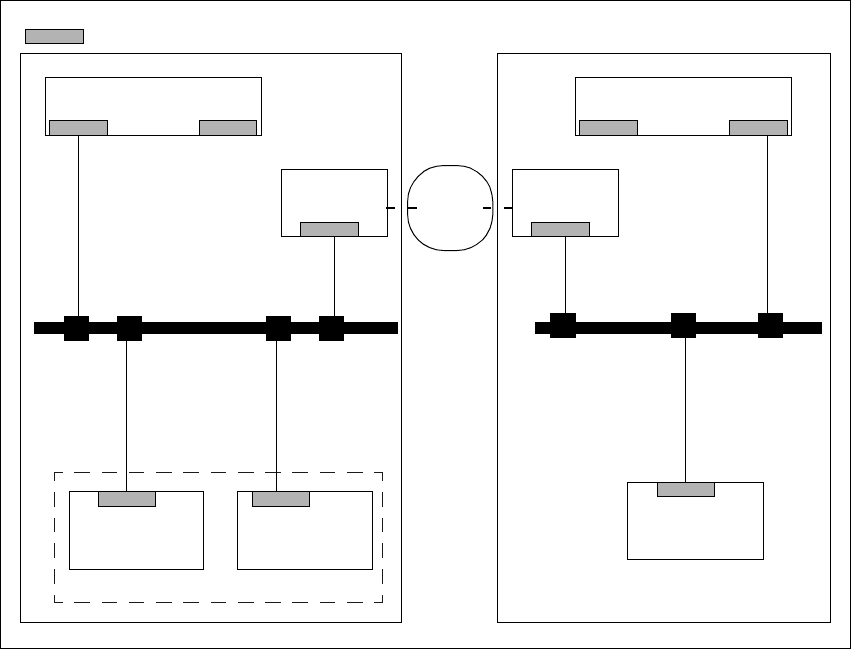
The following configurations are possible for the customer’s placement line: 7
– Connection of the ISDN router to the local SIPLACE-LAN
– Connection of the ISDN router to the customer’s site LAN
7 Station extensions/software SIPLACE Software Guide SR.504.xx
7.1 "Remote Support" option Issue 01/03 EN
70
7.1.5.1 Connecting the ISDN router to the local SIPLACE-LAN
This option is used when there is no site LAN available at the customer’s premises.
The customer will not need to implement any additional data security measures. 7
7
Fig. 7.1 - 1 Connecting the ISDN router to the local SIPLACE-LAN
SIPLACE Pro Server
Router
Station
computer
Machine
controller
SIPLACE
LAN
Router
Station
computer
LAN
SIPLACE Pro Server
Customer placement line Service dept.
ISDN
Network
= LAN card