00900170-02_ID_OIS_SIS_16.1_R19-1_EN_DE - 第13页
ASM OIS/SIS Datab ases 16.1 (R19 -1) / Interf ace Description 05/2019 Edition 13 4.5 Tables The layout of the ind ividual tables is illus trated below. The specified data t ypes correspond to th e naming schem e in the M…
ASM OIS/SIS Databases 16.1 (R19-1) / Interface Description 05/2019 Edition
12
4.4.2 Automatic Reorganization of Indexes and Statistics
The removal of old data may lead to fragmented database indexes and distorted statistics. Thus,
indexes and statistics have to be reorganized regularly. The OIS service checks the database
fragmentation at regular intervals (configured: 40 days). If the database fragmentation exceeds the
configured limit, the reorganization is started. All OIS connections are disabled and the OIS service
starts rebuilding the database indexes and statistics. This will take about 5 minutes. Reading and
writing are not possible during the reorganization.
After reorganization, all OIS connections will be enabled again.
4.4.3 Periodic Manual Maintenance of the OIS Database in OIS V10.x / V11.x
In these versions, the OIS database should be manually maintained bimonthly. If the maintenance
is not performed, there will be performance losses in the database queries after some time.
Preparations
● Log in as a system administrator (sa) to have access to the database.
● Stop all OIS clients (such as SIPLACE Explorer).
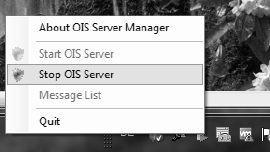
● Stop the OIS Server by right-clicking the OIS Server Manager icon.
Execution
● Execute the MaintainOISDatabase.cmd script.
The database will be reorganized and locked during the maintenance. Therefore it is essential that
no other programs access the OIS or SIS databases during this time. The lines can continue
to produce because they buffer the incoming data.
However, the script should not run longer than 10 minutes. Otherwise, the database is probably in
use by other programs. In this case, the script has to be canceled and the OIS Server rebooted to
collect the incoming data at the stations. After the active program has been identified and the OIS
connection to the machines exists for about 10 minutes the process can be restarted.
Files
● <Monitoring Service InstallDir>\MaintainOISDatabase.cmd
● <Monitoring Service InstallDir>\DBSkripts\MaintainOISDatabase.sql
● <Monitoring Service InstallDir>\DBSkripts\OIS_RebuildIndexAndStatistics.sql

ASM OIS/SIS Databases 16.1 (R19-1) / Interface Description 05/2019 Edition
13
4.5 Tables
The layout of the individual tables is illustrated below. The specified data types correspond to the
naming scheme in the MS-SQL-Server.
NOTICE
The sole purpose of the following tables is to clarify the views. No write access is
permitted to these tables. Backward compatibility cannot be guaranteed if you access
the tables directly. Use the provided views instead.
Legend for the following tables
CI
=
Clustered index
I
=
Index
P
=
Primary key
ASM OIS/SIS Databases 16.1 (R19-1) / Interface Description 05/2019 Edition
14
4.5.1 OIS Tables
4.5.1.1 Performance tips for querying OIS
Select by time not by station
OIS tables include indexes for most usual queries. There are clustered indexes as well as normal
indexes.
If a table contains a combined clustered index, try to adapt your query so that the where clause
includes at least the first part of the combined clustered index.
For example, the BOARD table includes a combined clustered table on (dtTime, lid).
Fast queries on the assigned V_BOARD_160 are:
select * from V_BOARD_160 where dtTime = ‘2019-02-25 13:13:47.417’
select * from V_BOARD_160 where dtTime > ‘2019-02-25 13:11:43.853’ and
dtTime < ‘2019-02-25 14:11:43.853’
select * from V_BOARD_160 where dtTime > ‘2019-02-25 13:11:43.853’ and
dtTime < ‘2019-02-25 14:11:43.853’and lid=1013
select * from V_BOARD_160 where lid=1013 and dtTime > ‘2019-02-25
13:11:43.853’ and dtTime < ‘2019-02-25 14:11:43.853’
Slow queries are all other columns, i. e.
select * from V_BOARD_160 where lid=1013
This means that queries for one time span and any station are executed very fast.
But this also means that queries for one station and any time span are executed slowly.
It is preferred to make time-based queries for the following views:
● V_BOARD*
● V_EVENT*
● V_PICKUPERROR*
● V_STATETRANSITION*
● V_USEDCOMPONENTS*
Use *_160 views (if exist)
With Monitoring Service 16.0 we converted several table columns from 32-bit to 64-bit. Only the
V*_160 views keep the original 64-bit values. All older views must convert the 64-bit values to
32-bit. This means:
1. if a table entry hits the max 32-bit value (2147483647), you no longer get the actual value but
either the converted 32-bit max value or in case of V_PANEL11 no row at all.
2. All views delivering the 32-bit max value cannot access the index for query optimization and
are very slow.