00198374-01_UG_OSC_Package_DE_EN.pdf - 第49页
4 Working with the OSC Features 4.1 Placement of Snap-In Components Bedienungsanleitung OSC Package User Guide OSC-Paket - 06/2017 49 4 Working with the OSC Features This chapter describes how to work with the single OSC…

3 Prerequisites
3.2 Hardware requirements
48 Bedienungsanleitung OSC Package User Guide OSC-Paket - 06/2017
4 Working with the OSC Features
4.1 Placement of Snap-In Components
Bedienungsanleitung OSC Package User Guide OSC-Paket - 06/2017 49
4 Working with the OSC Features
This chapter describes how to work with the single OSC features.
► Make use of the information provided in the Online Help files for SIPLACE Pro and the station
software. These files contain additional, detailed information about the OSC features.
4.1 Placement of Snap-In Components
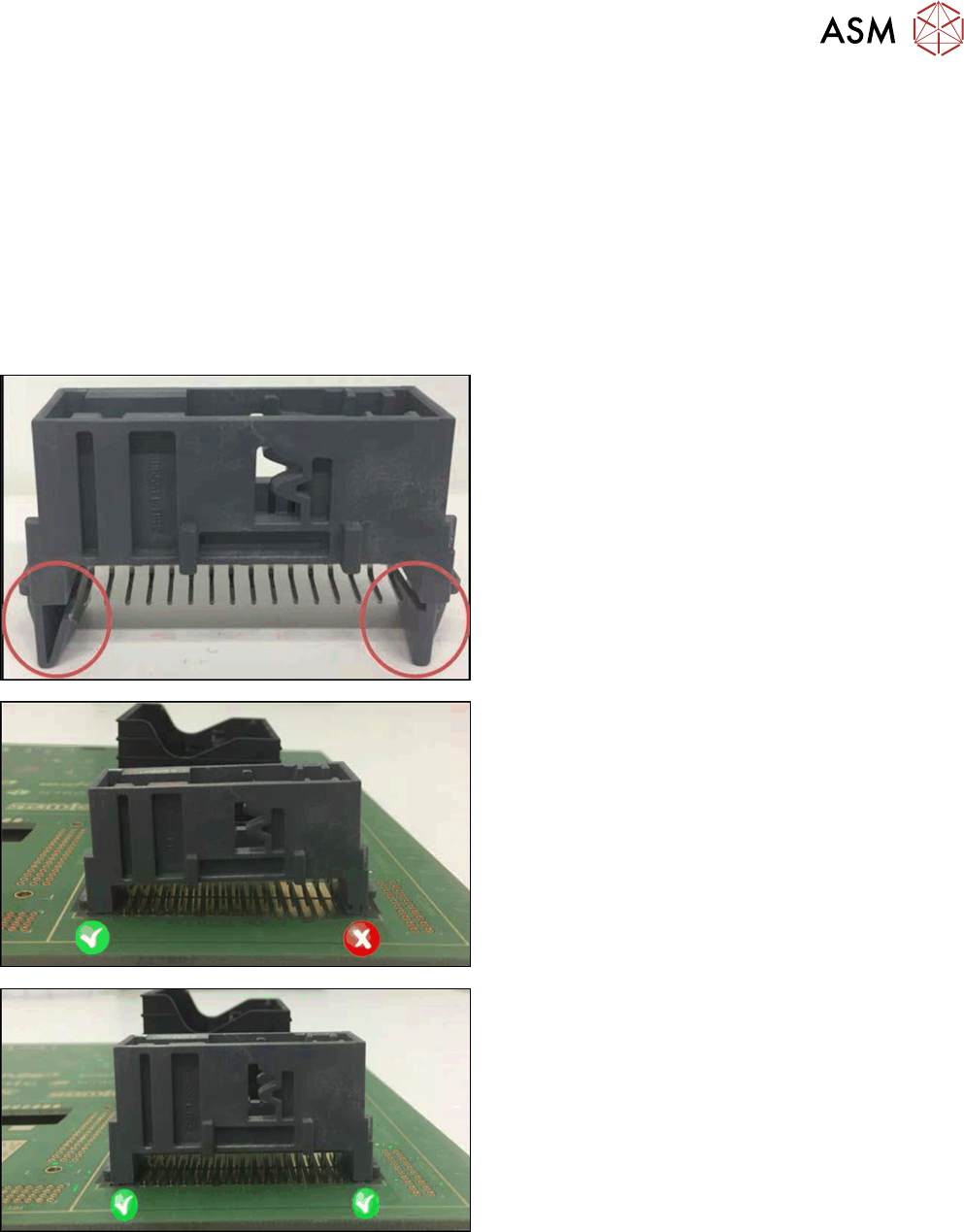
When placing snap-in components, it must be ensured that the components lock correctly into the
board. The system can verify this by an improved method.
Example
Snap-in component
Snap-in component – not placed correctly
Snap-in component – placed correctly
The actual Z-axis position of every snap-in placement will be compared with its corresponding
height reference value during the verification. These values must match each other.
The snap-in placement process has to be enabled for the component shape in SIPLACE Pro.
Additionally, the snap-in threshold that shall be used for comparing the two values has to be
specified.
4 Working with the OSC Features
4.1 Placement of Snap-In Components
50 Bedienungsanleitung OSC Package User Guide OSC-Paket - 06/2017
After the first board has been completely produced, it will be transferred to the output section or the
configured inspection station and marked for manual inspection. The operator has to inspect every
snap-in placement position and confirm whether the placement is correct or not. If correct, the cor-
responding Z-axis position will be stored as reference position and used as placement position for
all subsequent boards. If not correct or if subsequent boards are already produced before the
height reference values have been taught, the measured height will be ignored and the operator
has to confirm the height whenever the next component is placed.
The height reference values are not uploaded to SIPLACE Pro. Thus, when the job is changed at
the placement machine or the machine is shut down, the height reference values have to be taught
again.
NOTICE
Using SIPLACE Smart Pin Support
For reliable snap-in detection it is recommended to set support pins close to the snap-in
placement positions. Detailed information on Smart Pin Support can be found in the
SIPLACE Smart Pin Support Operation and Configuration User Manual, item no.
[00197001-xx].