semi合集-English.pdf - 第1589页
SEMI E37-0303 © SEM 1995, 2003 11 8.2.1 STyp e=0: Data Message — An HSMS message with SType = 0 is used by th e HSMS Data procedu re to send a Data message, either Primary or Reply. The message format is as follows: HSMS…
SEMI E37-0303 © SEMI 1995, 2003 10
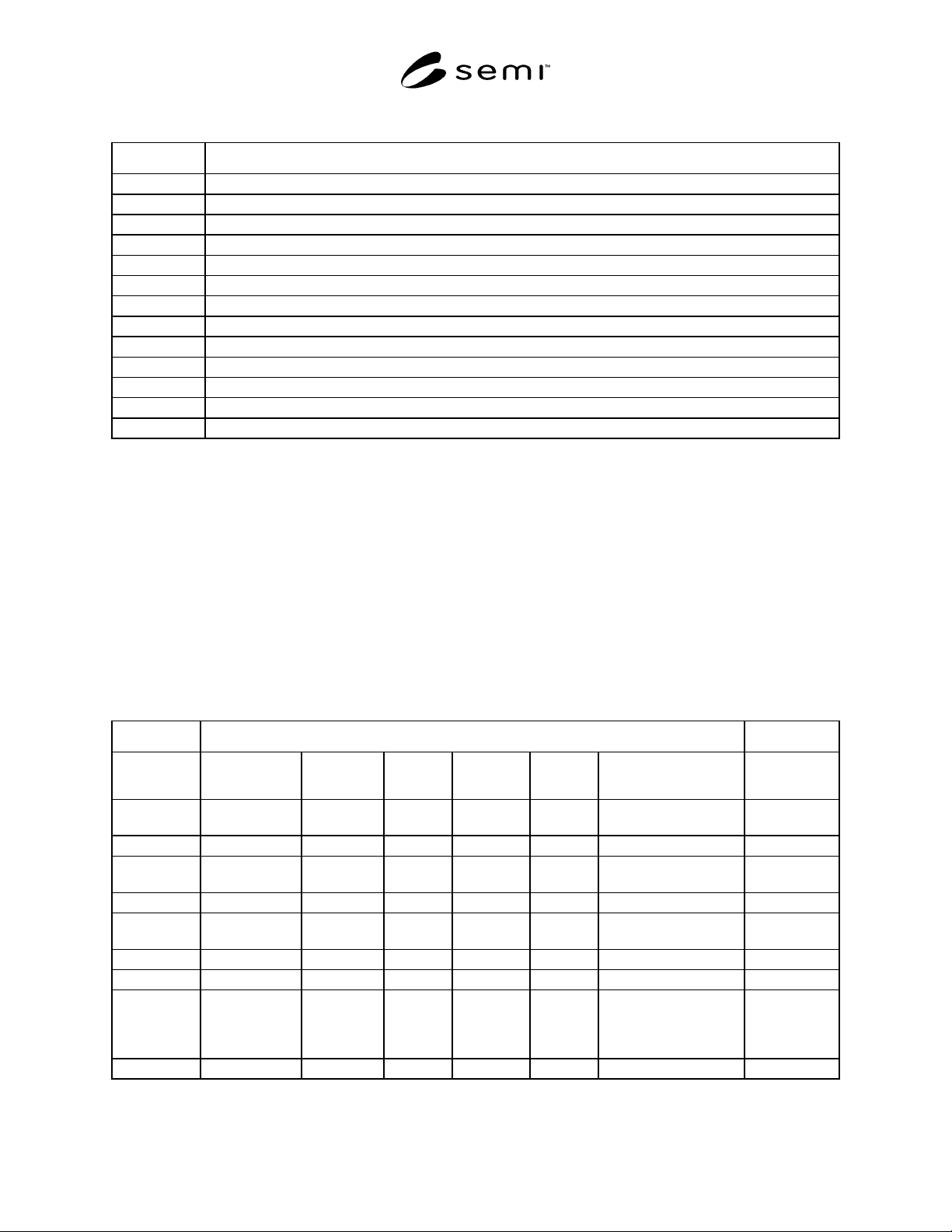
Table 5 SType
Value Description
0 Data Message
1 Select.req
2 Select.rsp
3 Deselect.req
4 Deselect.rsp
5 Linktest.req
6 Linktest.rsp
7 Reject.req
8 (not used)
9 Separate.req
10 (not used)
11–127 Reserved for subsidiary standards
128–255 Reserved, not used
8.1.4.6 System Bytes — System Bytes is a four-byte field occupying header bytes 6-9. System Bytes is used to
identify a transaction uniquely among the set of open transactions.
Uniqueness — The System Bytes of a Primary Data Message, Select.req, Deselect.req, or Linktest.req message must
be unique from those of all other currently open transactions initiated from the same end of the connection. They
must also be unique from those of the most recently completed transaction.
Reply Message — The System Bytes of a Reply Data Message must be the same as those of the corresponding
Primary Message. The System Bytes of a Select.rsp, Deselect.rsp, or Linktest.rsp must be the same as those of the
respective “.req” message.
8.2 HSMS Message Formats by Type — The specific interpretation of the header bytes in an HSMS message is
dependent on the specific HSMS message type as defined by the value of the SType field. The complete set of
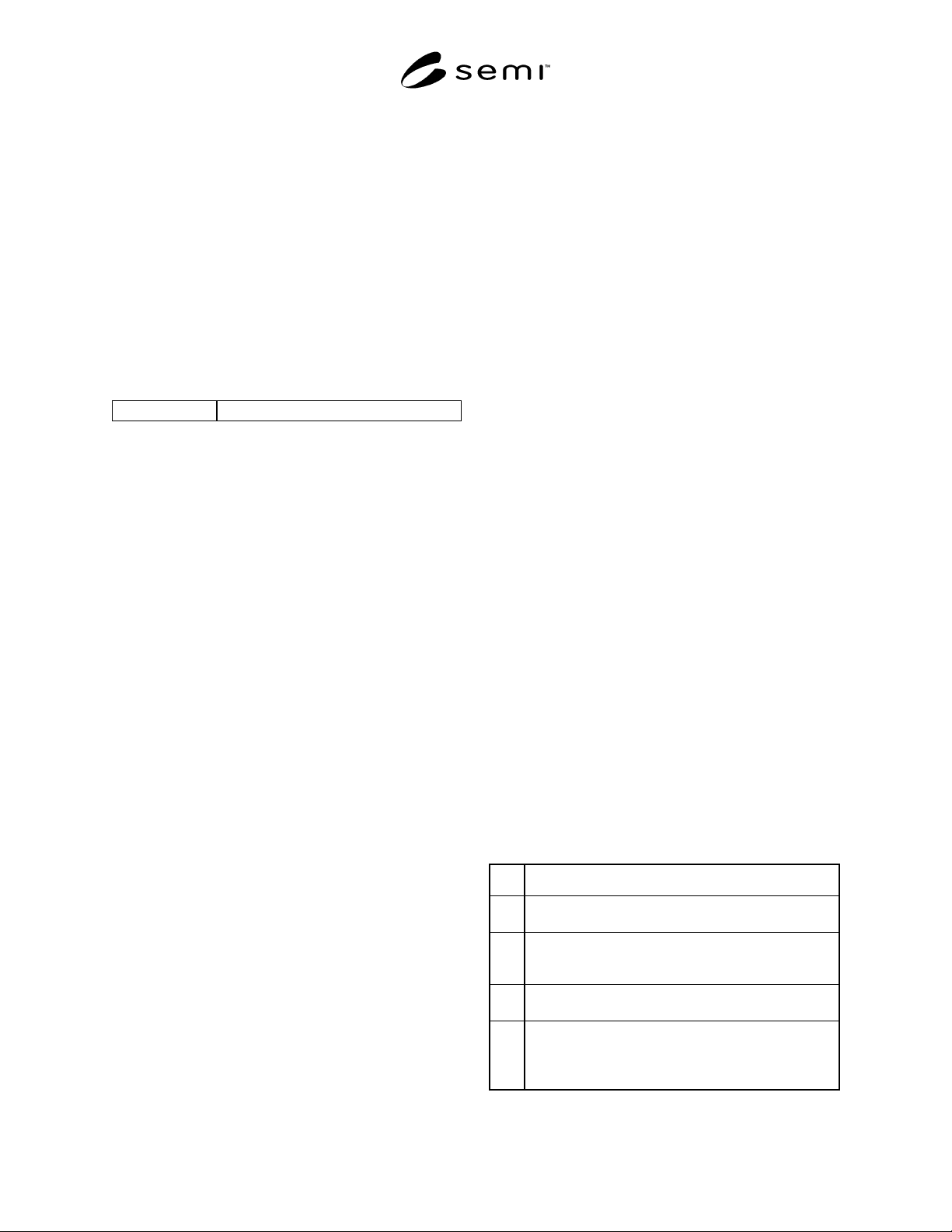
messages defined is summarized in the table below, shown for PType = 0 (SECS-II message format).
Table 6 HSMS Message Format Summary
Message Header
Message Type
Bytes 0-1
SessionID
Byte 2
Byte 3
Byte 4
PType
Byte 5
SType
Bytes 6–9 System Bytes
Message Text
Data Message * W-bit and
SECS Stream
SECS
Function
0 0 Primary: UniqueReply:
Same as primary
Text
Select.req * 0 0 0 1 Unique none
Select.rsp Same as .req 0 Select
Status
0 2 Same as .req none
Deselect.req * 0 0 0 3 Unique none
Deselect.rsp Same as .req 0 Deselect
Status
0 4 Same as .req none
Linktest.req 0xFFFF 0 0 0 5 Unique none
Linktest.rsp 0xFFFF 0 0 0 6 Same as .req none
Reject.req same as message
being rejected
PType or
SType of
message
being rejected
Reason
Code
0 7 Same as message being
rejected
none
Separate.req * 0 0 0 9 Unique none
* Indicates further specification by subsidiary standards.
SEMI E37-0303 © SEM 1995, 2003 11
8.2.1 SType=0: Data Message — An HSMS message
with SType = 0 is used by the HSMS Data procedure to
send a Data message, either Primary or Reply. The
message format is as follows:
HSMS Message Length is always 10 (the length of the
header alone) or greater.
The HSMS Message Header is as follows:
Session ID — As described above. Specific value
subject to subsidiary standards.
Header Byte 2 — For messages with PType value =
0 (SECS-II), header byte 2 is formatted as shown
below.
7 6 0
W-Bit Stream
The most significant bit (bit 7) of Header Byte 2 is
the W-Bit. In a Primary Message, the W-Bit
indicates whether the Primary Message expects a
Reply message. A Primary Message which expects
a Reply should set the W-Bit to 1. A Primary
Message which does not expect a Reply should set
the W-Bit to 0. A Reply Message should always set
the W-Bit to 0. The low-order 7 bits (bits 6-0) of
Header Byte 2 contain the SECS Stream for the
message. The Stream is a 7-bit unsigned integer
value, which identifies a major topic of the
message, and its use is defined within SEMI E5
(SECS-II).
Header Byte 3 — For messages whose PType
value=0, header Byte 3 contains the SECS
Function for the message. The Function is an 8-bit
unsigned integer value which identifies a minor
topic of the message (within the Stream), and its
use is defined within SEMI E5 (SECS-II). The
least significant bit (bit 0) of the Function defines
whether the Data Message is Primary or Reply; the
value 1 indicates Primary and the value 0 indicates
Reply.
PType — Set PType = 0 for SECS-II messages.
SType = 0
System Bytes — For PType=0 (SECS-II), the
following definition applies. For a Primary
Message, System Bytes contain a value uniquely
identifying this transaction from all other open
transactions initiated from the same end of the
Connection. For a Reply Message, System Bytes
contain the same value as the corresponding
Primary Message.
The HSMS Message Text contains the text of the Data
Message (if any), formatted as specified by the PType
field. For PType = 0, the text will be formatted as
SECS-II messages.
NOTE 4: Some Data Messages consist of header only, with
no text.
8.2.2 SType=1: Select.req — An HSMS message with
SType 1 is a “Select Request” Control Message, which
is used by the initiator of the procedure for establishing
HSMS communications. The message format is as
follows:
Message Length is always 10 (Header only).
The HSMS Message Header is as follows:
SessionID — As described above. Specific value
subject to subsidiary standards.
Header Byte 2 = 0
Header Byte 3 = 0
PType = 0.
SType = 1
System Bytes — A unique value among open
transactions.
8.2.3 SType=2: Select.rsp — An HSMS message with
SType 2 is a “Select Response” Control Message, used
as the response to a Select.req Control message in the
procedure for establishing HSMS communications.
The message format is as follows:
Message Length is always 10 (Header only).
The HSMS Message Header is as follows:
SessionID — must be equal to the value of the
session ID in the corresponding Select.req.
Header Byte 2 =0
Header Byte 3 — SelectStatus. A code of zero
indicates success of the Select operation. A non-
zero code indicates failure.
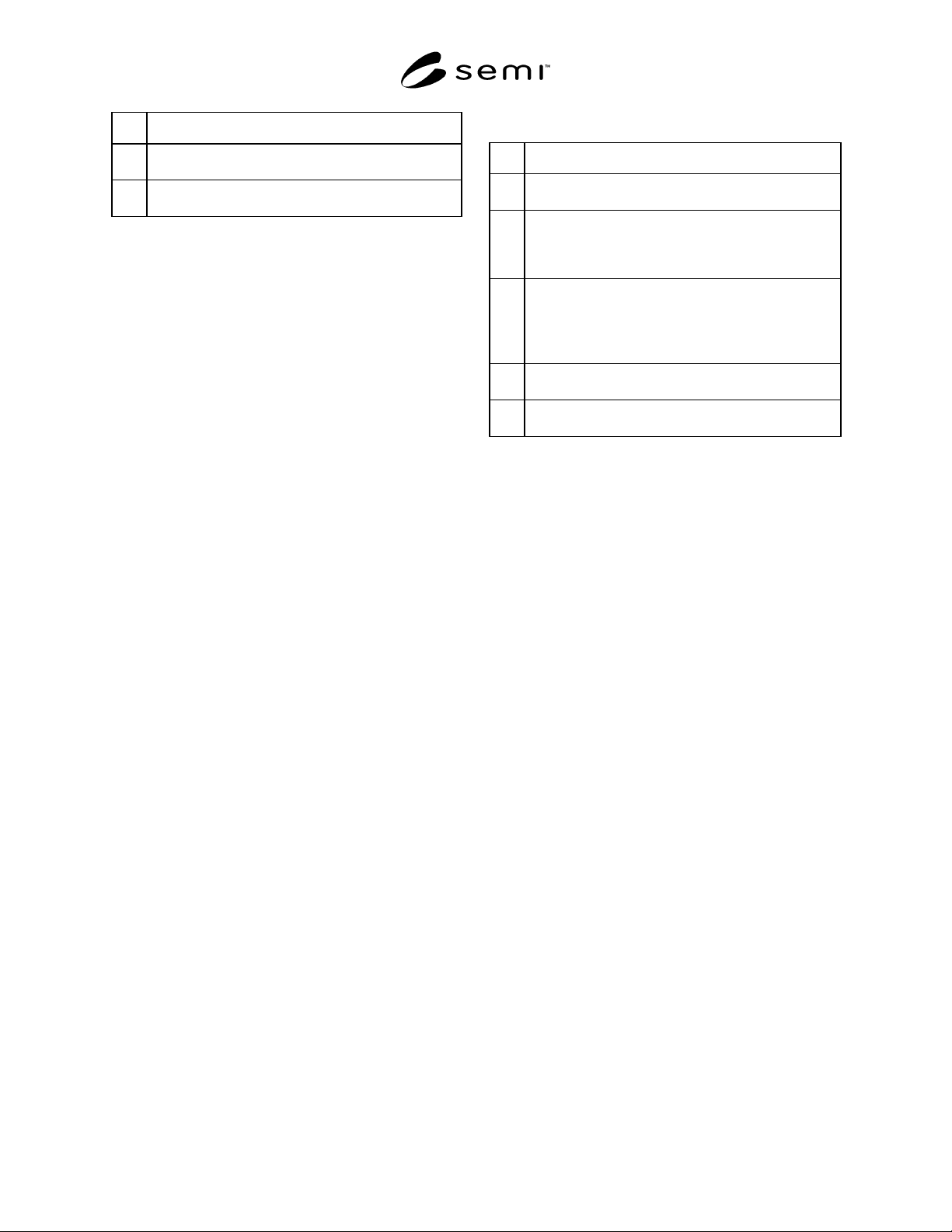
Table 7 SelectStatus
Value Description
0 Communication Established. Select was successfully
completed.
1 Communication Already Active. A previous select has
already established communications to the entity being
selected in this select.
2 Connection Not Ready. The Connection is not yet
ready to accept select requests.
3 Connect Exhaust. The connection was accepted, but
the entity is already servicing a separate TCP/IP
connection and is unable to service more than one at
any given time.
SEMI E37-0303 © SEMI 1995, 2003 12
Value Description
4–
127
Reserved for subsidiary standard-specific reasons for
select failure.
128–
255
Reserved for local entity-specific reasons for select
failure.
PType = 0
SType = 2
System Bytes — Equal to value of System Bytes in
the corresponding Select.req.
8.2.4 SType=3: Deselect.req — An HSMS message
with SType 3 is a “Deselect Request” Control Message,
used by the initiator of the Select procedure for ending
HSMS communication. The message format is as
follows:
Message Length is always 10 (Header only).
The HSMS Message Header is as follows:
SessionID — The SessionID must match the value
of the SessionID of a previously sent Select.req to
indicate the particular HSMS session that is
ending. Subject to further specification by
subsidiary standards.
Header Byte 2 = 0
Header Byte 3 = 0
PType = 0
SType = 3
System Bytes — A unique value among open
transactions.
8.2.5 SType=4: Deselect.rsp — An HSMS message
with SType 4 is a “Deselect Response” Control
Message, used as the response to a Deselect.req Control
message in the Deselect procedure for ending HSMS
communications. The message format is as follows:
Message Length is always 10 (Header only).
The HSMS Message Header is as follows:
SessionID — must equal the session ID in the
corresponding Deselect.req
Header Byte 2 = 0
Header Byte 3 — DeselectStatus. A code of zero
indicates success of the Deselect operation. A non-
zero code indicates failure.
Table 8
Value Description
0 Communication Ended. The Deselect completed
successfully.
1 Communication Not Established. HSMS
communications has not yet been established with a
select, or has already been ended with a previous
Deselect.
2 Communication Busy. The session is still in use by the
responding entity and so it cannot yet relinquish it
gracefully. In this case, if the original requester must
terminate communications, the separate procedure
should be used as a last resort.
3–
127
Reserved for subsidiary standard-specific reasons for
Deselect failure.
128–
255
Reserved for local entity-specific reasons for Deselect
failure.
PType = 0
SType = 4
System Bytes — Equal to System Bytes in
corresponding Deselect.req.
8.2.6 SType=5: Linktest.req — An HSMS message
with SType 5 is a “Linktest Request” Control Message.
It is used to verify the integrity of the HSMS
Connection, or as a periodic heartbeat. The message
format is as follows:
Message Length is always 10 (Header only).
The HSMS Message Header is as follows:
SessionID = 0xFFFF (in binary, all ones)
Header Byte 2 = 0
Header Byte 3 = 0
PType = 0
SType = 5
System Bytes — A unique value among open
transactions.
8.2.7 SType=6: Linktest.rsp — An HSMS message
with SType 6 is a “Linktest Response” Control
Message, used as the response to a Linktest.req Control
message in the Linktest Procedure. The message format
is as follows:
Message Length is always 10 (Header only).
The HSMS Message Header is as follows:
SessionID = 0xFFFF (binary, all ones)
Header Byte 2 = 0
Header Byte 3 = 0