semi合集-English.pdf - 第3057页
SEMI E122.1-0703 © SEMI 2003 12 R1-1.3 Unbuffered Test Data Acquisition R1-1.3.1 This scenario sh ows acquisitio n of test results data from the test equipment wh ile test is being performed on the devi ce(s). This scena…
SEMI E122.1-0703 © SEMI 2003 11
RELATED INFORMATION 1
NOTICE: This related information is not an official part of SEMI E122.1 and was derived from work by the
originating committee. This related information was approved for publication by full letter ballot procedures.
R1-1 Scenarios
R1-1.1 The purpose of this section is to document possible TSEM-specific operational scenarios to provide further
context to the specifications.
R1-1.2 Normal Processing Scenario
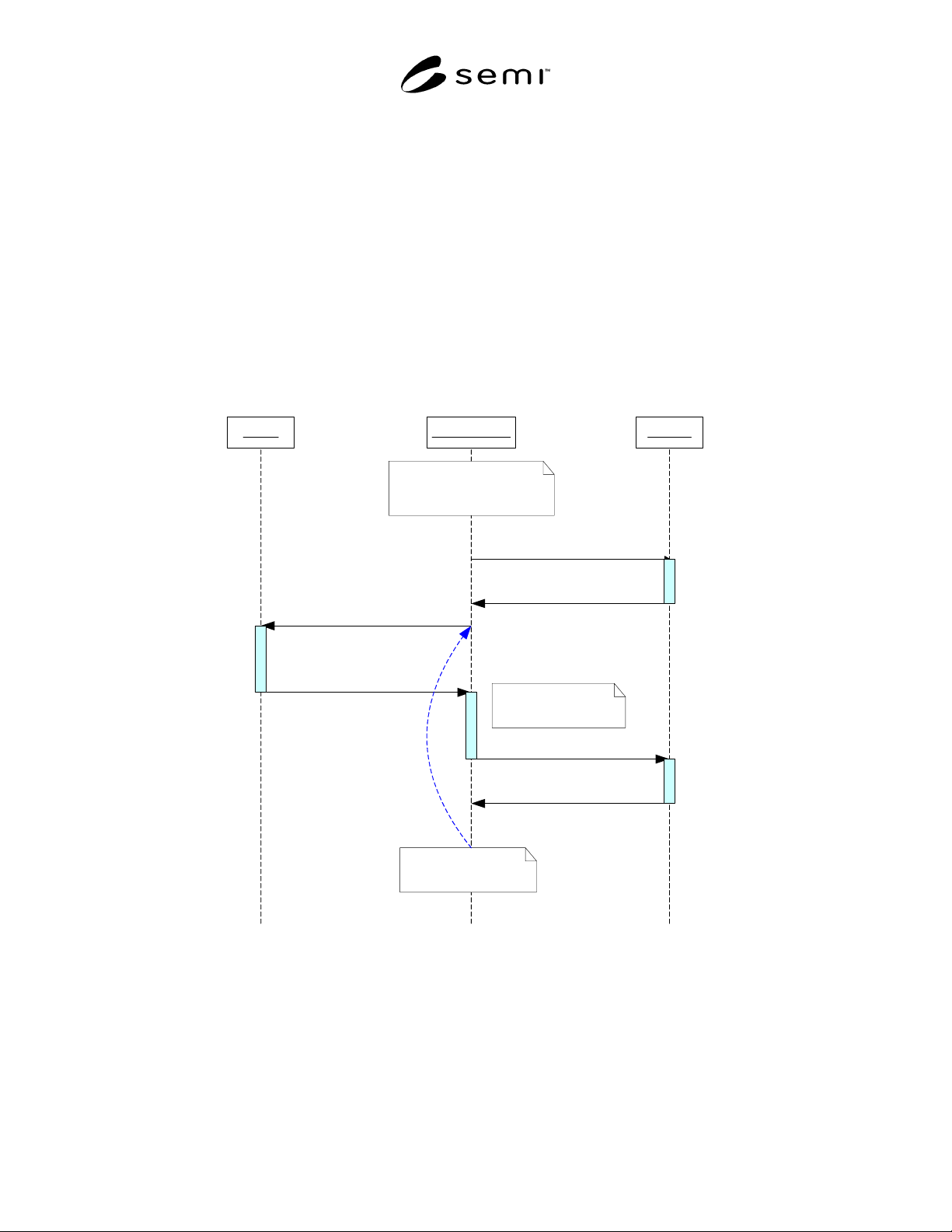
R1-1.2.1 This scenario shows typical automated processing of materials using a materials handler and TSEM
equipment. This scenario assumes no direct link between Test Equipment and Handler. Host directs all run-to-run
processing between the two equipments. Host and Station Controller represent the same entity here. Under this
intended usage, job processing with TSEM is simplified from perspective of Host as shown in Figure R1-1.
Cell Controller HandlerTester
Operator determines all
materials ready and tools
setup to start processing
READY
START
UnitsReady
START
LOADING
AWAITING
COMMAND
BinDataReady
WORKING
READY
Factory specific
bin data disposition
BIN-UNITS
LOADING
UnitsReady
Process repeat until
all units completed
AWAITING
COMMAND
Bin out/Load
READY
Figure R1-1
Normal Processing Scenario
SEMI E122.1-0703 © SEMI 2003 12
R1-1.3 Unbuffered Test Data Acquisition
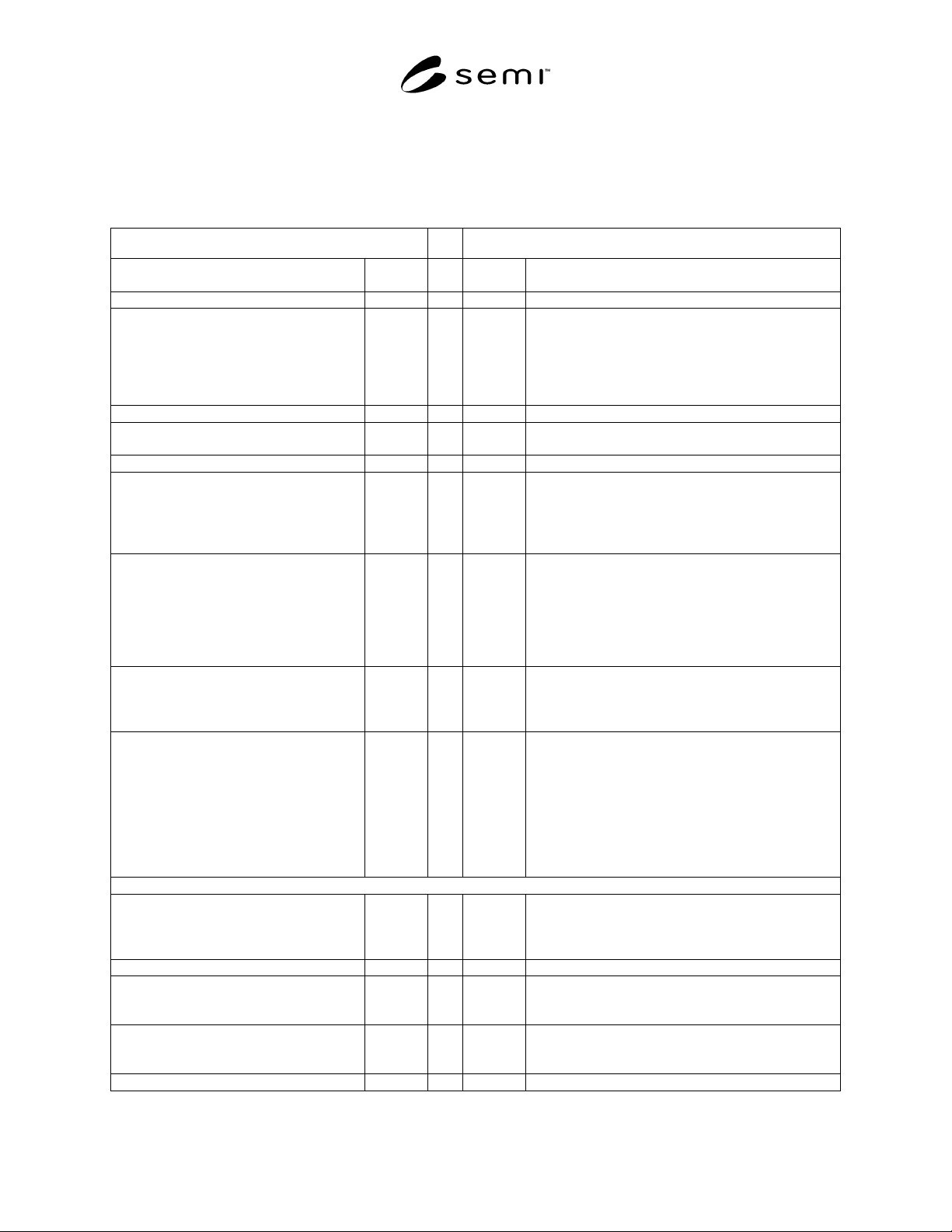
R1-1.3.1 This scenario shows acquisition of test results data from the test equipment while test is being performed
on the device(s). This scenario is useful for online process analysis. Note that all test data for current device(s)
under test needs to be read and acknowledged before next unit can proceed since data will be unbuffered.
Table R1-1 Unbuffered Test Data Acquisition Scenario
Host Test Equipment
SC introduces lot to equipment and other
external systems.
Tester completes PP-SELECT and in READY state.
SC configures Test Data Collection plan on
Tester and issues START command. See
Test Result Data Collection section for
details.
Assume Data Set A is assigned to all
Testheads.
S2,F49
!
"
S2,F50
"
S13,F1 Tester starts Testing and as Test Result data becomes
available, notifies SC of data set …
DSSA ACK = 0 S13,F2
!
Open Data Set Request (DSOR)
L,2
1. HANDLE = H-A (arbitrary but
unique)
2. DSNAME = A
S13,F3
!
"
S13,F4 Open Data Set Data (DSOD)
L,5
1. HANDLE = H-A
2. DSNAME = A
3. ACKC13 = 0
4. TYPE = STREAM
5. RECLEN = 0 (N/A for streams)
Read Data Set Request (DSRR)
L,2
1. HANDLE = H-A
2. READLN = 0 (read all available)
S13,F5
!
SC processes incoming data … i.e. SC can
spawn an agent to handle all incoming test
data and route to DSS system, freeing core
SC to process other events…
"
S13,F6 Read Data Set Data (DSRD)
L,4
1. HANDLE = H-A
2. ACKC13 = 0
3. CKPNT =…
4. L,n
1. <FILDAT>
2. …
n. <FILDAT>
Repeat until Test Completes …
"
S6,F11 Event Report Send (ERS)
Test Complete Event or State Transition Event
associated with Test Complete, along with attached
BinData Report.
Event ACK S6,F12
!
Since test is complete, SC can now close the
data set (is using agent, notify it to close
upon read complete).
Close Data Set Send (DSCS)
L,1
1. HANDLE = H-A
S13,F7
!
"
S13,F8
SEMI E122.1-0703 © SEMI 2003 13
Perform dispositioning…
Repeat until Lot is Complete …
R1-1.4 Buffered Test Data Acquisition
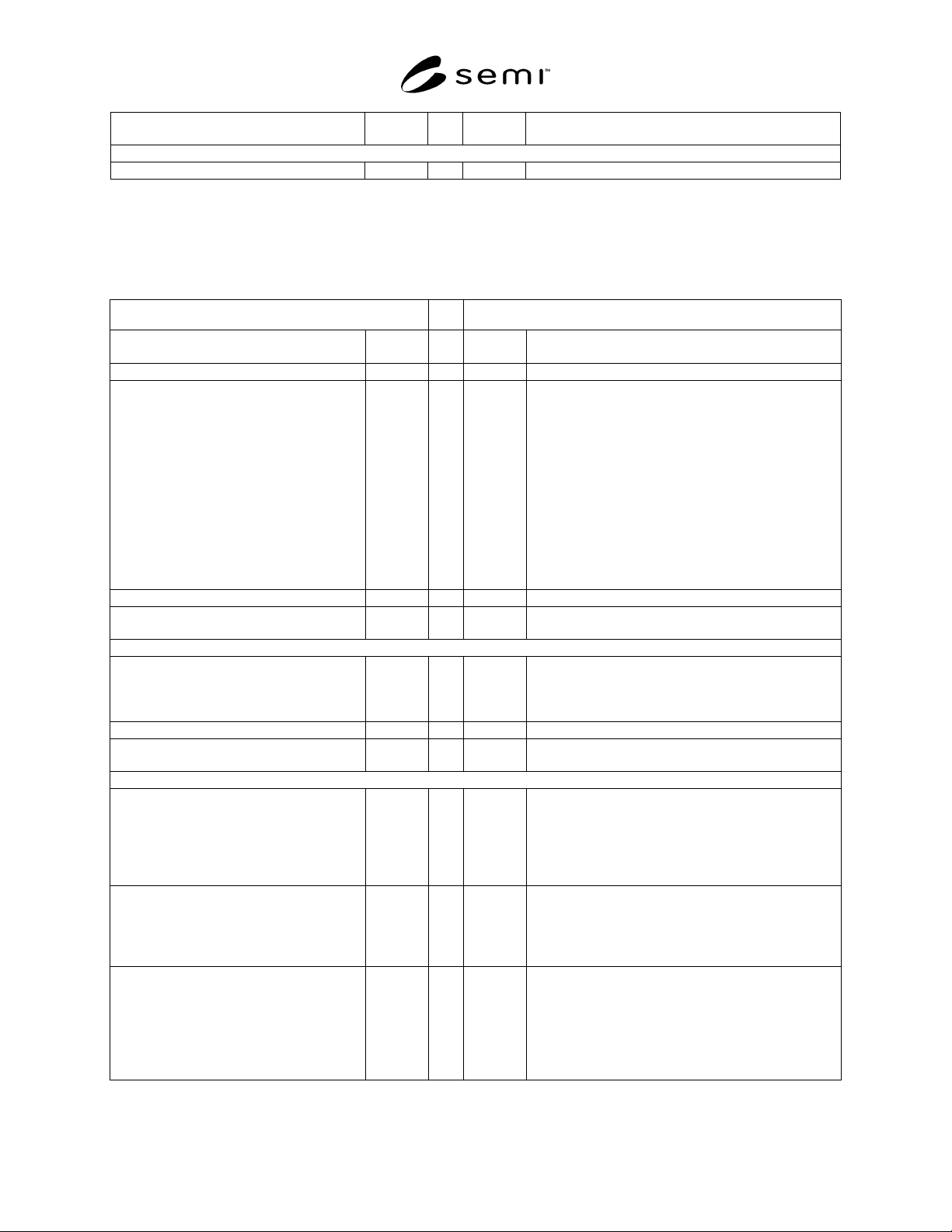
R1-1.4.1 This scenario shows acquisition of test results data using the buffered approach. The buffered test data log
is read at the end of entire lot processing. How the buffered data is being stored on tester is implementation specific.
Table R1-2 Buffered Test Data Acquisition
Host Test Equipment
SC introduces lot to equipment and other
external systems.
Tester completes PP-SELECT and in READY state.
SC configures Test Data Collection plan on
Tester and issues START command. See
Test Result Data Collection section for
details.
Assume all Testheads are assigned to
f
ile/bufferred Data Set “LOT12345.DLG”.
DATALOG-DATASETS
L,3
1. L,2
1. DSNAME=file:LOT123
45.DLG
2. L,0 (all sites)
S2,F49
!
"
S2,F50
Tester starts Testing and as Test Result data becomes
available, is buffered to assigned dataset name.
Repeat until Test Completes …
"
S6,F11 Event Report Send (ERS)
Test Complete Event or State Transition Event
associated with Test Complete, along with attached Bin
Data Report.
Event ACK S6,F12
!
Perform dispositioning on results from Bin
Data report…
Repeat until Lot is Complete …
When all units for lot have been processed,
before ending the lot, SC requests all
buffered data from tester …
Note: This transfer step can be skipped if file
is shared on network. In this case, just copy
the file and reset the dataset.
Open Data Set Request (DSOR)
L,2
1. HANDLE = H-LOT12345
(arbitrary but unique)
2. DSNAME = file:LOT12345.DLG
S13,F3
!
"
S13,F4 Open Data Set Data (DSOD)
L,5
1. HANDLE = H-LOT12345
2. DSNAME = file:LOT12345.DLG
3. ACKC13 = 0
4. TYPE = STREAM
5. RECLEN = 0 (N/A for streams)