semi合集-English.pdf - 第3525页
SEMI E134.1-0305 © SEMI 2005 12 7.2 DataCollectionManager 7.2.1 Appl ication of SEMI E13 2 Sessions 7.2.1.1 Th is section is provisional, pend ing the approva l of SEMI E132 .1 and th e SEMI Specification for Semiconduct…
SEMI E134.1-0305 © SEMI 2005 11
6.5.2 Each operation defined for a given UML interface class has a corresponding operation definition and binding.
Operations are described using a table format illustrated by Table 7 and Table 8.
Table 7 Example Operation Binding Table
SOAPAction <the SOAPAction HTTP header value to be used for this operation>
Input Headers (WSDL Message, Required)
<the name of the WSDL message providing input headers, and whether
or not the headers are required>
Output Headers (WSDL Message, Required)
<the name of the WSDL message providing output headers, and
whether or not the headers are required>
Table 8 Example PortType Operation Table
Input Message Name <WSDL message name used as input for the WSDL port type operation>
Output Message Name <WSDL message name used as output for the WSDL port type operation>
7 Mapping of E134 UML to XML Schema and WSDL
7.1 WSDL Organization
7.1.1 Each interface definition in SEMI E134 is mapped to a WSDL portType and binding definition. WSDL
portType definitions are named after the interface and its operations as they appear in SEMI E134. WSDL binding
definitions for each portType are used to specify the SOAP 1.1 envelope contents for each operation, and to define
the corresponding XML encoding styles and HTTP header usage. All SEMI E134 WSDL interfaces use
document/literal encoding, with the complete SOAP header and body contents defined in XML Schema file(s) via
global element definitions.
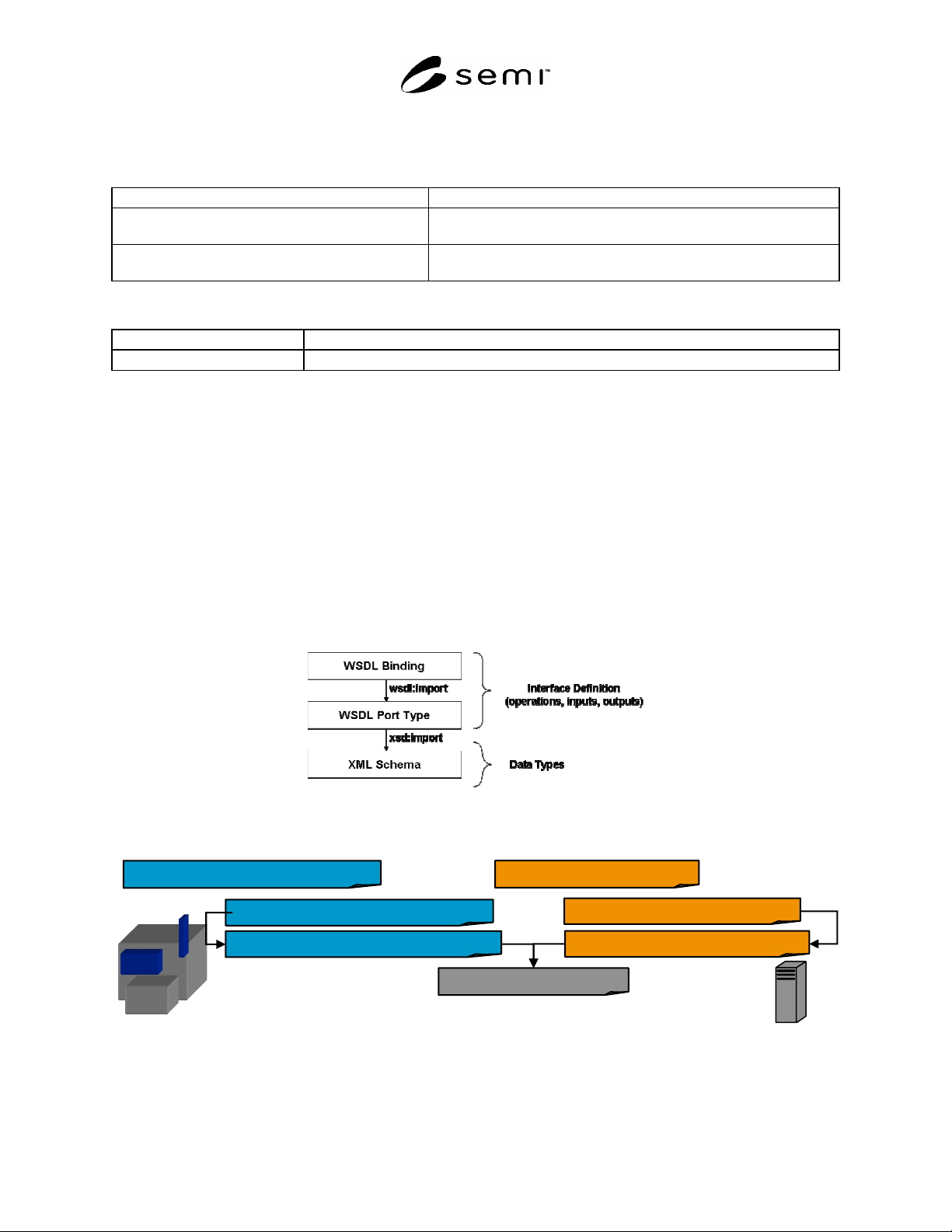
7.1.2 Figure 3 shows the relationship between the WSDL binding and portType definitions and the XML Schema
types used for each interface. The portType definition imports XML Schema type definitions used in each operation
via the XML Schema “import” statement. The WSDL binding definition imports the portType definition via the
WSDL “import” statement. Figure 4 shows the specific XML Schema and WSDL files defined for SEMI E134.
Figure 3
XML Schema and WSDL File Organization
con
E134 DataCollectionManager Interface
E134-1-
V
XXXX-Equipment-PortType.wsdl
E134-1-
V
XXXX-Client-PortType.wsdl
E134-1-
V
XXXX-Equipment-Binding.wsdl
E134-1-
V
XXXX-Schema.xsd
E134-1-
V
XXXX-Client-Binding.wsdl
E134 DPCConsumer Interface
Equipment
E134 Client
Figure 4
WSDL and XML Schema Files for SEMI E134

SEMI E134.1-0305 © SEMI 2005 12
7.2 DataCollectionManager
7.2.1 Application of SEMI E132 Sessions
7.2.1.1 This section is provisional, pending the approval of SEMI E132.1 and the SEMI Specification for
Semiconductor Common Components.
7.2.1.2 The DataCollectionManager shall use SEMI E132.1 for authentication and authorization.
7.2.1.3 Use of the interfaces defined in SEMI E134 to collect data can directly affect overall data throughput for the
equipment, and may indirectly affect the equipment’s ability to perform its intended function. Additionally, data
accessible from the equipment via the SEMI E134 interfaces may be proprietary to the equipment supplier and/or
the factory that uses the equipment, and should be protected against unauthorized access within the factory.
7.2.1.4 For this reason, all operations defined by the SEMI E134 DataCollectionManager interface can be
exchanged using the HTTPS transport (HTTP 1.1 over SSL 3.0) by enabling SSL authentication as specified in
SEMI E132.1. Once enabled via SEMI E132.1, the equipment shall require mutual client-server SSL authentication
for all SEMI E134 DataCollectionManager operations supported by the equipment, and the equipment shall not
provide access to any operations except via the HTTPS transport.
7.2.2 There may be some integration, development, and/or test environments in which it is not practical or feasible
to install equipment and/or client certificates in order to communicate with the equipment. As a practical
consideration for such environments only, the equipment shall support the ability of the user to disable SSL
authentication for the SEMI E134 DataCollectionManager interface, using the equipment configuration specified by
E132.1. Users should be aware that disabling SSL authentication opens up complete unrestricted access to SEMI
E134 data for any application with network access to the equipment.
7.2.2.1 Regardless of whether or not SSL authentication is enabled, the equipment shall reject all requests from
clients that do not provide a valid SEMI E132 session identifier in the SOAP envelope header provided with the
request. The SEMI E132 session identifier shall be provided via the E132Header element, as specified by SEMI
E132.1. If a client does not provide a recognized session identifier, the equipment shall immediately reject the
request using the SEMI Common Error data type, with an error code of ‘6005’ and a source of ‘urn:semi-org:E132’
as specified in SEMI E132.1. The equipment shall perform no other processing of an SEMI E134 request if the
request is found to include an invalid SEMI E132 session identifier, or if no session identifier is provided.
7.2.3 Session and DCP State Interaction
7.2.3.1 The equipment shall maintain DCP activity on a per-Session basis. For example, the same SEMI E132
Principal may establish one or more SEMI E132 Sessions on the equipment. If only one of those Sessions activates
a DCP, the equipment shall only enable the DCP for that specific session. If two separate SEMI E132 sessions
attempt to activate the same DCP, the equipment shall activate the DCP for both sessions. Similarly if one active
SEMI E132 session attempts to activate the same DCP twice, the equipment shall respond to the second request with
the DCPIsActive error, as defined in SEMI E134.
7.2.3.2 As described in ¶7.2.1.3 , the equipment shall use the URL provided with the HTTPEndpoint information
provided with the SEMI E132 EstablishSession request to send all SEMI E134 communication.
7.2.3.3 If a consumer’s SEMI E132.1 Session is closed for any reason (either expressly closed or through a
communication failure), the equipment shall stop sending data from all DCP’s previously activated by that
consumer. This shall not affect data transmission from those DCP’s to consumers that still have SEMI E132
Sessions in the Established state.
7.2.3.3.1 If one or more of these DCP’s has more than one consumer, the equipment shall take the actions defined in
transition 5 of the E134 DataCollectionPlan State model. These DCP’s will remain active, and the equipment shall
remove the consumer’s session from the active consumers list and continue to send data to the other consumers for
those DCP’s.
7.2.3.3.2 If one or more of these DCP’s has only one consumer, the equipment shall take the actions defined in
transition 8 of the SEMI E134 DataCollectionPlan State model. The equipment shall remove the consumer’s session
from the active consumers list and change the state of these DCP’s to Inactive.
SEMI E134.1-0305 © SEMI 2005 13
7.2.3.4 If a DCP is returning from the Hibernating state and there is at least one consumer with an SEMI E132
persistent Session that had previously requested activation of the DCP, then the equipment shall transition the DCP
to the Active state, and resume sending data to each consumer with an SEMI E132 persistent Session.
7.2.3.5 If a DCP is returning from the Hibernating state and there are no consumers with SEMI E132 persistent
Sessions, then the equipment shall transition the DCP to the Inactive state.
7.2.4 Authentication and Authorization Using SEMI E132.1
7.2.4.1 The equipment shall implement the SEMI E134 privilege levels as SEMI E132 privileges.
7.2.4.2 The equipment shall implement the SEMI E134 privilege levels naming convention as specified in Table 9.
The privileges listed are of the format urn:semi-org:priv.<priv-name>.
Table 9 SEMI E134 to SEMI E132 Privilege mapping
SEMI E134 Privilege Level SEMI E132.1 PrivilegeId Entry
ManageOnlyAuthoredDCPs urn:semi-org:priv.ManageOnlyAuthoredDCPs
UseAnyDCP urn:semi-org:priv.UseAnyDCP
ManageAnyDCP urn:semi-org:priv.ManageAnyDCP
7.2.5 Using SEMI E125 Metadata to Identify Sources, Events, Exceptions, and Parameters
7.2.5.1 Sources shall be named using a valid SEMI E120 Locator value (see SEMI E120, Related Information 2,
and the SEMI E120.1 LocatorType). Events/exceptions are identified by their SEMI E125 “id” attribute, and
Parameters are identified by their SEMI E125 “name” attribute. If the events, exceptions, or parameters are defined
by an SEMI E39-compliant objType, then use the following naming conventions to distinguish between information
from any instance vs. a specific instance.
Table 10 Source/Event/Exception/Parameter Naming Convention
SEMI E125 Element Naming Convention
Parameter SEMI E125 Parameter Class Name attribute
Event SEMI E125 Event Class Id attribute
Exception SEMI E125 Exception class Id attribute
ObjType Attribute (any instance) urn:semi-org:objType:<typeName>:objAttr:<parameter name>
ObjType Event (any instance) urn:semi-org:objType:<typeName>:<eventId >
ObjType Exception (any instance) urn:semi-org:objType:<typeName>:<exceptionId>
ObjType Attribute (specific instance) urn:semi-org:objType:<instName>:objAttr:<parameterName >
ObjType Event (specific instance) urn:semi-org:objType:<instName>:<eventId >
ObjType Exception (specific instance) urn:semi-org:objType:<instName>:<exceptionId>
7.2.5.2 <typeName> and <instName> referenced in Table 10 shall be of the following format. “typeName” shall be
the E39 objType name for the object type of interest. “instName” shall be equal to a string of the form
<typeName>-<E39 objId>, where “typeName” specifies the object type of interest, and “objId” specifies the
particular object of interest, equal to the value of that instance’s SEMI E39 objId attribute.
7.2.6 Use of Common Error Type
7.2.6.1 This section is provisional, pending the approval of the SEMI Specification for Semiconductor Common
Components.
7.2.6.2 Table 11 below provides a mapping of the SEMI E134 defined errors to its common error code. The SEMI
E134 mapped error codes below are in addition to any common error codes defined in the Common Components
Specification. SEMI E134 Error codes shall be denoted in the common error type structure by defining the “source”
name of “urn:semi-org:E134”.