semi合集-English.pdf - 第3629页
SEMI E139.1-0705 © SEMI 2005 5 Figure 1 XML Example Diagram 6.5.6 The yellow ( or gray if pri n ted in m onochrome) boxes indi cate the use of other define d types. So, Child4 is of type “Child4T ype”. Child4T ype define…
SEMI E139.1-0705 © SEMI 2005 4
comply with this specification. Figure 1 shows a sample XML diagram that will be used to provide a basis for
explanation of the XML graphical notation used in the rest of the document.
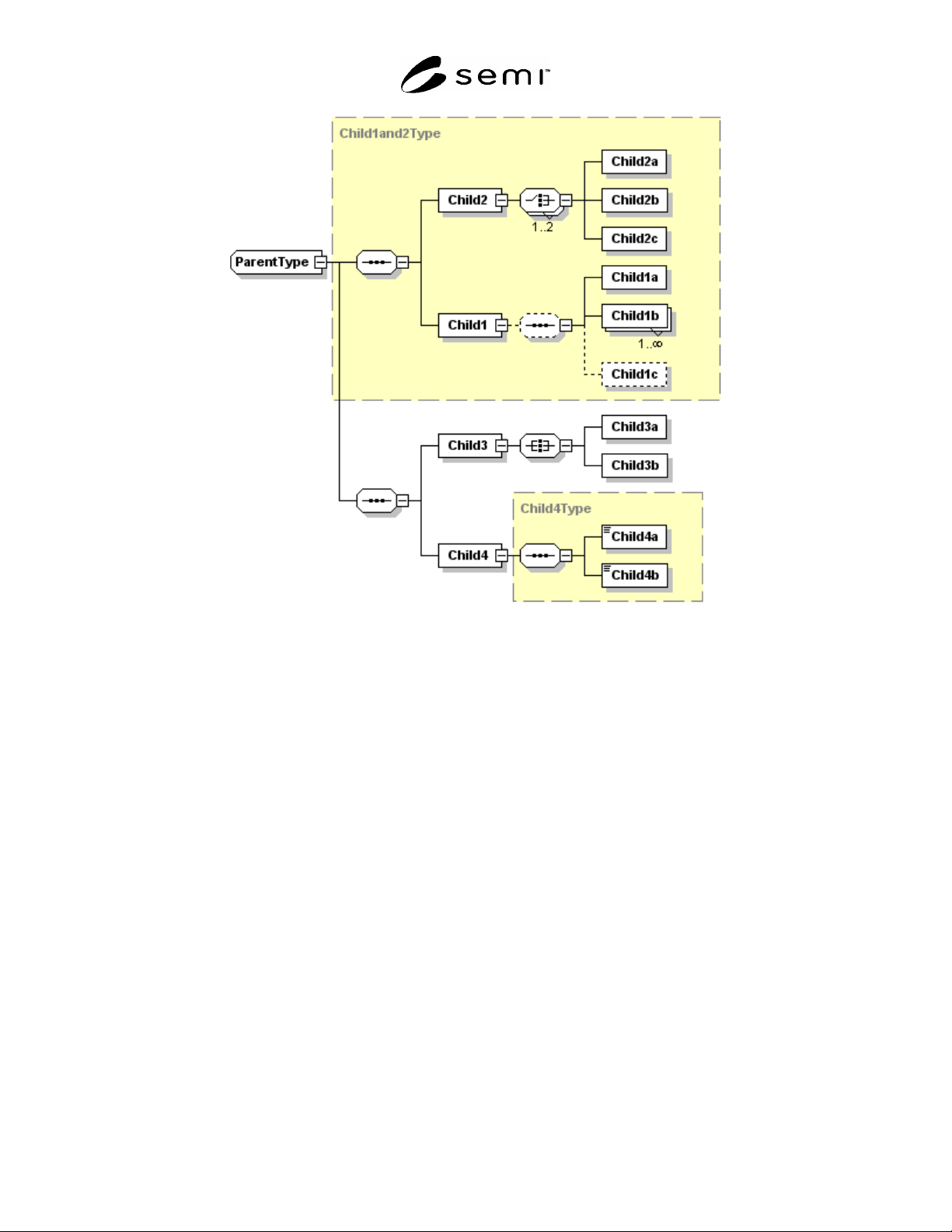
6.5.2 In the diagram, rectangular boxes represent XML elements. Ownership or containment is read from right to
left in the diagrams. In the sample diagram, ParentType contains Child1, Child2, Child 3, and Child 4. In turn,
Child2 contains Child2a, Child2b, and Child2c. The additional symbols (8-sided boxes) represent sequences or
choices. See Table 2 for an explanation of these symbols.
6.5.3 Please note that “element”, “sequence”, “all”, and “choice” are XML terms (see the W3C standards
referenced in ¶4.3).
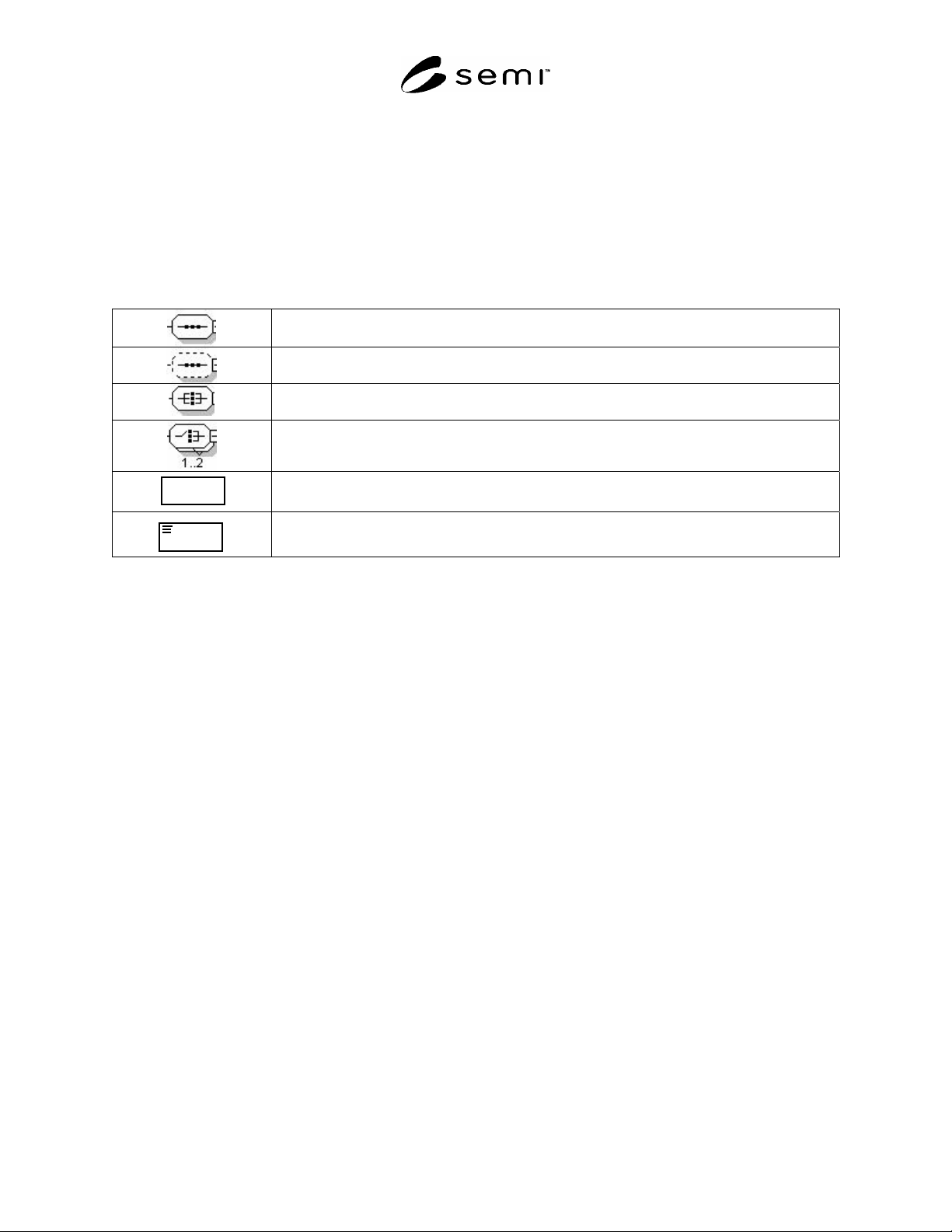
Table 2 Altova XMLSPY® Schema Diagram Symbols
Denotes a required ordered sequence of the right hand elements with a cardinality of one
for each element. (sequence)
Denotes an optional ordered sequence of the right hand elements with a cardinality of one
for each element. (sequence)
Denotes a required, but unordered, sequence of the right hand elements with a cardinality
of one for each element. (all)
Denotes a required choice of the right hand elements. Exactly one or two of the right
hand elements must be present. (choice)
Name
Denotes an element. Optional element if outline is dashed line.
NameName
Denotes an element that contains parsed character data.
6.5.4 A graphic using a solid line is a required element; using a dashed line represents an optional element.
Numbers or ranges in the lower right hand corner represent cardinality. The default cardinality is one.
6.5.5 To simplify a diagram or help focus on a particular aspect, detail may be hidden. The 8-sided symbols have a
small square on the right end. If a minus sign “-“ is in the box, then all detail is shown. If the box contains a plus
sign “+”, then all detail to the right of that symbol is hidden. The example has no hidden detail.
SEMI E139.1-0705 © SEMI 2005 5
Figure 1
XML Example Diagram
6.5.6 The yellow (or gray if printed in monochrome) boxes indicate the use of other defined types. So, Child4 is of
type “Child4Type”. Child4Type defines Child4a and Child4b. This detail may be hidden in the diagram. Object
oriented inheritance is typically represented in XML as type extension. In Figure 1, ParentType extends
Child1and2Type by adding a sequence that includes Child3 and Child4.
6.5.6.1 Reading Figure 1 would yield the following additional information:
Child1and2Type is an ordered sequence of two items: Child2 and Child1.
Child1 contains an optional ordered sequence of Child1a, one or more Child1b, and (optionally) Child1c.
Child2 contains a choice of one or two of the following: Child2a, Child2b, and Child2c.
Child3 contains an unordered sequence of Child3a and Child3b.
6.5.7 XML Schema Sample
6.5.7.1 The sample XML for the example shown in Figure 1, is presented below. Refer to the XML documentation
referenced in ¶4.3 for a complete description of the syntax and semantics of XML schemas.
SEMI E139.1-0705 © SEMI 2005 6
<?xml version="1.0" encoding="UTF-8"?>
<xs:schema xmlns:xs="http://www.w3.org/2001/XMLSchema" elementFormDefault="qualified"
attributeFormDefault="unqualified">
<xs:complexType name="ParentType" abstract="true">
<xs:complexContent>
<xs:extension base="Child1and2Type">
<xs:sequence>
<xs:element name="Child3">
<xs:complexType>
<xs:all>
<xs:element name="Child3a"/>
<xs:element name="Child3b"/>
</xs:all>
</xs:complexType>
</xs:element>
<xs:element name="Child4" type="Child4Type" nillable="false"/>
</xs:sequence>
</xs:extension>
</xs:complexContent>
</xs:complexType>
<xs:complexType name="Child4Type" abstract="true">
<xs:sequence>
<xs:element name="Child4a" type="xs:integer" nillable="false"/>
<xs:element name="Child4b" type="xs:string" nillable="false"/>
</xs:sequence>
</xs:complexType>
<xs:complexType name="Child1and2Type" abstract="true">
<xs:sequence>
<xs:element name="Child2">
<xs:complexType>
<xs:choice maxOccurs="2">
<xs:element name="Child2a"/>
<xs:element name="Child2b"/>
<xs:element name="Child2c"/>
</xs:choice>
</xs:complexType>
</xs:element>
<xs:element name="Child1">
<xs:complexType>
<xs:sequence minOccurs="0">
<xs:element name="Child1a"/>
<xs:element name="Child1b" maxOccurs="unbounded"/>
<xs:element name="Child1c" minOccurs="0"/>
</xs:sequence>
</xs:complexType>
</xs:element>
</xs:sequence>
</xs:complexType>
<xs:element name="Parent" type="ParentType" final="#all"/>
</xs:schema>
Figure 2
XML for Sample
7 PDE Schema Definition
7.1 PDE Class Mapping to XML
7.1.1 This section describes how the PDE classes from SEMI E139 are mapped to XML. The descriptions in this
section are provided to support and explain the XML schema document for the PDE (attached, see ¶7.2.2). This
section contains no requirements. Specific requirements are included in ¶7.2.
7.1.2 Abstract Classes
7.1.2.1 No classes in the PDE model for RaP are abstract.