Gemini Semi Appendix Manual.pdf - 第84页
TECHNICAL REFERENCE APPENDIX CALIBRATIONS 3.46 Appendix to Micron Technical Manuals Chapter Issue 1 Feb 15 18. Select Incr . or Decr . to start the belts run ning lef t to right. 19. Ensure that one of the following spee…
TECHNICAL REFERENCE APPENDIX
CALIBRATIONS
Chapter Issue 1 Feb 15 Appendix to Micron Technical Manuals 3.45
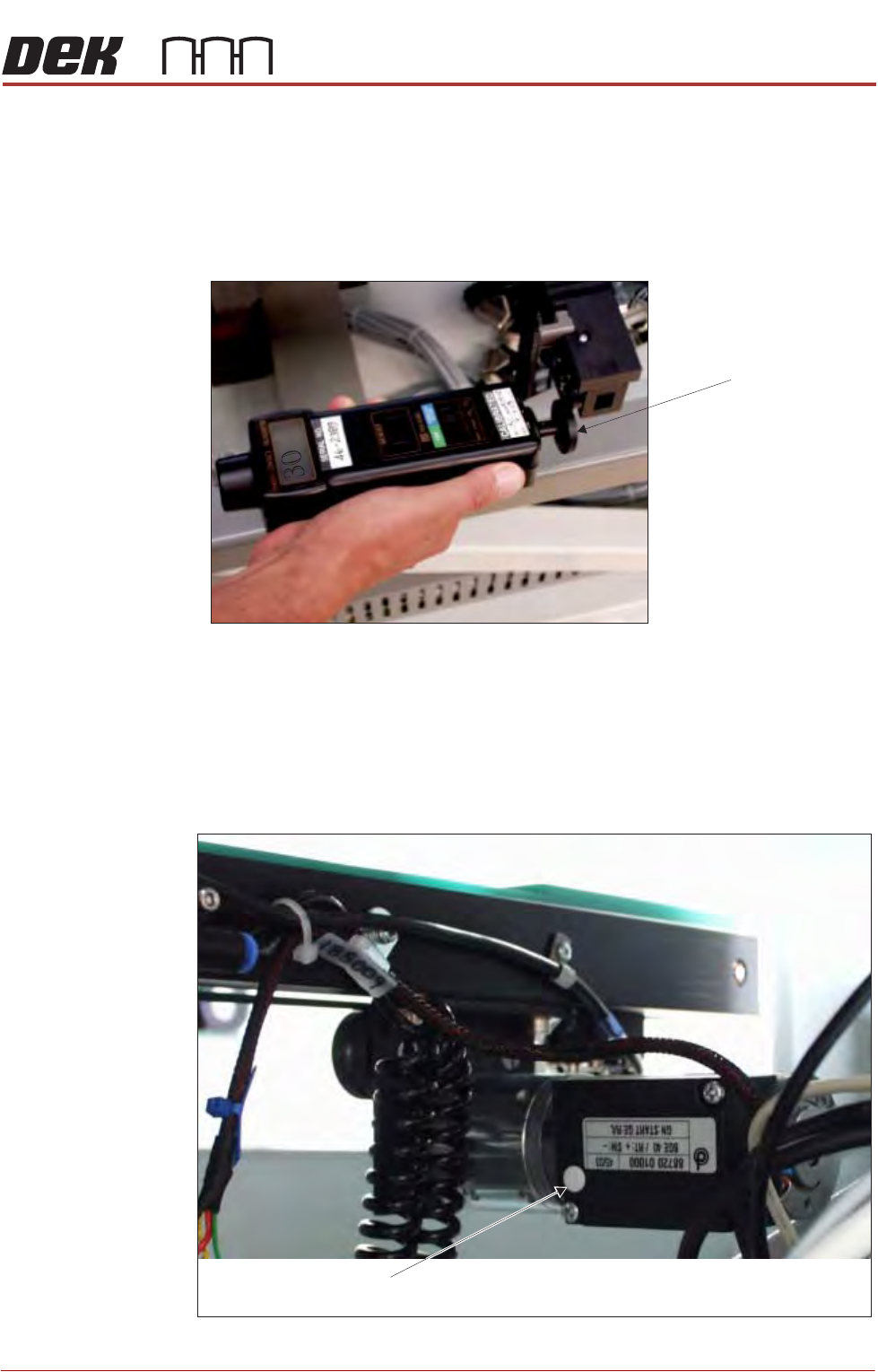
13.Using a tachometer fitted with the surface speed test wheel, positioned on
the input or output pulley of the front belt motor, measure the speed of the
motor right to left.
NOTE
For heavy board option the ‘Front’ settings refer to the rear rail and the ‘Rear’
settings refer to the front rail.
14.Select Incr. or Decr. to adjust the motor speed to achieve 14 to 16 m/min.
15.Repeat steps 13 and 14 for Front R 2 L Alt Speed, Rear L 2 R Alt Speed,
and Rear R 2 L Alt Speed.
16.If adjustment is required, remove the belt speed adjuster cap on the appro-
priate motor and adjust using a suitable trimming tool.
17.Select Next.
Rear Belt Speed using Digital Tachometer
Surface Speed Test Wheel
Belt Speed Adjuster Cap
View on Front Rail Transport Belt Drive Motor

TECHNICAL REFERENCE APPENDIX
CALIBRATIONS
3.46 Appendix to Micron Technical Manuals Chapter Issue 1 Feb 15
18.Select Incr. or Decr. to start the belts running left to right.
19.Ensure that one of the following speeds is achieved for both the front and
rear belts:
a. 29 to 31 metres/min for standard transport rails.
b. 37 to 39 metres/min for heavy board transport rails.
NOTE
There is no separate adjustment between left to right and right to left. If the
above speed is not achievable in both directions, the motor may be faulty.
20.Select Exit.
21.Select Exit.
22.Select Back.
23.Refit the safety cover.
TECHNICAL REFERENCE APPENDIX
CALIBRATIONS
Chapter Issue 1 Feb 15 Appendix to Micron Technical Manuals 3.47
Solvent USC
WARNING
SOLVENT SPRAY. THE UNDERSCREEN CLEANER SPRAYS A FINE JET OF
SOLVENT SOLUTION ON TO THE CLEANER. APPROVED PROTECTIVE
CLOTHING SHOULD BE WORN.
CAUTION
RECOMMENDED SOLVENTS. ANY SOLVENTS USED MUST COMPLY WITH
LOCAL ENVIRONMENTAL GUIDELINES. DEK RECOMMEND USING SOLVENTS
THAT ARE ENVIRONMENTALLY FRIENDLY, IE CFC FREE AND WATER BASED.
SOLVENTS USED MUST HAVE FAST EVAPORATION RATES AND FLASHPOINT
SPECIFICATIONS GREATER THAN 39ºC.
CAUTION
SOLDER PASTE AND SOLVENTS. WHEN USING OR HANDLING ANY SOLDER
PASTE OR SOLVENT FORMULATION THE MANUFACTURERS’ RECOMMENDED
SAFETY PRECAUTIONS MUST BE STRICTLY ADHERED TO.
External Solvent
Tank
The software needs to know the weight of the external solvent tank when fitted
with an empty container and when fitted with a full container of the solvent to be
used.
NOTE
Due to solvents having different gravities, the weight must be re-calibrated
when changing solvents.
To calibrate the software carry out the following procedure:
1. Ensure that the external solvent tank is fitted with an empty 5 litre container.
2. Select Maintenance.
3. Select Calibrations.
4. Select Solvent.
5. Select Set Solv Empty.
6. Confirm by selecting Yes.
7. Replace the empty 5 litre container with a 5 litre container full of the solvent
to be used.
8. Select Set Solv Full.
9. Confirm by selecting Yes.
10.Select Exit.
11. Select Exit.
12.Select Back.
Paper If paper counting is enabled, the software needs to know the paper roll length
when first fitted to the under screen cleaner.
NOTE
The length of the paper roll is printed on the paper roll wrapping.
To calibrate the software carry out the following procedure:
SEMI 2
SEMI 2