00197197-02-IM SetupCenter 5.1.pdf - 第27页
Installation Motorola MC70/MC75 1D/2D barcode scanner Hardware Installation Installation Manual SIPLACE Setup Center 5.1 27 4.2.4 Motorola MC70/MC75 1D/2D barc ode scanner 4.2.4.1 System Requirements The following compon…
Installation
Hardware Installation Datalogic Scanner’s Cradle BC-8030-BT (Bluetooth)
26 Installation Manual SIPLACE Setup Center 5.1
Step 6
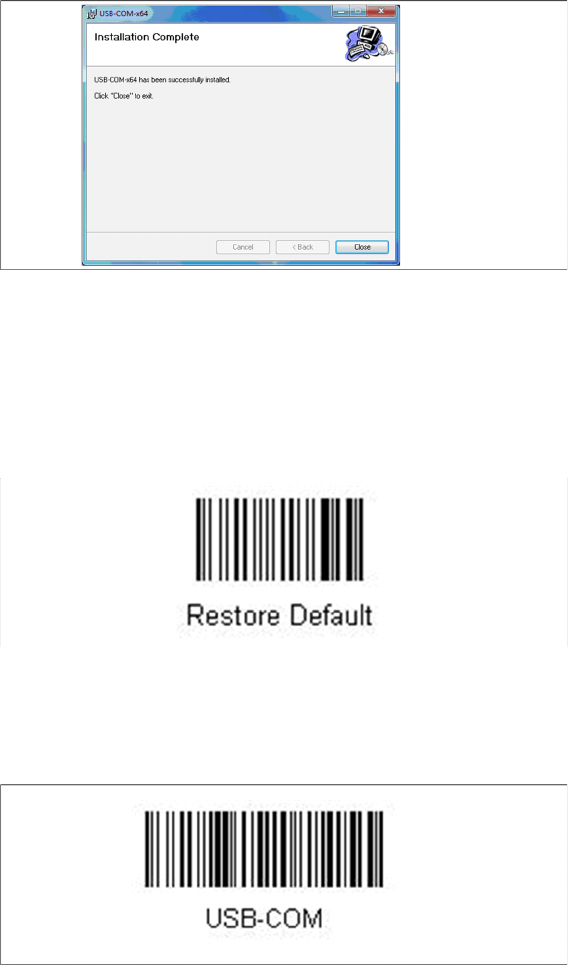
► The installation of the driver software starts.
► The "Installation Complete" window appears if the installation has been completed successfully.
► Click Close.
Steps to configure the cradle to the USB-COM interface
The device may be configured to a different interface ex factory, the following steps switch to USB-COM
port.
► Please scan the following barcodes in the order they are printed:
► Scan the “Link by Contact” – Barcode from the cradle and put the scanner into the cradle.
⇨ The scanner is now registered on the cradle.
► Scan the barcode "USB-COM" to set the interface to USB.
The cradle is now ready for use with Setup Center.

Installation
Motorola MC70/MC75 1D/2D barcode scanner Hardware Installation
Installation Manual SIPLACE Setup Center 5.1 27
4.2.4 Motorola MC70/MC75 1D/2D barcode scanner
4.2.4.1 System Requirements
The following components are required for the operation of the scanner:
▪ WLAN-infrastructure (not included)
▪ MC70 / MC75 scanner integrated in WLAN-infrastructure and accessible with "ping" windows-com
-
mand.
▪ Required scanner firmware versions
– MC70: 05.43 or higher
– MC75: 01.23 or higher
4.2.4.2 Configurate WLAN on Scanner
Please configure the barcode scanner for the operation within WLAN network - as described in docu
-
ment Installation Manual WLAN Infrastructure for SIPLACE (item no. 00195606-xx).
NOTICE
The scanner might be delivered with a different firmware version. Please install the firmware
version listed above. It is located on the software DVD "SIPLACE Support Media DVD1” in the
section “SIPLACE Products” (See "4.2.4.3 MC70/MC75 Prerequisites installation" [ ➙ 28]).
Please observe by all means the enclosed documentation.
Installation
Hardware Installation Motorola MC70/MC75 1D/2D barcode scanner
28 Installation Manual SIPLACE Setup Center 5.1
4.2.4.3 MC70/MC75 Prerequisites installation
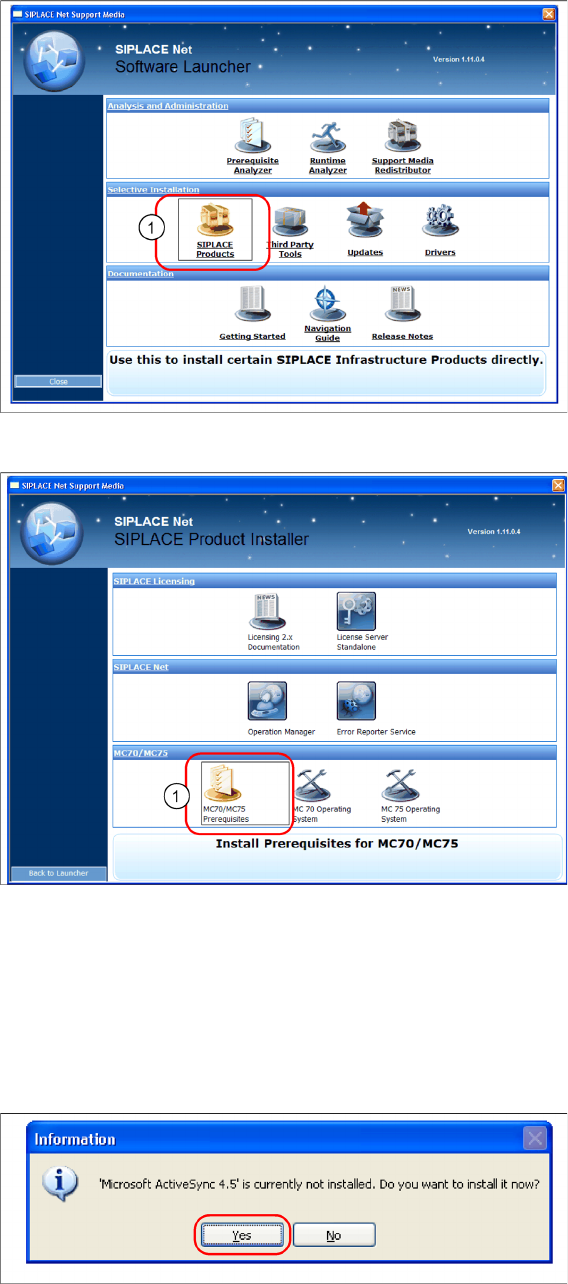
The installation for MC70 Prerequisites is located on the DVD "SIPLACE Support Media DVD1" in the
section SIPLACE Products (1).
► Execute the MC70 / MC75 Prerequisites (1).
Step 1: ActiveSync / Mobile Device Center
The “MC70 / MC75 Prerequisites” setup tool checks if the necessary communication program (Ac
-
tiveSync or Mobile Device Center) is present. If this is not the case, the program can be installed.
Windows XP: ActiveSync
If ActiveSync is not installed on the system, the following message box appears.
► Select Yes to start the installation of Microsoft ActiveSync. Make sure that the scanner is not yet con
-
nected to the basic station.