00197197-02-IM SetupCenter 5.1.pdf - 第8页
Navigation Guide for Installation SIPLACE Setup Center 8 Installation Manual SIPLACE Setup Center 5.1
Navigation Guide for Installation
SIPLACE Setup Center
Installation Manual SIPLACE Setup Center 5.1 7
2 Navigation Guide for Installation
2.1 SIPLACE Setup Center
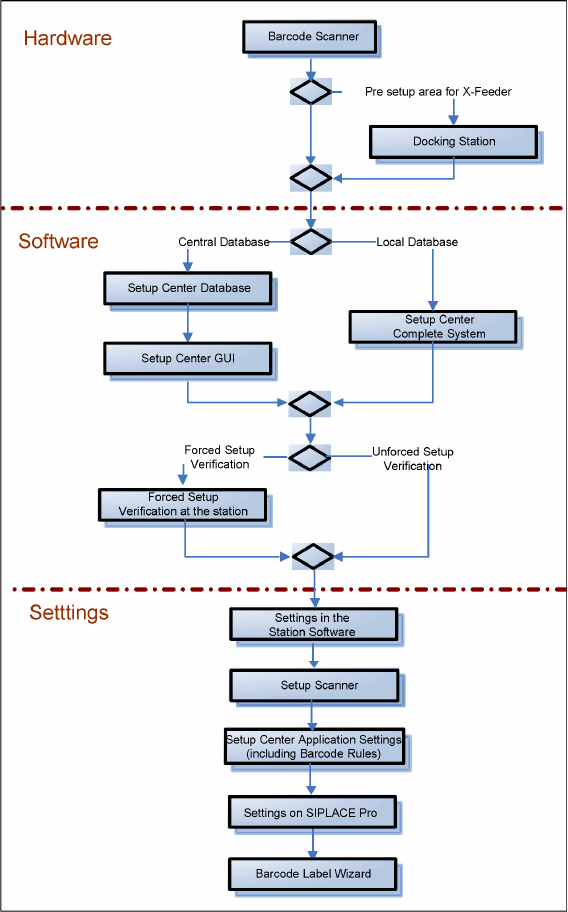
The installation procedure is divided into several parts (see the following Figure):
1. Installation of hardware
▪ Barcode scanner
▪ Optional: Docking Station
2. Installation of software
▪ Setup Center, with setup type
– SIPLACE Setup Center Complete
– SIPLACE Setup Center GUI
– SIPLACE Setup Center GUI Server
–Custom
▪ Setup Center "Forced Setup Verification"
3. Settings
▪ Station software, see SIPLACE Setup Center User Guide
▪ Barcode Scanner (see the chapter "Scanner Configuration")
▪ Setup Center, see SIPLACE Setup Center User Guide
▪ SIPLACE Pro, see SIPLACE Setup Center User Guide
▪ Barcode Label Wizard, see SIPLACE Setup Center User Guide
Navigation Guide for Installation
SIPLACE Setup Center
8 Installation Manual SIPLACE Setup Center 5.1
System Components and Configurations
Setup Center System Components
Installation Manual SIPLACE Setup Center 5.1 9
3 System Components and Configurations
3.1 System Components
3.1.1 Setup Center
A complete installation of SIPLACE Setup Center requires:
▪ SIPLACE Pro Interface and SIPLACE Pro Desk
SIPLACE Setup Center consists of the following components:
▪ SIPLACE Setup Center GUI
▪ SIPLACE Setup Center Database
3.1.2 Scanner System
3.1.2.1 Datalogic Scanner
Setup Center supports the following barcode reader from Datalogic. This scanner has a four-line display.
Narrowband 433MHz or 910MHz
Communication between the scanner and the Setup Center requires the cradle "OM-Dragon" or "BC-
8030". This is connected to the Setup Center PC via the serial port or the USB port. Each Setup Center
GUI supports only one cradle. Up to 32 scanners can be linked to one cradle. Setup Center supports
simultaneous operation with multiple scanners.
▪ 1D barcode: Dragon M101, M131, PowerScan M8300, M8500
▪ 1D and 2D barcode: PowerScan M8500
Bluetooth
TM
Communication between the scanner and the Setup Center requires the cradle "BC-8030 BT". This is
connected to the Setup Center PC via the serial port or the USB port. Each Setup Center GUI supports
only one cradle. Up to 4 scanners can be linked to one cradle. Setup Center supports simultaneous op
-
eration with multiple scanners.
▪ 1D barcode: PowerScan BT8300
3.1.2.2 Motorola / Symbol MC70/MC75
The Setup Center supports the 2D barcode scanning with the "Motorola / Symbol MC70/MC75" scanner,
equipped with 2D scan engine, usable with 2,4 GHz and 5 GHz WLAN.
2D barcodes contains more information than 1D barcodes. The support for 2D barcode scanners ena
-
bles the operator to scan more packaging information at same time.
3.1.3 Forced Setup Verification
The software CD "SIPLACE Setup Center" activates the forced setup verification and the component lev
-
el indicator at the SIPLACE placement machine.
The forced setup verification monitors the verification status of individual tracks. Non-verified tracks are
disabled by setup center.
The component level indicator identifies the component fill level for each track, and updates the fill level
for each track at the end of each PCB. Further, it manages threshold values for each track and stops the
pick up process, if a threshold is reached.