00197197-02-IM SetupCenter 5.1.pdf - 第92页
Installation Troubleshooting Relevant Files to Analyz e Installation Prob lems 92 Installation Manual SIPLACE Setup Center 5.1 4.5 Troubleshooting If it is not possible to solve a problem during installation of SIPL ACE …
Installation
SIPLACE Setup Center Configuration Steps to Perform After Installation
Installation Manual SIPLACE Setup Center 5.1 91
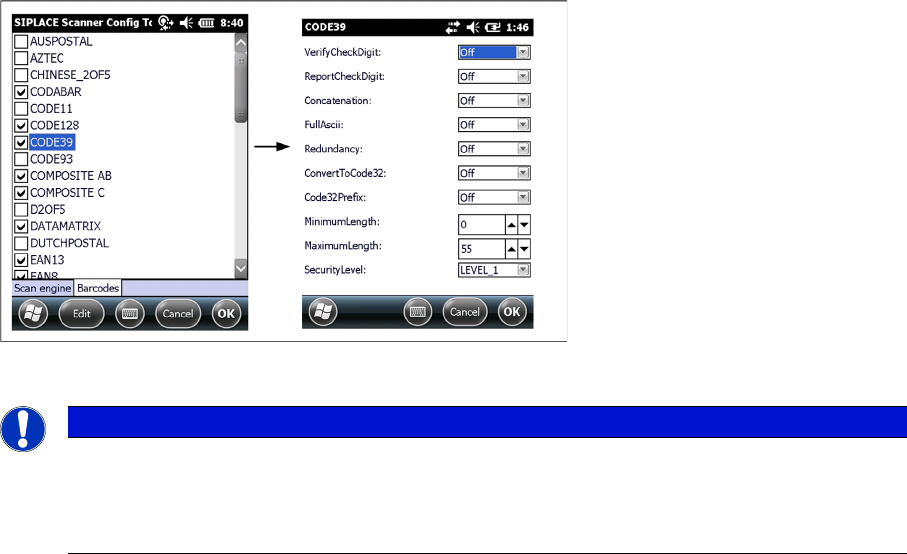
► Select the barcode and press Edit to open the additional barcode settings.
► Press Ok to save the settings.
4.4.6 SIPLACE Setup Center Configuration
Setup Center GUI requires to be configured before it can be used. The configuration can be found via
the main menu Extras → Settings. For detailed information, please refer to User Guide SIPLACE Setup
Center 5.1.
4.4.7 Settings on the SIPLACE Pro
In order to use Setup Center you should make settings on the programming system SIPLACE Pro. For
detailed information, please refer to User Guide SIPLACE Setup Center 5.1.
4.4.8 Barcode Label Wizard
The Barcode Label Wizard enables you to print out barcodes needed for the operation of the SIPLACE
Setup Center. For detailed information, please refer to User Guide SIPLACE Setup Center 5.1.
NOTICE
Context menu
Click and hold on a barcode to open the context menu:
All Off: Select none of the barcodes in the list
All On: Select all the barcodes in the list
Installation
Troubleshooting Relevant Files to Analyze Installation Problems
92 Installation Manual SIPLACE Setup Center 5.1
4.5 Troubleshooting
If it is not possible to solve a problem during installation of SIPLACE Setup Center, please send the file
SIPLACESetupCenterSetupLog.html and all similar "log" named files to the SIPLACE Service.
4.5.1 Relevant Files to Analyze Installation Problems
Error description
Whenever problems arise during setup, please inspect the file SIPLACESetupCenterSetupLog.html,
which is written during each installation.
Cause
Setup problems.
Solution
The log file is found either in C:\ (prior to the "move data phase") or in the selected program folder.
Old versions of the log file are located in the program folder. A timestamp is added to the filename. Dialog
boxes appear during the file copying phase of installation which only contain
► Yes and No options.
Hint
► If you need SIPLACE support regarding installation problems, please provide all installation log files.
4.5.2 Conflicting old SIPLACE Setup Center Installations
Error Description:
InstallShield reports a conflicting old installation of SIPLACE Setup Center.
Cause:
The new SIPLACE Setup Center installation conflicts with old SIPLACE Setup Center installations.
Solution:
If SIPLACE Setup Center setup detects old installations and if you are absolutely sure you have unin
-
stalled the old version of SIPLACE Setup Center, please proceed as follow:
Make sure that you have manually removed any remnants of this old installation from the program folder
except for the database.
Installation
Conflicts with old SIPLACE Setup Center Configurations Troubleshooting
Installation Manual SIPLACE Setup Center 5.1 93
4.5.3 Conflicts with old SIPLACE Setup Center Configurations
Error Description
After reinstalling SIPLACE Setup Center, the program starts but displays an error that the database can
not be reached. During the installation the correct database server was selected.
Cause
The database server’s name has probably changed since the last installation. When uninstalling
SIPLACE Setup Center, all configuration files are backed up and restored after a new installation. The
old settings, including the database server’s name, will be restored. In this case the selected database
server will be overwritten in the settings.
Solution
Please correct the database server name in the settings dialog of SIPLACE Setup Center.
4.5.4 Remote Installation with Windows XP Clients
Error description:
If you are logged on to the server via remote desktop connection and start the installation following mes
-
sage will be shown.
1607: Installation of Install Shield Scripting not possible
Solution:
Copy the complete content from the Setup CD to the server to be able to start the installation.
4.5.5 Conflicting Applications
Conflicts with applications are detected and displayed during the installation.