4OM-996-007.pdf - 第195页
0509-001 2-21-2 AIM01ETRP Check Code Display Section A Display Section B 802001 ACV Information Changing the feeder alternate condition to 'Disable' for ACV found empty feeder . 802002 ACV Information Changing …
Check Code Display Section A Display Section B
801a04 Warning Operation The feeder ready button was turned on in start protection mode.
801a05 Warning Operation Cannot alternate by external start protection.
801b01 Lightning Surge Lightning Surge Protector works; Q204.
Warning
801b02 Lightning Surge Lightning Surge Protector works; Q204. Running continue.
Warning
801c01 Information This placement step was detected outside of the possible range.
This step is auto skip running.
801c02 Information Feeder carriage has been paused to avoid clash with missing com-
ponent. Please collect component before operating the feeder car-
riage.
801c03 Information Data was changed during machine worked. The changed data is
not reflected in operation until it stops or interrupts operation.
801c04 Information PCB Origin Position data is not right. Please correct a PCB Origin
Position on a "Prod Chng(Origin Pos)" screen.
801c05 Information The object of "Recognition image preservation" is not used with
current NC. Correct "Recognition image preservation" data from
the production parameter screen. Please set the function selection
item in data to "Do not preserve it".
801c06 Information Source of light unit not correspond to the specified lighting method
801c07 Information Specified lighting method not correspond to nozzle of current pat-
tern
801d01 Semi-auto (continue) Production operation was interrupted for the state where PCB be-
start mode auto fore component are placed exists on XY table.
change
801e01 Placement Level Calculated data out of range. Please check library data and pattern
Data program data.
801f01 Warm start mode Operation was canceled for the state where the P.C.B. in the middle
auto change of component placing is on X/Y table.
(Contents) Self-Diagnostics Error Message
(Description) Confirm the displayed contents.
0509-001 2-21-1 AIM01ETRP
1.3 Machine lnformation
0509-001 2-21-2 AIM01ETRP
Check Code Display Section A Display Section B
802001 ACV Information Changing the feeder alternate condition to 'Disable' for ACV found
empty feeder.
802002 ACV Information Changing the feeder alternate condition to 'Disable' for ACV found
missing feeder.
802101 Feeder Maintenance The total number of feeder's shots reached a previous notice set-
Warning ting number.
802102 Feeder Maintenance "The feeder adsorption rate decreased and exceeded the previ-
Warning ous notice setting number.
802201 Head warning Head or Nozzle bypass started before scrap component check.
information
802301 PEC Inspect P.C.B. position gap (Warning value) was detected at P.E.C. re-
(Re_trial) trial check.
802401 Placement Data Step of not placed was occured by the skip setting of Comp sup-
ply data. Production is interrupted and please confirm it.
(Contents) Self-Diagnostics Error Message
(Description) Confirm the displayed contents.
809001 Internal Exception CPU2 Vector 0 exception has been disregarded.
Notice
809002 Internal Exception CPU2 spurious exception has been disregarded.
Notice
809003 Internal Exception CPU2 undefined exception has been disregarded.
Notice
809004 Internal Exception CPU3 undefined exception has been disregarded.
Notice
809005 Internal Exception EB005 SYSFAIL exception has been disregarded.
Notice
809101 Refer to data of the It was referring from exterior when the management data was up-
device. dated.
809102 Refer to data of the It was referring from exterior when data was updated.
device.
809201
809202
(Contents) Self-Diagnostics Error Message
(Description) Confirm the displayed contents.
1.3 Machine lnformation
1.4 "ERROR" Windows
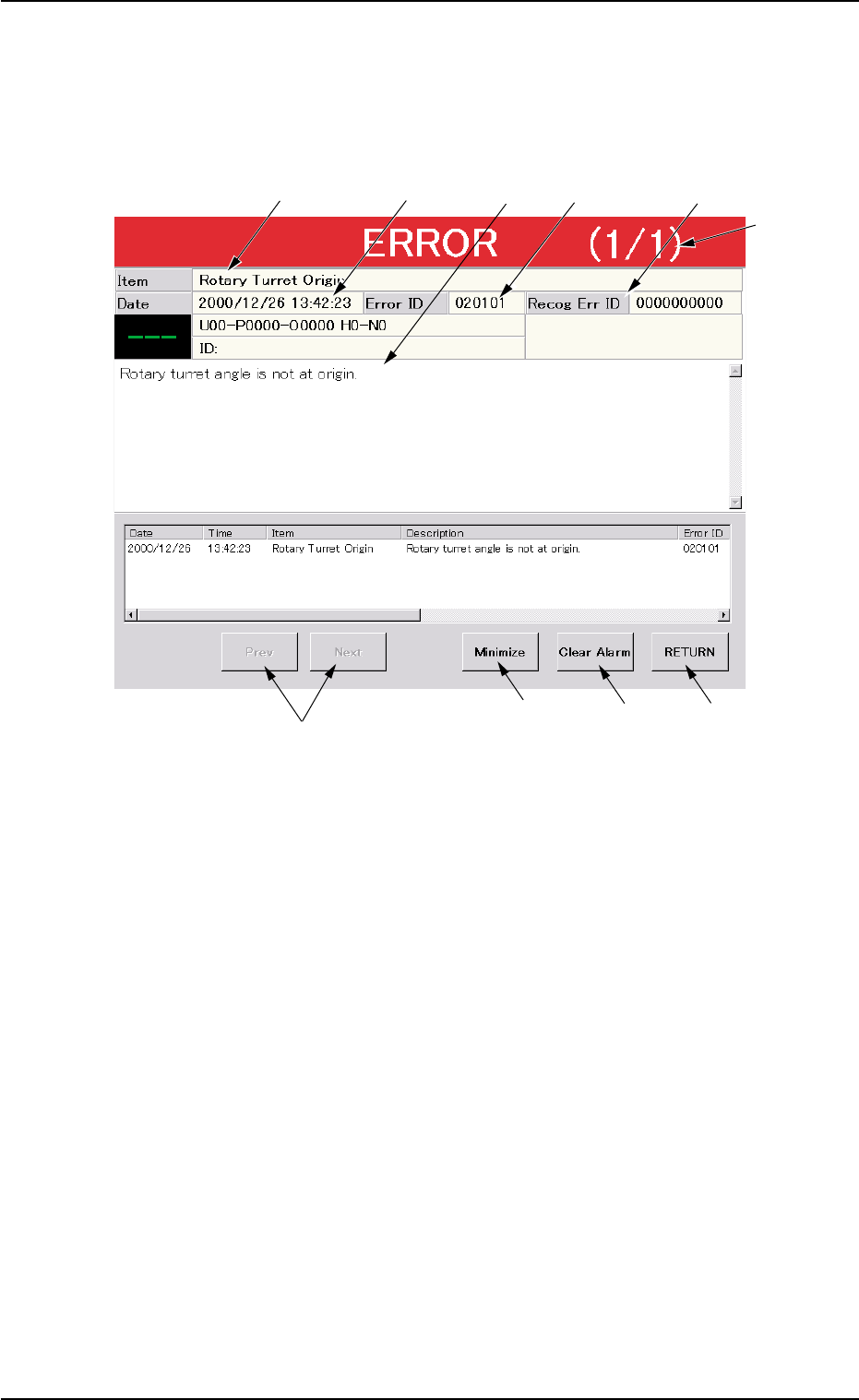
When the machine detects an error, the following "ERROR" window
opens.
Fig. 4B4 Example of "ERROR" Window
*1 Error ID
Displayed is a string of alphanumeric characters (6 characters)
that identifies an error.
When an error has occurred, use the error ID as an index and refer
to "3. Troubleshooting after Error Window (Error ID)" for details.
*2 Recog Err ID
Displayed is a string of numeric characters (10 characters) that
identifies an error.
When an error has occurred, use the recognition error ID as an
index and refer to "4. Troubleshooting after Error Window (Recog-
nition Error ID)" for details.
*3 Item
Displayed are the contents of the error.
*6
*1
*9
*8
*5
*3
*4 *2
*7
*10
0509-003 2-22 AIM01ETRP
1.4 "ERROR" Windows