4OM-1505-004_w.pdf - 第158页
4OM-1505 2-43 2. T roubleshooting on Each Section : Chap.2 (16 Self-Diagnostics) T4B40 Error ID Error Name, Description, Cause, and Remedy 1601000 Control Board System error 1602000 Control Board Control board error (Cau…
4OM-1505
2-42
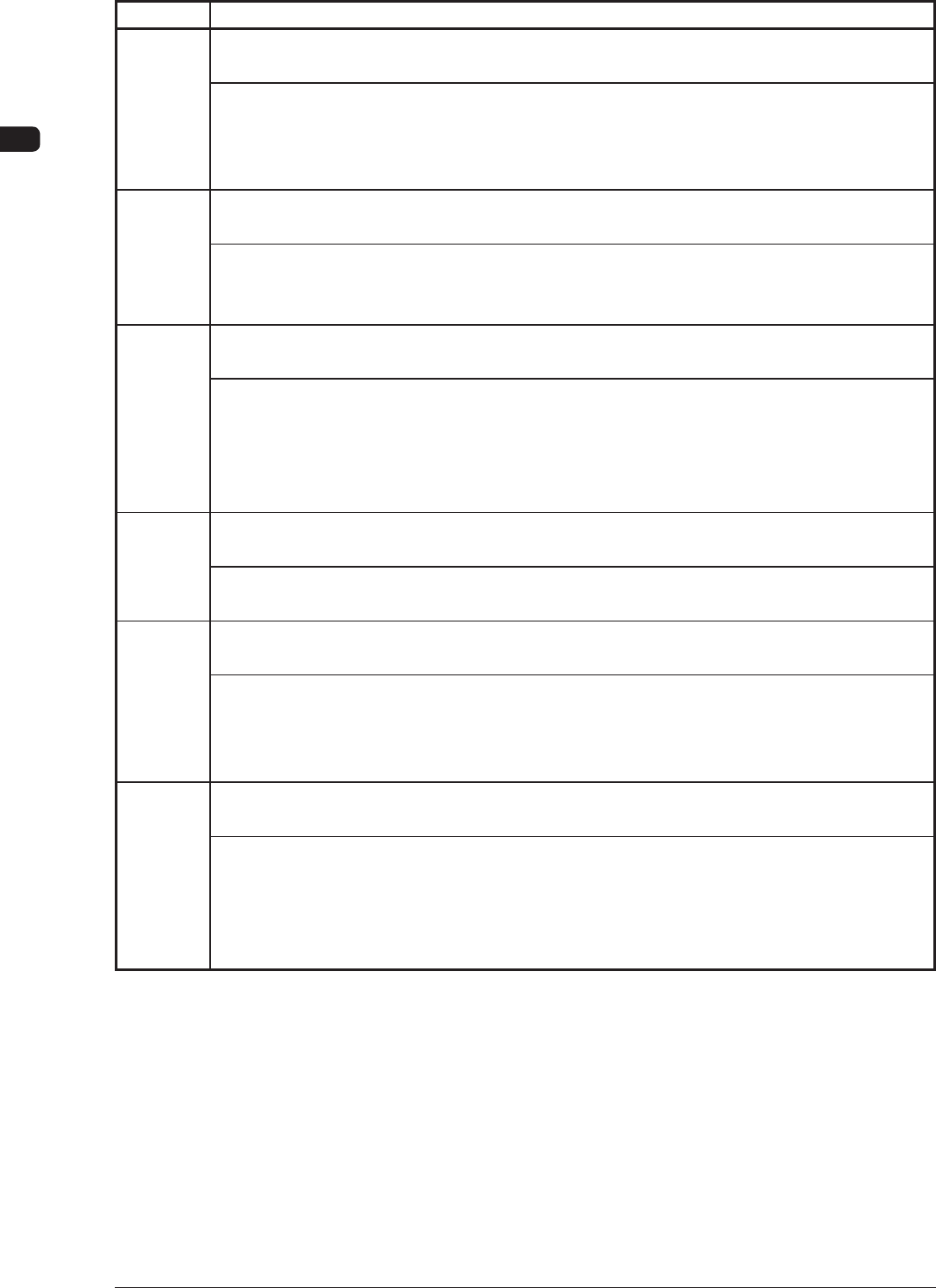
2. Troubleshooting on Each Section : Chap.2
(15 Safety Device)
T4B39
Error ID Error Name, Description, Cause, and Remedy
1501000 Load Power Off
[Emergency] switch pressed.
(Cause 1) An [EMERGENCY STOP] switch was pressed.
(Remedy 1) Unlock the [EMERGENCY ST
OP] switch and hold down the [POWER ON]
button on the operation panel for more than 3 seconds. After that, press the
[RETURN] button in the "ERROR" window.
1502000 Load Power Off
The air pressure is too low.
(Cause 1) The main air pressure had dropped below 0.4MPa (the set value of the
pressure switch).
(Remedy 1) Adjust the pressure to the correct one.
1503000 Load Power Off
The safety door is open.
(Cause 1) The transparent cover is open.
(Remedy 1) Close the transparent cover and hold down the [POWER ON] button on the
operation panel for more than 3 seconds. After that, press the [RETURN]
button on the touch screen. Power up the machine again and restart the
operation.
1504000 Load Power Off
Detected circuit breaker of
f.
(Cause 1) The circuit breaker of Q100, Q202 or Q203 is turned OFF.
(Remedy 1) Contact our service personnel for details.
1505000 Load Power Off
Detected all load power moniter of
f.
(Cause 1) The load power supply monitor (K021) is turned OFF.
(Remedy 1) Shut down the power of the machine once and power up the machine again.
After that, restart the operation. When the same error still occurs, contact our
service personnel for details.
1506000 Load Power Off
Detected load power moniter of
f.
(Cause 1) The load power supply monitor (K15) is turned OFF.
(Remedy 1) Shut down the power of the machine once and power up the machine again.
After that, restart the operation. When the same error still occurs, contact our
service personnel for details. If possible, check how the fuse (F01), K03, K15,
K2020 and K204 are working.
0906-001
4OM-1505
2-43
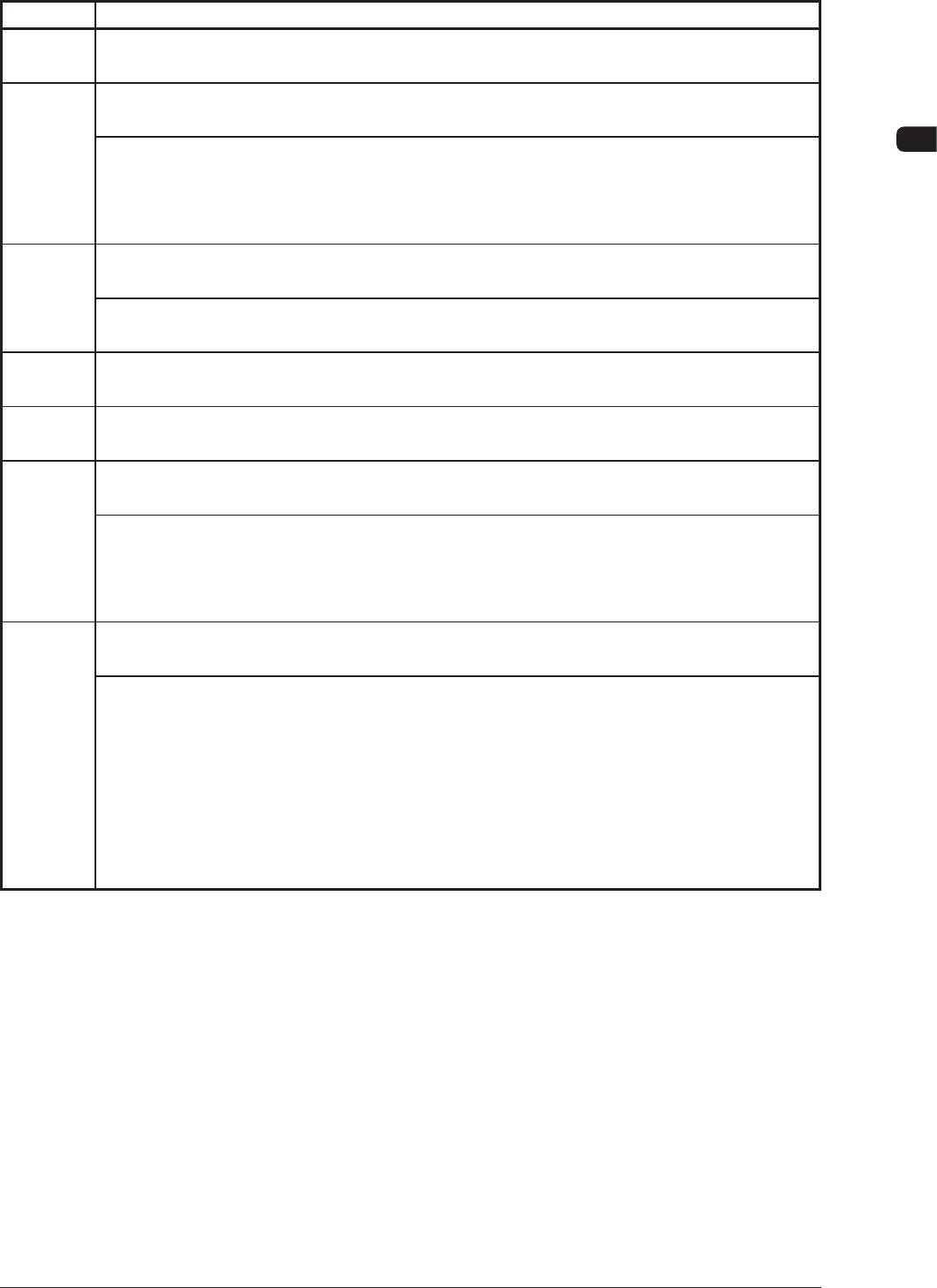
2. Troubleshooting on Each Section : Chap.2
(16 Self-Diagnostics)
T4B40
Error ID Error Name, Description, Cause, and Remedy
1601000 Control Board
System error
1602000 Control Board
Control board error
(Cause 1) An error has occurred in the I/O communication.
(Remedy 1) Shut down the power of the machine once and power up the machine again.
After that, restart the operation. When the same error still occurs, contact our
service personnel for details.
1603000 Sensor
Paste detect sensor error
(Cause 1) The paste height detection sensor (B64) is not adjusted correctly.
(Remedy 1) Contact our service personnel for details.
1604000 System Error
Undened Error.
1605000 System Error
Illegal error code.
1606000 System Error
Internal data error.
(Cause 1) Self-Diagnostics Error Message
(Remedy 1)
Shut down the power of the machine once and power up the machine again.
After that, restart the operation. When the same error still occurs, contact our
service personnel for details.
1607000 System Error
Failed to caliculate position.
(Cause 1) Self-Diagnostics Error Message
(Cause 2) The amount of the recognition correction has exceeded the limited value
(10 mm twice).
(Remedy 1) Shut down the power of the machine once and power up the machine again.
After that, restart the operation. When the same error still occurs, contact our
service personnel for details.
(Remedy 2) Check the coordinates of the ducial mark and the value for printing
inaccuracy correction.
0906-001
4OM-1505
2-44
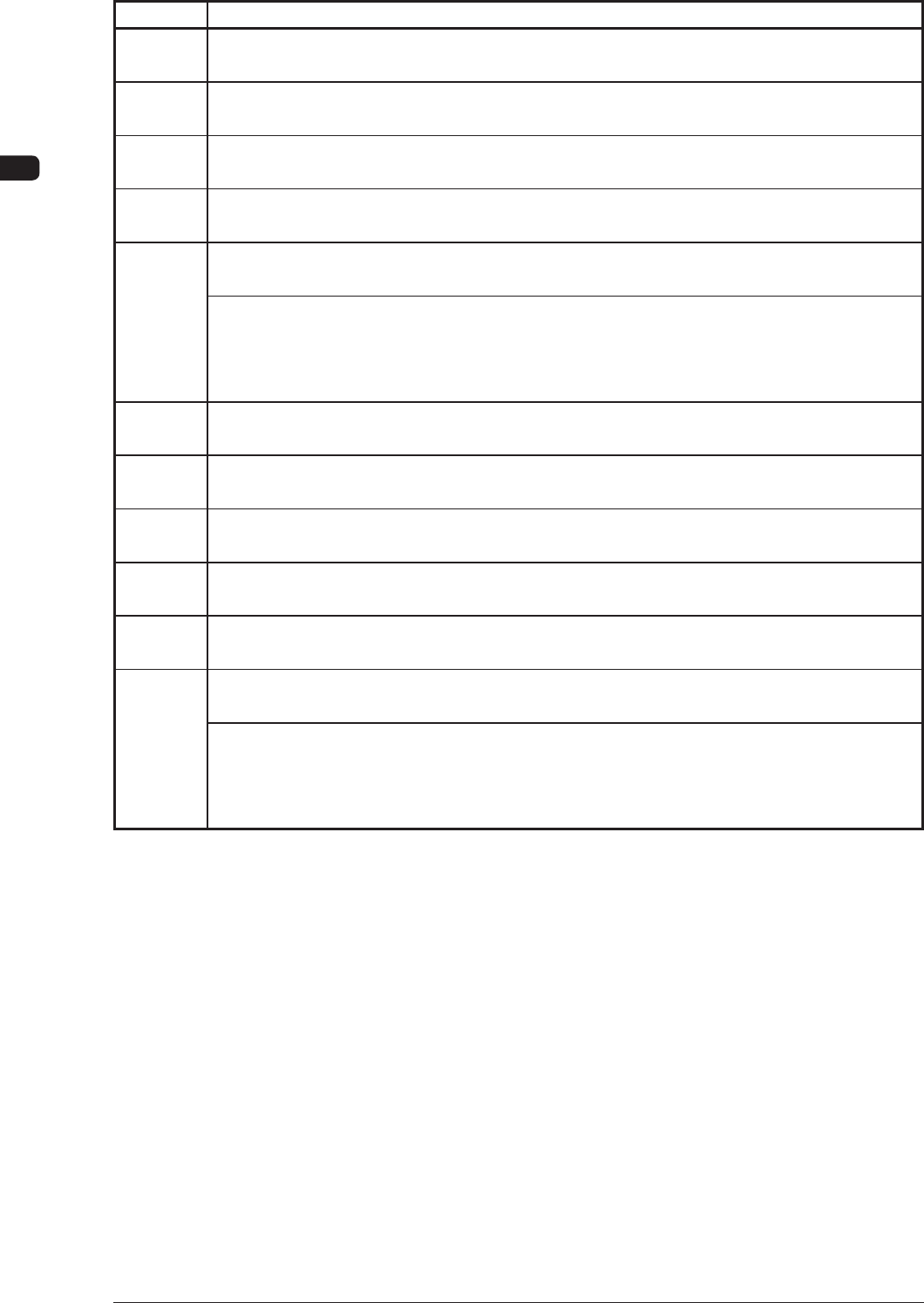
2. Troubleshooting on Each Section : Chap.2
0906-001
T4B41
Error ID Error Name, Description, Cause, and Remedy
1608000 Node Error
Operation Node (1) Error
1609000 Node Error
Relay Secquence Node (2) Error
1610000 Node Error
Inp.&& Outp.Mac. Interface Node (3) Error
1611000 Node Error
PCB Transfer Node (4) Error
1612000 Node Error
PCB Chuck Node (5) Error
(Cause 1) Node failed in the communication with the host computer.
(Remedy 1) Shut down the power of the machine once and power up the machine again.
After that, restart the operation. When the same error still occurs, contact our
service personnel for details.
1613000 Node Error
Squeegee Head Node (6) Error
1614000
Node Error
PEC Recog. Node (7) Error
1615000 Node Error
Cleaning Unit Node (8) Error
1616000 Node Error
Blower Unit Node (9) Error
1617000 Node Error
Printing pressure control output node error
1618000 Node Error
Printing pressure control input node error
(Cause 1) Node failed in the communication with the host computer.
(Remedy 1) Shut down the power of the machine once and power up the machine again.
After that, restart the operation. When the same error still occurs, contact our
service personnel for details.