xp141-241-341-5.0E.pdf - 第129页
FK-9F98- 29 XP Series training Text for Service Engineers Edition 5.0 XP241 – Chapter 5 Peripheral Adjustments Page 4 of 19 Fuji Machine Mfg. Co., Ltd. Okazaki. SMT Equipment Quality Assurance Dept . 5 – 4 CS Section Out…
FK-9F98-29 XP Series training Text for Service Engineers
Edition 5.0 XP241 – Chapter 5 Peripheral Adjustments Page 3 of 19
Fuji Machine Mfg. Co., Ltd. Okazaki.
SMT Equipment Quality Assurance Dept.
5 – 3 CS Section
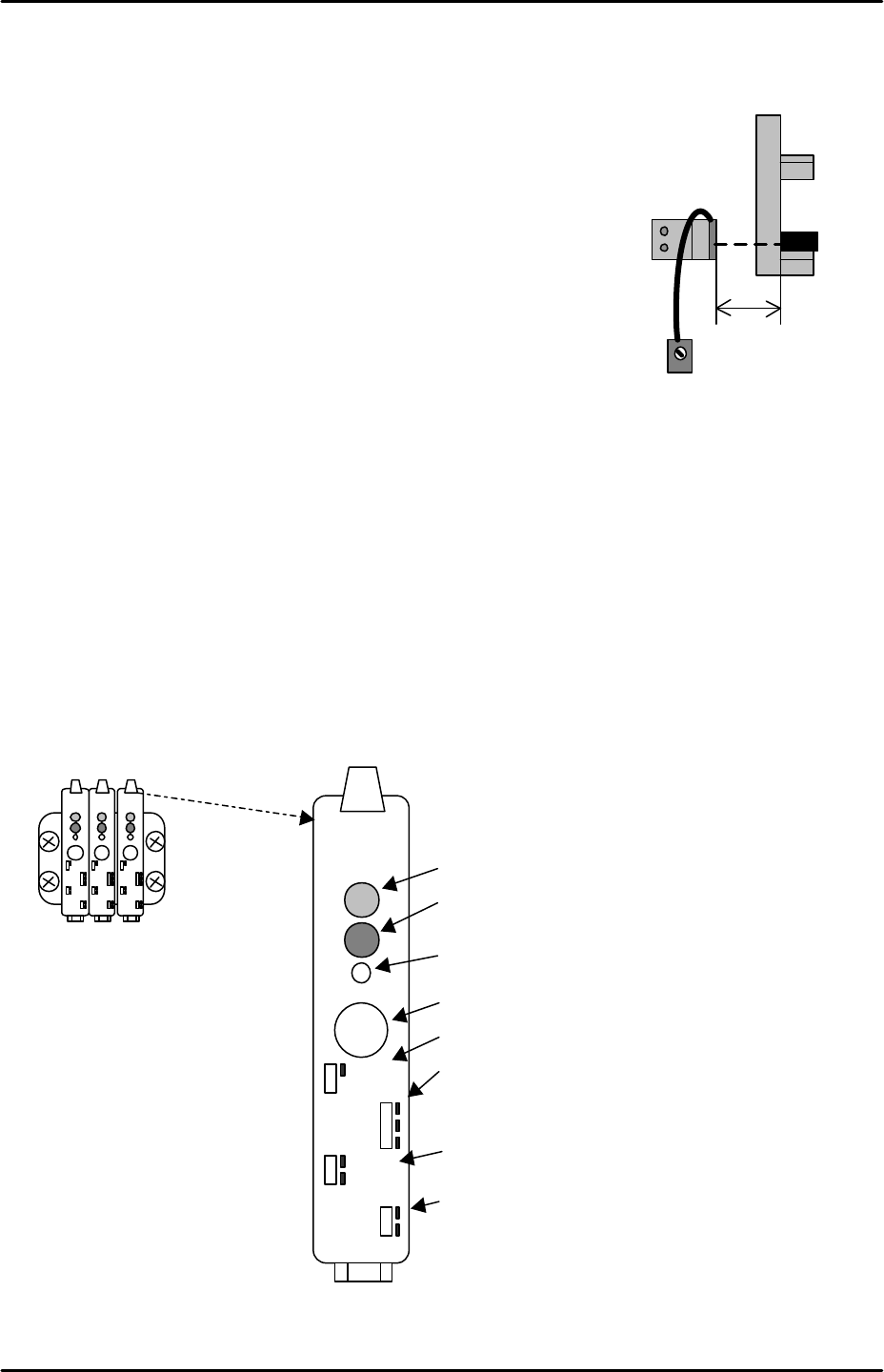
Tray detection sensor adjustment
1. Set a tray at tray position 1 and bring the T axis to the T_Tray
Org position.
2. Set the sensor volume to its maximum (clockwise).
3. Position the sensor 20 mm from the tray’s leading edge and
adjust the position of the sensor so that its beam is centered
on the tray side.
4. Ensure the I/O X038 M.PosTrayDetect turns ON when the
sensor is interrupted.
MTU interlock sensor adjustment
Equipment: MTU Interlock Sensor Jig (Z9631DEPJ3101).
1. Remove three trays from the middle of the MTU magazine.
2. Close the MTU door and select [Manual Operation] – [Tray Operation] – [Slot] – [Here
choose the slot number of the lowest of the removed trays] and then press [Move
elevator] to move the magazine to the loading position for that tray.
3. The amplifier for the interlock sensor is located to the right of the two tray height check
sensor amplifiers. To set the amplifier carry out the following procedure:
4. Verify that the amplifier is set as follows:
20mm
Set the volume
to MAX.
Tray detection
sensor
Output timer changeover switch
SET
LOCK
OFF.D
ON.D
OFF
D.ON
L.ON
FINE
TURBO
Operation indicator lamp (Red LED)
Stable operation indicator (Green LED)
Tuning indicator (Yellow LED)
SET button
Key-Protect switch
Output changeover switch
FINE/TURBO toggle switch

FK-9F98-29 XP Series training Text for Service Engineers
Edition 5.0 XP241 – Chapter 5 Peripheral Adjustments Page 4 of 19
Fuji Machine Mfg. Co., Ltd. Okazaki.
SMT Equipment Quality Assurance Dept.
5 – 4 CS Section
Output timer changeover switch OFF
Output changeover switch L.ON
FINE/TURBO toggle switch FINE
5. Push the [LOCK] switch down to unlock the amplifier.
6. With the sensor uninterrupted press the [SET] button once.
7. With the sensor interrupted press the [SET] button one more time.
8. Push the [LOCK] switch up to lock the amplifier.
9. To monitor the status of the sensor select [Maintenance A] – [I/O Check] – [X03C
TraySetCheck].
10. To check the position of the sensor use the MTU Interlock Sensor Jig (Z9631DEPJ3101).
This slides into the MTU like a tray and has two protrusions at either end, one of 2.5mm,
one of 3.5mm.
11. With the 2.5mm protrusion foremost slide the jig into the tray position selected at step 2.
The jig should be pushed in as far as it will go so that it is in contact with the MTU guide
bar rail.
12. Under these conditions the sensor [X03C TraySetCheck] should be ON.
13. With the 3.5mm protrusion foremost slide the jig into the tray position selected at step 2.
The jig should be pushed in as far as it will go so that it is in contact with the MTU guide
bar rail.
14. Under these conditions the sensor [X03C TraySetCheck] should be OFF.
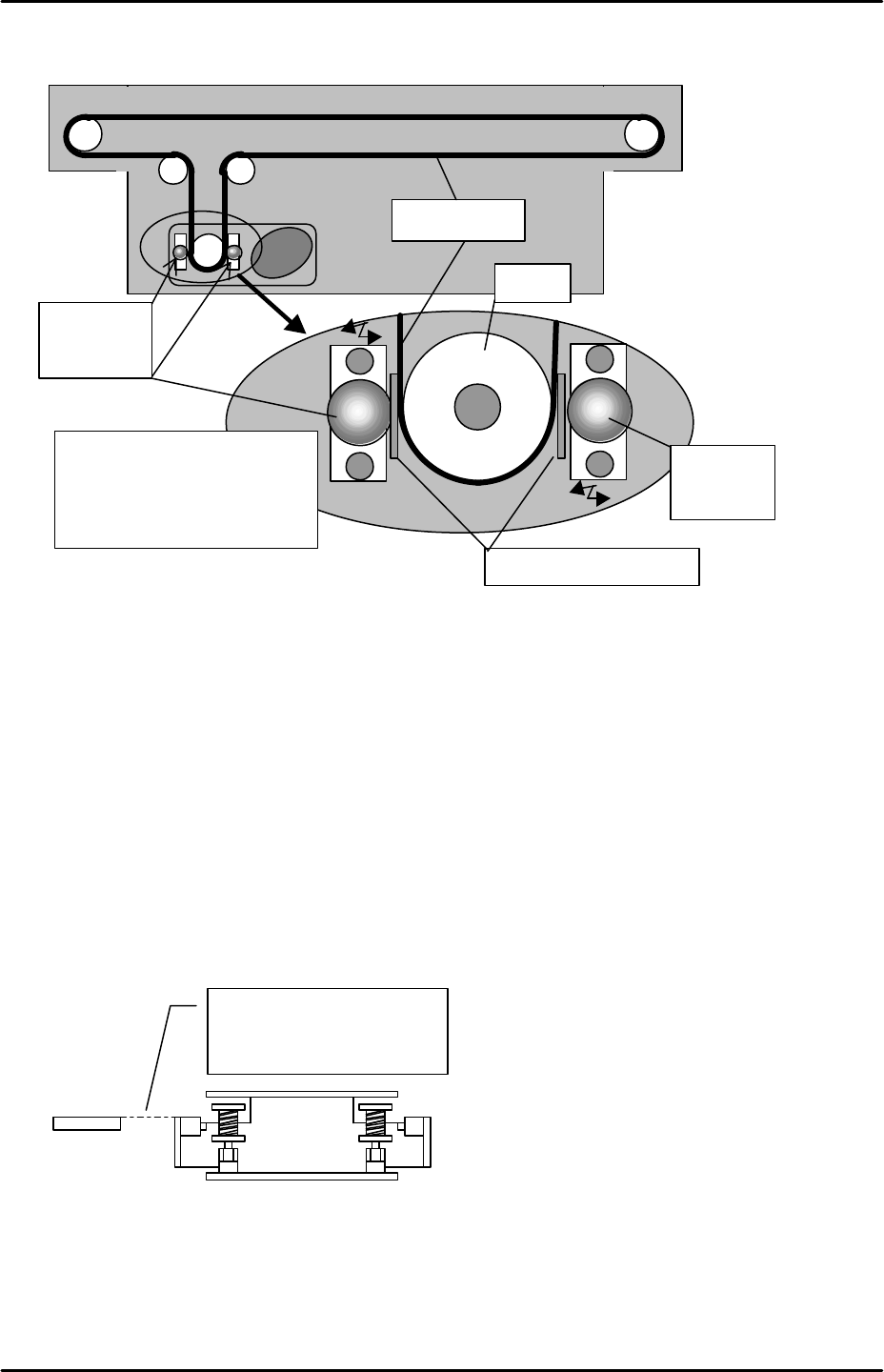
U-axis belt slippage adjustment
1. Use a feeler gauge and adjust the roller guide so that the distance between the roller and
the belt becomes 0.1 mm.
2. Insert a 0.1mm feeler gauge between the pully belt and roller. Lightly push the roller
against the pulley and tighten the roller bolt.
FK-9F98-29 XP Series training Text for Service Engineers
Edition 5.0 XP241 – Chapter 5 Peripheral Adjustments Page 5 of 19
Fuji Machine Mfg. Co., Ltd. Okazaki.
SMT Equipment Quality Assurance Dept.
5 – 5 CS Section
Tray shuttle advance / retract adjustment
1. Select [Manual Operation] – [Tray Operation] – [Tray Exchange Pos.] – [START] to move
the tray unit to the tray exchange position.
2. Retract the shuttle, making sure it moves to its retract position.
3. Descend the magazine so that the rollers on the U-axis shuttle are visible.
4. Ensure that the shuttle rollers and the T-axis guide bars are in alignment. If they are not
in alignment, adjust the shuttle retract position by editing [Maintenance C] – [Proper Data
Editor] – [Tray] – [U_Shuttle Backward Ofst].
5. When the shuttle is at the retract limit position (under 200v ON condition), the clamper
should be 0.5mm inside the roller. See diagram overleaf.
Roller for
slippage
prevention
Pulley
0.1mm feeler gauge
Roller for
slippage
prevention
Insert the feeler gauge
between the pulley and roller.
Push the roller against the
pulley and tighten the bolt.
Timing belt
The shuttle roller and the
guide bar should be in
alignment.
Guide bar