xp141-241-341-5.0E.pdf - 第202页
FK-9F98- 29 XP Series Training Text for Service Engineers Edition 5.0 XP241 – Chapter 9 New MTU Adjustment Page 19 of 21 Fuji Machine Mfg. Co., Ltd. Okazaki SMT Equipment Quality Assurance Dept. 9 – 19 CS Section 9.25 Tr…
FK-9F98-29 XP Series Training Text for Service Engineers
Edition 5.0 XP241 – Chapter 9 New MTU Adjustment Page 18 of 21
Fuji Machine Mfg. Co., Ltd. Okazaki
SMT Equipment Quality Assurance Dept.
9 – 18 CS Section
9.24 Shuttle clamp position check
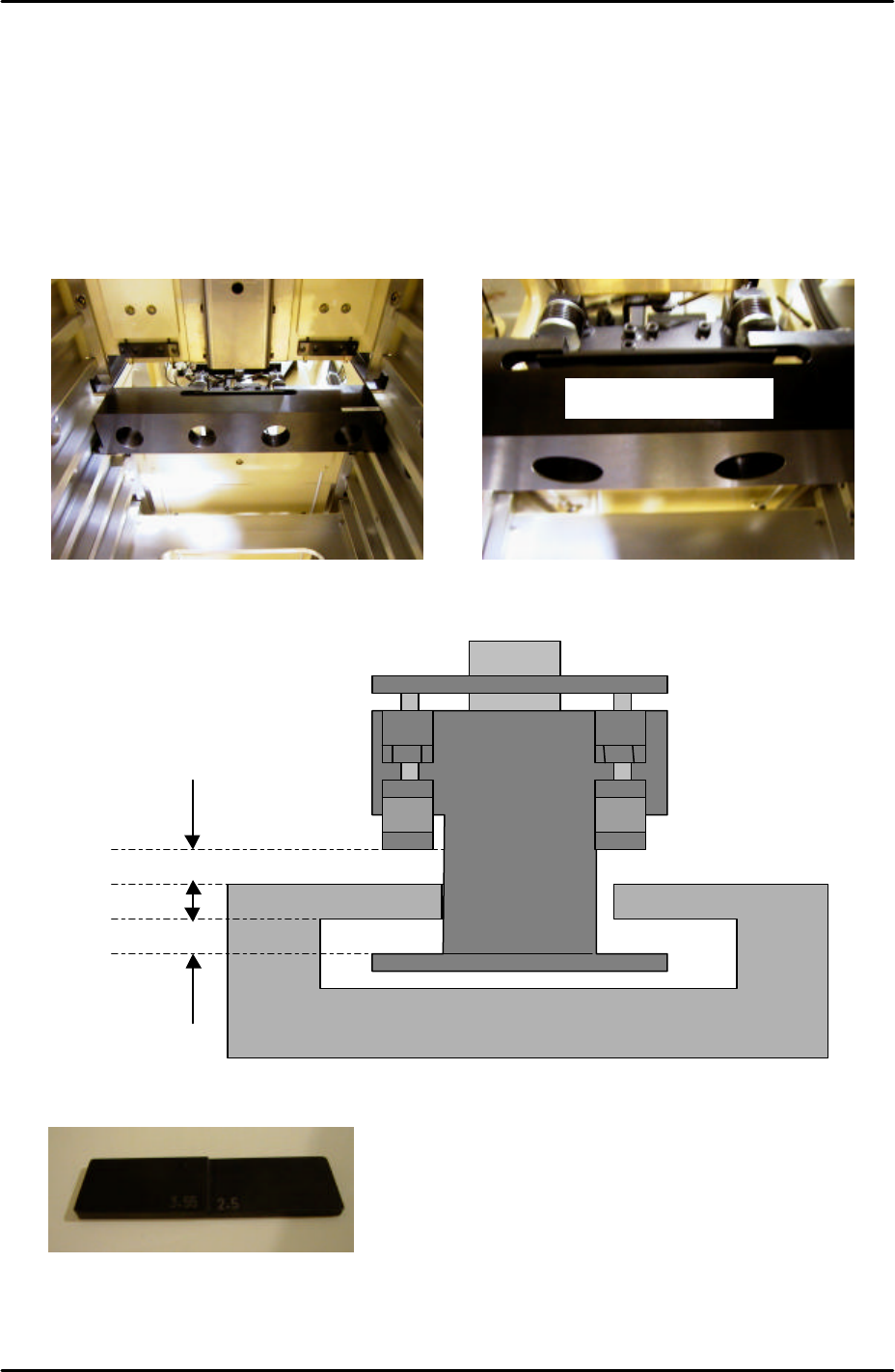
1. Temporarily set the large block jig (Z9631ADEPJ8172) in the center of slot [41,42].
2. Move the T-axis so that slot [51,52] moves to the tray transference position.
3. Position the large block jig so that the cut out section hooks over the shuttle clamper as
shown in the photographs below. Make sure that the large block jig is pushed as far
forward as possible so that it is right up against the MTU guide rails:
4. Under these conditions check that the front and back clearances between the shuttle
clamper and jig are within tolerance as shown in the following diagram:
5. Use a feeler gage jig or similar object to measure the gaps:
6. If the clearance is not within tolerance recheck the shuttle clamping position adjustment
(9.16) and the tray catch stopper adjustment (9.23).
Z9631ADEPJ8172
2.5mm to 3.55mm
2.5mm to 3.55mm
Z9631ADEPJ8172
3.55 2.5
FK-9F98-29 XP Series Training Text for Service Engineers
Edition 5.0 XP241 – Chapter 9 New MTU Adjustment Page 19 of 21
Fuji Machine Mfg. Co., Ltd. Okazaki
SMT Equipment Quality Assurance Dept.
9 – 19 CS Section
9.25 Tray detection sensor adjustment
1. Move the T-axis to the “T_TrayOrg” position.
2. Set the tray shutter at position 1.
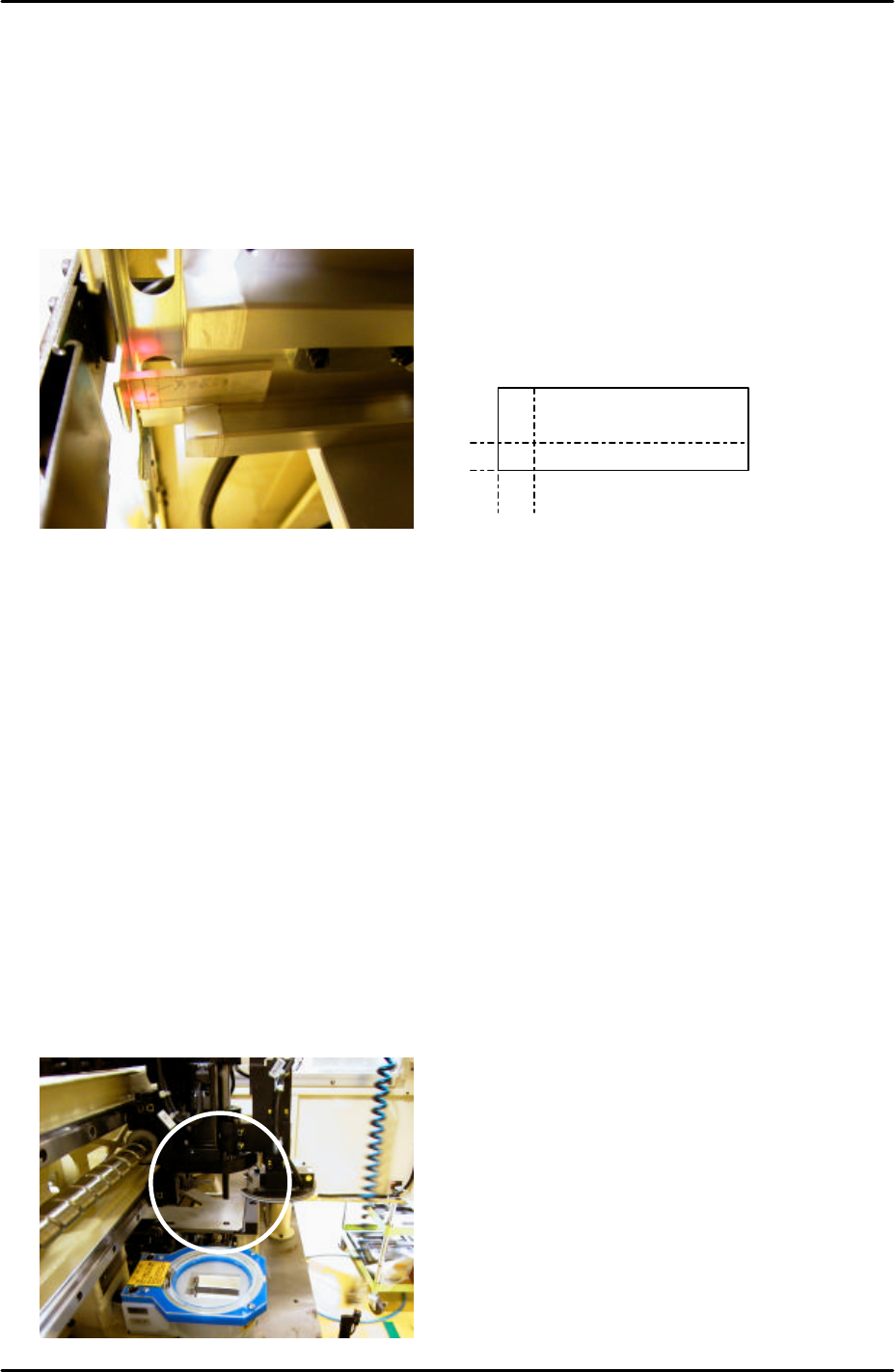
3. Slide the acrylic jig along the slot [01,02] magazine rail until it contacts the shutter as
shown below:
4. Adjust the position of the tray detection sensor so that the sensor beam is in the center of
the cross on the jig.
5. If it is impossible to set the sensor beam in the center of the cross then set it as close as
possible.
9.26 Tray pickup position measurement
1. Set the tray jig (Z9531DEPJ3522) in slot [01,02] and select [Manual Operation] – [Tray
Operation] – [01,02] – [Move Elevator] to bring the jig to the tray origin position.
2. Select [Shuttle Forward] to bring the tray jig to the tray pickup position.
3. Select [Maintenance A] – [I/O Check] – [Y021 NozzleUnhold] – [OFF] and attach the tray
pickup position nozzle jig (Z9731DEPJ3650) to the placing head.
4. Bring the placing head over the tray jig and then press the emergency stop button to cut
the 200V power supply to the servos:
5mm
4mm
Acrylic Jig

FK-9F98-29 XP Series Training Text for Service Engineers
Edition 5.0 XP241 – Chapter 9 New MTU Adjustment Page 20 of 21
Fuji Machine Mfg. Co., Ltd. Okazaki
SMT Equipment Quality Assurance Dept.
9 – 20 CS Section
5. Manually move the X, Y and Z axes until the nozzle jig can slide smoothly into the tray
pick up position jig hole:
6. Select [Maintenance C] – [Proper Data Editor] – [Machine Origin] –
[X_stage2Org/Y_stage2Org] – [Direct Servo Input] to save the current X and Y-axes
positions in proper data.
7. To set the [Z_stage2surface] proper data remove the tray jig (Z9531DEPJ3522). Set a
standard tray pallet in slot [01,02] and select [Manual Operation] – [Tray Operation] –
[01,02] – [Move Elevator] to bring the tray pallet to the tray origin position.
8. Select [Shuttle Forward] to bring the tray pallet to the tray pickup position.
9. Replace the pickup position nozzle jig (Z9731DEPJ3650) with the standard nozzle jig
(Z9531DEPJ0070).
10. Bring the placing head over the tray pallet and then press the emergency stop button to
cut the 200V power supply to the servos.
11. Manually descend the Z-axis until the nozzle jig just contacts the surface of the tray
pallet.
12. Select [Maintenance C] – [Proper Data Editor] – [Machine Origin] – [Z_stage2surface] –
[Direct Servo Input] to save the current Z-axis position in proper data.
9.27 Returning proper data
1. Select [Maintenance C] – [Proper Data Editor] – [Operation] – [TrayDetectMotion] and
change from 0 to 2.
2. Select [OPERATION_2] – [JogInterlockOFF] and change from 1 to 0.
9.28 Re-tightening check
1. Carry out a re-tightening check for any bolts that were tightened during the adjustment.