xp141-241-341-5.0E.pdf - 第77页
FK-9F98- 29 XP Series Training Text for Service Engineers Edition 5.0 XP141 – Chapter 6 Proper Data Measurements Page 22 of 26 Fuji Machine Mfg. Co., Ltd. Okazaki SMT Equipment Quality Assurance Dept. 6 – 22 CS Section 6…
FK-9F98-29 XP Series Training Text for Service Engineers
Edition 5.0 XP141 – Chapter 6 Proper Data Measurements Page 21 of 26
Fuji Machine Mfg. Co., Ltd. Okazaki
SMT Equipment Quality Assurance Dept.
6 – 21 CS Section
5. Press the emergency stop button to cut the 200v power supply to the servos.
6. Push the placing head out of the way along the Y-axis but do not change the position of
the X-axis.
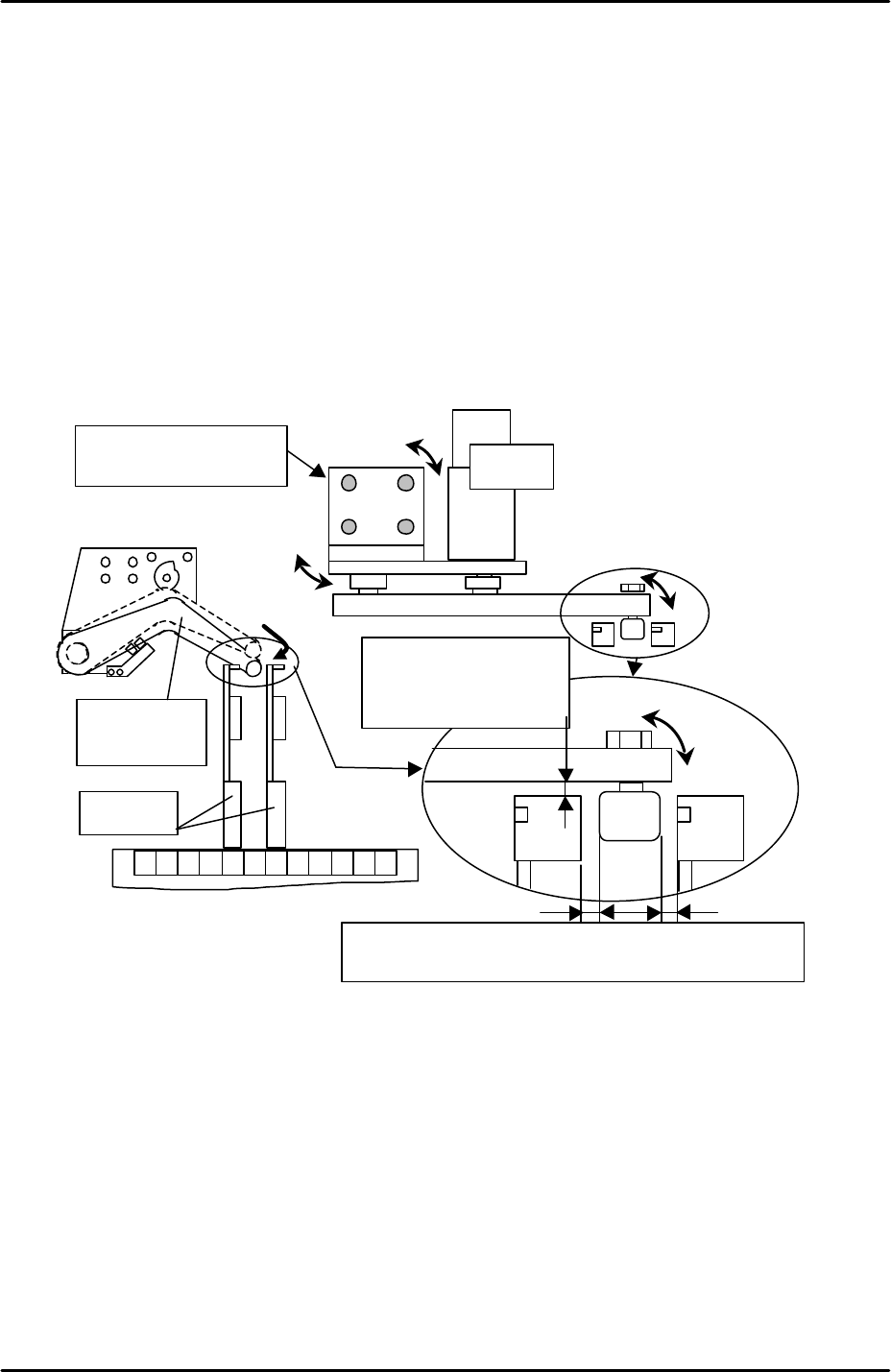
7. Manually descend the feeder indexing lever between the two feeders in slots D19 and
D21.
8. At this position the clearance between the tape feeder indexing arm and the XP indexing
lever should be 0.5 to 1.0mm in the Y direction. Please refer to the diagram below and
adjust if necessary.
9. The position of the XP indexing lever in the X direction should be such that when the
indexing lever is pressed down it is in the center of the two feeders on either side. Please
refer to the diagram below and adjust if necessary.
10. After any adjustments confirm that the feeder indexing lever height is still 0.7mm (see the
first part of 6.17 “feeder indexing lever height”).
11. Finally select [Maintenance C] – [Proper Data Editor] – [Machine Origin] – and confirm
that the value entered for [F_DownPoint] and [G_DownPoint] is –8.7mm.
19 2120 2218
Feeder
Feeder
index lever
The clearance between
lever and feeder:
0.5mm~ 1.0mm
Adjust to have even clearance between the cam follower
and feeder when lowering the index lever.
Adjust the motor BKT
for positioning
Motor
FK-9F98-29 XP Series Training Text for Service Engineers
Edition 5.0 XP141 – Chapter 6 Proper Data Measurements Page 22 of 26
Fuji Machine Mfg. Co., Ltd. Okazaki
SMT Equipment Quality Assurance Dept.
6 – 22 CS Section
6.18 X and Y axis retract position
1. The retract position ensures the placing head is not in a position that would cause
interference when clamping or unclamping an MFU from the machine.
2. Select [Maintenance C] – [Proper Data Editor] – [Machine Origin] – and check that the
following proper data is input:
X_Table Org 5mm
Y_Table Org 400mm
6.19 Measuring the parts reject position
1. Select [Maintenance A] – [Jog] – [Fiducial Camera] and display the cross hairs on the
screen.
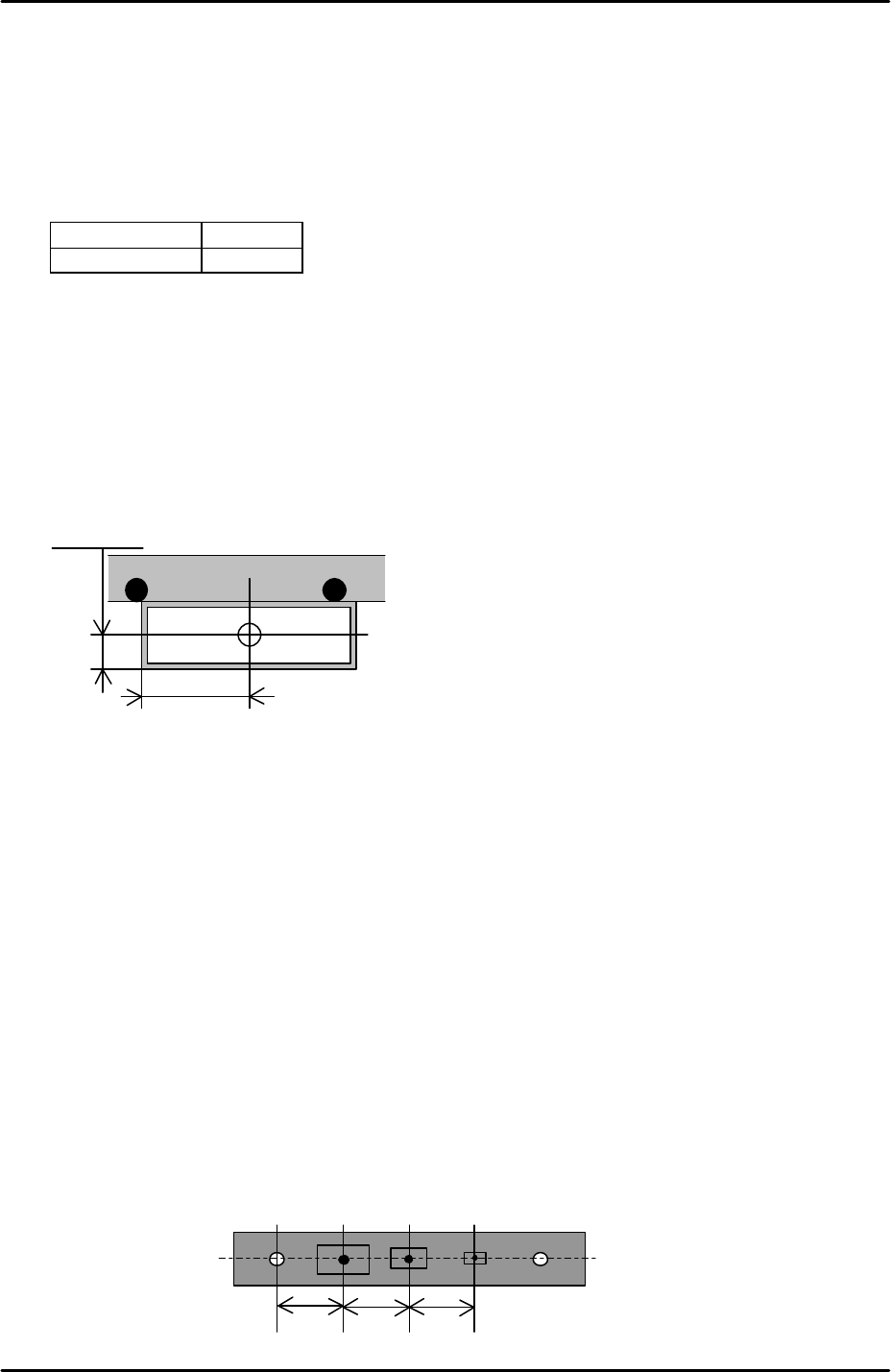
2. Jog the fiducial camera until it is in the center of the parts reject box. Refer to the
diagram below for the dimensions of the box:
3. Select [Maintenance C] – [Proper Data Editor] – [Dispose Position] –
[X_Disposal1/Y_Disposal1] – [Direct Servo Input] to save the current X-axis and Y-axis
positions in proper data.
6.20 Measuring the parts gage pickup positions
1. Equipment: nozzle jig (A5706ASEAJ8100). Lever type dial gage (0.01mm).
2. Select [Maintenance A] – [Jog] – [Fiducial Camera] and display the cross hairs.
3. Carefully remove the three ceramic parts gages from the parts gage station so that the
parts gage indents and vacuum holes are visible.
4. Center the cross hairs on the parts gage 1 vacuum hole and select [Maintenance C] –
[Proper Data Editor] – [Jig Position] – [Y_JigPickPos] – [Direct Servo Input] and
[X_JigPickPos1] – [Direct Servo Input] to save the current X and Y axis counter values to
proper data.
12.5mm
35mm
10 1010
1 2 3A
FK-9F98-29 XP Series Training Text for Service Engineers
Edition 5.0 XP141 – Chapter 6 Proper Data Measurements Page 23 of 26
Fuji Machine Mfg. Co., Ltd. Okazaki
SMT Equipment Quality Assurance Dept.
6 – 23 CS Section
5. Return to the jog screen and center the cross hairs on the parts gage 2 vacuum hole and
select [X_JigPickPos2] – [Direct Servo Input] to save the current X axis counter value to
proper data.
6. Return to the jog screen and center the cross hairs on the parts gage 3 vacuum hole and
select [X_JigPickPos3] – [Direct Servo Input] to save the current X-axis counter value to
proper data.
7. Insert the nozzle jig in nozzle piston no.1 and replace the no.1 parts gage in the parts
gage station.
8. Bring the nozzle jig above the parts gage and descend the Z-axis until the nozzle jig
almost contacts the parts gage.
9. Place a dial gage on the nozzle jig and use this to determine the point where the nozzle
jig first contacts the parts gage.
10. Select [Z_JigPickPos] – [Direct Servo Input] to save the current Z-axis counter value to
proper data.
6.21 Measuring the matrix data
1. Equipment: glass gage for matrix measurement (A5704DEAJ14013).
2. Note that the matrix data measurement should be carried out when the machine is cold,
otherwise the results will not be reliable. Fuji recommends that the machine is not used
for at least two hours prior to the measurement.
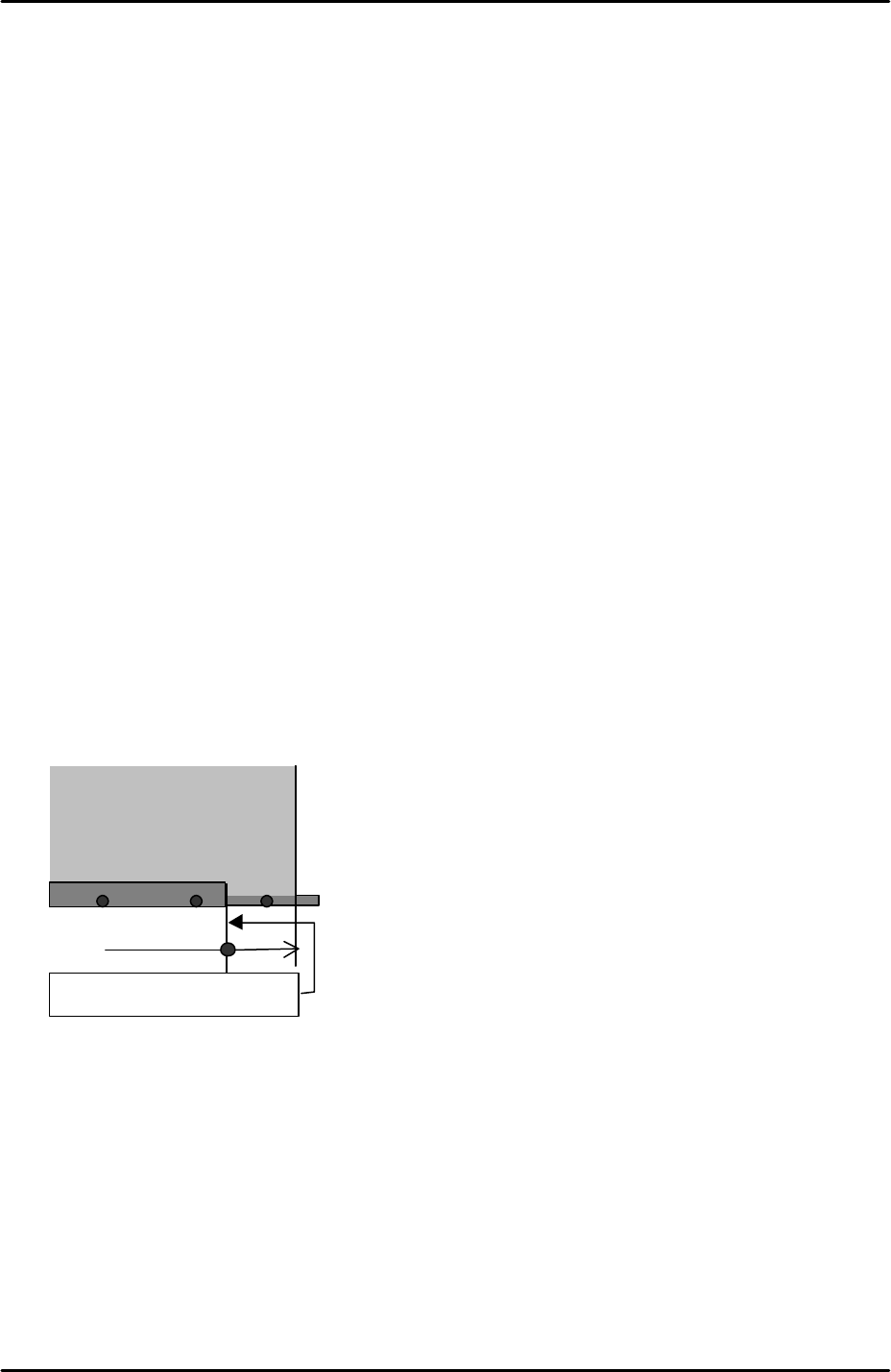
3. Clamp the matrix measurement glass gage approximately 70mm from the main conveyor
right end.
4. Because the glass gage is 5mm thick the main lifter upper limit sensor will not come ON
when the gage is clamped. As a result it is necessary to interrupt the upper limit sensor
with a piece of paper tape.
5. Select [Maintenance A] – [Jog] – [Fiducial camera] – and display the cross hairs on the
screen.
6. Center the fiducial camera on the last dot in the bottom left hand corner of the glass gage
and record the Y-axis counter value.
7. Move the fiducial camera until it is centered on the last dot in the bottom right hand
corner of the glass gage. Compare the current Y-axis counter value with that recorded in
step 6. The difference in value should be within 0.5mm. This ensures that the X-axis
Glass gauge for matrix data
( A5704DEAJ1013)
Approx. 70mm
Main conveyor right end