xp141-241-341-5.0E.pdf - 第82页
C C h h a a p p t t e e r r 7 7 O O p p e e r r a a t t i i o o n n a a n n d d A A c c c c u u r r a a c c y y

FK-9F98-29 XP Series Training Text for Service Engineers
Edition 5.0 XP141 – Chapter 6 Proper Data Measurements Page 26 of 26
Fuji Machine Mfg. Co., Ltd. Okazaki
SMT Equipment Quality Assurance Dept.
6 – 26 CS Section
NOTES:

C
C
h
h
a
a
p
p
t
t
e
e
r
r
7
7
O
O
p
p
e
e
r
r
a
a
t
t
i
i
o
o
n
n
a
a
n
n
d
d
A
A
c
c
c
c
u
u
r
r
a
a
c
c
y
y
FK-9F98-29 XP Series Training Text for Service Engineers
Edition 5.0 XP141 – Chapter 7 Operation and Accuracy Page 1 of 4
Fuji Machine Mfg. Co., Ltd. Okazaki
SMT Equipment Quality Assurance Dept.
7 – 1 CS Section
Chapter 7 – Checking operation and accuracy
7.1 Checking idle operation
1. Transmit the idle program “XP1_IDLE” to the machine.
2. Ensure that there are no feeders in the MFU and no nozzles in the revolver.
3. Select [Production] – [Nozzle Editor] – and set all 12 nozzle diameter entries to 1.3mm.
4. Set the conveyor at its maximum width of 356mm.
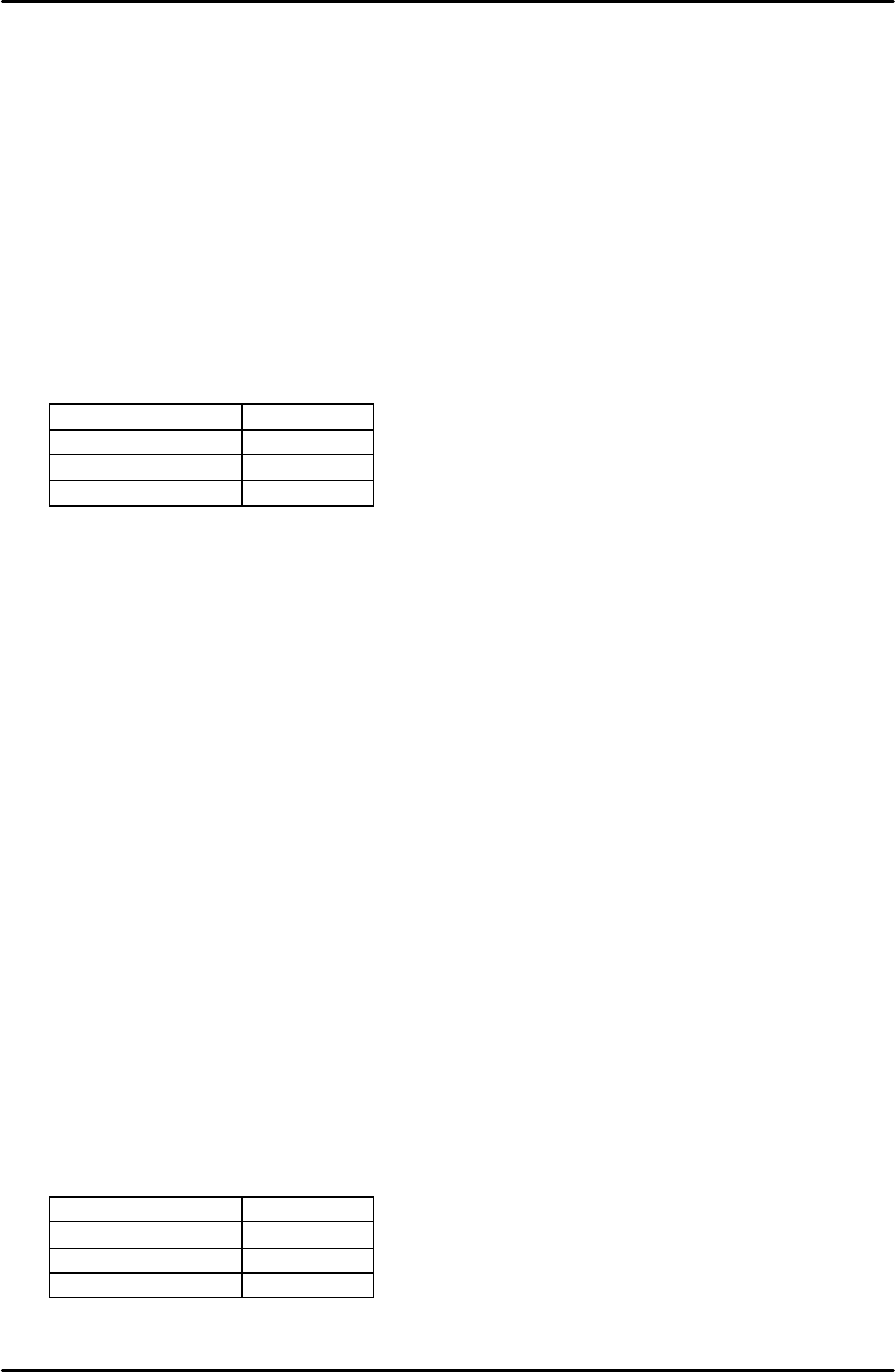
5. Select [Maintenance A] – [Select Mode] and set the mode as detailed in the following
table:
Operation Mode Idle
Production Mode Automatic
Error handling Error Stop
Acceleration rate 0.1
6. Check for any mechanical interference in the machine then select [Production] –
[Automatic] – [START] to commence idling.
7. Check that there are no irregular noises or movements in the machine and then gradually
increase the acceleration rate up to a maximum 0f 1.0.
8. The machine should be run for at least 12 hours without stopping, and in total for at least
30 hours.
9. After idling is complete check the machine for any irregularities.
7.2 Placing Accuracy Measurement
1. Equipment: glass board (Z5314CGPJ0120) with white background and double-sided
sticky tape. 12 x 1.3mm white nozzles. 3216 black PAM parts.
2. Transmit the relevant program to the machine. Side1: [G_3216PAM-18]. Side2:
[G_3216PAME-18].
3. Select [Production] – [Select Program] – [G_3216PAM-18] – [Download] to bring the
program into the machine foreground.
4. Select [Maintenance A] – [Select Mode] – and set the mode as detailed in the following
table:
Operation Mode Production
Production Mode Automatic
Error handling Error Pass
Acceleration Rate 1.0