ts9800-user-guide-7511-0360_A.pdf - 第15页
15 WARNING: Ma ke sure the nozzle insert and nozzle bushing ar e properly in stalled in the nozzle unit before starting the calibration pr oc e ss . Never over- tig hten the nozzle unit a ga inst the tappet since it can …
14
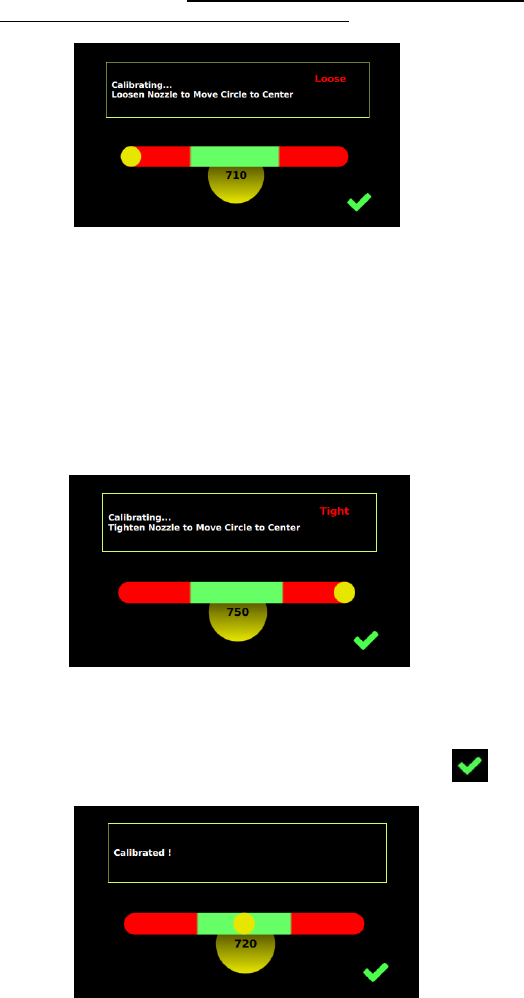
Step 4:
Slowly and gently un-screw the nozzle unit (counter-clockwise), using
the nozzle adjustment tool if necessary, to move the yellow circle to the
center of the green zone. Note: values in the yellow circle are only for
reference and it will vary from valve to valve.
Caution: The value shown below the green zone does not make a significant
difference for the precision of the dispense process if the yellow circle is
inside the green zone.
Step 5:
If the nozzle unit is un-screwed too far out, the yellow circle will move to
the right of the green zone. Slowly screw the nozzle unit to move the
yellow circle back to the center of the green zone.
Step 6:
Once the yellow circle is at the center of the green zone, the nozzle insert is
properly calibrated. Touch the ‘Accept’ icon to save and exit .
15
WARNING:
Make sure the nozzle insert and nozzle bushing are properly installed in the
nozzle unit before starting the calibration process.
Never over-tighten the nozzle unit against the tappet since it can break the
tappet or cause pre-matured wear on both tappet and nozzle insert.
If the yellow circle can’t be moved to or stay inside the green zone, touch
the ‘Accept’ icon to exit and repeat the calibration procedure starting from
Step 1.
Remarks:
• You can leave the calibration procedure by touching the ‘Accept’
icon.
• The calibration can only be confirmed by touch the ‘Accept’
icon when the yellow circle is inside the green zone.
• If you shut down the system and alter nothing mechanically,
you don’t have to perform the calibration procedure again when
switching the system on.
• The calibration procedure should be done in cleaned dry system
to avoid any influences of the material between nozzle insert
and tappet and to get a consistent dispense result.
• If the fluid contains particles (fillers), the calibration procedure
performed with fluid is not possible. It must be performed
without fluid.
16
5. OPERATION
5.1 Start Dispensing
The valve is now ready to dispense. Dispensing fluid (via cartridge/syringe
or reservoir) must be connect the supply pressure regulator.
Enter the desired dispensing parameters refer to section 7.5.5 (Rising, Open
Time, Falling, Delay, Needle Lift and Number of Pulses), then touch ‘Save’
icon. Information to the values can be found in the table for ‘essential
parameters’ on the page below.
To start the dispensing, touch the ‘Run’ icon or use external start
signal for both or dot mode. When in line mode start
can only be activate or trigger by an external devised.
Attention: To de-air (removal of air in the system) after going through a
calibration procedure in section 4.3. (e. g. after the change of
cartridge/syringe and/or after the remove of nozzle) use the Purge feature to
de-air. To purge touch and hold the ‘Purge’ icon it will run the
parameter in the current program, and it will run until the purge icon is let
go.
5.2 Parameter Settings for the dispensing process
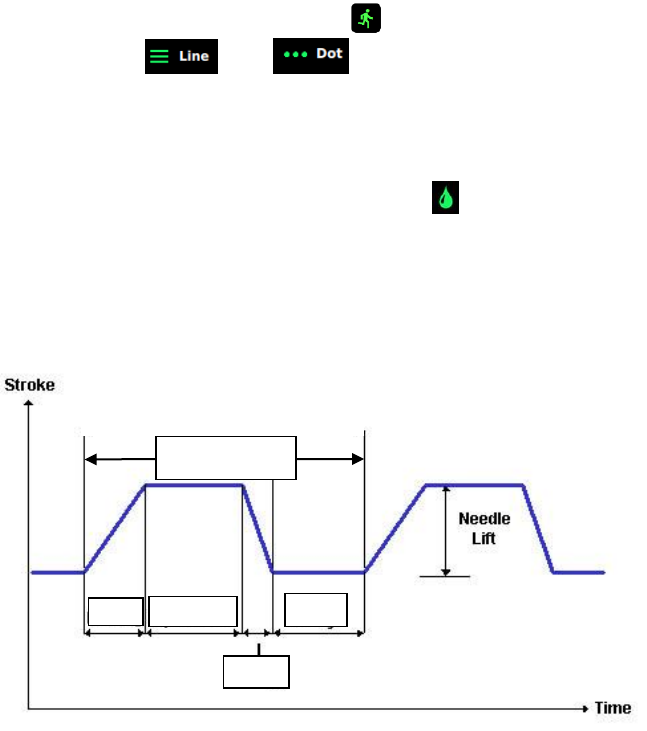
The TS9800 Jet Valve System works according to the control profile shown
below:
both
Figure 4: Control Curve
Delay
Open time
Rise
Fall
One Full Cycle
(Frequency)