ts9800-user-guide-7511-0360_A.pdf - 第35页
35 9.5 Operation 9.5.1 Login 1. Touch the ‘ Login ’ ic on to en ter the login screen 2. Ent er default password ‘ 0000 ’ in the password window. Ca ution: To chan ge the p assword, skip ste p 2 a nd proceed to step 4. 3.…
34
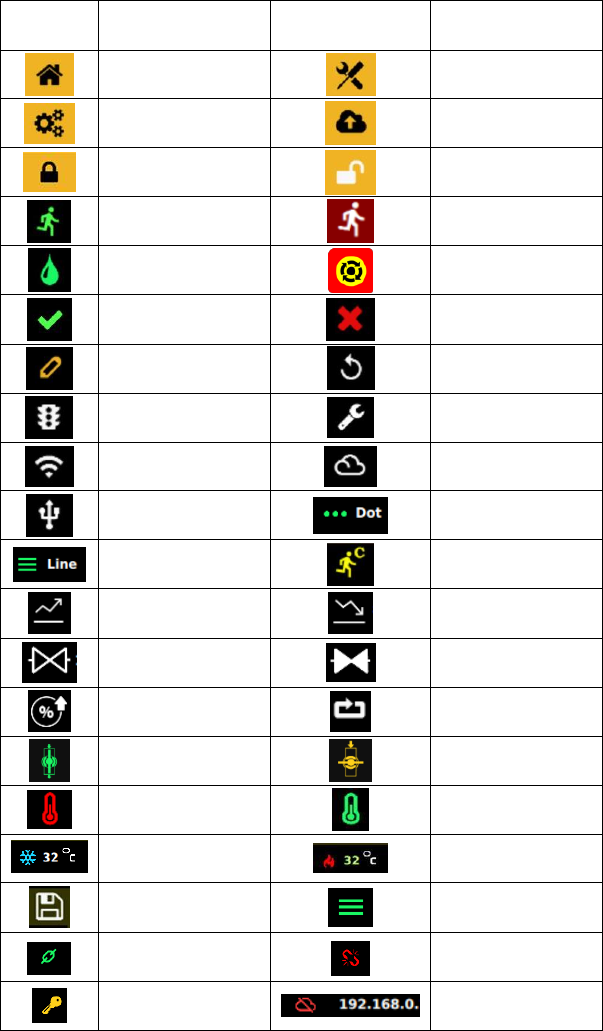
9.4 Symbol Definitions
Symbol
Description
Symbol
Description
Home Screen
Calibration
Settings
IoT
Login (Lock)
Logout (Unlock)
Run (Start)
System Inhibit
Purge (Press & Hold)
E-Stop
Accept
Cancel
Change Password
Counter Reset
Run Method
Service Mode
Wi-Fi Setting
(Not Available)
Remote Server
USB Application
Update
Dot Mode
Line Mode
Continuous Cycle
(Repeat Mode)
Rise Time
Fall Time
Open Time
Delay Time
Percentage Lift
Pulse
Valve Open
Valve Close (Closed
when system is ON)
Heater Off
Heater On
Heater is Idling/Off
Heater is On and
Heating Up
Save
Line Mode
(External Trigger)
Password Lock
Password Unlock
Master Password
Reset
IP Address for
Ethernet Connection
35
9.5 Operation
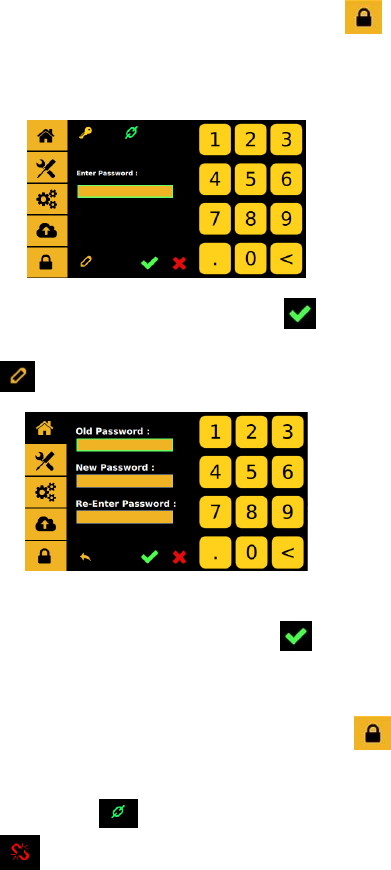
9.5.1 Login
1. Touch the ‘Login’ icon to enter the login screen
2. Enter default password ‘0000’ in the password window.
Caution: To change the password, skip step 2 and proceed to step 4.
3. Touch ‘Accept’ icon to save and exit
4. To change the password, touch the ‘Change Password’ icon
5. Enter the old password, then enter the new password.
6. Touch ‘Accept’ icon to save and exit
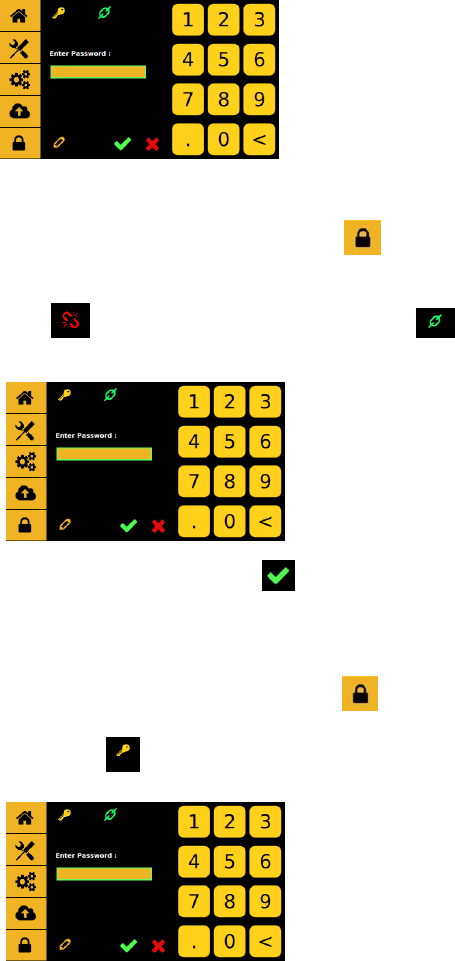
9.5.2 Disable Password protection (keep controller in Unlock Mode)
1. Touch the ‘Login’ icon to enter the login screen
2. Enter default password ‘0000’ in the password window and touch
the lock icon . The lock icon will switch to an unlock icon
indicating that the login icon will stay unlock untill it get
switch back.
36
9.5.3 Enable Password protection (keep controller in Lock Mode)
1. Touch the ‘Login’ icon to enter the login screen
2. Enter default password ‘0000’ in the password window and touch
the unlock icon . The unlock icon will switch to an lock icon
indicating that the login icon will lockup with every login and logout.
3. Touch ‘Accept’ icon to save and exit
9.5.4 Reseting Master password ( Please call TECHON for Master
Password)
1. Touch the ‘Login’ icon to enter the login screen
2. Enter password ‘xxxx’ in the password window and touch the
master reset icon .