ts9800-user-guide-7511-0360_A.pdf - 第41页
41 9.5.9 Se rvice Mode 1. Touch the valve Close icon it will toggle to the valve Open icon to open the valve for de-airing or purging (stay open). 2. Touch the valve Open icon to close the valve and it will toggle to a v…
40
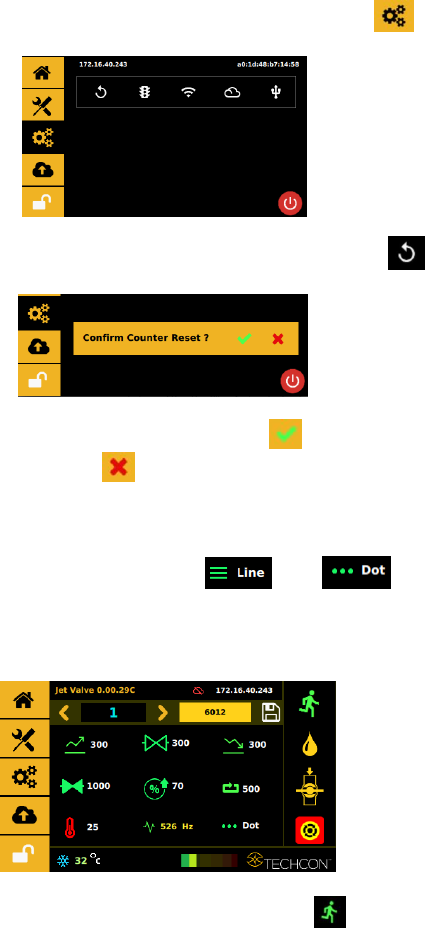
1. Touch the ‘Settings’ icon to enter the setup screen
2. Touch the ‘Counter Reset’ icon to reset the counter
3. Touch the ‘Accept’ icon to confirm or touch the
‘Cancel’icon to exit without resetting counter.
9.5.8 To Run in Dot or Line Mode
1. Touch to toggle between the line or dot icons
to switch mode. Note: switching from Line to Dot mode may
required a re-entry of a specific number of pulses desired to run
the parameter or setup.
1.
2. Touch ‘Run’ icon to start the dispensing cycle
3. If Line Mode is selected an external triggering devise is required
to trigger a start.
Caution: Line mode, the controller must be activated by secondary
source such as PLC or XYZ Table connected through 15-Pin I/O port.
41
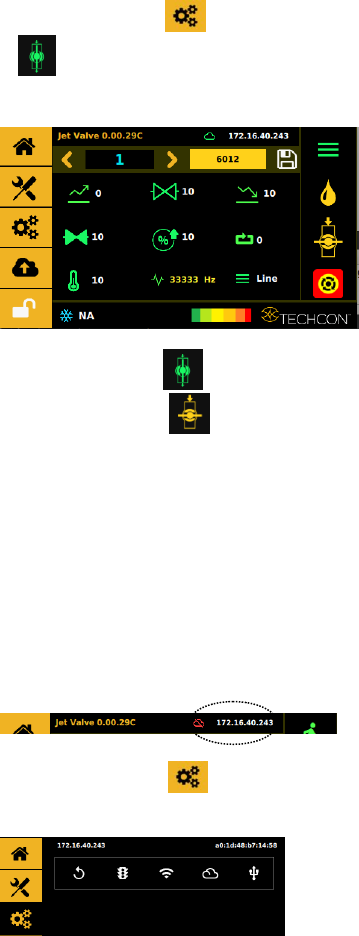
9.5.9 Service Mode
1. Touch the valve Close icon it will toggle to the valve Open
icon to open the valve for de-airing or purging (stay
open).
2. Touch the valve Open icon to close the valve and it will
toggle to a valve Close icon close position is a normal
operation mode.
Caution: The valve does not jet the material in this mode, the
material flows under regulated pressure only.
9.5.10 Connect to Wi-Fi Network (not available)
9.5.11 IOT (Remote Communication)
Note: Ethernet must be connected and it should already have
an IP address
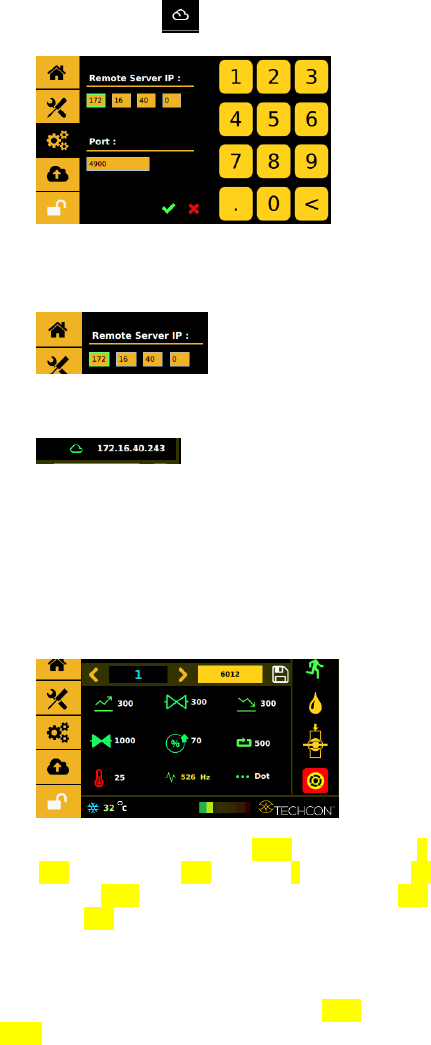
1. Touch the Setting icon it will toggle to the menu
bellow.
42
2. Touch the clould icon to prompt up the Remote sever
3. Enter in the Remote sever IP and use the 4900 default for the
Port.
4. If the connection is successful a Green Clould should appear.
5. Use any TCP/IP tool setup as a server to remotely retrived.
@<Program Number>
6. Use any TCP/IP tool setup as a server to remotely update.
#<Program Number>#<Profile Data>
Profile Data example:
#1#{"cycleCount":"6012","delay":"1000","dutyCycle":"7",
"dwell":"300","fallTime":"300","mode":0,"nozTemp":"25,
"nozTempState":false,"programValue":1,"riseTime":"300",
"totalCycles":"500"}
7. Change any of the highlighted value to the desired
setting and update the program. Note: Dot mode it is
0, and line mode it is 1. Heater Off is false On is
True and make sure the red value matches.