Nordson_EFD_OptiSure_Operating_Manual - 第48页
OptiSure Automated Optical Inspection 48 www.nordsonefd.com info@nordsonefd.com +1-401-431-7000 Sales and service of Nordson EFD dispensing systems are available worldwide. Mea. Width Example for V erifying Line Width Me…
OptiSure Automated Optical Inspection
47www.nordsonefd.com info@nordsonefd.com +1-401-431-7000 Sales and service of Nordson EFD dispensing systems are available worldwide.
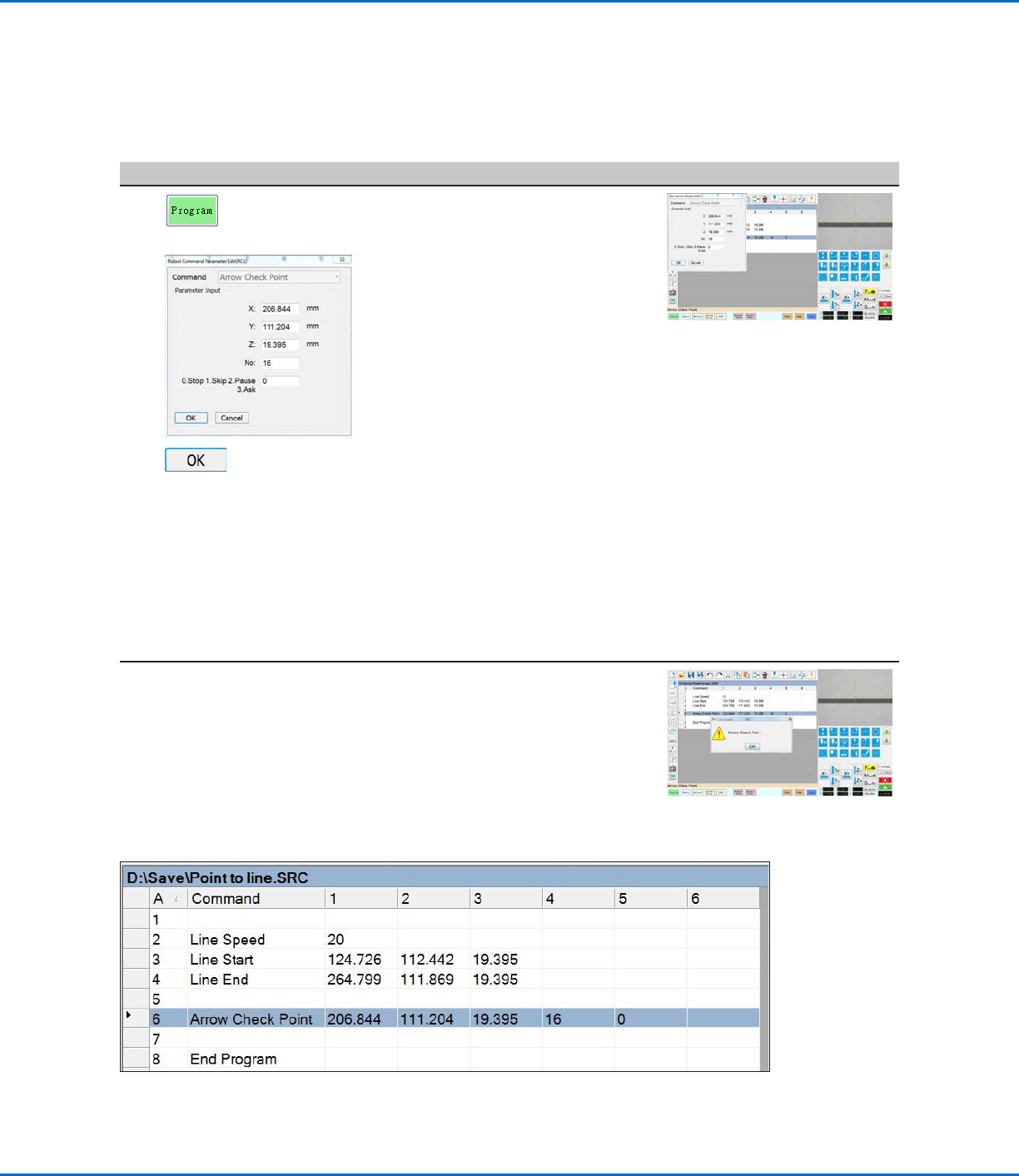
To Use Arrow Check Point in a Program (Mea. Point to Line Example)
# Click Step Reference Image
1
> ARROW CHECK
POINT >
>
• Click the PROGRAM tab.
• Insert commands to dispense a
line over the line on the workpiece
template.
NOTE: The complete example
program is provided below.
• Jog the camera to a location on the
line where you want the system to
check the width of a section.
• Insert an ARROW CHECK POINT
command and enter parameters as
follows:
- Enter the number (No.) of the mark
image created for the line in the
previous procedure.
- Select the action you want the
system to take if the measured line
section is above the Max value
or below the Min value specified
for the mark image (step 13 on
page46). Refer to “Arrow Check
Point” on page71 for details.
• Click OK.
When the system executes the Arrow Check Point command and
finds an unacceptable line section, it takes the action specified by the
Stop, Skip, Pause, Ask parameter. Refer to “Arrow Check Point” on
page71 for details.
Mea. Point To Line Example (continued)
Using the Arrow Types (continued)
Example program that contains an Arrow Check Point command for verifying line width
OptiSure Automated Optical Inspection
48 www.nordsonefd.com info@nordsonefd.com +1-401-431-7000 Sales and service of Nordson EFD dispensing systems are available worldwide.
Mea. Width Example for Verifying Line Width
Mea. Width (Measure Width) is an OptiSureAOI feature that can be used in tandem with the Arrow Check Point or
Arrow Check Line commands to measure the width of a predefined line, compare that measurement to subsequent
dispenses (for either one section of the line or the complete line), and then, depending on the user-specified
parameters, determine if the dispense is acceptable. If the dispense does not meet the specified criteria, the system
takes the action specified in the Arrow Check Point or Arrow Check Line command.
PREREQUISITES
To learn how to use this feature, draw a line on a sheet of white paper and use it as a workpiece template.
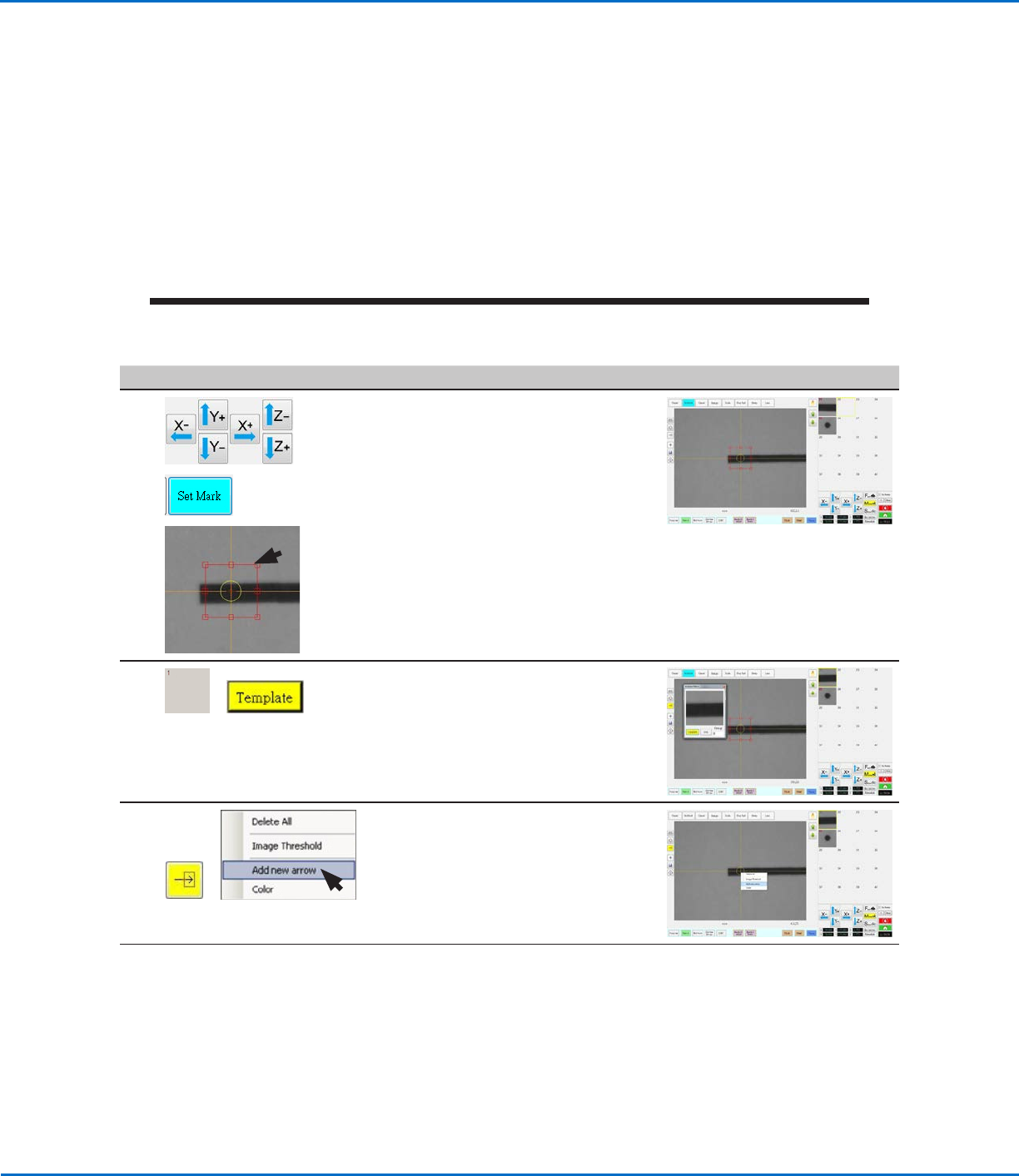
To Create a Mark Image for the Desired Line Dispense
# Click Step Reference Image
1
>
>
• Jog the camera to a location near the
beginning of the line.
• Click SET MARK, then drag to position
the red box over the line.
2
>
• Click a socket in the Mark Library to
save the mark, then click TEMPLATE
when the Template Match window
appears.
The system saves the image in the
Mark Library.
3
>
• Click the ARROW icon.
• In the Primary View screen, right-click
and select ADD NEW ARROW.
The system adds an arrow to the
screen.
Continued on next page
Using the Arrow Types (continued)
OptiSure Automated Optical Inspection
49www.nordsonefd.com info@nordsonefd.com +1-401-431-7000 Sales and service of Nordson EFD dispensing systems are available worldwide.
Using the Arrow Types (continued)
# Click Step Reference Image
4
1.
2.
3.
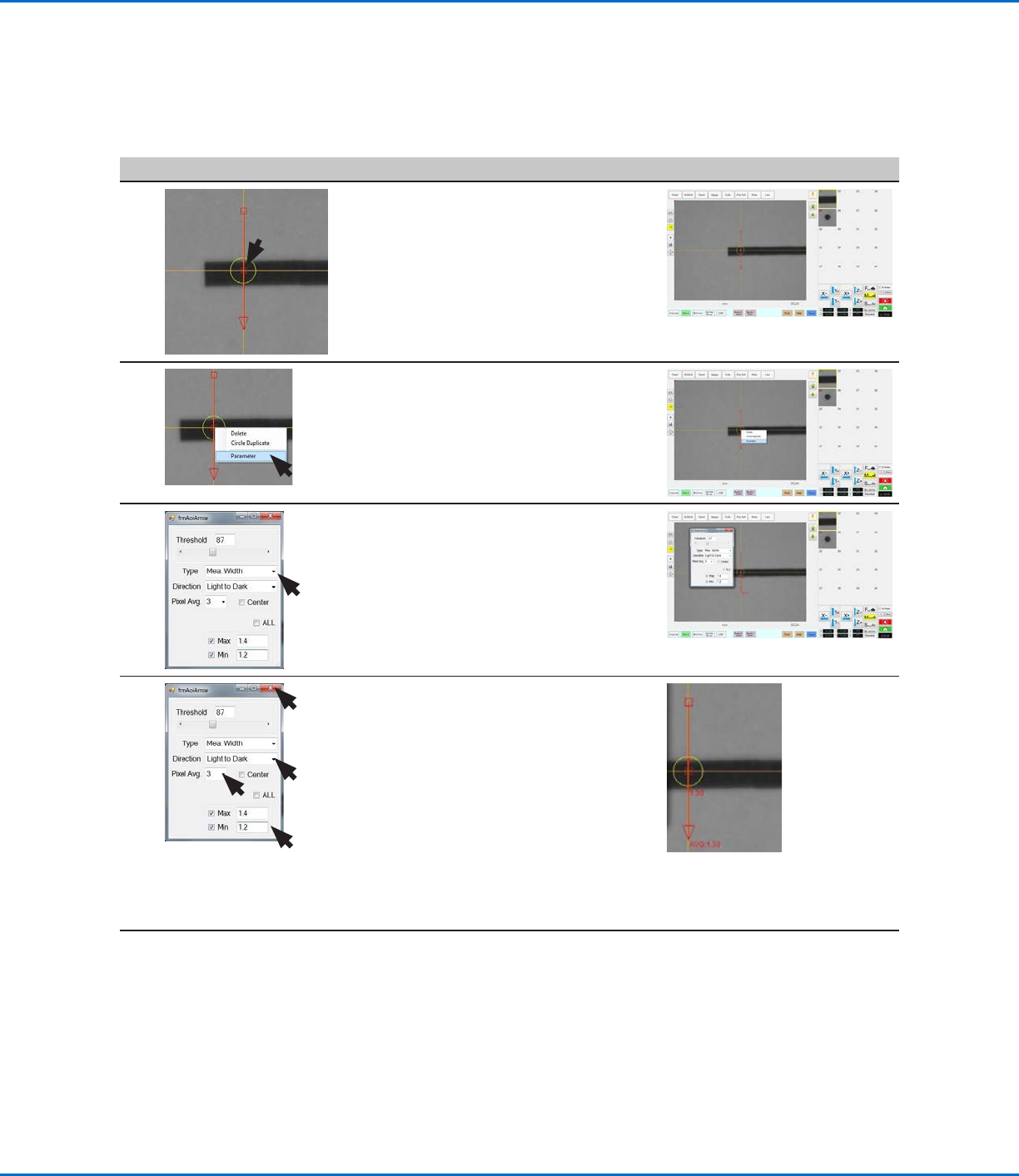
• Use the mouse to drag the arrow to
the line:
- To move the entire arrow, click and
drag the middle box (item 1).
- To elongate or shorten the arrow,
click and drag the arrow point
(item2) or the upper box (item 3).
5
4.
• Right-click the middle box (item4)
of the arrow and then select
PARAMETER.
The AOI Arrow window opens.
6 • For Type, select MEA. WIDTH.
7 • Select LIGHT TO DARK.
• Adjust PIXEL AVG to make the mark
image easier for the system to find.
• Check CENTER if you want to center
the image based on the image in the
mark library.
• For MAX, enter the maximum
allowable width of the line. The
displayed AVG (average) value is equal
to the line width.
• For MIN, enter the minimum allowable
width of the line.
Continued on next page
Mea. Width Example for Verifying Line Width (continued)
To Create a Mark Image for the Desired Line Dispense (continued)