00197902-03_UM_X-Serie-S_EN.pdf - 第253页
User manual SIPLACE X-Series 5 Working with the machine From software version 710.0 Edition 12/2016 5.2 Controls and displays 253 5.2 Controls and displays 5.2.1 Overview 5 Fig. 5.2 - 1 Controls and displays (example of …
5 Working with the machine User manual SIPLACE X-Series
5.1 Staff profiles From software version 710.0 Edition 12/2016
252
5.1.3 Operator level "Service (customer)"
5.1.3.1 Tasks
The service personnel's duties include:
– Major preventive maintenance jobs
– Mounting replacement parts
– Editing machine data
– Calibrating the machine
5.1.4 Operator level "Service (SIPLACE)"
5.1.4.1 Tasks
The programmer's jobs are as follows:
– Preparing CAD files
– Creating and calibrating vision data (teaching)
– Writing placement programs
– Implementing a new job
– Data maintenance
– Data backup
User manual SIPLACE X-Series 5 Working with the machine
From software version 710.0 Edition 12/2016 5.2 Controls and displays
253
5.2 Controls and displays
5.2.1 Overview
5
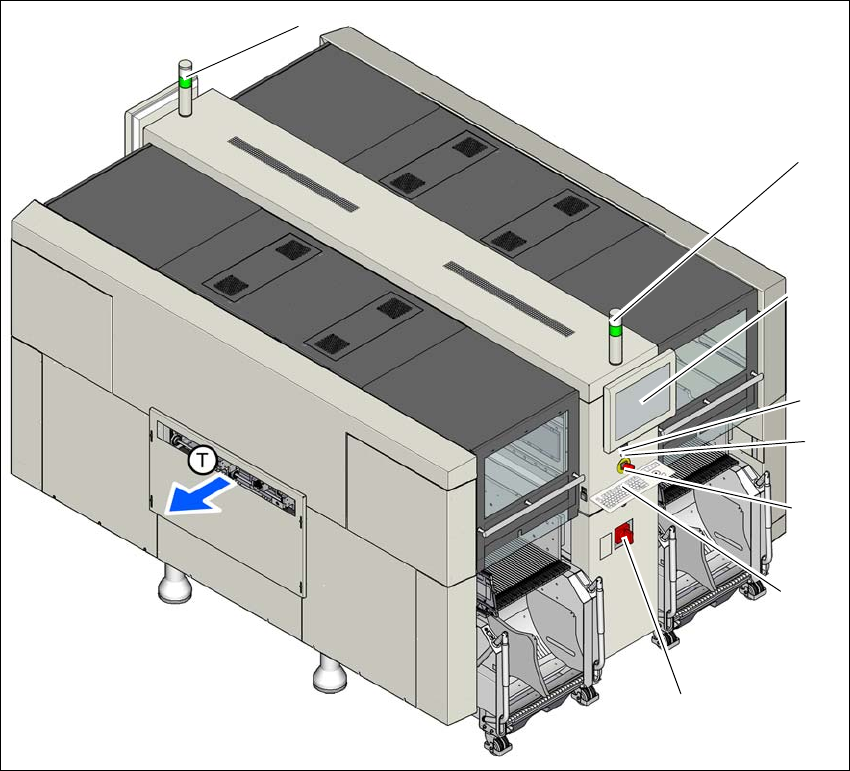
Fig. 5.2 - 1 Controls and displays (example of SIPLACE X2 S / X3 S / X4 S shown)
(1) Main switch (5) Start button (green)
(2) Stop button (black) (6) LCD touchscreen
(3) EMERGENCY STOP button (7) Indicator lamps with horn
(4) Keyboard (T) Direction of PCB transport
(1)
(2)
(3)
(5)
(6)
(7)
(7)
(4)

5 Working with the machine User manual SIPLACE X-Series
5.2 Controls and displays From software version 710.0 Edition 12/2016
254
5.2.2 Description
All the controls can be reached by a 1.40 m tall person.
Main switch 5
The main power switch is used to switch the power supply to the machine on and off.
5
Stop button 5
This white button is used to stop the machine.
Start button (green) 5
This green button starts the machine after it has been switched on or after faults have been elim-
inated.
EMERGENCY STOP button 5
The EMERGENCY STOP button latches in the ON position when pressed. The power supply to
the gantry axes, the component trolleys, conveyors and used tape cutters is interrupted and the
voltage supplied to the star axes of the placement heads is reduced. Turn the button to release it.
LCD touchscreen 5
There is a flat LCD screen with a touch-sensitive surface (touchscreen) on either side of the place-
ment machine.
DANGER
Lethal voltages!
Some parts inside the machine carry potentially lethal voltages - even when switched off
at the main power switch.