00194422-09_MM_X-Series_en.pdf - 第26页
Minor Maintenance Maintenance Tasks for Base Machi ne 4.2.1 Tools, Consumables, Spa re and Wear Parts 26 Maintenance Manual SIPLACE X Series 4.2 4 . 2 M a in t e n a n c e T a s k s f o r B a s e M a c h in e Maintenance…

Minor Maintenance
Maintenance Intervals for Minor Maintenance
Maintenance Manual SIPLACE X Series 25
4
4 Minor Maintenance
Minor Maintenance
4.1
4.1 Maintenance Intervals for Minor Maintenance
Maintenance Intervals for Minor Maintenance
2020 - Minor - Basic Machine - X-Series
2120 - Minor - Component S upply - X-Series
2220 - Minor - Optical Systems - X-Series
2320 - Minor - Gantry - X-Series
2420 - Minor - Conveyor - X-Series
See also
1.3.2 Calculation of Maintenance Intervals [ ➙ 15]
Maintenance tasks
Base machine
Duration
[min]
Each
week
Every 3
months
Every 6
months
Every 12
months
Cleaning/Replacing the Filter on the Protective
Covers (X4I Only)
1X
Checking the Fan on the Covers and on the Ma
-
chine Rucksack
1X
Maintenance tasks
Gantry
Duration
[min]
Each
week
Every 3
months
Every 6
months
Every 12
months
Check and clean the magnetic surfaces of the X
and Y axes
2X
Maintenance tasks
Conveyor
Duration
[min]
Each
week
Every 3
months
Every 6
months
Every 12
months
Vacuuming the Conveyors, Conveyor Belts, Sen
-
sors and Lifting Table
1X
Minor Maintenance
Maintenance Tasks for Base Machine 4.2.1 Tools, Consumables, Spare and Wear Parts
26 Maintenance Manual SIPLACE X Series
4.2
4.2 Maintenance Tasks for Base Machine
Maintenance Tasks for Base Machine
4.2.1
4.2.1 Tools, Consumables, Spare and Wear Parts
Tools, Consumables, Spare and Wear Parts
▪ Sheet of DIN A4 paper
▪ ESD wristband [00320279-xx]
▪ Vacuum cleaner with appropriate nozzle
4.2.2
4.2.2 Performing Maintenance Tasks
Performing Maintenance Tasks
4.2.2.1
4.2.2.1 Cleaning/Replacing the Filter on the Protective Covers (X4I Only)
Cleaning/Replacing the Filter on the Protective Covers (X4I Only)
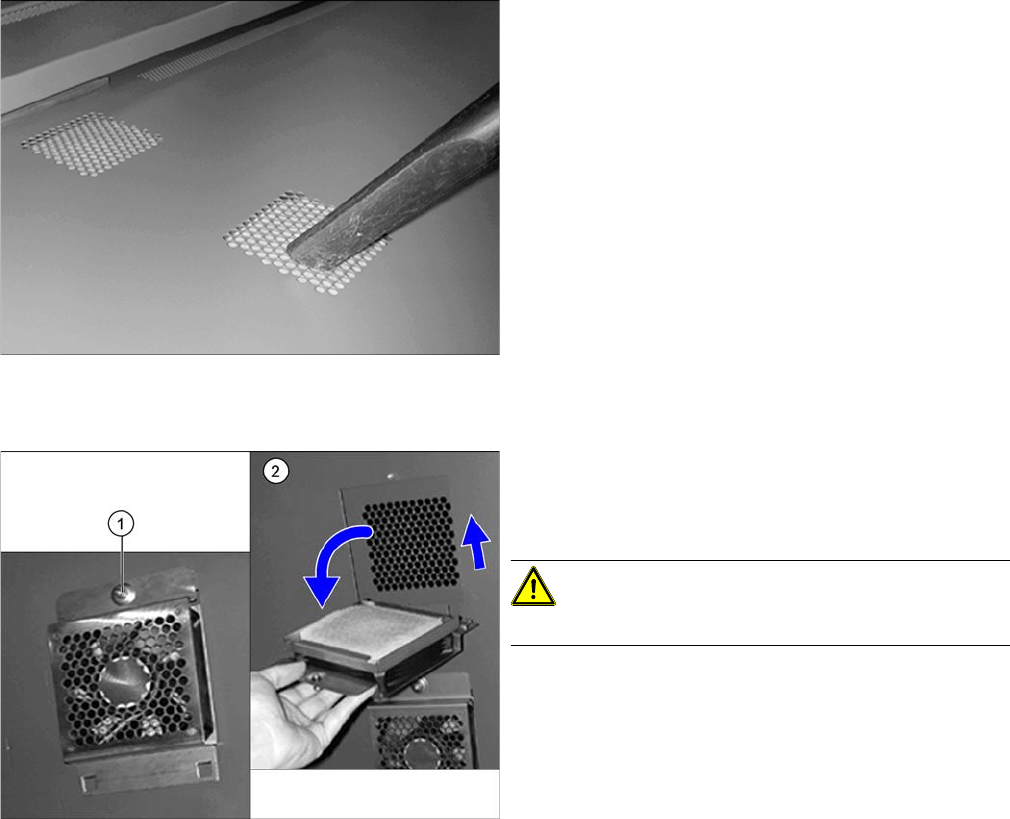
Replacing the filters in the protective covers
► Vacuum the filters in the protective covers of the
SIPLACE X4I from above.
► Check the filters for dirt.
If the filters are very dirty, replace with new ones. (see
below)
► Open the protective cover.
► Loosen the screw (1) on the upper side of the fan.
► Push the fan element up, and fold it down carefully.
CAUTION!
Take care not to damage the fan connection cable!
► Replace the filter with a new metal filter [03076892-
xx].
► Fit the fan and screw tight.
► Close the protective cover.
Minor Maintenance
4.2.2 Performing Maintenance Tasks Maintenance Tasks for Base Machine
Maintenance Manual SIPLACE X Series 27
4.2.2.2
4.2.2.2 Checking the Fan on the Covers and on the Machine Rucksack
Checking the Fan on the Covers and on the Machine Rucksack
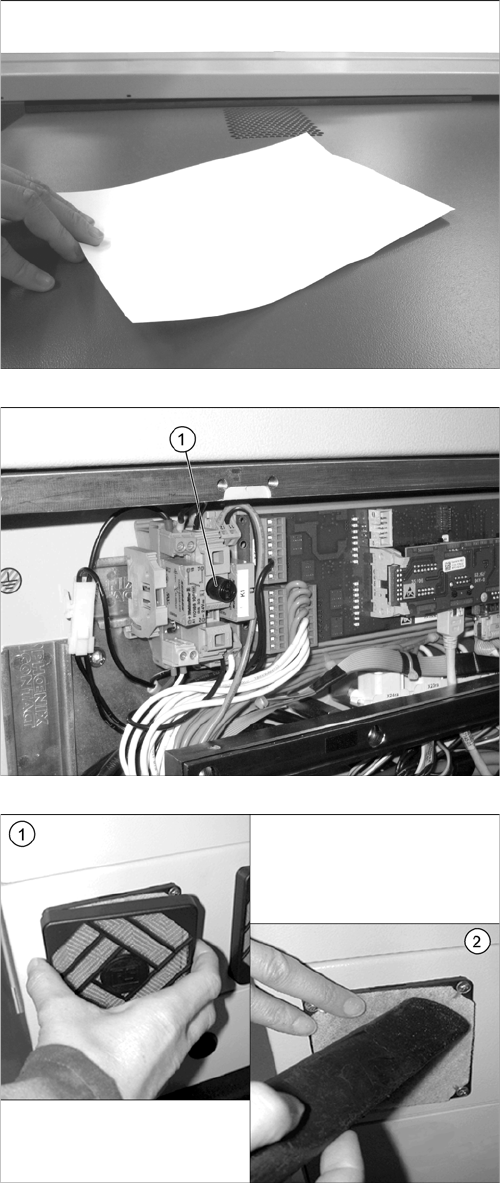
➢ The machine needs to be switched on for this check.
► Close the protective covers and press the Start button.
► Place a sheet of paper on the fan openings. This
sheet of paper should be noticeably held in place by
suction.
► If the sheet of paper is not held in place, check the
fuse F1 (1) for the voltage supply in the distributor at
location 4 and replace this if necessary. Check all
cover fans again.
If the fuse is OK, replace the defective fan
[03056479
-
xx].
► Repeat this check for all cover fans.
► (1) Remove the covers from the filters.
► (2) Use a suitable nozzle to vacuum the filters.
► Check the filters for dirt.
► If a filter is very dirty, replace with a new one.
► Repeat these tasks for all eight fans.