00194422-09_MM_X-Series_en.pdf - 第28页
Minor Maintenance Maintenance Tasks for Base Machine 4.2.2 Performing Maintenance Tasks 28 Maintenance Manual SIPLACE X Series ► Op en the cover above th e axis unit (1) . ► Check the fan function (2) in the center of th…
Minor Maintenance
4.2.2 Performing Maintenance Tasks Maintenance Tasks for Base Machine
Maintenance Manual SIPLACE X Series 27
4.2.2.2
4.2.2.2 Checking the Fan on the Covers and on the Machine Rucksack
Checking the Fan on the Covers and on the Machine Rucksack
➢ The machine needs to be switched on for this check.
► Close the protective covers and press the Start button.
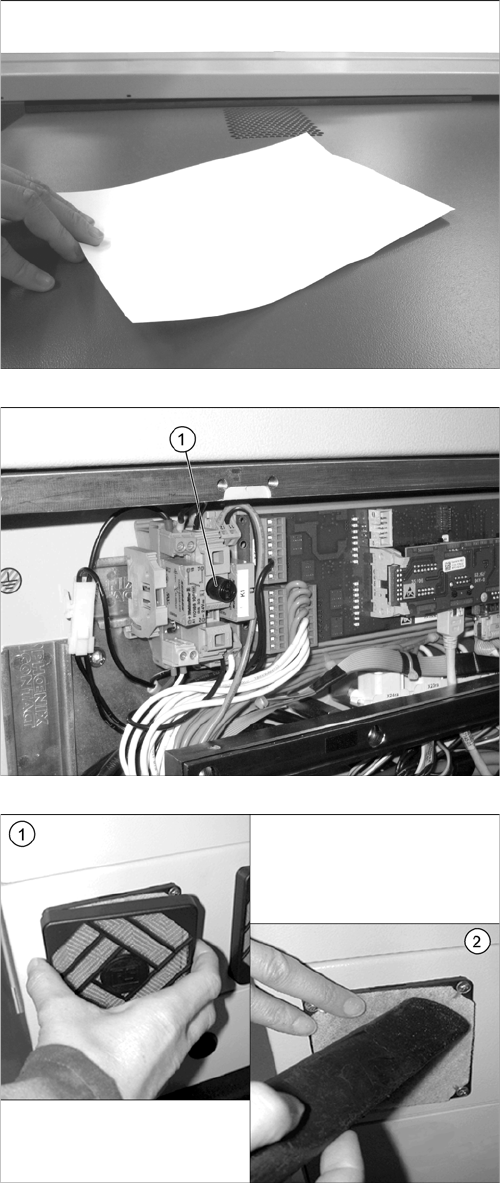
► Place a sheet of paper on the fan openings. This
sheet of paper should be noticeably held in place by
suction.
► If the sheet of paper is not held in place, check the
fuse F1 (1) for the voltage supply in the distributor at
location 4 and replace this if necessary. Check all
cover fans again.
If the fuse is OK, replace the defective fan
[03056479
-
xx].
► Repeat this check for all cover fans.
► (1) Remove the covers from the filters.
► (2) Use a suitable nozzle to vacuum the filters.
► Check the filters for dirt.
► If a filter is very dirty, replace with a new one.
► Repeat these tasks for all eight fans.
Minor Maintenance
Maintenance Tasks for Base Machine 4.2.2 Performing Maintenance Tasks
28 Maintenance Manual SIPLACE X Series
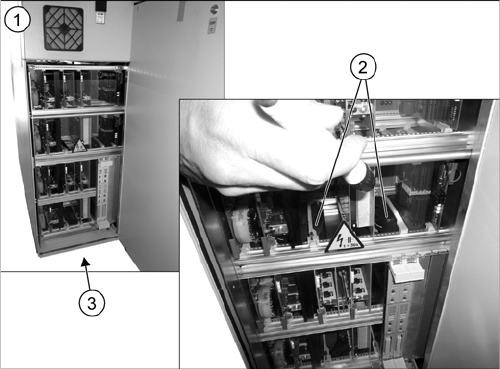
► Open the cover above the axis unit (1).
► Check the fan function (2) in the center of the axis
unit. Also check whether this still moves. Use a flash
-
light to help you, if necessary. If a fan is defective, re
-
place it.
► Check the function of the fan on the underside of the
axis unit (3) by holding your hand in front of the fan.
You should be able to feel a noticeable flow of air. If
the fan is defect, replace it.
► Now close the cover again.
► Repeat these steps for all axis units.
Minor Maintenance
4.3.1 Tools, Consumables, Spare and Wear Parts Maintenance Work on the Gantry
Maintenance Manual SIPLACE X Series 29
4.3
4.3 Maintenance Work on the Gantry
Maintenance Work on the Gantry
4.3.1
4.3.1 Tools, Consumables, Spare and Wear Parts
Tools, Consumables, Spare and Wear Parts
▪ Lint-free cloths [03082092-xx]
▪ Protective latex gloves [00372972-xx]
▪ ESD wristband [00320279-xx]
4.3.2
4.3.2 Preparatory Steps
Preparatory Steps
► There must be no PCBs in the machine during the following maintenance steps.
► Switch off the machine, disconnect it from the power supply and secure it to prevent unauthorized
reactivation. Observe the instructions in section "1.2 Preparatory Work..." [ ➙ 12].
4.3.3
4.3.3 Performing Maintenance Tasks
Performing Maintenance Tasks
See also
1.1.2 Safety Instructions for Working with Strong Magnetic Fields [ ➙ 8]
4.3.3.1
4.3.3.1 Checking and Cleaning the Magnetic Surfaces of the X and Y Axes
Checking and Cleaning the Magnetic Surfaces of the X and Y Axes
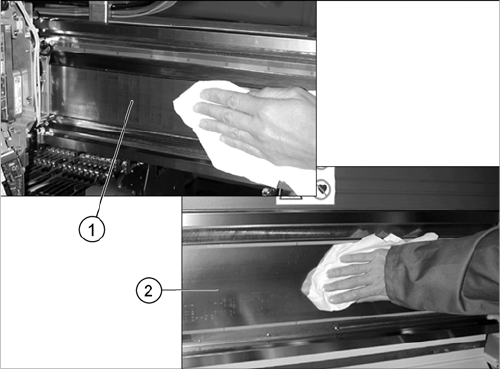
► Clean the magnetic surfaces of the X
-
(1) and Y
axis (2) thoroughly over their entire length. Use a lint-
free cloth to remove any dirt from the magnetic sur
-
faces. Where necessary, remove components with a
non-magnetic tool.Where necessary, remove compo
-
nents with a non-magnetic tool.
► In the event of damage or other problems, please
contact your SIPLACE Service team in Munich.