00194422-09_MM_X-Series_en.pdf - 第29页
Minor Maintenance 4.3.1 Tools, Consumables, Spare and Wear Parts Maintenance Work on the Ga ntry Maintenance Manual SIPLACE X Series 29 4.3 4 . 3 M a in t e n a n c e W o r k o n t h e G a n t r y Maintenance Work on the…
Minor Maintenance
Maintenance Tasks for Base Machine 4.2.2 Performing Maintenance Tasks
28 Maintenance Manual SIPLACE X Series
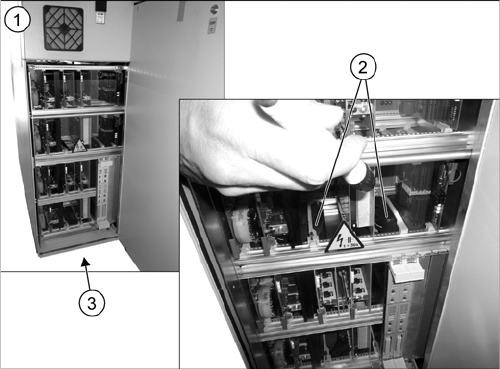
► Open the cover above the axis unit (1).
► Check the fan function (2) in the center of the axis
unit. Also check whether this still moves. Use a flash
-
light to help you, if necessary. If a fan is defective, re
-
place it.
► Check the function of the fan on the underside of the
axis unit (3) by holding your hand in front of the fan.
You should be able to feel a noticeable flow of air. If
the fan is defect, replace it.
► Now close the cover again.
► Repeat these steps for all axis units.
Minor Maintenance
4.3.1 Tools, Consumables, Spare and Wear Parts Maintenance Work on the Gantry
Maintenance Manual SIPLACE X Series 29
4.3
4.3 Maintenance Work on the Gantry
Maintenance Work on the Gantry
4.3.1
4.3.1 Tools, Consumables, Spare and Wear Parts
Tools, Consumables, Spare and Wear Parts
▪ Lint-free cloths [03082092-xx]
▪ Protective latex gloves [00372972-xx]
▪ ESD wristband [00320279-xx]
4.3.2
4.3.2 Preparatory Steps
Preparatory Steps
► There must be no PCBs in the machine during the following maintenance steps.
► Switch off the machine, disconnect it from the power supply and secure it to prevent unauthorized
reactivation. Observe the instructions in section "1.2 Preparatory Work..." [ ➙ 12].
4.3.3
4.3.3 Performing Maintenance Tasks
Performing Maintenance Tasks
See also
1.1.2 Safety Instructions for Working with Strong Magnetic Fields [ ➙ 8]
4.3.3.1
4.3.3.1 Checking and Cleaning the Magnetic Surfaces of the X and Y Axes
Checking and Cleaning the Magnetic Surfaces of the X and Y Axes
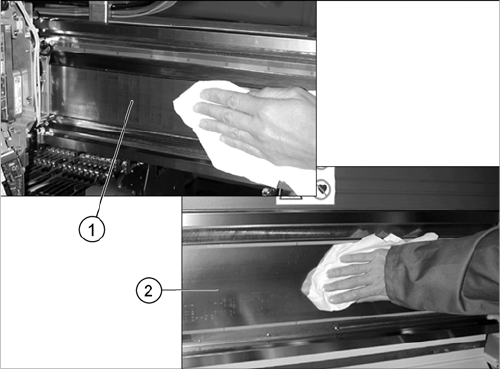
► Clean the magnetic surfaces of the X
-
(1) and Y
axis (2) thoroughly over their entire length. Use a lint-
free cloth to remove any dirt from the magnetic sur
-
faces. Where necessary, remove components with a
non-magnetic tool.Where necessary, remove compo
-
nents with a non-magnetic tool.
► In the event of damage or other problems, please
contact your SIPLACE Service team in Munich.
Minor Maintenance
Maintenance Tasks for the Conveyor 4.4.1 Tools, Consumables, Spare and Wear Parts
30 Maintenance Manual SIPLACE X Series
4.4
4.4 Maintenance Tasks for the Conveyor
Maintenance Tasks for the Conveyor
4.4.1
4.4.1 Tools, Consumables, Spare and Wear Parts
Tools, Consumables, Spare and Wear Parts
▪ Cotton gloves [00359087-xx]
▪ ESD wristband [00320279-xx]
▪ Vacuum cleaner
4.4.2
4.4.2 Preparatory Steps
Preparatory Steps
Caution Conveyor - No PCB Must Be in the Conveyor
Note Co nveyor - Re commendation: Ad justing Sides via S oftware for Acces sibility
► Move the component trolley out of the machine.
See also
1.2 Preparatory Work... [ ➙ 12]
4.4.3
4.4.3 Performing Maintenance Tasks
Performing Maintenance Tasks
4.4.3.1
4.4.3.1 Vacuuming the Conveyors, Conveyor Belts, Sensors and Lifting Table
Vacuuming the Conveyors, Conveyor Belts, Sensors and Lifting Table
4.4.4
4.4.4 Final Work
Final Work
► Restore the original conveyor configuration.
CAUTION
No board
There must be no PCBs in the machine during the following tasks.
NOTICE
Accessibility
We recommend using the following procedure for better access:
► Use the station software to adjust the conveyor sides in such a way that you can easily
reach all conveyor belts as well as the whole area below the sides.
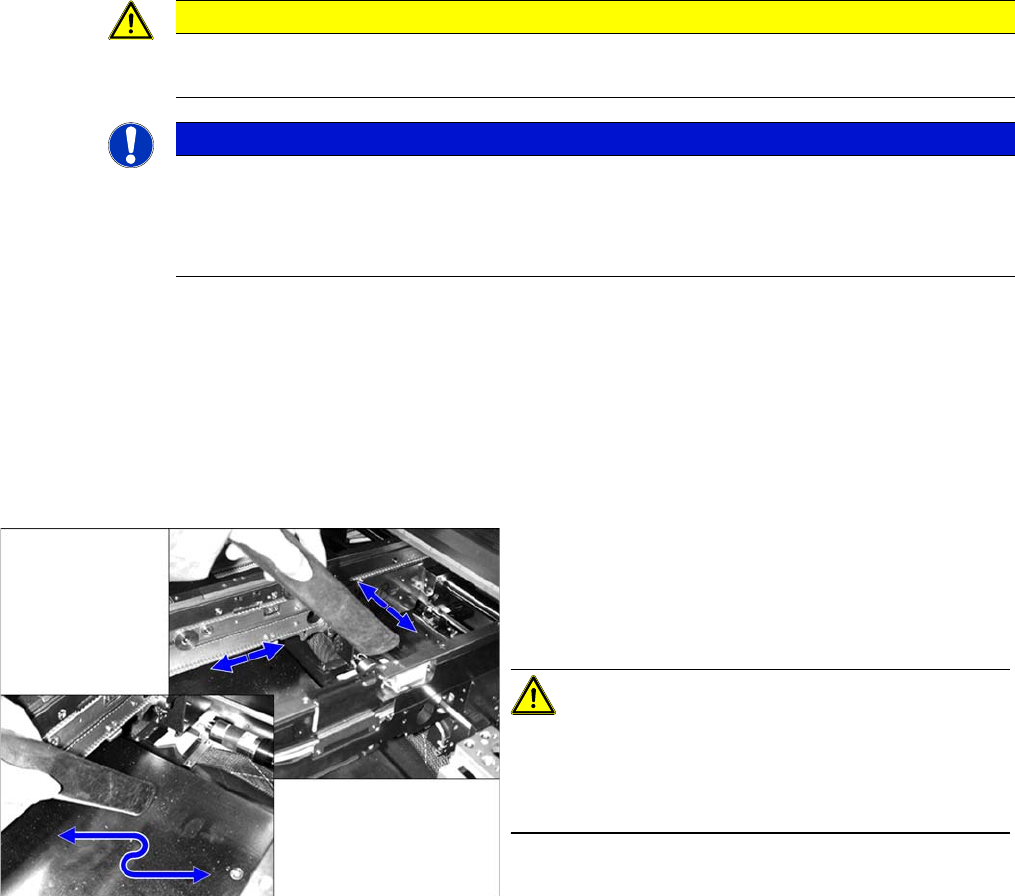
► Use the vacuum cleaner to remove all loose compo
-
nents on and around the PCB conveyor. Pay particu
-
lar attention to the areas near the lifting table, the
width adjustment, the trailing cables and the convey
-
or belts.
CAUTION!
Loose components on the PCB conveyor could cause
faults.
Make sure not to damage the cables on the belt drive mo
-
tors.