NPM Calibration Manual-En.pdf - 第4页
NPM Maint en anc e E di ti on 9.1 NPM Calibrati on It ems and Pr ocedures EJM9BE-M B-09M-21 Page 9-3 9.1. 2 Jigs to be Used fo r Calibration The t abl e below lists the t ypes o f jigs to be used f or calibr ati on. ST E…
NPM
Maintenance Edition
9.1 NPM Calibration Items and Procedures
Page 9-2 EJM9BE-MB-09M-21
9.1 NPM Calibration Items and Procedures
NOTICE
Observe the following when performing calibration.
•
Turn ON the main power switch of the machine at least 1 hour before starting
calibration.
•
Do not perform warm-up operation before starting calibration.
•
After the machine has been stopped during production or warm-up operation, wait
more than 3 hours before starting calibration.
9.1.1 Calibration Items
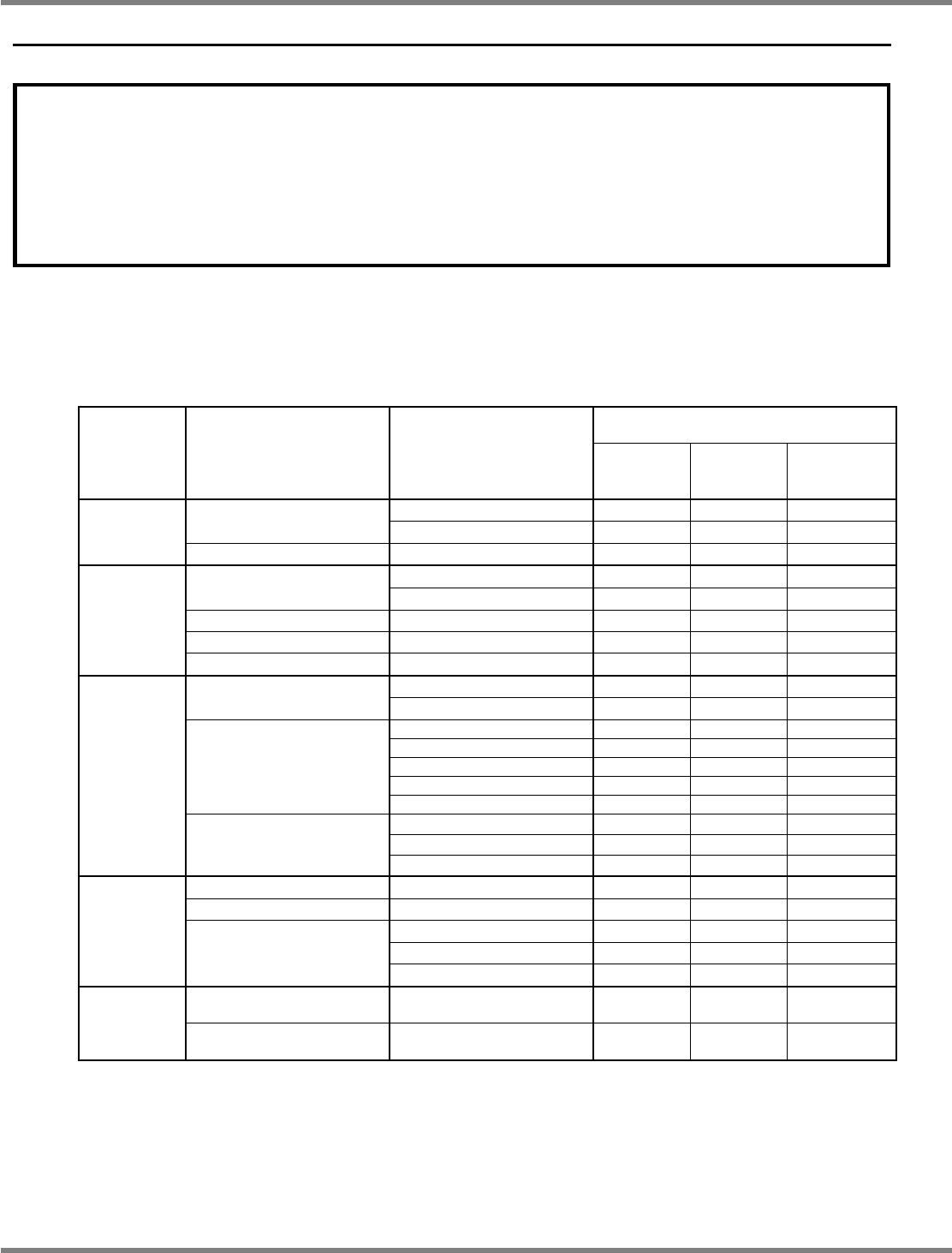
The table below shows the calibration items and the items to be performed in response to the changes in
machine conditions (relocation, unit replacement, etc.).
Changes in machine condition and
calibrations to be performed
STEP Menu Sub-menu
Relocation,
change in
floor level
Addition of
3D sensor
∗
2
Replacement
of head
∗
2
Camera angle c
−
−
H-camera XY org
XY Origin Camera scale
c
−
−
STEP 1
PlaneCorrXY
PlaneCorrXY
∗
1
c
−
−
Measure height c
−
c
Head/PlaneCorrZ
PlaneCorrZ
∗
1
c
−
−
Width adjusting Std width move
−
−
−
Mnt Pos/Conv Measure height
−
−
−
STEP 2
Mount load Load meas(F1)/(F2)
−
−
−
H
θ
axis origin
−
−
−
L-camera
Camera offset
−
−
−
ScanPos. c
c
c
Changer H c
c
c
HCMR Light c
c
c
PCMR Light c
c
c
Jig station
HeadOffset
c
c
c
Height Scale
(
c
)
c
(
c
)
ScanPos.
(
c
)
c
(
c
)
STEP 3
3DCamera (Option)
HeadOffset
(
c
)
c
(
c
)
Height offset Pickup c
−
−
VerticalCamera (Option)
Camera offset
(
c
)
−
(
c
)
Pickup
(
c
)
−
−
Pickup pos. 1
(
c
)
−
−
STEP 4
Tray
Pickup pos. 2
(
c
)
−
−
Placement accuracy
Reflection
c
c
c
Accuracy
Verification
Placement accuracy
Verification
c
c
c
c
: To be performed
(
c
): To be performed only for the machines with that option
∗
1: When the machine is equipped with the dual conveyor, it is necessary to change to the
single lane mode.
∗
2: Perform calibration only for the table where the unit has been replaced.
NPM
Maintenance Edition
9.1 NPM Calibration Items and Procedures
EJM9BE-MB-09M-21 Page 9-3
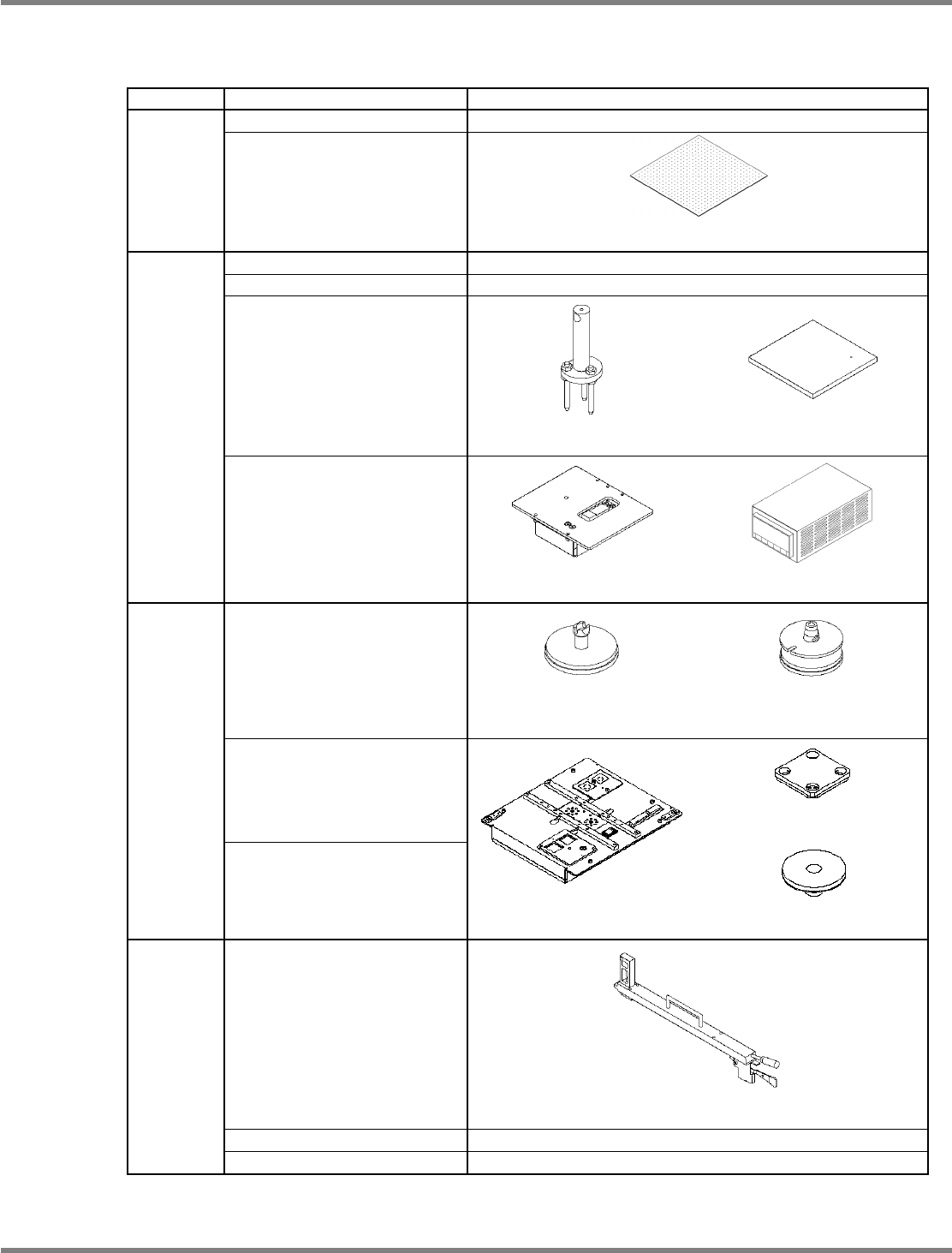
9.1.2 Jigs to be Used for Calibration
The table below lists the types of jigs to be used for calibration.
STEP Menu Jigs used
H-camera XY org
−
STEP 1
PlaneCorrXY
Plane-compensation jig
(N610064253AA)
Head/PlaneCorrZ
−
Width adjusting
−
Mnt Pos/Conv
Support-pin height jig
(N610084259AA)
Placement-height teaching jig
(N610003319AA)
STEP 2
Mount load
Load measuring jig
(N610084605AA)
Load cell meter
(N610093887AB)
For 12-/8-nozzle head
(N610071657AA)
For 2-nozzle head
(N610003301AA)
L-camera
Line camera jigs
Jig station
Jig component
(N610102559AA)
STEP 3
3DCamera (Option)
Jig station
(N610087861AA)
Light luminosity jig
(N610071689AA)
Height offset
Pickup-position-height teaching jig
(N610003318AA)
VerticalCamera (Option)
−
STEP 4
Tray
−
NPM
Maintenance Edition
9.1 NPM Calibration Items and Procedures
Page 9-4 EJM9BE-MB-09M-21
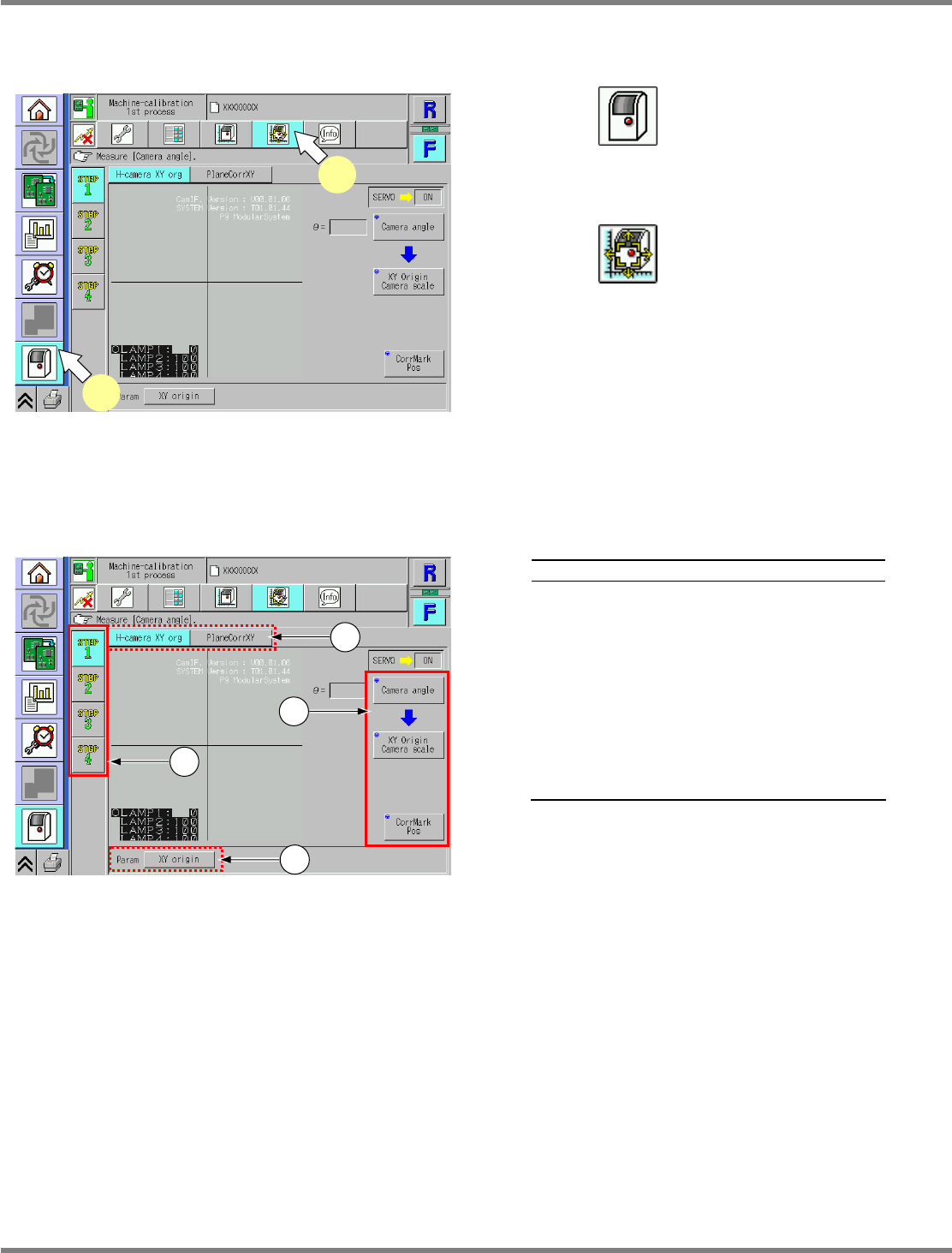
9.1.3 Common Procedure
The calibration menu opens.
1
Press .
•
The unit menu opens.
2
Press .
•
The calibration menu opens.
9.1.4 Explanation of the Calibration Menu Screen
Explanation
a
Calibration processes (1st to 4th) are
displayed.
b
Items in calibration processes (1st to
4th) are displayed.
c
Motion items required for performing or
preparing the calibration are displayed.
d
Parameters to be set by the calibration
are displayed. Pressing a button
displays the currently registered
parameters.
UnitCalibAxisOrigin-01E00
1
2
UnitCalibAxisOrigin-01E00
a
d
c
b