NPM Calibration Manual-En.pdf - 第99页
NPM Maint en anc e E di ti on 9.14 Accu racy Ve rificat ion Page 9-98 EJM9BE-M B-09M-21 3 Che cki ng of Pl a cem ent Re sul t s ⑤ Placem en t (S ame as P lac ement ) ⑥ Check ing of P la cem e nt R esults (S am e as R…
NPM
Maintenance Edition
9.14 Accuracy Verification
Page 9-96 EJM9BE-MB-09M-21
④
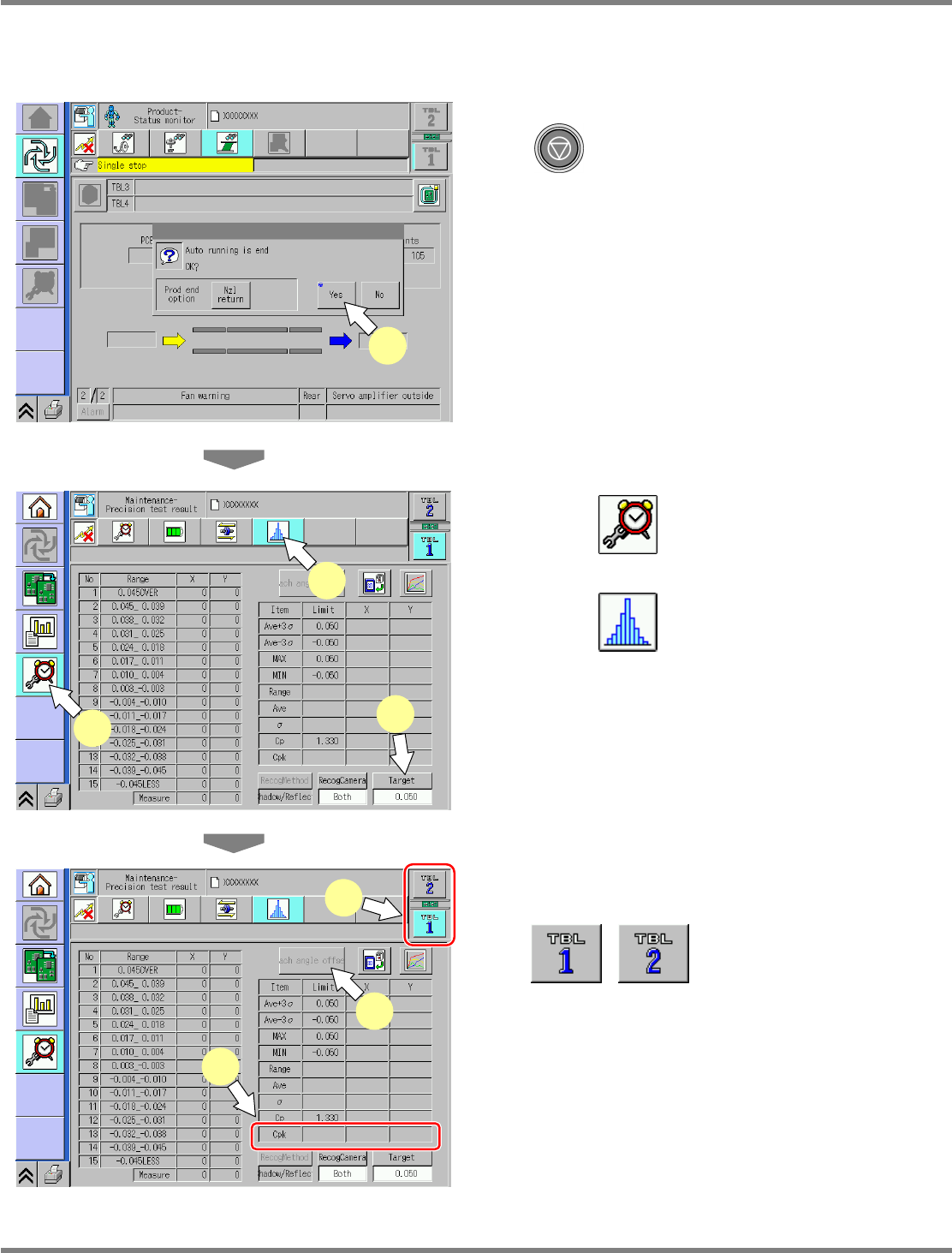
Checking and Reflection of Placement Results
1
After placement is complete, press
.
2
Press [Yes].
Automatic operation is complete.
3
Press .
4
Press .
5
Press [Target].
•
Chip component 0.040 mm
•
Irregular-shaped component
0.030 mm
6
Select the table.
displays the individual
and the general accuracy on the front and the
rear.
7
Display the placement accuracy.
If the measurement result CpK is lower than
the prescribed value, reflect the each-angle
offset.
ProductionProc-02E00
2
ProdConditionVarifyCPK-01E01
3
4
5
ProdConditionVarifyCPK-01E01
8
6
7
NPM
Maintenance Edition
9.14 Accuracy Verification
EJM9BE-MB-09M-21 Page 9-97
8
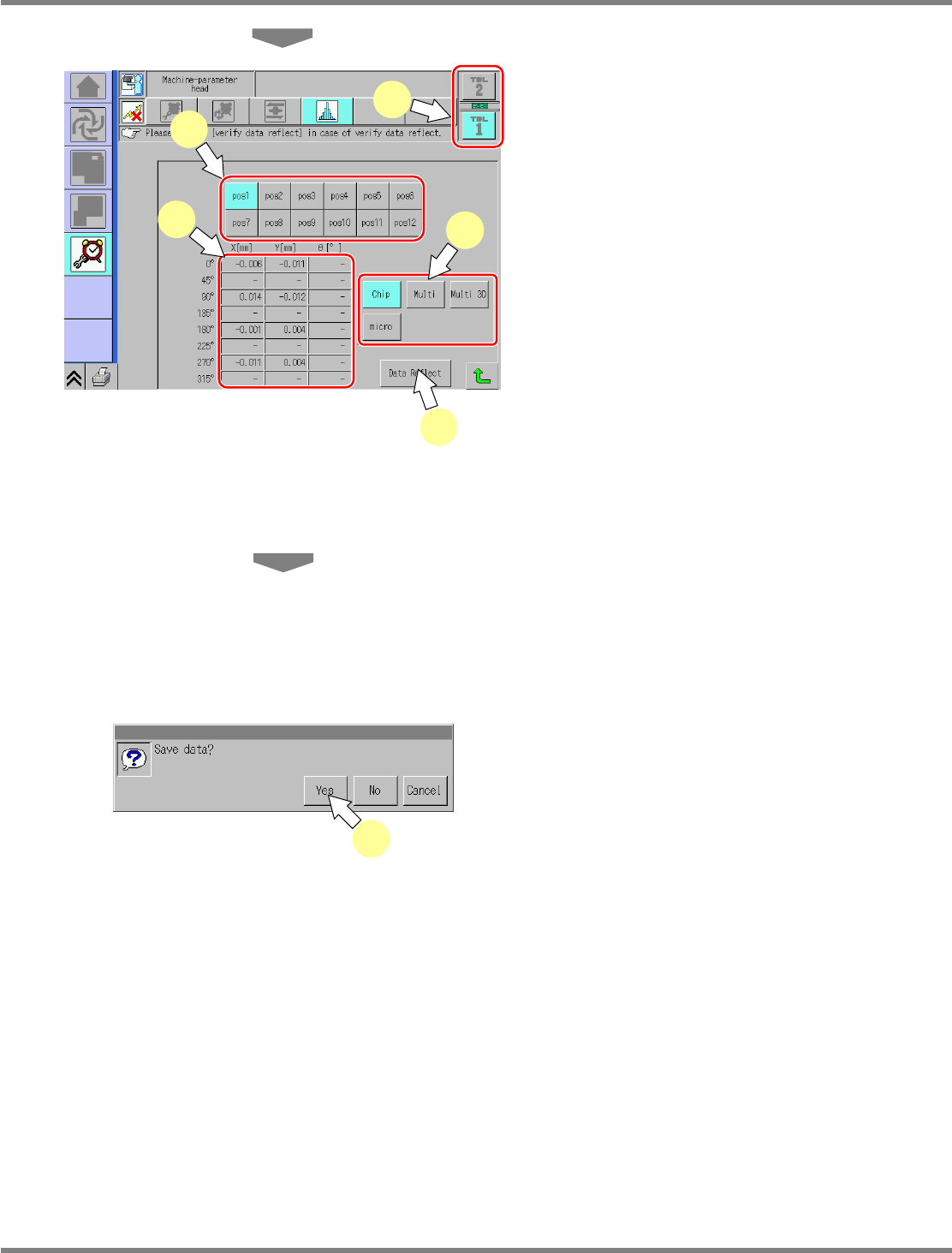
To reflect the placement offset, press
[Each angle offset].
Pressing [Each angle offset] displays the
screen shown left.
9
Select the desired nozzle.
10
The offset of each nozzle is
displayed.
11
Select the desired table.
12
Select the placed components.
The display depends on the placed component
type.
13
To reflect the verification data, press
[Data Reflect].
Pressing [Data Reflect] displays the screen
shown left.
14
Press [Yes].
Pressing [Yes] reflects the data and updates
the parameters.
•
All the heads and nozzles concerned with
placement are updated.
•
Regardless of the selected table, the offsets
of all the heads and nozzles are updated.
This concludes the placement offset reflecting
procedure.
You can check the placement accuracy result
by placing them again. In that case, perform
the procedure “3 Checking of Placement
Results.”
UnitParamHeadEachAngle-01E05
11
9
10
13
12
14

NPM
Maintenance Edition
9.14 Accuracy Verification
Page 9-98 EJM9BE-MB-09M-21
3 Checking of Placement Results
⑤
Placement (Same as Placement)
⑥
Checking of Placement Results (Same as Reflection of Placement
Results)
This process is not always necessary; however, the machine’s real accuracy can be measured.
If the accuracy verification result is not improved in spite of a repetition of reflection, this may be
arisen from the following causes.
Cause Troubleshooting
The target components are deteriorated. Check for any flaws or foreign bodies on the
surface of JIG_BGA.
The correct jig chips are not used. Check the jig chips.
Actual components 1005C are used. Check the jig chips.
The head shaft is damaged. Check for unsmooth sliding of the shaft.
The illumination of the line camera is
wrong.
Execute the lamp-value illumination calibration.