1OM-1505-004_w.pdf - 第80页
1OM-1505 5. V arious Functions : Chap.1 1-25 0906-001 5. V arious Functions 5.1 Paste Kneading Function Stable printing can be realized by mixing solder paste before printing, making use of the rolling phenomenon of sold…
1OM-1505
1-24
4. Screen Printing Procedure : Chap.1
0906-001
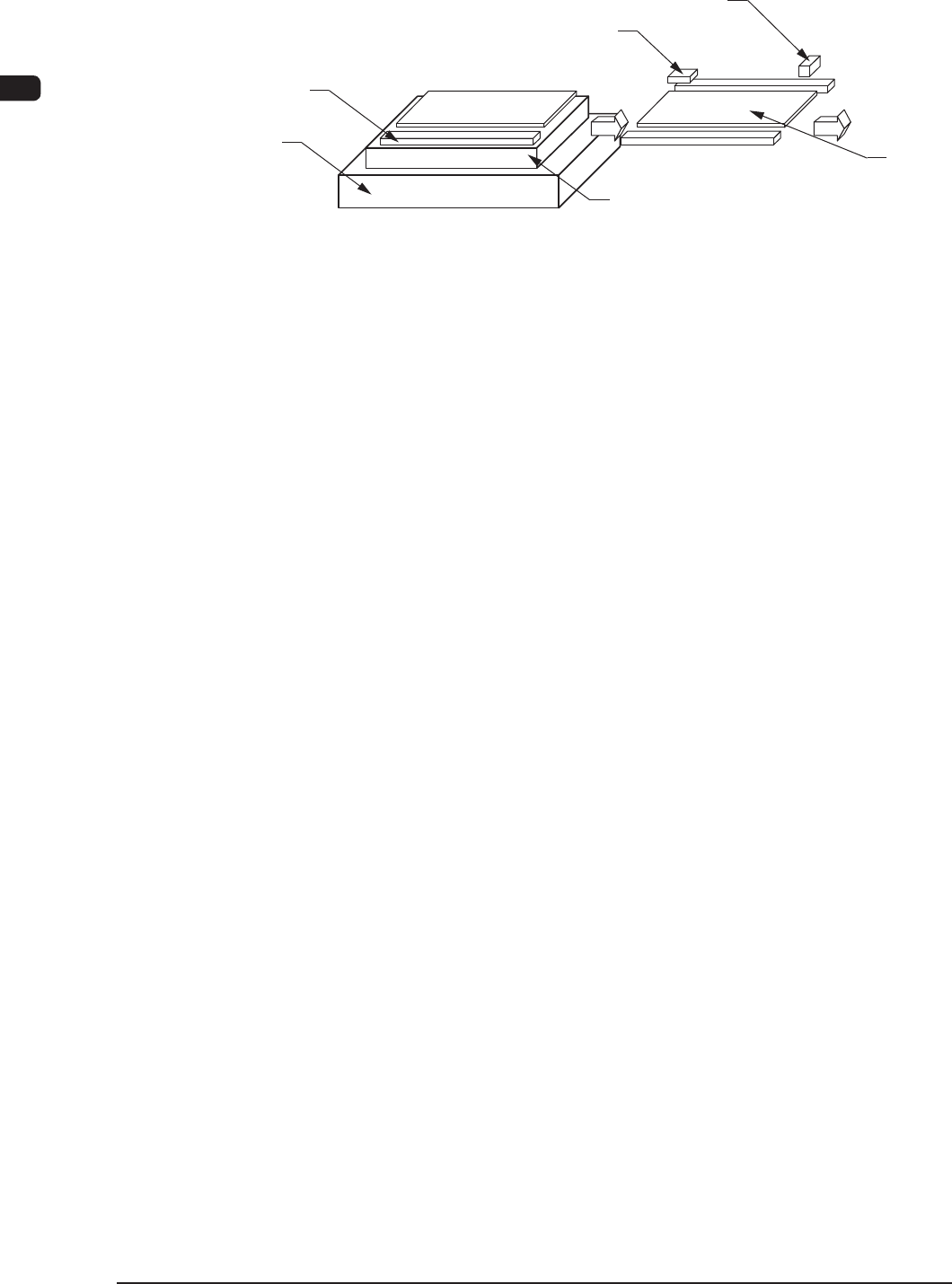
4.4 PCB Output
Table
PCB Clamp
PCB Passage Detection Sensor
PCB Arrival Detection Sensor
PCB Backup Base
PCB
F1A29
(1) The horizontal clamp releases the PCB at the PCB positioning section and
the PCB backup base moves down. Then, the PCB is transferred onto the
belt conveyor at the PCB positioning section.
(2) When the R-conveyor and the conveyor in the PCB positioning section
are driven and the condition that the PCB has been transferred onto the
R-conveyor using the "PCB Pass Detection Sensor" is conrmed, the
conveyor in the PCB positioning section is stopped.
(3) When the PCB arrival detection sensor detects the PCB, the R conveyor
stops running.
(4) When the machine receives a PCB request signal from the output machine,
the R conveyor is driven to transfer the PCB to the output machine.
(5) When the PCB request signal stops coming from the output machine, the R
conveyor also stops running.

1OM-1505
5. Various Functions : Chap.1
1-250906-001
5. Various Functions
5.1 Paste Kneading Function
Stable printing can be realized by mixing solder paste before printing, making
use of the rolling phenomenon of solder paste (solder paste stirred due to the
excessive flowing between the squeegee and the stencil).
Note
When the solder paste is already kneaded enough, this operation is not required.
Reference
Refer to "5.3 Paste Kneading" in "Chapter 3 (Vol.2)" for details.
5.2 Coordinate Teaching Function
This function is used to teach the PEC recognition mark position and stencil
recognition mark position coordinates.
The positional coordinates of two ducial marks can be taught in each recognition
mode.
Reference
Refer to "7.2 Coordinate" in "Chapter 3 (Vol.2)" for details.
5.3 Jig Position Coordinate Teaching Function
This function is used to teach the positional coordinates of the vacuum jig to pick
up and hold a PCB rmly.
Reference
Refer to "7.3 Vac. Jig Pos. Teaching" in "Chapter 3 (Vol.2)" for details.
5.4 Device Check and Management Functions
This function is used to display and manage the input conditions of various
sensors/motor control and software version information.
Reference
Refer to "3. DEVICE CHECK" in "Chapter 1 (Vol.3)" for details.

1OM-1505
1-26
5. Various Functions : Chap.1
1002-002
5.5 Blower Unit (Vacuum Source)
The machine is equipped with a blower that generates vacuum for stencil cleaning
and PCB picks.
5.6 Cleaning Function
This function is used to clean the stencil in three modes (combinations of "Dry",
"Wet", and "Vacuum") for stable printing.
Reference
Refer to "4. Cleaning" Tab" in "Chapter 1 (Vol.2)" for details.
5.7 Conveyor Width Automatic Adjustment Function
This function is used to automatically adjust the widths of the L/R conveyors
according to the parameters registered in the pattern program.
5.8 Table Chute Width Automatic Adjustment Function
This function is used to automatically adjust the width of the table chutes
according to the parameters registered in the pattern program.
5.9 PCB Stopper Position Automatic Adjustment Function
This function is used to automatically adjust the position of the PCB stopper
according to the parameter registered in the pattern program.
5.10 PCB Backup Pin Up/Down or Jig Automatic Adjustment
Function
This function is used to automatically adjust the up/down movement (distance)
of the PCB backup pins or the jig according to the parameters registered in the
pattern program.
5.11 Backup Pin Automatic Replacement Function
This function is used to move and store automatically the backup pins stocked in
advance on the backup plate, to and in the required locations.
Note
All the manual backup operations are performed using the optional functions.