1OM-1505-004_w.pdf - 第95页
1OM-1505 2-10 2. Operation Window : Chap.2 0906-001 [4] [Unit Return] Button When this button is pressed, this button and the [START] button on the operation panel flash for 10 seconds. When the [START] button on the oper…
1OM-1505
2. Operation Window : Chap.2
2-9
2.1 Control Menu
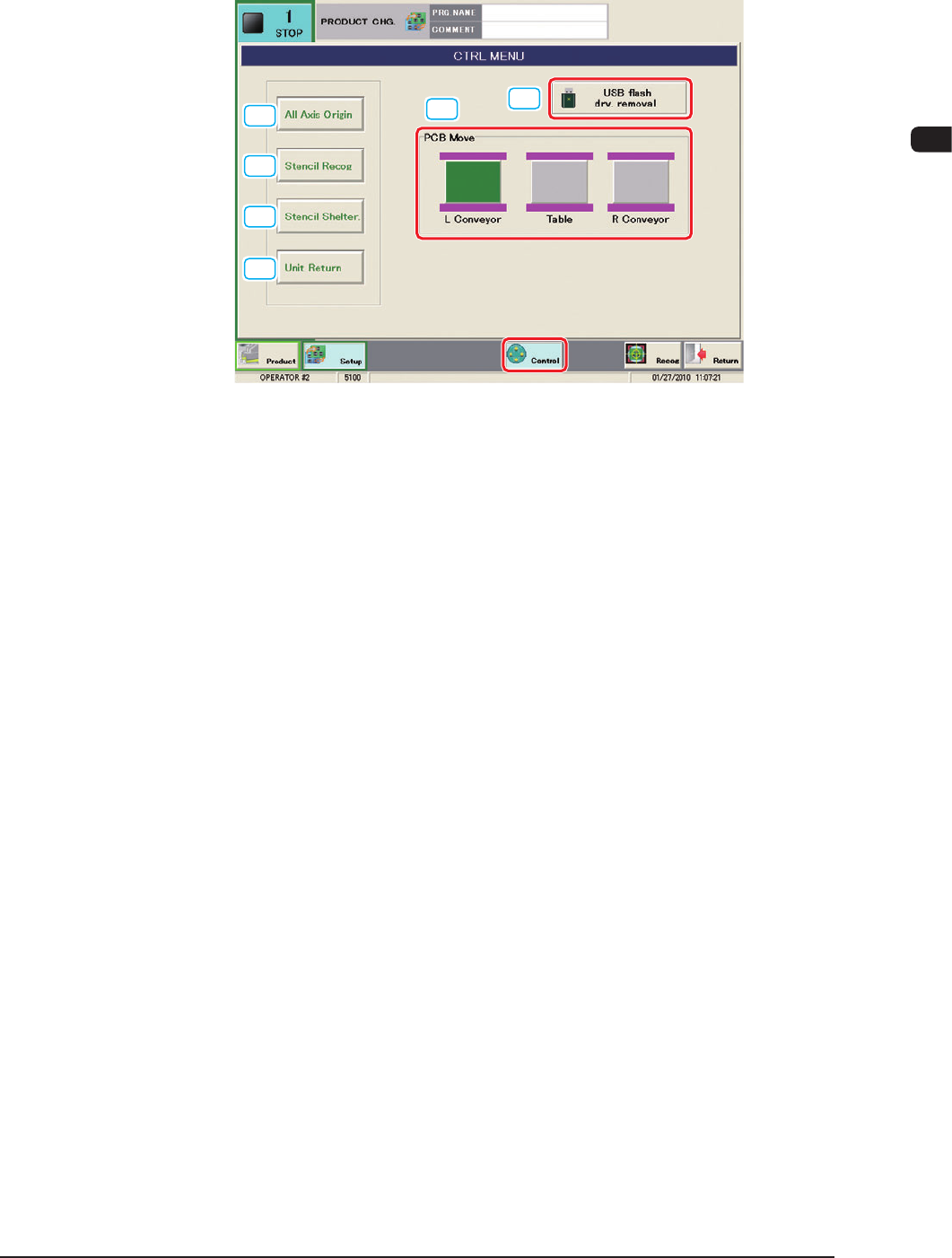
When the [CTRL] button is pressed, the "CTRL MENU" window appears.
[1]
[2]
[3]
[5]
[6]
[4]
F1B8
In the "CTRL MENU" window, the buttons for basic operations are arranged in a
group.
[1] [All Axis Origin] Button
When this button is pressed, this button and the [START] button on the
operation panel flash for 10 seconds.
When the [START] button on the operation panel is pressed while the button
is flashing, all axes except for that for the conveyor width, are zeroed.
[2] [Stencil Recog] Button
When this button is pressed, this button and the [START] button on the
operation panel fl
ash for 10 seconds.
When the [START] button on the operation panel is pressed while the button
is flashing, the stencil recognition is executed.
[3] [Stencil Shelter] Button
When this button is pressed, this button and the [START] button on the
operation panel fl
ash for 10 seconds.
When the [START] button on the operation panel is pressed while the button
is flashing, the stencil sheltering operation is executed.
1002-002

1OM-1505
2-10
2. Operation Window : Chap.2
0906-001
[4] [Unit Return] Button
When this button is pressed, this button and the [START] button on the
operation panel flash for 10 seconds.
When the [START] button on the operation panel is pressed while the button
is flashing, each unit is returned to the printing position.
[5] [USB Flacg drv. removal] Button
This button is used when the USB memory is removed.
After pressing this button and conrming that the USB memory lamp is
turned OFF, remove the USB memory stick.
[6] PCB Move
[L Conveyor] Button
[Table] Button
[R Conveyor] Button
Wh
en the button for the PCB transfer destination is pressed and the [START]
button on the control panel is pressed, the PCB is transferred to that
destination.
When there is no PCB in the machine, this button is unavailable. When the
[Table] button is pressed, while there is a PCB both on the output conveyor
and input conveyor, the PCB on the input conveyor is transferred to the table.
1OM-1505
2. Operation Window : Chap.2
2-11
2.2 Recognition Window
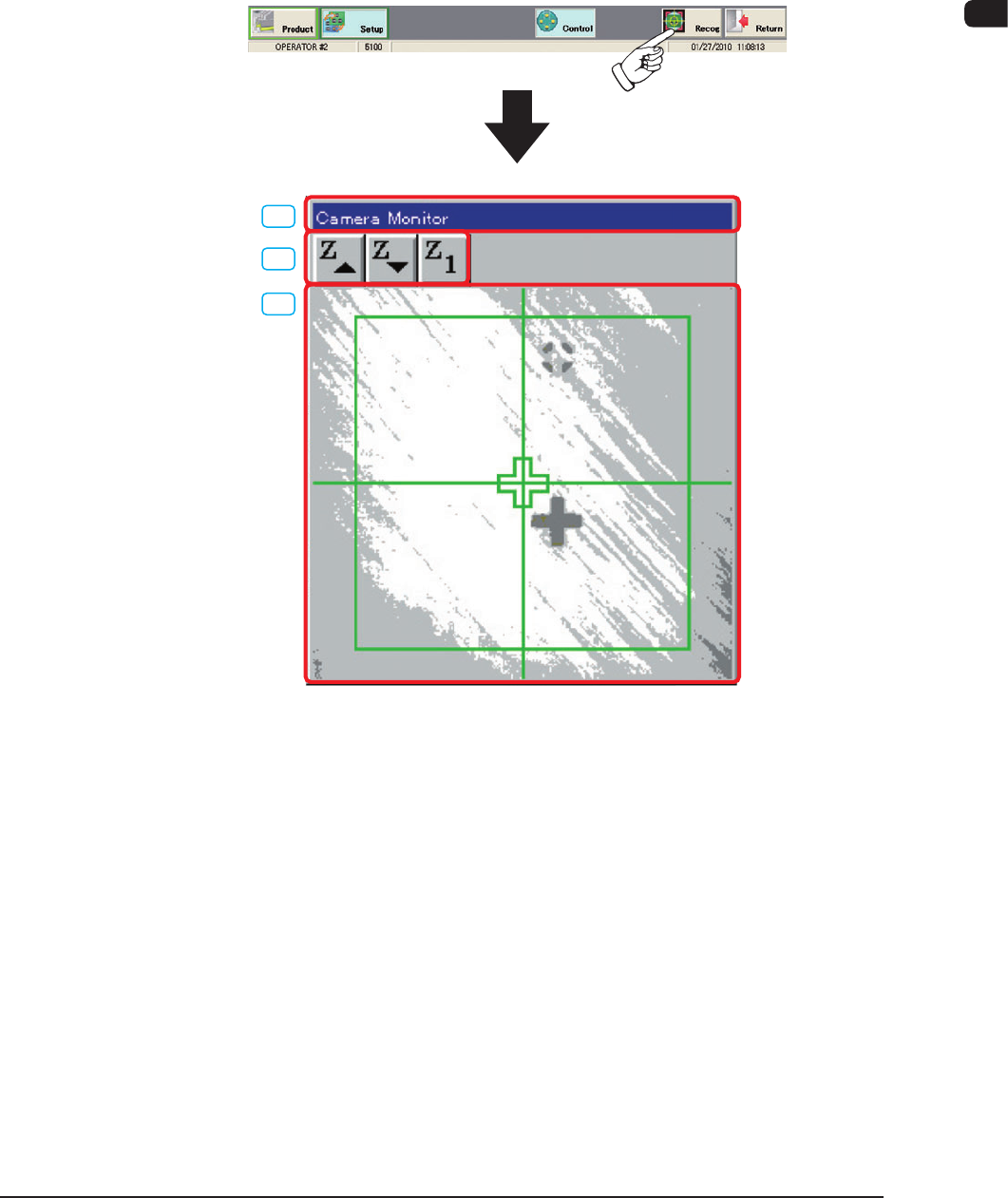
In the "Recognition" window the display pattern is designated to impose-display
the recognition image on the operation window indicated on the touch screen.
When the [Recog] button is pressed on the common menu bar, the "Camera
Monitor" window is displayed using the "multiple window" format.
[1]
[2]
[3]
F1B9
1002-002