00192792-02.pdf - 第66页
2 Retrofitting Instructions: M atrix Tray Changer MTC on S-25 HM (Option) SIPLACE 80 S-25 HM 2.7 Installing t he Retrofit Kit 01/01 Issue 66 Å Dismantl e the comp onent table stop fro m the dism antled "Rail, c ompo…
SIPLACE 80 S-25 HM 2 Retrofitting Instructions: Matrix Tray Changer MTC on S-25 HM (Option)
01/01 Issue 2.7 Installing the Retrofit Kit
65
,QVWDOOLQJWKH5HWURILW.LW
WARNING
Follow the safety instructions for the cutter (see Section 2.6).
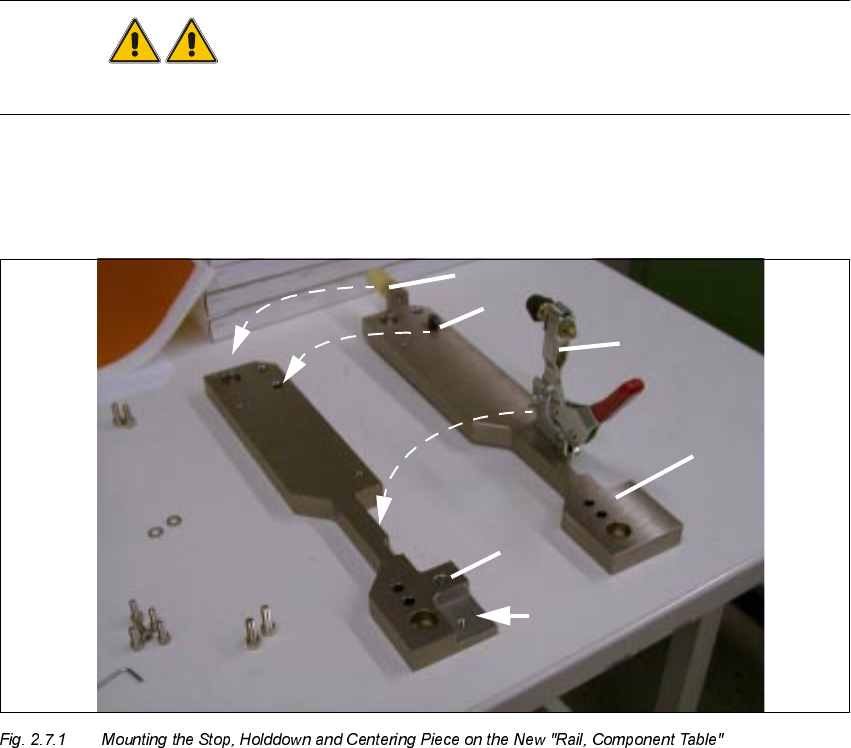
$VVHPEOLQJWKH5DLO&RPSRQHQW7DEOH
.H\
1. New "Rail, component table"
2. Relief milling cut
3. Old, "Rail, component table" after removal
4. Moving stop of the component table
5. Moving the holddown
6. Moving the centering piece (see also Detail, Fig. 2.7.2)
2 Retrofitting Instructions: Matrix Tray Changer MTC on S-25 HM (Option) SIPLACE 80 S-25 HM
2.7 Installing the Retrofit Kit 01/01 Issue
66
Å Dismantle the component table stop from the dismantled "Rail, component table" (undo 2
socket hex head cap screws M4).
Å Mount the stop on the new "Rail, component table" from the MTC retrofit kit (Item no.
00334697-03), see Fig. 2.7.1.
Å Dismantle the holddown (2 socket hex head cap screws M6) and fasten it to the new "Rail,
component table".
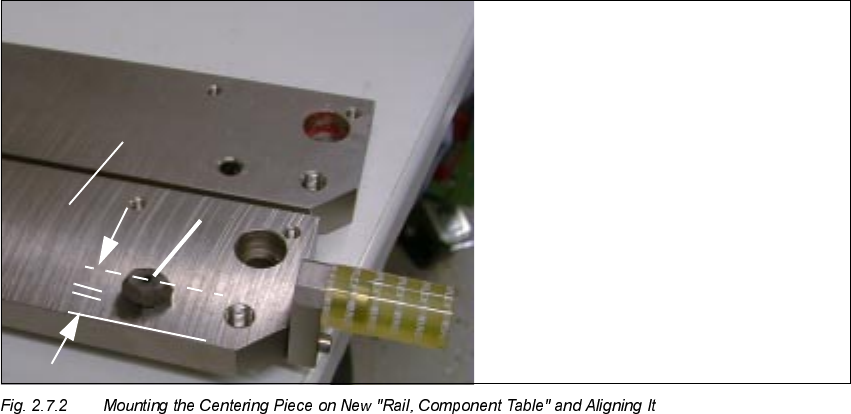
.H\
1. New "Rail, component table"
2. Centering piece (moved from the old "Rail, component table")
Å Loosen the locknut holding the centering piece (use fork wrench, size 13) and use a nylon
hammer to drive out the centering piece.
Å Insert the centering piece into the new "Rail, component table", align it with the longitudinal
edge parallel to the longitudinal edge of the "Rail, component table" (see Fig. 2.7.2) and fix the
centering piece in place with a locknut.
Å Apply screw-locking compound RED to the hex nut.
SIPLACE 80 S-25 HM 2 Retrofitting Instructions: Matrix Tray Changer MTC on S-25 HM (Option)
01/01 Issue 2.7 Installing the Retrofit Kit
67
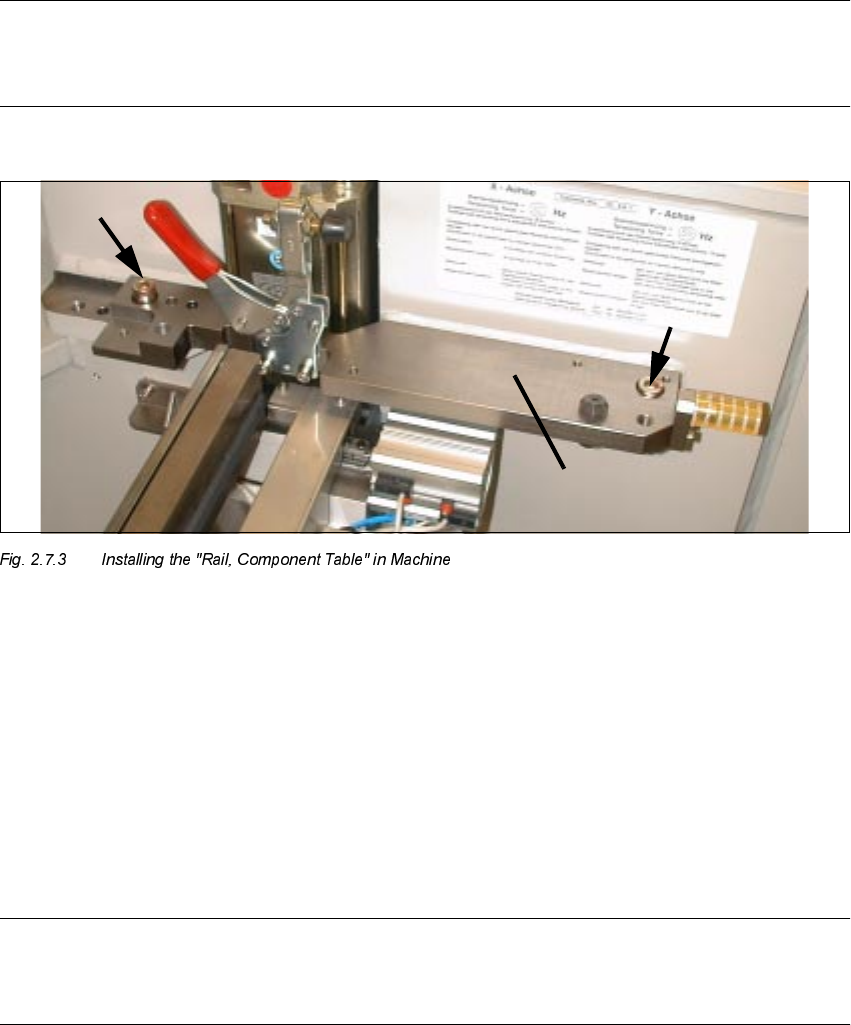
,QVWDOOLQJDQG$GMXV WLQJWKH1HZ5DLO&RPSRQHQW7DEOH
NOTE
The "Rail, component table" is aligned in the machine by moving the component table in care-
fully.
.H\
1. New "Rail, component table"
2. Socket hex head cap screws M10: Do not tighten completely yet.
Å On the RH side of the machine frame, insert the "Rail, component table" into the centering pin,
but do not completely tighten the fastening screws yet (2 socket hex head cap screws M10). It
will be necessary to align the "Rail, component table" longitudinally first while moving the com-
ponent table into place.
NOTE
Both of the screws used to fasten the rail are still adequately accessible after the component
changeover table has been moved/inserted into place.
Å With the machine turned OFF, carefully move the previously connected component
changeover table into place (table in position above).
Å Connect the pneumatic system of the movable changeover table.