00192792-02.pdf - 第84页
2 Retrofitting Instructions: M atrix Tray Changer MTC on S-25 HM (Option) SIPLACE 80 S-25 HM 2.8 Installing t he MTC 01/01 Issue 84 Å T ake the set- up gauge ou t of MTC to wer 1. Å Insert th e set-up gauge into the hole…
SIPLACE 80 S-25 HM 2 Retrofitting Instructions: Matrix Tray Changer MTC on S-25 HM (Option)
01/01 Issue 2.8 Installing the MTC
83
.H\
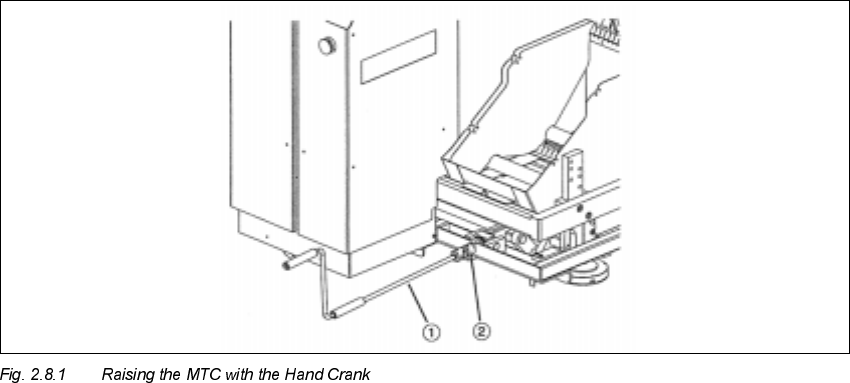
1. Hand crank
2. Coupling for hand crank
Å If necessary, set the MTC to the required conveyor height/starting height (dimensions: see
above), as described in the MTC User Manual.
Å Raise the MTC as high as possible with the hand crank fastened on the right on the MTC (see
Fig. 2.8.1). Turning direction = clockwise.
Å Take all of the cables out of the MTC and place them on the floor such that they won’t jam later
when the MTC is moved into the machine.
Å Carefully move the MTC into the machine.
8VLQJDQ$OLJQPHQW*DXJ HWR$OLJQWKH07&
&RPSO\ZLWKWKHDERYH'$1*(5QRWH
The following sequence is described in abbreviated form.
This sequence must be followed as described in detail in the MTC User Manual.
2 Retrofitting Instructions: Matrix Tray Changer MTC on S-25 HM (Option) SIPLACE 80 S-25 HM
2.8 Installing the MTC 01/01 Issue
84
Å Take the set-up gauge out of MTC tower 1.
Å Insert the set-up gauge into the hole of conveyor section 2 of the MTC that is NEXT TO the
PCB conveyor, as shown below in Fig. 2.8.2.
Å Use the hand crank to lower the MTC slowly (see Fig. 2.8.1) and exactly until the red ring of
the set-up gauge is barely visible (see Fig. 2.8.2).
CAUTION
6WRS
the lowering movement
LPPHGLDWHO\
if the feeler
GRHVQRW
move.
If the feeler does not move, the component changeover table is not in optimal contact with the
"Rail, component table".
The "Rail, component table" may not have been aligned correctly after reassembly, therefore the
centering pieces may not project the maximum distance into the holes.
In this case, move the WPC back out of the machine and repeat the process, beginning by adjust-
ing the height as described in Section 2.8.1.
)LVKH\HRIWKH
DGMXVWPHQWJDXJH
5HGULQJ
SIPLACE 80 S-25 HM 2 Retrofitting Instructions: Matrix Tray Changer MTC on S-25 HM (Option)
01/01 Issue 2.8 Installing the MTC
85
.H\
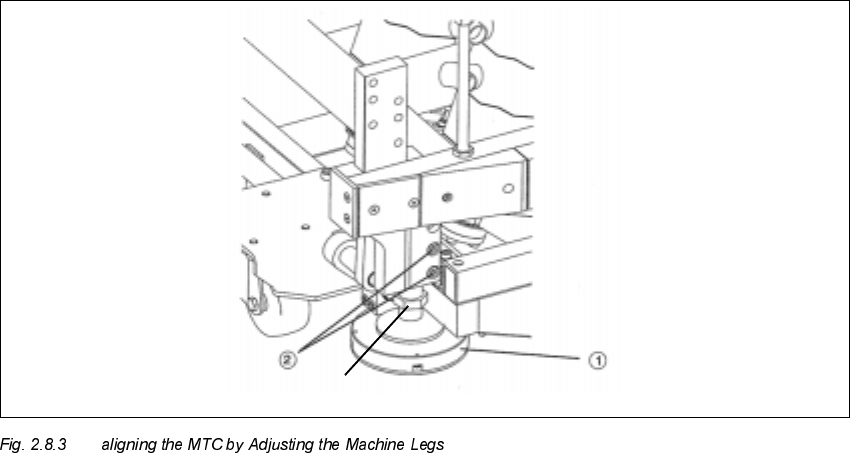
1. Machine leg
2. Clamping screws
Å At a conveyor height of 830 mm: On the bottom of the MTC machine frame, disassemble the
U-shaped cover plate so that the two clamping screws (see Fig. 2.8.3 -> Pos. 2) are accessible.
To accomplish this, loosen the 6 screws on the cover plate (size 3 Allen wrench).
Å Then align the MCT using fork wrenches, width across the flats 30 - 36, to adjust the machine
legs such that the air bubble of the fisheye is exactly in the middle of the adjustment gauge.
This is described in detail in the MTC User Manual.
Å During this process it is possible that you will ultimately have to correct the height of the MTC
again so that the red ring (see Fig. 2.8.2) is again just barely visible when the air bubble is in
the middle.
Å Lock the machine legs in this position with the clamping screws (see Fig. 2.8.3 -> Pos. 2):
socket hex head cap screws M8 (size 6).
Å Remove the setting gauge and return it to the enclosure in tower 1 of the MTC.
Å Re-install the cover plate of the MTC (6 screws, size 3 Allen wrench).
Width across the flat = 13