DECAN_S2_Admin(Eng_Ver4.5).pdf - 第183页
7-18 Advanced Chip Shooter DECAN S2 Admi nistra t or’s Guide <Z Place D own> combo box Select driving speed of the Z-axis driving mot or while the head is descending to place parts. I f the speed is in a ppropria…

7-17
Part Registration
<Dump Vac Off> edit box
During component dumping, the delay time after the head has come down
until vacuum off.
<Dump Blow On> edit box
During component dumping, The time from vacuum off till blown on
once the head stops upon completion of descent.
Unit: msec (Possible to setup for 10 msec intervals)
<Speed> group
Set the speed for each axis during pickups, placement, and dumping operations.
The speed must be set appropriately according to the corresponding part by
considering the nozzle type, part weight, pickup area of the part, etc
The speeds are as follows, and the profile of each moving speed is set in the
system.
1- Fastest: The fastest speed.
2- Fast: Fast speed.
3- Middle: Middle speed.
4- Slow: Slow speed.
5- Slowest: The slowest speed.
<XY> combo box
Select the driving speed of the XY axis driving motor. If the speed is
inappropriate according to the part, A part may jump during pickup, causing a
pickup error.
<Z Pick Down> combo box
Select driving speed of the Z-axis driving motor while the head is descending
to pickup parts. If the speed is inappropriate according to the part, the part
may jump, causing a pickup error.
The “Soft Touch” function can be used together, if needed.
<Z Pick Up> combo box
Select driving speed of the Z-axis driving motor while the head is ascending to
pickup parts. If the speed is inappropriate according to the part, the part may
drop from the nozzle, causing a pickup error.
The “Soft Touch” function can be used together, if needed.
<R> combo box
Select the driving speed of the R axis driving motor. If the speed is
inappropriate according to the part, the part may be slipped so that the angle of
the part may be distorted or it may drop off.

7-18
Advanced Chip Shooter DECAN S2 Administrator’s Guide
<Z Place Down> combo box
Select driving speed of the Z-axis driving motor while the head is descending
to place parts. If the speed is inappropriate according to the part, it will cause a
crack to be created in the part or have other influence on the part.
The “Soft Touch” function can be used together, if needed.
<Z Place Up> combo box
Select driving speed of the Z-axis driving motor while the head is ascending to
place parts. If the speed is inappropriate according to the part, it may have bad
influence on the placement accuracy.
The “Soft Touch” function can be used together, if needed.
<Z Align Speed> combo box
Sets the speed at which the Z axis moves up and down for the Fix Camera to
recognize a part or the speed at which the Fly Camera moves to the Z axis
movement height after recognizing the part.
This speed is applied separately from the Z axis speed that was set in the <Speed>
group and <Soft Touch> combo box and it is applied as the Z axis movement
speed only for part recognition.
For existing machines, it was moved referring to the Z Place Down/Up movement
speed for the above two movements.
Therefore, when the Z Place Down/Up movement speed is set slow for precision,
the movement to the Z axis recognition or the movement from the fly camera to
the Z axis movement height after recognition was inevitably slow.
To overcome such disadvantage, the function designating the speed of the above
two movements was added.
In the case of micro parts to which a pickup error can easily occur according to the
Z axis movement speed, change the value here and perform a recognition test.
Then set the value when recognition is successful and register the part.
<Insp Only Zero> check box
In the case of a specific part, the difference in the recognition ratio often occurs
according to the direction in which the part is picked up to the nozzle when
recognizing the part.
At this time, if this function is selected after the corresponding part is registered
based on the direction for better recognition ratio, the part is recognized always at
the registered angle when recognizing the corresponding part. This function is
applied mainly to TR or IC parts.
<Soft Touch> combo box
This can be applied for the part pickup and placement. It allows the speed of the Z
axis to become 4 (slow) at 2mm height from the PCB upper surface when the head
moves down regardless of the speed set in the <Speed> group.
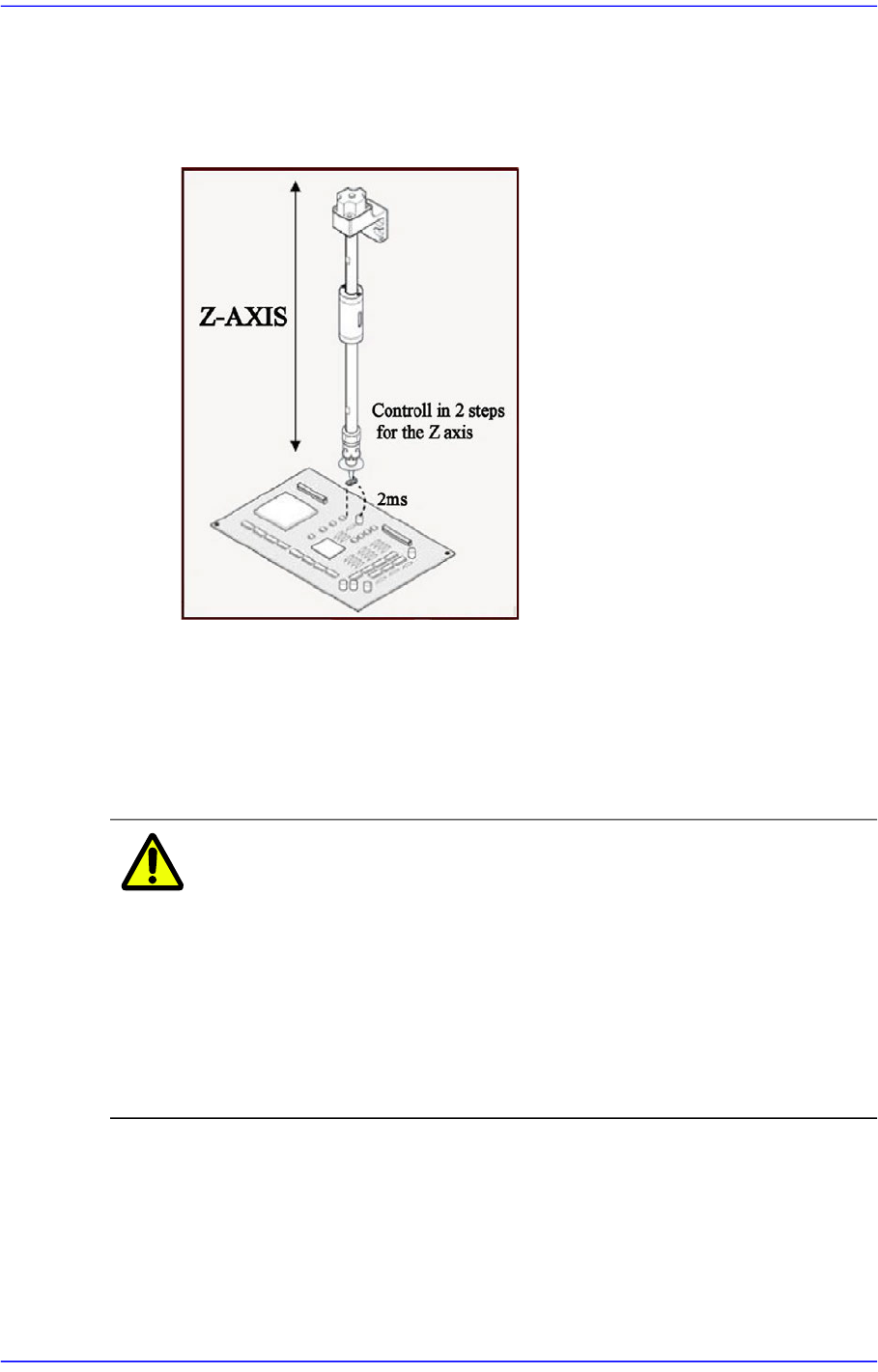
7-19
Part Registration
That is, the speed is controlled in 2 steps for the Z axis. For example, if cracks
occur frequently in the part. The overall speed of the Z axis may be reduced.
However, in this case, overall efficiency decreases.
At this time, the work can be done efficiently using this function.
Not Use: Set this function so that it is not used.
Pick: Set this function so that it is used only for pickup.
Mount: Set this function so that it is used only for placement.
Pick&Mount: Set this function so that it is used only for pickup and
placement.
Caution In case of shock sensitive components like CSP or μBGA,
the z-axis related speed parameters must be set according
to the component manufacturer’s specification or standards.
And use the nozzle suitable to component manufacturer’s
specification or standards.
If necessary, please contact our Business Department or
the local agent for the nozzle suitable to component
manufacturer’s specification or standards.