DECAN_S2_Admin(Eng_Ver4.5).pdf - 第318页
10-11 Opti mization Used for installing the parts with upper heigh t than the height input i n the right side edit box. Upon selection of thi s c heck box, the edit box is ac tivated. I nput the height of the part here. …
10-10
Advanced Chip Shooter DECAN S2 Administrator’s Guide
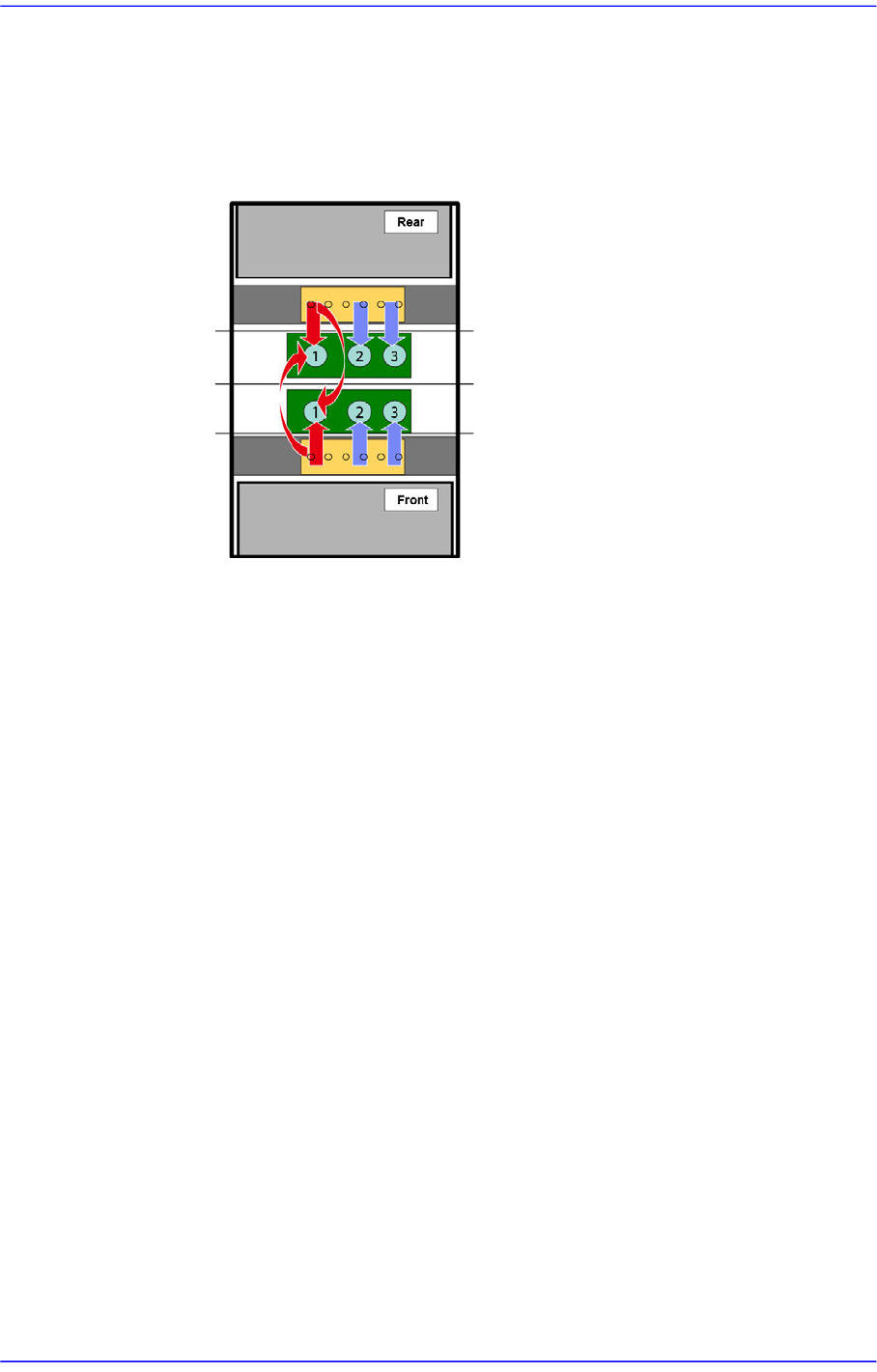
As shown in the following figure, in the case of the model for which parts ①,
② and ③ are placed, if the number of placement points allocated to the part
① is significantly large and the number of placement points allocated to the
parts (② and ③) are small, the front and rear gantry place the part ? in the join
mode, placing the remaining parts (② and ③) in the twin
mode.
1: The part to which the largest number of placement points are allocated
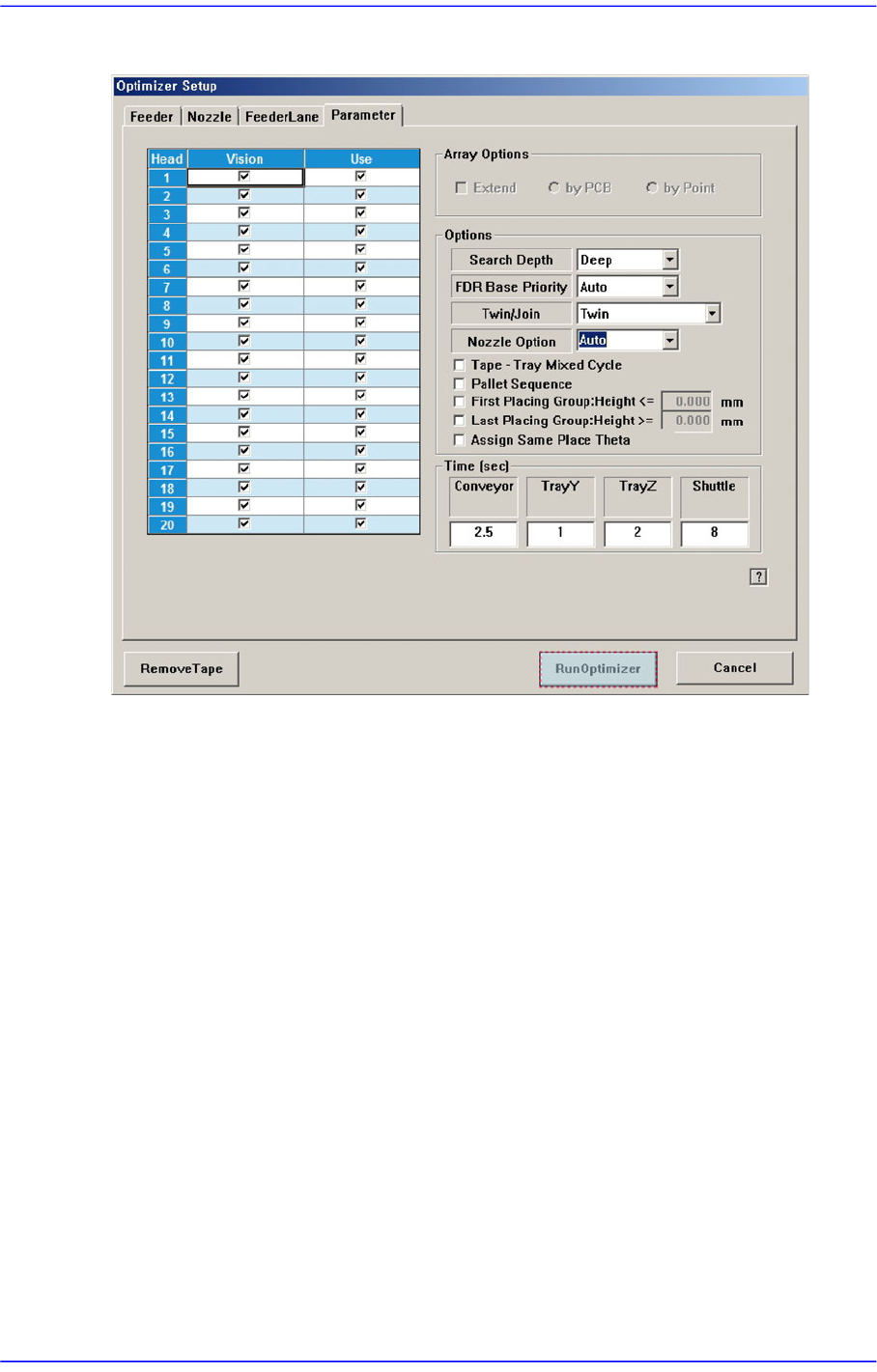
<Nozzle Option> combo box
Manual
Uses the existing nozzle arrangement as it is.
Auto
Ignores the existing nozzle arrangement and arranges nozzles automatically
again.
Semi-Auto
Arranges nozzles additionally needed for the available holes leaving the
existing nozzles arranged in the ANC as they are.
<Tape-Tray Mixed Cycle> check box
Allows part placement to be performed for the parts to be fed to the tape feeder
while replacing the part in the tray feeder.
<Pallet Sequence> check box
Optimizes the tray pallet pick-up sequence when executing the optimizer.
<First Placing Group: Height<= > check box
Used for installing the parts with lower height than the height input in the right
side edit box. Upon selection of this check box, the edit box is activated. Input the
height of the part here.
<Last Placing Group: Height>= > check box

10-11
Optimization
Used for installing the parts with upper height than the height input in the right
side edit box. Upon selection of this check box, the edit box is activated. Input the
height of the part here.
<Assign Same Place Theta> check box
Allows heads with the same placement angle to use the same cycle when using
microchips.
<Time(sec)> edit box group
This group inputs the time for executing each movement in the equipment. It is used to
calculate the working time at the optimizer. In addition, the values of the tray Y and
tray Z may have influence on the determination of the work sequence.
Therefore, in order to increase the work efficiency and to get the exact estimate of the
working time, the value as close as possible to the actual value shall be inputted.
Conveyor: Time (second) taken until the PCB is fixed by the backup table since
being transferred to the workstation.
Tray Z: Time required for the multi-tray feeder to move in the Z direction (sec)
Tray Z: Time required for the multi-tray feeder to move in the Z direction (sec)
Shuttle : Time required for the pad of the shuttle tray to complete one cycle (sec)
10-12
Advanced Chip Shooter DECAN S2 Administrator’s Guide
10.5. Run Optimizer
<Remove Tape> button
Click on the <Remove Tape> button to disregard all the feeders already arranged and
to newly arrange all tape feeders. When this button is clicked on, all the tape feeders
already arranged are removed.
<Run Optimizer> button
Saves the set options and executes Optimizer. To obtain an efficient result, empty all
lanes by pressing the <Remove Tape> button and execute Optimizer.
<Cancel> button
Closes the Optimizer Setup window without saving the currently set Optimizer
Options.