DECAN_S2_Admin(Eng_Ver4.5).pdf - 第378页
14-9 Machine Calibration Able to delete the placement offs et data of all the heads corresponding to the sele cted camera. <Import Print File> b ut ton Selecting the created Re po rt V iewer T ext file by clickin…
14-8
Advanced Chip Shooter DECAN S2 Administrator’s Guide
Transmits the change data to the equipment and closes the dialog box.
<Cancel> button
Ignores the change data and closes the dialog box.
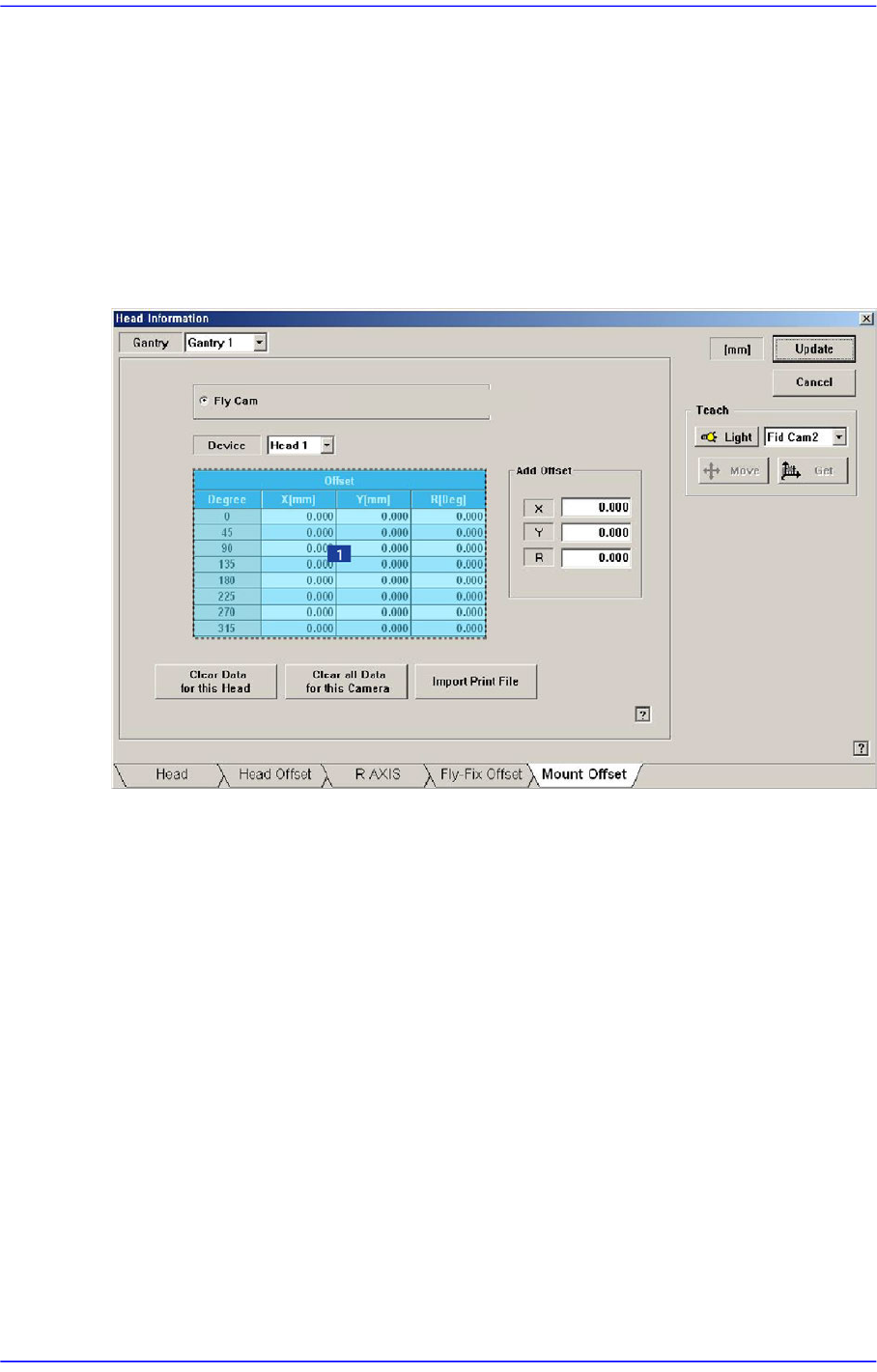
14.1.5. <Mount Offset> tab dialog
Sets the placement offset for each head.
Figure14.5 “Mount Offset” tab dialog
1: Grid group
<Fly Cam, Fix 1 Cam..> option button area
Sets the placement offset for each camera.
<Device> combo box
Sets the placement offset for each head.
<Grid> group
Sets the placement offset by degree at 45 degree interval.
<Degree> column
<Offset-X, Y, R> column
Sets the placement offset of X, Y and R.
<Clear data for this Head> button
Deletes placement offset data of the selected head.
<Clear all data for this Camera> button
14-9
Machine Calibration
Able to delete the placement offset data of all the heads corresponding to the selected
camera.
<Import Print File> button
Selecting the created Report Viewer Text file by clicking this button will apply the
offset extracted from the CPK Report Viewer to the placement offset of the current
machine.
<Add Offset> group
It is possible to apply X, Y and R placement offsets collectively to all heads.
This function is used at the factory. Users must not apply the offsets at their own
discretion.
<Update> button
Transmits the change data to the equipment and closes the dialog box.
<Cancel> button
Ignores the change data and closes the dialog box.
14-10
Advanced Chip Shooter DECAN S2 Administrator’s Guide
14.2. Camera [F5]
Sets various data on the camera.
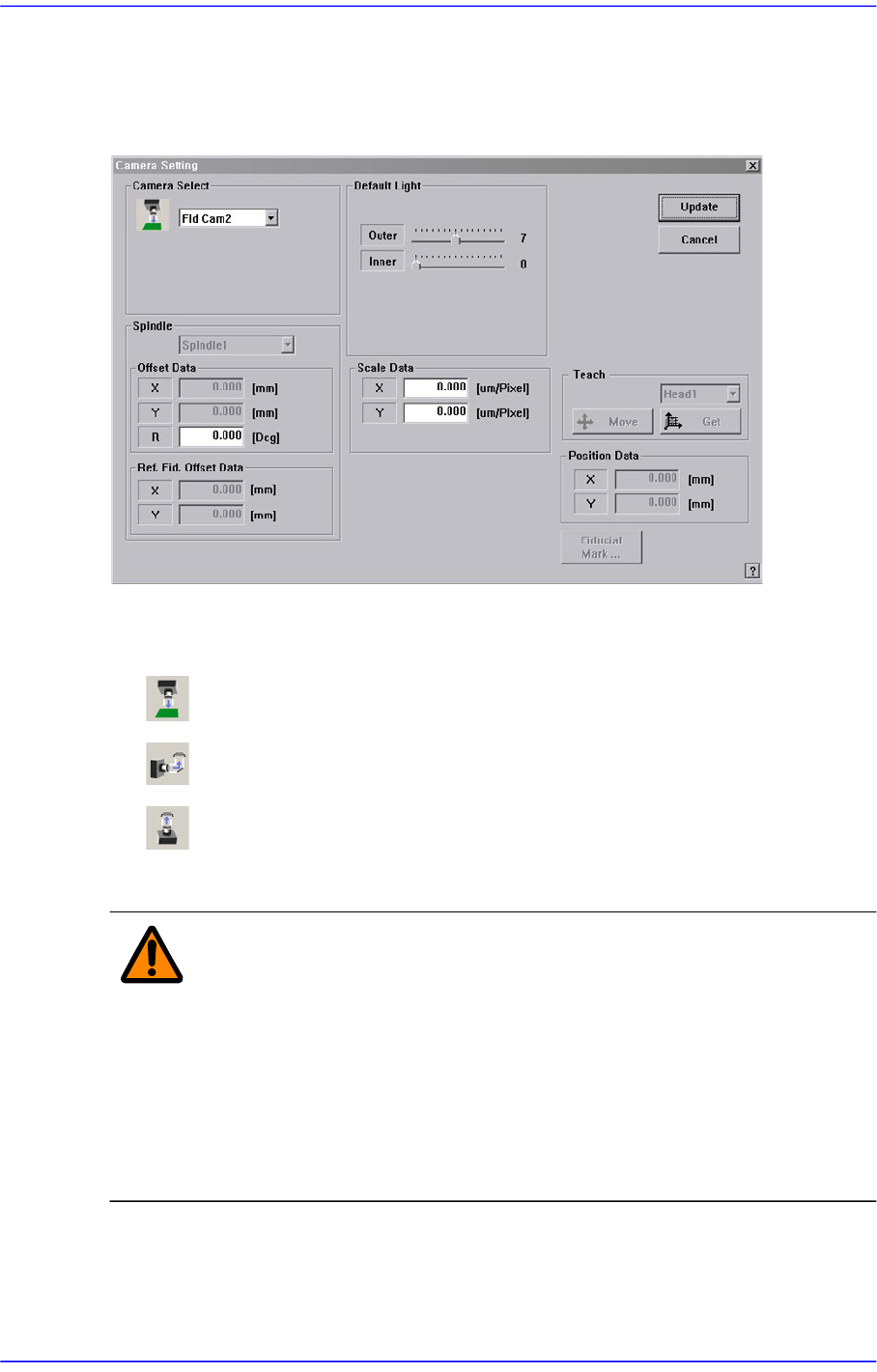
Figure14.6 “Camera Setting” dialog box
<Camera Select> combo box
Select the camera type to set. Available camera types are as follows.
Move Camera: Camera used for position teaching or fiducial mark check.
Fly Camera: Camera used for component check, it is attached to each head.
Refers to the camera used to recognize large parts and connectors.
Above screen is the case where the camera type is set to “Fiducial Camera”.
Warning Operation error caused by unauthorized or untrained
personnel or insufficient checking before calibration could
severely damage the equipment or the set up data, or it
could cause personal injury of the operator or the worker
near the equipment. Before carrying out calibration, check
the item to be calibrated and check if there is any worker
near the equipment. And calibration must be carried out by
an authorized and trained user only.
<Scale Data> group
Sets the scale of the camera selected from the <Camera Select> combo box. It can be
set up directly and performing calibration for the camera will input the result value