DECAN_S2_Admin(Eng_Ver4.5).pdf - 第98页
4-17 Tools Shortcut M enu Head 1/Axis Z When the check box for <From home sensor> i s not ticked, the height of the nozzle tip of head 1 on the PCB is indi c ated. Head 1/Axis R Indicates the presently rotated …
4-16
Advanced Chip Shooter DECAN S2 Administrator’s Guide
To send the signal manually, click on the <Not Busy> button on the right.
DI-Available (Pre)
Receives the signal that the previous machine is ready for sending PCBs.
DI-Not Busy (Next)
Receives the signal that the next machine is ready for receiving PCBs.
DO-Available (Next)
Sends the signal to be ready for sending PCBs to the next machine. To send
the signal manually, click on the <Available> button on the right.
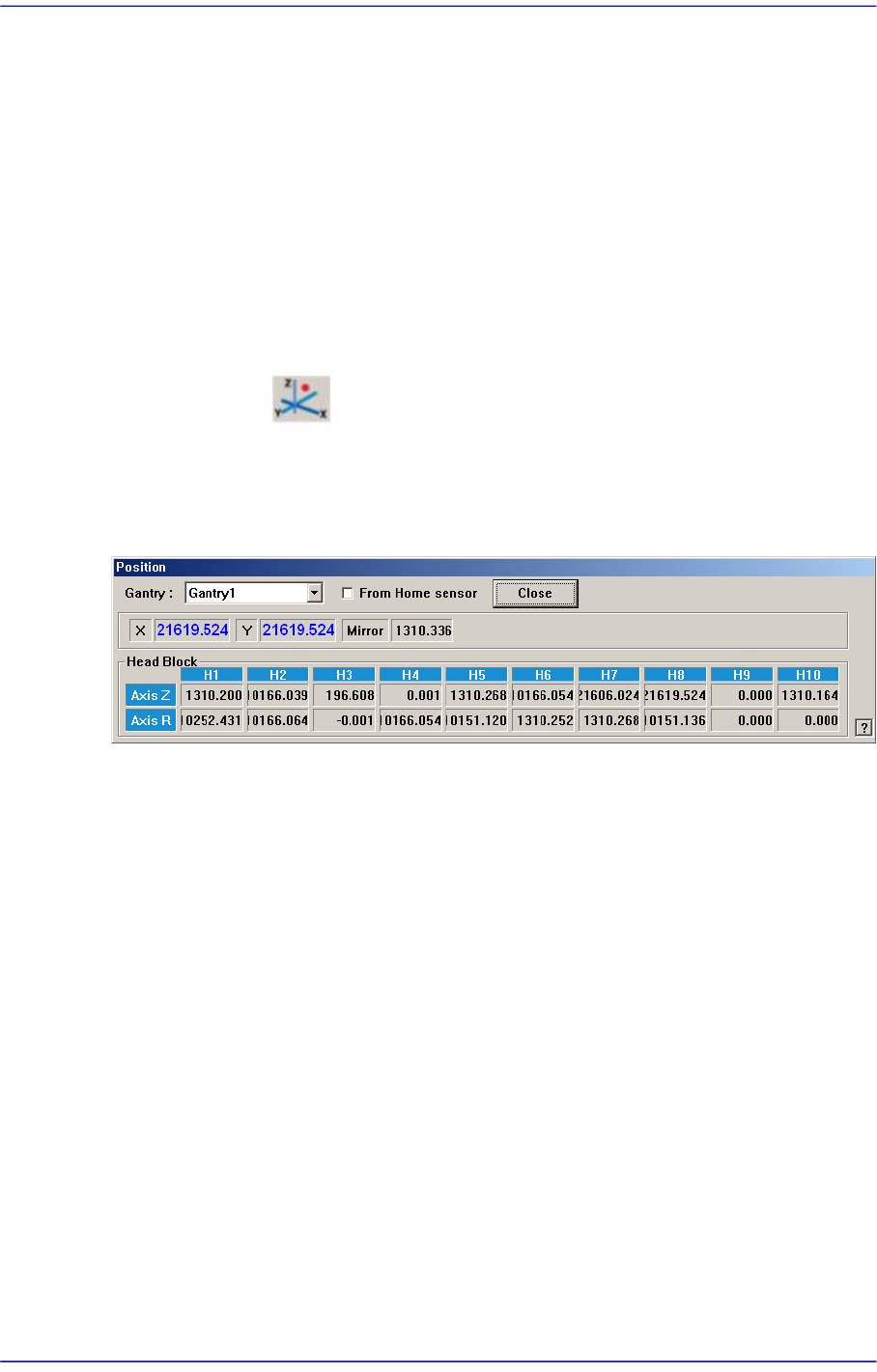
4.6. Current Position
Mainly used when the present coordinates of each driving axis need to be referenced for
teaching or calibration.
Figure4.6 “Position” dialog box
<Gantry> combo box
Select the gantry for which the coordinate is to be checked.
<From Home sensor> check box
This function is used to see how much the nozzle tip of the head has been lowered
from the position of the home sensor for the Z-axis.
Coordinates
X [When 1F-H1 is selected]
Indicates the present position in X direction of Head 1 at the origin of the
equipment.
Y [When 1F-H1 is selected]
Indicates the present position in Y direction of Head 1 at the origin of the
equipment.
Mirror
Indicates the presently rotated angle from the home position of mirror rotation axis
for fly camera.
Head Block group

4-17
Tools Shortcut Menu
Head 1/Axis Z
When the check box for <From home sensor> is not ticked, the height of the
nozzle tip of head 1 on the PCB is indicated.
Head 1/Axis R
Indicates the presently rotated angle from the home position of R axis for head 1.
Head 2/Axis Z
When the check box for <From home sensor> is not ticked, the height of the
nozzle tip of head 2 on the PCB is indicated.
Head 2/Axis R
Indicates the presently rotated angle from the home position of R axis for head 2.
Head 3/Axis Z
When the check box for <From home sensor> is not ticked, the height of the
nozzle tip of head 3 on the PCB is indicated.
Head 3/Axis R
Indicates the presently rotated angle from the home position of R axis for head 3.
Head 4/Axis Z
When the check box for <From home sensor> is not ticked, the height of the
nozzle tip of head 4 on the PCB is indicated.
Head 4/Axis R
Indicates the presently rotated angle from the home position of R axis for head 4.
Head 5/Axis Z
When the check box for <From home sensor> is not ticked, the height of the
nozzle tip of head 5 on the PCB is indicated.
Head 5/Axis R
Indicates the presently rotated angle from the home position of R axis for head 5.
Head 6/Axis Z
When the check box for <From home sensor> is not ticked, the height of the
nozzle tip of head 6 on the PCB is indicated.
Head 6/Axis R
Indicates the presently rotated angle from the home position of R axis for head 6.
Head 7/Axis Z
When the check box for <From home sensor> is not ticked, the height of the
nozzle tip of head 7 on the PCB is indicated.
Head 7/Axis R
Indicates the presently rotated angle from the home position of R axis for head 7.

4-18
Advanced Chip Shooter DECAN S2 Administrator’s Guide
Head 8/Axis Z
When the check box for <From home sensor> is not ticked, the height of the
nozzle tip of head 8 on the PCB is indicated.
Head 8/Axis R
Indicates the presently rotated angle from the home position of R axis for head 8.
Head 9/Axis Z
When the check box for <From home sensor> is not ticked, the height of the
nozzle tip of head 9 on the PCB is indicated.
Head 9/Axis R
Indicates the presently rotated angle from the home position of R axis for head 9.
Head 10/Axis Z
When the check box for <From home sensor> is not ticked, the height of the
nozzle tip of head 10 on the PCB is indicated.
Head 10/Axis R
Indicates the presently rotated angle from the home position of R axis for head 10.
Mirror
Indicates the presently rotated angle from the home position of mirror rotation axis for
fly camera.
<Close> button
Close the <Position> dialog box, End the <Current Position> command.